Introduzione
This manual provides essential information for the safe operation and maintenance of your Holy Stone HS156 GPS Drone. Please read it thoroughly before your first flight and keep it for future reference. The HS156 is a lightweight, foldable drone equipped with a 2K camera, GPS, and brushless motors, designed for stable flight and high-quality aerial photography.
Contenuto della confezione
Verifica che tutti gli articoli elencati di seguito siano inclusi nel tuo pacchetto:
- Aereo (Drone) x 1
- Trasmettitore (telecomando) x 1
- Batteria x 2
- Cavo di ricarica x 1
- Eliche di ricambio x 4
- Propeller Screws x 1 set
- Protection Guards x 4
- Cacciavite x 1
- Manuale utente (giapponese) x 1
- Battery Safety Guide x 1

Image: All components included in the Holy Stone HS156 drone package, laid out neatly.
Prodotto finitoview
The Holy Stone HS156 is a compact and lightweight drone, weighing under 100g, which means no drone registration is required in many regions. It features a foldable design for easy portability.

Image: The Holy Stone HS156 drone flying outdoors, showcasing its compact design and GPS capabilities.
Caratteristiche principali:
- Under 100g Weight: No drone registration required.
- Design pieghevole: Migliora la portabilità e lo stoccaggio.
- Modulo GPS: Provides stable outdoor flight and precise positioning.
- Telecamera 2K: Cattura foto e video ad alta risoluzione.
- Motori brushless: Offers quiet operation, increased efficiency, and longer lifespan.
- Posizionamento del flusso ottico: Ensures stable hovering indoors and in environments with weak GPS signals.

Image: A hand holding the folded Holy Stone HS156 drone, demonstrating its compact and portable design.

Image: The Holy Stone HS156 drone in flight, with an emphasis on its brushless motors for quiet and stable operation.
Impostare
1. Installazione e ricarica della batteria
Insert the fully charged battery into the drone. Connect the charging cable to the battery and a USB power source to charge. Ensure the battery is securely latched before flight.
Note on Battery Appearance: The slight swelling on the battery surface is due to internal cushioning foam and is not an indication of battery expansion or defect. It is safe for use. This foam can be removed if desired (refer to the provided video tutorial for instructions, if available).

Image: Two Holy Stone HS156 drone batteries and a charging cable, illustrating the 26-minute flight time with two batteries.
2. Propeller and Guard Installation
Attach the propellers to the motor shafts, ensuring correct orientation (A and B propellers). Secure them with the provided screws. For added safety, install the propeller protection guards before flying, especially for beginners.
3. Preparazione del telecomando
Install batteries into the remote control. Extend the phone holder and securely mount your smartphone. Download and install the "HS GPS V4" app from your device's app store (links provided in the Support section).
4. Svolgimento del drone
Carefully unfold the drone arms until they click into place. Ensure all arms are fully extended and locked before powering on.
Istruzioni per l'uso
1. Accensione e associazione
- Posizionare il drone su una superficie piana e aperta.
- Tenere premuto il pulsante di accensione sul drone finché le spie luminose non si accendono.
- Turn on the remote control. The drone and remote will automatically pair.
- Connect your smartphone to the drone's Wi-Fi network (usually named "HolyStone-HS156-XXXXXX").
- Open the "HS GPS V4" app to view the live camera feed and flight status.
2. Calibrazione GPS
For stable outdoor flight, GPS calibration is crucial. Follow the app's instructions to calibrate the compass and gyroscope before each flight. Ensure you are in an open area away from strong magnetic interference.
Nota: If GPS signal is weak or unavailable (e.g., indoors), the drone will rely on optical flow positioning for stability.
3. Decollo e atterraggio
- Decollo con una sola chiave: Premi il pulsante di decollo sul telecomando o nell'app. Il drone salirà automaticamente a un'altezza sicura e rimarrà in volo stazionario.
- Decollo manuale: Spingere entrambi i joystick verso il basso e verso l'esterno per avviare i motori, quindi spingere lentamente il joystick sinistro verso l'alto per salire.
- Atterraggio con una sola chiave: Premi il pulsante di atterraggio. Il drone scenderà e atterrerà automaticamente.
- Atterraggio manuale: Tirare lentamente verso il basso la leva di comando sinistra per scendere. Una volta atterrati, spingere entrambe le leve verso il basso e verso l'interno per fermare i motori.
4. Comandi di volo di base
Utilizzare i joystick sul telecomando per manovrare il drone:
- Joystick sinistro: Su/Giù per l'altitudine, Sinistra/Destra per la rotazione (imbardata).
- Joystick destro: Su/Giù per il movimento avanti/indietro (beccheggio), Sinistra/Destra per il movimento laterale (rollio).
The drone offers 3 flight speed modes. Adjust the speed according to your skill level and environmental conditions.
Modalità di volo e caratteristiche
1. Modalità principiante
The HS156 features a Beginner Mode that automatically adjusts distance and altitude limits, making it easier for new pilots to fly smoothly. This mode is enabled by default and can be disabled via the app settings.
| Parametro | Valore |
|---|---|
| Hovering Radius | 5m |
| Flight Distance Limit | 0-20m |
| Limite di altitudine di volo | 0-20m |
| Return Altitude | 15 metri |

Image: The Holy Stone HS156 drone flying in Beginner Mode, illustrating its ease of use for new pilots with automatic distance and altitude limits.
2. Modalità Seguimi
In Follow Me mode, the drone will automatically follow the remote controller or the connected smartphone, capturing dynamic footage of your activities. Ensure sufficient GPS signal for optimal performance.

Image: The Holy Stone HS156 drone following a person on a bicycle, demonstrating the Follow Me mode.
3. Waypoint Mode
Plan your flight path by tapping desired waypoints on the map within the app. The drone will then fly along the specified route, allowing for hands-free aerial photography.

Image: A smartphone screen displaying the Holy Stone HS156 drone app with a flight path marked by waypoints over a coastal landscape.
4. Circle Flight Mode
In Circle Flight mode, the drone will fly in a circular path around a designated point, capturing panoramic video or photos. This feature is ideal for showcasing a specific subject or landscape.
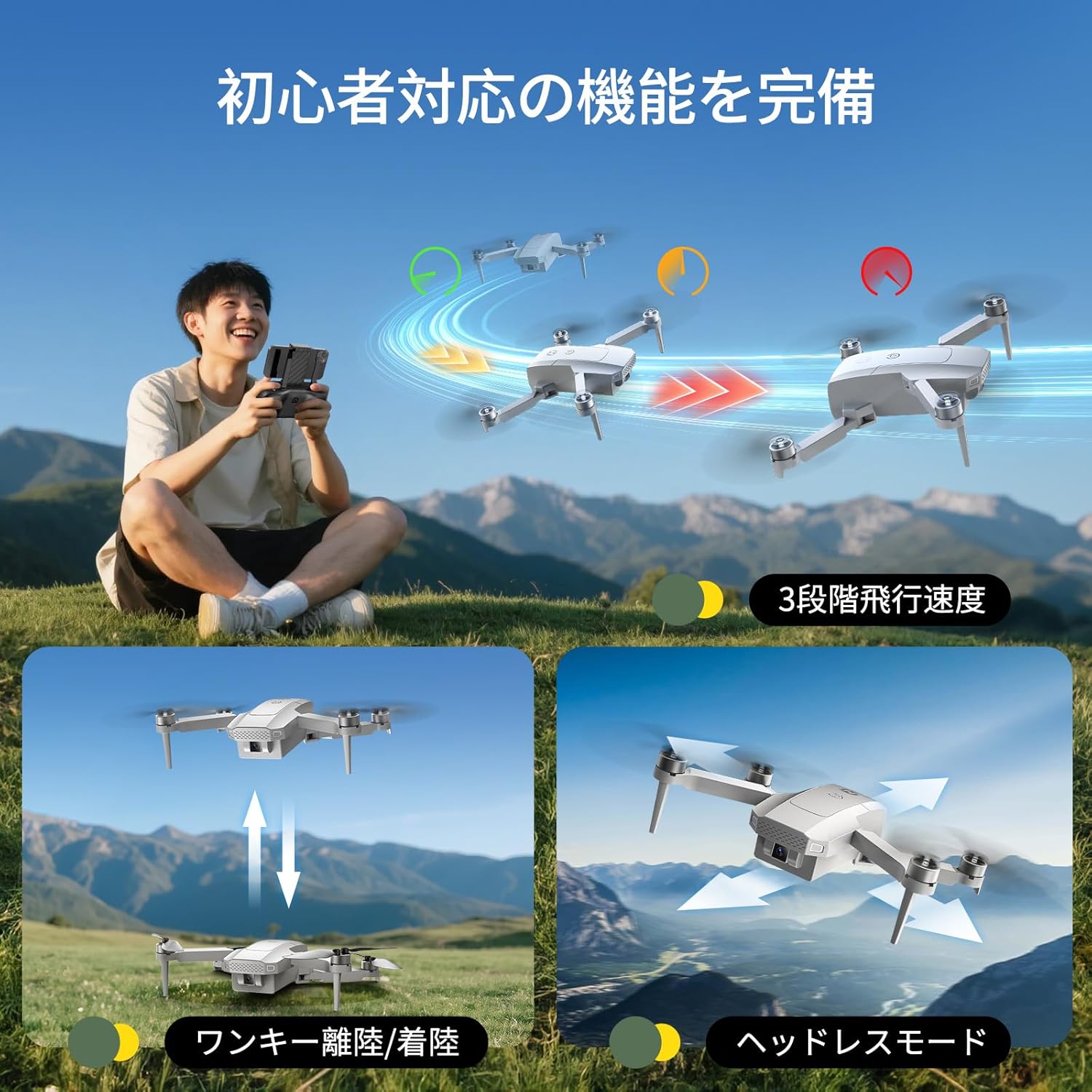
Image: The Holy Stone HS156 drone performing a circular flight around a person and a dog on a mountain, illustrating the Circle Flight mode.
5. Modalità senza testa
Headless Mode eliminates the need to distinguish the drone's head from its tail. The drone's orientation will be relative to the pilot, simplifying control, especially for beginners.

Image: The Holy Stone HS156 drone flying over water, with arrows indicating movement directions relative to the pilot in Headless Mode.
6. 2K Camera and Wi-Fi Transmission
The integrated 2K camera allows for clear photo and video capture. Real-time footage is transmitted via Wi-Fi to your smartphone. The drone supports up to a 64GB Class 10 TF card (sold separately) for storing media.

Image: A side-by-side comparison of image quality, showing the clarity of 2K resolution versus 1080P, captured by the Holy Stone HS156 drone's camera.
Caratteristiche di sicurezza
1. Automatic Return (RTH)
The HS156 is equipped with three types of automatic return functions to ensure safe recovery of the drone:
- One-Touch Return: Press the RTH button on the remote control or in the app, and the drone will automatically return to its takeoff point.
- Basso volumetage Ritorno: If the battery level drops critically low, the drone will automatically initiate a return to home.
- Communication Loss Return: If the drone loses connection with the remote control for more than 6 seconds, it will automatically return to its takeoff point.
These features significantly reduce the risk of losing the drone. The RTH function is only active when GPS is available.

Image: The Holy Stone HS156 drone returning to its takeoff point, illustrating the automatic return function for safe recovery.
Manutenzione
- Eliche: Regularly inspect propellers for damage (cracks, bends). Replace any damaged propellers immediately using the provided spares.
- Motori: Mantenere i motori liberi da polvere e detriti. Evitare di volare in ambienti sabbiosi o polverosi.
- Cura della batteria: Conservare le batterie in un luogo fresco e asciutto. Non sovraccaricarle o scaricarle eccessivamente. Se non utilizzate per periodi prolungati, caricarle fino a circa il 50-60% della capacità.
- Pulizia: Utilizzare un panno morbido e asciutto per pulire il drone e il telecomando. Evitare l'uso di liquidi o solventi.
- Magazzinaggio: When not in use, fold the drone arms and store it in a protective case to prevent damage.
Risoluzione dei problemi
| Problema | Possibile causa | Soluzione |
|---|---|---|
| Il drone non si accende. | La batteria non è carica o non è inserita correttamente. | Assicurarsi che la batteria sia completamente carica e inserita correttamente. |
| Il drone non riesce ad associarsi al telecomando. | Remote control is off or too far from the drone. | Turn on the remote and ensure it's close to the drone during pairing. Restart both devices. |
| Volo instabile / Deriva. | Improper calibration, strong wind, or weak GPS signal. | Perform GPS and gyroscope calibration. Fly in calm conditions. Ensure strong GPS signal outdoors. |
| Nessuna ripresa della telecamera sullo smartphone. | Wi-Fi not connected, app not open, or app permissions denied. | Connect to the drone's Wi-Fi. Open the "HS GPS V4" app. Check app permissions. |
| Automatic Return (RTH) not working. | Segnale GPS insufficiente. | Ensure the drone has acquired enough GPS satellites (indicated in the app) before takeoff. RTH requires a strong GPS signal. |
Specifiche
| Caratteristica | Dettaglio |
|---|---|
| Numero di modello | HS156 |
| Peso | 99 grammi |
| Dimensioni (spiegate) | Dimensioni: 16 x 12.3 x 4.5 cm |
| Telecamera | 2K (Video Capture Format: MP4) |
| Tipo di motore | Senza spazzole |
| Sistema di posizionamento | GPS, posizionamento del flusso ottico |
| Connettività | Wifi |
| Tipo di controllo | Telecomando |
| Tipo di batteria | Ioni di litio (2 inclusi) |
| Tempo di volo | Fino a 26 minuti (con 2 batterie) |
| Supporto massimo per schede TF | 64GB (Class 10 or higher, sold separately) |
Garanzia e supporto
For warranty information, please refer to the documentation included with your purchase or contact Holy Stone customer support directly. If you have any questions or require assistance, please contact us via Amazon message.
Download dell'app:
Scan the QR codes below or click the links to download the "HS GPS V4" app for your smartphone:

Image: QR codes for downloading the HS GPS V4 app for iOS and Android, along with a link to the Japanese instruction manual.


