Introduzione
This manual provides comprehensive instructions for the Motorola Moto Edge 60 Pro 5G Ai smartphone. Please read this guide thoroughly to ensure proper use and to maximize your device's capabilities. Keep this manual for future reference.
1. Impostazione
1.1 Disimballaggio e ispezione iniziale
All'apertura della confezione, verificare che tutti i componenti siano presenti e integri. Il contenuto standard della confezione include:
- Smartphone Motorola Moto Edge 60 Pro 5G Ai
- Adattatore di alimentazione
- Cavo USB
- Custodia per telefono
1.2 Installazione della scheda SIM
The Motorola Moto Edge 60 Pro 5G Ai supports Dual Nano SIM cards. Follow these steps to install your SIM card(s):
- Individua il vassoio SIM sul lato del dispositivo.
- Insert the SIM ejector tool (not included, use a thin pin) into the small hole on the SIM tray to open it.
- Estrarre con cautela il vassoio della SIM.
- Inserisci la/le tua/e scheda/e Nano SIM negli appositi slot sul vassoio. Assicurati che i contatti dorati siano rivolti verso il basso e che l'angolo dentellato sia allineato correttamente.
- Spingere delicatamente il vassoio della SIM nel dispositivo finché non scatta in posizione.
Nota: Questo dispositivo non supporta le schede MicroSD.
1.3 Compatibilità di rete
This phone is GSM Unlocked and is compatible with GSM carriers. It is not compatible with CDMA carriers. For USA buyers, it works with T-Mobile, Metro PCS, Mint Mobile, Tello, and Ultra. It is also compatible with other carriers that use T-Mobile towers and works worldwide with GSM networks.

Image: A chart illustrating compatible (T-Mobile, Metro, Mint Mobile, Ultra, Rest of World) and incompatible (Verizon, AT&T, Sprint, Boost, Virgin Mobile, Visible, Cricket, Other CDMA Network) GSM networks.
1.4 Accensione e configurazione iniziale
Press and hold the Power button until the Motorola logo appears. Follow the on-screen prompts to complete the initial setup, including language selection, Wi-Fi connection, Google account setup, and security settings.
2. Utilizzo del dispositivo
2.1 Dispositivo suview

Immagine: Frontale view of the Motorola Moto Edge 60 Pro, highlighting its curved display and key features like the 50MP+50MP+50X AI Camera, Moto AI, and 1.5K True Colours Quad-Curved Display.
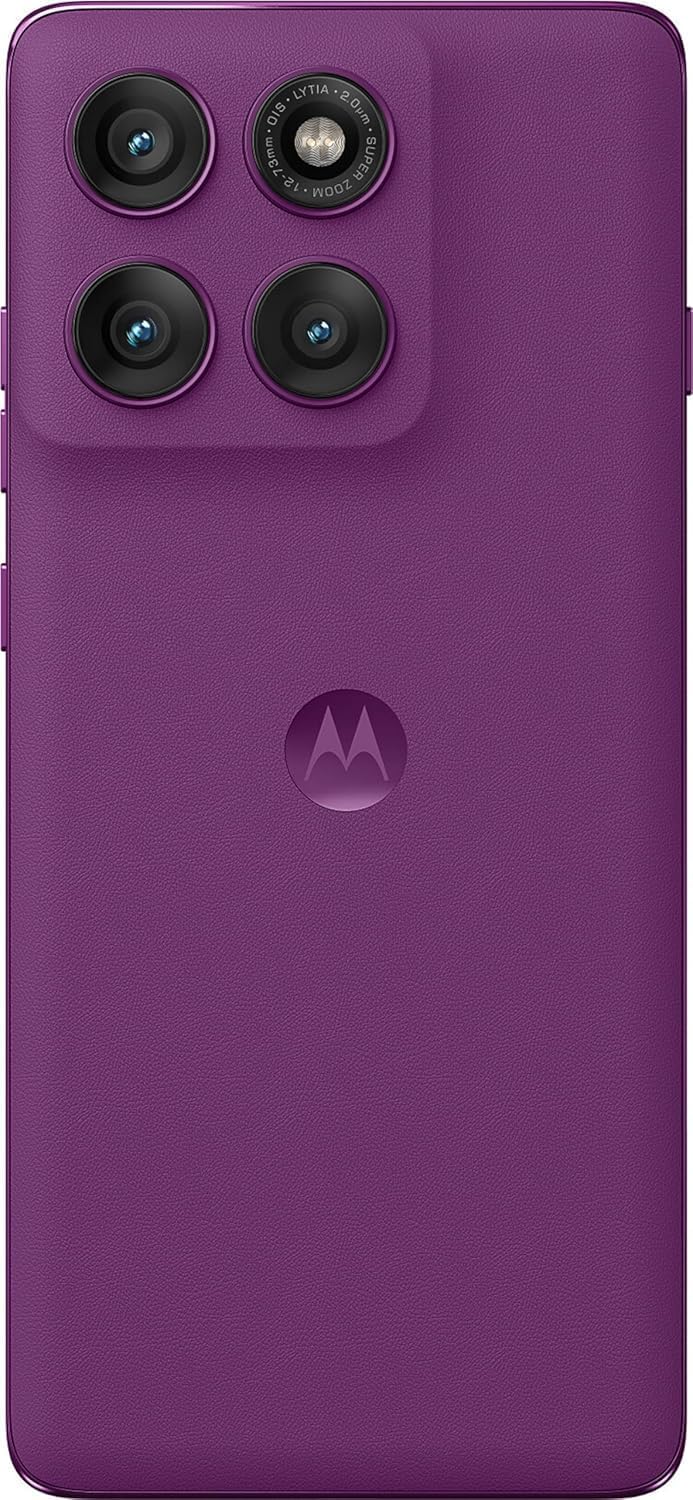
Immagine: Posteriore view of the Motorola Moto Edge 60 Pro in Pantone Sparkling Grape, showcasing the triple camera system and Motorola logo.

Immagine: Lato view of the Motorola Moto Edge 60 Pro, emphasizing the curved display and slim profile.
2.2 Funzionalità di visualizzazione
The device features a 6.7-inch Super HD pOLED display with a 120 Hz refresh rate and 4500 nits peak brightness. It supports HDR10+ and displays over a billion shades of color with 100% DCI-P3 color space. The display is Pantone Validated for accurate color reproduction and Pantone Skintone Validated for natural skin tones. It also includes SGS Low Blue Light and SGS Low Motion Blur certifications for eye comfort.

Image: A visual representation of the Motorola Moto Edge 60 Pro's display features, including 1.5K True Quad-Curved Display, 4500 nits peak brightness, HDR10+, 100% DCI-P3, Pantone Validation, and SGS Eye Care Protection.
2.3 Sistema di telecamere
The Motorola Moto Edge 60 Pro is equipped with a versatile triple camera system and a high-resolution front camera:
- Fotocamera principale: 50 MP with 1/1.55" optical format, f/1.4 aperture, 1.0 µm pixel size (2.0 µm with Quad Pixel Technology), Omni-directional PDAF, and Optical Image Stabilization.
- Fotocamera ultragrandangolare/macro: 13 MP (FOV 120°) con Macro Vision, apertura f/2.2, dimensione pixel 1.12 µm e messa a fuoco automatica.
- Teleobiettivo: 10 MP with 3x Optical Zoom, f/2.0 aperture, 1.0 µm pixel size, autofocus, and Optical Image Stabilization.
- Fotocamera frontale: 50 MP con apertura f/1.9, pixel da 0.64 µm (1.28 µm con tecnologia Quad Pixel) e autofocus.
The camera system also features a Laser autofocus (time-of-flight) and a 3-in-1 Sensor for exposure, auto white balance, and flicker detection.
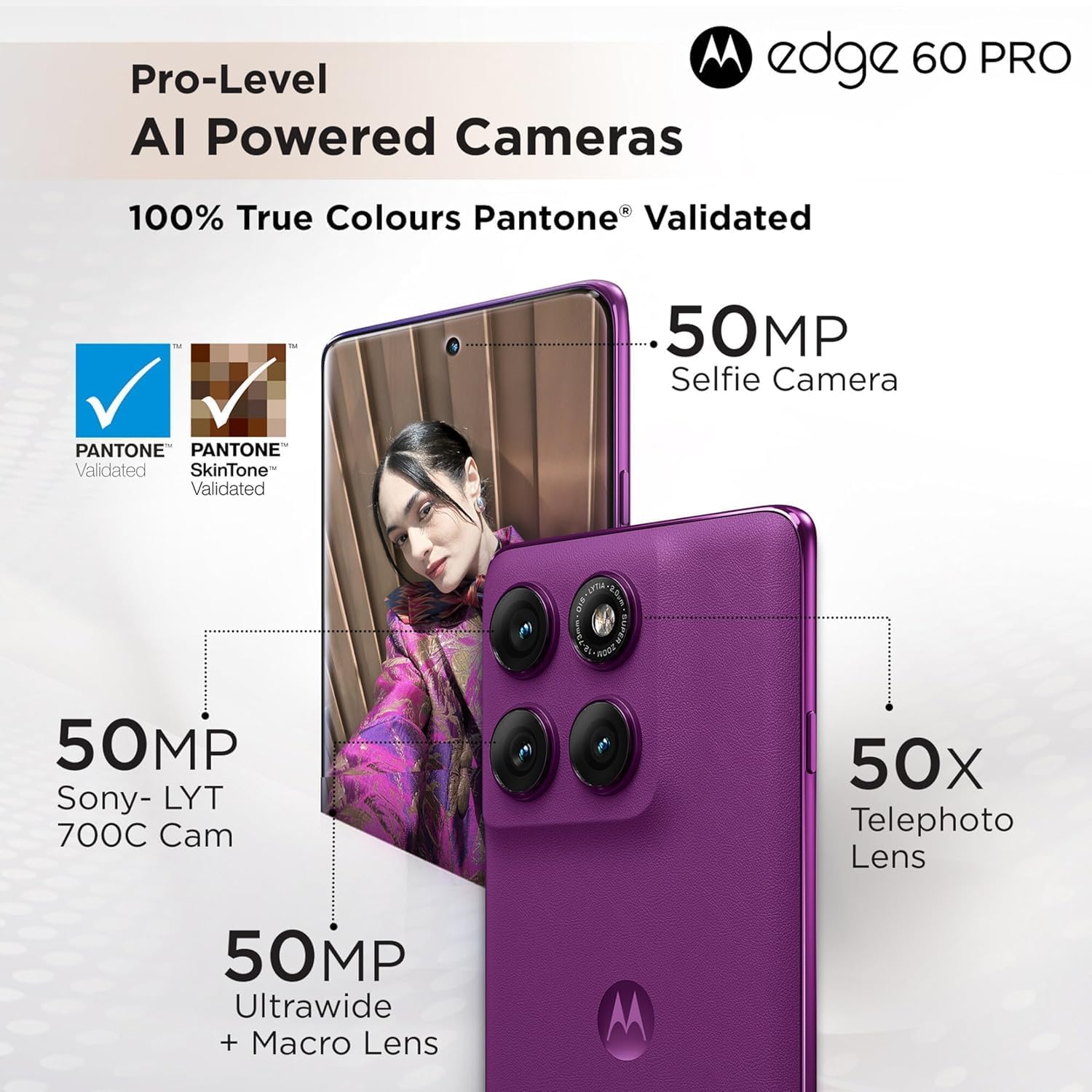
Image: Detailed breakdown of the Motorola Moto Edge 60 Pro's camera system, showing the 50MP Sony-LYT 700C Cam, 50MP Ultrawide + Macro Lens, 50X Telephoto Lens, and 50MP Selfie Camera, all with Pantone Validated True Colours.
2.4 AI Camera Features
Leverage the device's AI capabilities for enhanced photography:
- Ripresa in azione AI: Keeps your shots smooth and steady, ideal for capturing fast-moving subjects.
- Stabilizzazione adattiva AI: Stabilizes moving objects within your photos and videos.
- Foto di gruppo AI: Assicura che tutti i soggetti in una foto di gruppo siano a fuoco.
- Stile distintivo AI: Regola automaticamente colori, contrasto e illuminazione per un aspetto professionale.

Immagine: Visual examples of AI camera features on the Motorola Moto Edge 60 Pro, including AI Action Shot, AI Adaptive Stabilisation, AI Group Shot, and AI Signature Style.
2.5 Prestazioni e connettività
The Motorola Moto Edge 60 Pro is powered by the MediaTek Dimensity 8350 Extreme chipset, an ultra-efficient 4nm-class chip with an Octa-core CPU (4 x Arm Cortex-A715 cores up to 3.35 GHz) and an Arm Mali-G615 MC6 GPU. It includes a MediaTek NPU 780 for AI processing. The device comes with 12GB of RAM and 512GB of UFS 4.0 storage.
Connectivity options include 5G, 4G, 3G, and 2G network bands, Bluetooth, NFC, USB, Wi-Fi, and GPS.
2.6 Funzionalità di sicurezza
Your device includes multiple security features to protect your data:
- On-screen fingerprint reader
- Sblocco facciale
- ThinkShield security platform
- Moto Sicuro
2.7 Smart Connect and Moto AI
The device integrates with Moto AI and Smart Connect for enhanced functionality:
- Cross Control: Seamlessly operate your tablet with a PC.
- Swipe to Stream: Transfer app activities to a bigger screen in seconds.
- File Trasferimento: Condividere files across your devices seamlessly.

Image: An illustration demonstrating Smart Connect features like Cross Control (tablet with PC), Swipe to Stream (phone to larger screen), and File Transfer between devices, powered by Moto AI.
3. Manutenzione
3.1 Protezione da acqua e polvere
The Motorola Moto Edge 60 Pro is designed with IP68 and IP69 dust and water protection, meaning it is resistant to dust ingress and can withstand immersion in water up to 1.5 meters for 30 minutes. It is also Military-grade certified (MIL-STD-810H) for durability against harsh conditions. While durable, avoid intentional submersion and exposure to high-pressure water jets.
3.2 Batteria e ricarica
Il dispositivo è dotato di un 6000 Milliamp Hours (mAh) battery. Use the provided Power Adapter and USB Cable for optimal charging. The device supports fast charging. To prolong battery life, avoid extreme temperatures and fully discharging the battery frequently.
3.3 Pulizia del dispositivo
Per pulire il telefono, utilizzare un panno morbido e privo di lanugine. Evitare materiali abrasivi, solventi o spray aerosol. Per macchie ostinate, strofinare leggermente.ampImmergere il panno in acqua. Assicurarsi che tutte le porte siano asciutte prima di caricare.
4. Risoluzione Dei Problemi
Se riscontri problemi con il tuo dispositivo, prova i seguenti passaggi comuni per la risoluzione dei problemi:
- Il dispositivo non risponde: Per forzare il riavvio, tenere premuto il pulsante di accensione per circa 10-15 secondi.
- Problemi di connettività di rete:
- Assicurati che la scheda SIM sia inserita correttamente.
- Controlla se la modalità aereo è disattivata.
- Verify that your carrier is supported by the device (GSM networks only).
- Riavvia il dispositivo.
- La batteria si scarica rapidamente:
- Ridurre la luminosità dello schermo.
- Chiudi le app inutilizzate in esecuzione in background.
- Disattivare Wi-Fi, Bluetooth o GPS quando non sono in uso.
- Check for app updates, as outdated apps can consume more power.
- L'app non risponde: Force close the app through Settings > Apps, then reopen it. If the issue persists, clear the app's cache or reinstall it.
- Fingerprint Sensor/Face Unlock Issues: Ensure your fingers are clean and dry for the fingerprint sensor. For face unlock, ensure adequate lighting and that your face is clearly visible to the front camera. Re-register your fingerprint or face if problems persist.
Per problemi più complessi, fare riferimento al supporto ufficiale Motorola websito o contattare il servizio clienti.
5. Specifiche
| Caratteristica | Dettaglio |
|---|---|
| Numero di modello | XT2507-1 |
| Sistema operativo | Androide 15 |
| Processore | MediaTek Dimensity 8350 Extreme (Octa-core, up to 3.35 GHz) |
| Scheda grafica | Braccio Mali-G615 MC6 |
| Memoria RAM | 12 GB |
| Magazzinaggio | 512 GB (UFS 4.0) |
| Dimensioni dello schermo | 6.7 pollici |
| Tipo di visualizzazione | pOLED Super HD |
| Risoluzione | 2340x1080 |
| Frequenza di aggiornamento | Frequenza 120 Hz |
| Luminosità massima | 4500 nidi |
| Fotocamera principale | 50 MP (OIS, PDAF) |
| Fotocamera ultragrandangolare/macro | 13 MP (campo visivo 120°) |
| Teleobiettivo Fotocamera | 10 MP (3x Optical Zoom, OIS) |
| Fotocamera frontale | 50 MP (messa a fuoco automatica) |
| Capacità della batteria | 6000 mAh |
| Connettività | 5G, 4G, 3G, 2G, Bluetooth, NFC, USB, Wi-Fi, GPS |
| Protezione da acqua e polvere | IP68 e IP69, certificazione MIL-STD-810H |
| Dimensioni (confezione) | 7 x 4 x 2 pollici |
| Peso dell'articolo | 14 once |
6. Garanzia e supporto
6.1 Garanzia del prodotto
Your Motorola Moto Edge 60 Pro 5G Ai is covered by a limited manufacturer's warranty. Please refer to the warranty card included in your product packaging or visit the official Motorola website for detailed terms and conditions, including warranty duration and coverage specifics.
Optional protection plans may be available for purchase separately to extend coverage beyond the standard warranty period.
6.2 Assistenza clienti
For technical assistance, troubleshooting, or service inquiries, please visit the official Motorola support website or contact their customer service department. You can find contact information and support resources on the Motorola websito:
Motorola ufficiale Websito: www.motorola.com
Please have your device model number (XT2507-1) and purchase information ready when contacting support.


