1. Introduzione
Welcome to the DOOGEE Note 56 user manual. This guide provides essential information to help you set up, operate, and maintain your new smartphone. The DOOGEE Note 56 is an unlocked Android 16 smartphone featuring a powerful Octa-Core processor, a large 6150mAh battery, and a vibrant 6.56-inch 90Hz HD+ display. It is designed for efficient daily use, photography, and connectivity.
2. Cosa c'è nella scatola
Your DOOGEE Note 56 package includes the following items:
- 1 x telefono cellulare DOOGEE Note 56
- 1 x scatola di imballaggio
- 1 x Manuale utente
- 1 x pellicola protettiva (pre-applicata)
- 1 x PIN della scheda SIM
- 1 cavo porta di tipo C
- 1 x Caricabatterie
- 1 x Scheda di garanzia
- 1 custodia protettiva in TPU
3. Dispositivo suview
Familiarize yourself with the physical components and design of your DOOGEE Note 56.
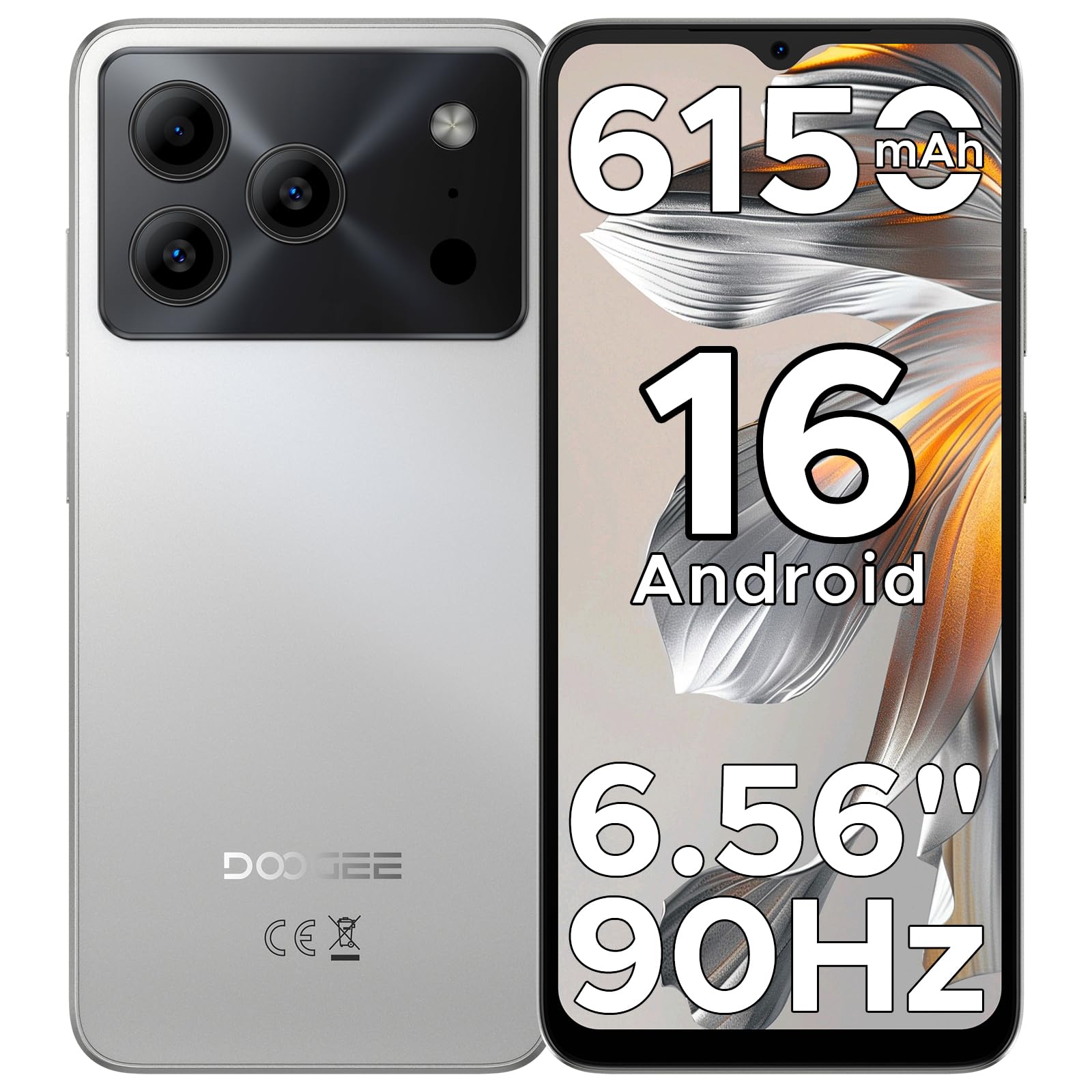
Image: The DOOGEE Note 56 smartphone, showcasing its slim design and key features such as the 8.45mm ultra-slim body, 6150mAh Silicon-Carbon Battery, Up-To-Date Android 16, 6.56" 90Hz Display, AI Scene Recognition, Instant Face Unlock, and 3.5mm Headphone Jack.

Immagine: un primo piano view of the DOOGEE Note 56 highlighting its ultra-slim 8.45mm profile and lightweight 195g design, emphasizing its pocket-friendly and refined appearance.
Pulsanti e porte fisiche:
- Pulsante di accensione: Situato sul lato, serve per accendere/spegnere il dispositivo o per riattivare/sospendere lo schermo.
- Pulsanti del volume: Situato lateralmente, serve per regolare il volume dei contenuti multimediali e delle chiamate.
- Porta USB di tipo C: Situato nella parte inferiore, serve per la ricarica e il trasferimento dei dati.
- Jack per cuffie da 3.5 mm: Situato nella parte superiore, per collegare le cuffie cablate.
- Slot per scheda SIM/TF: Located on the side, for inserting SIM cards and a TF (microSD) card.
4. Impostazione
4.1. Inserimento delle schede SIM e TF
- Locate the SIM/TF card slot on the side of your phone.
- Insert the provided SIM eject tool into the small hole next to the slot to open the tray.
- Place your Nano-SIM card(s) and/or TF card into the tray according to the diagram on the tray.
- Spingere con cautela il vassoio nello slot finché non è a filo con il corpo del telefono.
4.2. Accensione iniziale e configurazione
- Tenere premuto il pulsante di accensione finché non viene visualizzato il logo DOOGEE.
- Segui le istruzioni sullo schermo per selezionare la lingua, connetterti al Wi-Fi e configurare il tuo account Google.
- Configure security settings, including Face Unlock, for quick and secure access.
5. Istruzioni per l'uso
5.1. Sistema operativo Android 16
Your DOOGEE Note 56 runs on the latest Android 16 OS, offering an intuitive and secure user experience. Navigate through apps, customize your home screen, and access various features with ease.

Image: A visual representation of the Android 16 operating system interface on the DOOGEE Note 56, showing various app icons and system settings.
5.2. Sblocco facciale
For convenient and secure unlocking, your device supports Face Unlock. To set it up:
- Vai a Impostazioni > Sicurezza > Sblocco facciale.
- Segui le istruzioni visualizzate sullo schermo per registrare il tuo volto.
- Per ottenere prestazioni ottimali, assicurarsi che le condizioni di illuminazione siano adeguate durante la registrazione.

Image: A user demonstrating the Instant Face Unlock feature on the DOOGEE Note 56, highlighting its quick and secure access capabilities.
5.3. Integrazione dell'intelligenza artificiale Gemini
The DOOGEE Note 56 integrates Gemini AI features, enhancing your device's intelligence and responsiveness. This includes smart body sensing, dual system mode, super clipboard, memory expansion, screen optimization, and customizable screen colors.
Video: This video demonstrates how to utilize and upgrade Gemini AI features on a DOOGEE smartphone, showcasing its capabilities within the Android 16 operating system.
6. Caratteristiche della fotocamera
Capture memorable moments with the DOOGEE Note 56's advanced camera system.
6.1. Fotocamera posteriore (8 MP)
The 8MP main camera delivers clear, natural photos. Features include:
- Immagine HDR: Migliora la gamma dinamica per un'esposizione bilanciata in condizioni di illuminazione difficili.
- Modalità Pro: Offre il controllo manuale delle impostazioni della fotocamera.
- Modalità notturna: Migliora la qualità delle foto in condizioni di scarsa illuminazione.
- Riconoscimento scene AI: Automatically detects 12 scenes and optimizes settings for stunning shots.
- Modalità ritratto: Crea un effetto di profondità di campo per ritratti dall'aspetto professionale.
- Acquisizione del sorriso: Scatta automaticamente una foto quando rileva un sorriso.
- Panorami: Capture wide-angle scenic views.
- Burst Shots: Scatta più foto in rapida successione.
- Filtri divertenti: Applica filtri creativi alle tue foto.

Image: An illustration of the DOOGEE Note 56's camera capabilities, including AI Scene Recognition icons and various sample photos taken with the 8MP main camera and 5MP front camera.
6.2. Fotocamera frontale (5 MP)
The 5MP front camera is perfect for selfies and video calls, featuring Beauty Mode and Portrait Effect for bright and natural results.
7. Connettività
Stay connected with a range of network and wireless options.
- Doppia SIM 4G: Supporta due schede SIM per un utilizzo flessibile della rete.
- Wifi: Connettersi alle reti wireless per accedere a Internet.
- Bluetooth 4.2: Per la connessione ad accessori wireless.
- Posizione GPS: Per servizi di navigazione e localizzazione.
- FM Radio: Ascolta le tue stazioni radio preferite.
7.1. Supported Network Bands:
- Numero di modello: B2/3/5/8
- Italiano: B1/2/4/5/8
- TDD: B38 / 40 / 41
- DDD: B1/2/3/4/5/7/8/18/19/20/25/26/28A/28B/66
- Supporto: EDGE/GPRS
8. Gestione della batteria
The DOOGEE Note 56 is equipped with a large 6150mAh Silicon-Carbon battery for extended usage.

Immagine: Un interno view of the DOOGEE Note 56 highlighting its 6150mAh Silicon-Carbon Battery, emphasizing its longer lifespan, unmatched durability, 1000 charge cycles, 4 years durable battery, 20% smaller size, and 5W reverse charging capability.
Video: This video highlights the 6150mAh Silicon-Carbon Battery of the DOOGEE Note 56, showcasing its capacity and efficiency.
8.1. Ricarica inversa OTG
The device supports OTG (On-The-Go) reverse charging, allowing you to use your Note 56 to charge other compatible devices.
8.2. Tips for Extending Battery Life:
- Regolare la luminosità dello schermo a un livello più basso.
- Disattivare Wi-Fi, Bluetooth e GPS quando non vengono utilizzati.
- Chiudere le applicazioni in background.
- Abilita la modalità di risparmio batteria nelle impostazioni.

Image: This image illustrates various usage scenarios for the DOOGEE Note 56, demonstrating its extended battery life for web browsing (7 hours), music playing (49.5 hours), video watching (14 hours), and calling (28 hours).
9. Archiviazione e prestazioni
The DOOGEE Note 56 is powered by a UNISOC SC9863A Octa-Core processor, ensuring smooth performance for applications and daily tasks.
- Memoria RAM: 24GB (virtual RAM expansion, 8GB physical RAM).
- Memoria interna: 64 GB.
- Archiviazione espandibile: Supports up to 2TB via TF (microSD) card (TF card needs to be purchased separately).

Image: A visual representation of the DOOGEE Note 56's internal memory and storage, showing 64GB ROM and 24GB RAM (3GB+21GB virtual expansion), emphasizing smooth multitasking and amplo spazio.
10. Visualizzazione
Experience immersive visuals on the 6.56-inch HD+ 90Hz IPS waterdrop screen.
- Misurare: 6.56 pollici
- Risoluzione: 720 x 1612 pixel
- Frequenza di aggiornamento: 90 Hz
- Proporzioni: 20:9
- IPP: 269

Immagine: Il display del DOOGEE Note 56 mostraasing its 6.56-inch HD+ screen with a 90Hz refresh rate, designed for smooth viewing and social media interaction.
11. Manutenzione e cura
To ensure the longevity and optimal performance of your DOOGEE Note 56, follow these care guidelines:
- Evitare di esporre il telefono a temperature estreme, alla luce solare diretta o a umidità eccessiva.
- Utilizzare solo caricabatterie e cavi approvati.
- Pulire lo schermo e il corpo con un panno morbido e privo di lanugine.
- Utilize the provided TPU protective case and pre-applied protective film to guard against scratches and minor impacts.
12. Risoluzione Dei Problemi
If you encounter issues with your DOOGEE Note 56, try the following basic troubleshooting steps:
- Il dispositivo non si accende: Assicurarsi che la batteria sia carica. Collegare il caricabatterie e attendere qualche minuto prima di riprovare ad accendere.
- Schermo non reattivo: Riavviare il dispositivo tenendo premuto il pulsante di accensione per circa 10-15 secondi.
- Problemi di rete: Check if your SIM card is properly inserted. Verify network settings and ensure you have an active plan with your carrier.
- Arresti anomali dell'app: Svuota la cache dell'app problematica o reinstallala. Assicurati che il software del tuo dispositivo sia aggiornato.
Per problemi più complessi, fare riferimento al supporto ufficiale DOOGEE websito o contattare il servizio clienti.
13. Specifiche
| Caratteristica | Dettaglio |
|---|---|
| Nome del modello | NOTA56 |
| Sistema operativo | Androide 16 |
| Processore | UNISOC SC9863A Octa-Core (1.6 GHz CPU Speed) |
| Memoria RAM | 24 GB (8 GB fisici + 16 GB virtuali) |
| Memoria interna | 64 GB |
| Archiviazione espandibile | Fino a 2 TB tramite scheda TF |
| Dimensioni dello schermo | 6.56 pollici |
| Risoluzione dello schermo | 720 x 1612 (HD+) |
| Frequenza di aggiornamento | Frequenza 90 Hz |
| Telecamera posteriore | 8 MP |
| Fotocamera frontale | 5 MP |
| Capacità della batteria | 6150 milioneamp Ore (Li-Po) |
| Connettività | 4G Dual SIM, Wi-Fi, Bluetooth 4.2, GPS, FM Radio, USB Type-C |
| Presa audio | 3.5 millimetri |
| Dimensioni | 6.45 x 2.98 x 0.33 pollici |
| Peso dell'articolo | 6.9 once (195 grammi) |
| Caratteristiche speciali | Doppia SIM, memoria espandibile, supporta USB OTG, sblocco facciale |
14. Garanzia e supporto
Your DOOGEE Note 56 comes with a warranty. Please refer to the included Warranty Card in your product package for detailed information on warranty terms, conditions, and duration.
Per supporto tecnico, assistenza o ulteriori richieste, visita il sito ufficiale DOOGEE website or contact their customer service channels. Keep your purchase receipt and warranty card handy for any claims.


