Introduzione
Welcome to the DOOGEE V Max Play 5G Rugged Smartphone user manual. This device is engineered for durability and high performance, featuring a built-in 100-lumen projector, a massive 20500mAh battery, and a powerful 200MP AI camera system. Designed to withstand challenging environments, the V Max Play is IP68/IP69K and MIL-STD-810H certified, ensuring reliability wherever your adventures take you. This manual will guide you through the setup, operation, and maintenance of your new smartphone.
Cosa c'è nella scatola
Upon unboxing your DOOGEE V Max Play, you should find the following items:
- 1x telefono robusto DOOGEE V Max Play
- 1x Cavo di ricarica
- 1x Charger (45W Fast Charger)
- 1x pellicola protettiva per serigrafia (pre-applicata)
- 1x Pellicola protettiva in vetro temperato
- 1x Manuale utente
- 1x Scheda di garanzia
- 1x Package Box
- 1x scatola di immagazzinaggio portatile
- 1x clip posteriore per telefono
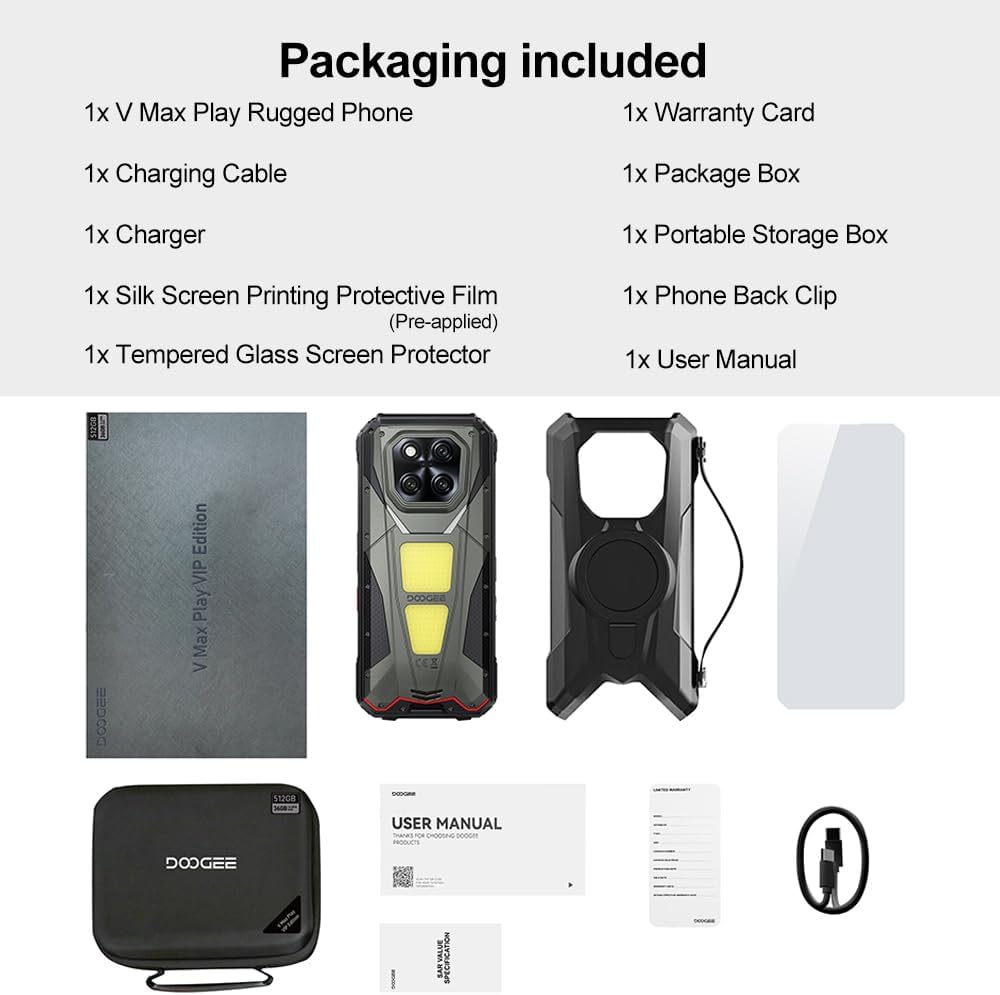
Image: Contents of the DOOGEE V Max Play retail box, including the phone, charger, cables, and documentation.
Dispositivo suview
Familiarize yourself with the physical features and components of your DOOGEE V Max Play smartphone.

Immagine: Oltreview of the DOOGEE V Max Play highlighting the projector, mega battery, main camera, dual camping lights, loud speaker, and waterdrop display.
Pulsanti e porte fisiche
- Pulsante di accensione/sensore di impronte digitali: Located on the side, used to power on/off the device and for biometric authentication.
- Pulsanti del volume: Regola il volume dei contenuti multimediali e delle chiamate.
- Pulsante di azione personalizzabile: A programmable button for quick access to various functions (e.g., flashlight, camera, SOS).
- Porta USB-C: For charging and data transfer, protected by a waterproof cover.
- Slot per scheda SIM/SD: Supports dual 5G Nano-SIM cards and expandable storage up to 2TB.
Schermo secondario

Image: Close-up of the customizable secondary display on the rear of the DOOGEE V Max Play.
The DOOGEE V Max Play features a 1.32-inch customizable secondary display on its rear. This display can show time, battery status, music controls, notifications, and more. It offers various clock styles and widgets for personalized quick-glance information.
Built-in Projector
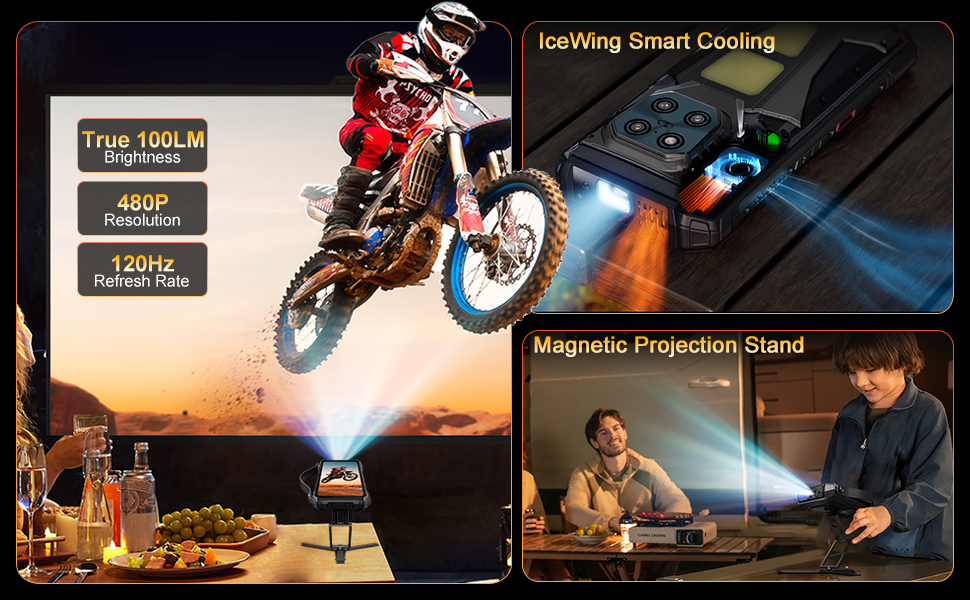
Image: The DOOGEE V Max Play's 100-lumen projector in action, showing projection features like autofocus and keystone correction.
Integrated into the device is a 100-lumen projector with a 60Hz refresh rate and 854x480 resolution. It supports autofocus and various projection adjustments for clear viewing.
Doppio Campluci

Image: The DOOGEE V Max Play's 1200LM dual camping lights illuminating a dark outdoor scene.
The phone features powerful 1200LM dual camping lights with multiple modes (Lighting, SOS, Flash) and brightness adjustments, capable of brightening up to 8 meters ahead.
Impostare
1. Accensione iniziale
- Press and hold the Power Button on the side of the device until the DOOGEE logo appears.
- Seguire le istruzioni sullo schermo per completare la configurazione iniziale, inclusa la selezione della lingua, la connessione Wi-Fi e la configurazione dell'account Google.
2. SIM Card & MicroSD Card Installation
- Individuare lo slot per la scheda SIM/SD sul lato del telefono.
- Aprire con cautela il coperchio protettivo.
- Insert your Nano-SIM card(s) and/or MicroSD card into the tray, ensuring correct orientation.
- Gently push the tray back into the slot and securely close the protective cover to maintain waterproof integrity.
3. Fingerprint & Face Unlock Setup
- Vai a Impostazioni > Sicurezza e privacy > Sblocco dispositivo.
- Selezionare Impronta digitale or Sblocco facciale and follow the on-screen instructions to register your fingerprint(s) or face data.
Istruzioni per l'uso
1. Operazioni di base
- Accensione/spegnimento: Press and hold the Power Button. Select 'Power off' or 'Restart' from the menu.
- Blocco/sblocco schermo: Premere brevemente il pulsante di accensione per bloccare o sbloccare lo schermo.
- Regolazione del volume: Use the Volume Up/Down buttons to control audio levels.
2. Secondary Display Usage
To interact with the secondary display, simply swipe across its surface. You can customize its functions via Settings > MiniScreen.
- Clock Plate: Choose from various clock styles.
- Widgets: Access music controls, camera shortcuts, calendar, and notifications.
- Notifiche: Incoming calls and messages will be displayed on the secondary screen.
3. Funzione proiettore
Video: Demonstration of the DOOGEE V Max Play's 100-lumen projector in various usage scenarios, including outdoor entertainment and professional presentations.
The built-in projector allows you to share content on a larger screen. Access projector settings from the quick settings panel or a dedicated app.
- Attivazione: Open the projector app or toggle from the quick settings.
- Messa a fuoco automatica: The projector automatically adjusts focus for a clear image.
- Regolazioni: Use on-screen controls for vertical flip, keystone correction, and aspect ratio.
- Gioco: Connect a game controller for an enhanced gaming experience with projected content.
4. Laampluci
Video: Mostraasing the DOOGEE V Max Play's camping lantern feature, demonstrating its brightness and utility in dark environments.
The 1200LM dual camping lights provide powerful illumination. Access controls from the quick settings panel or a dedicated app.
- Modalità: Switch between Lighting, SOS, and Flash modes.
- Luminosità: Regola il livello di luminosità dallo 20% al 100%.
5. Utilizzo della fotocamera

Immagine: dettagliata view of the DOOGEE V Max Play's camera setup, including the 200MP AI main camera, 20MP night vision, 8MP ultra-wide/macro, and 32MP front camera.
The DOOGEE V Max Play features a versatile camera system:
- Fotocamera principale AI da 200 MP: Per foto ad alta risoluzione con stabilizzazione EIS.
- Fotocamera per visione notturna da 20 MP: Captures clear images in complete darkness.
- 8MP Ultra-Wide & Macro Camera: For expansive landscapes and detailed close-ups.
- Fotocamera frontale da 32 MP: For optimized selfies.
Open the Camera app and select your desired mode (Photo, Video, Night Vision, Macro, etc.).
6. Customizable Action Button
The customizable action button on the side of the device can be configured for various shortcuts. Go to Impostazioni > Funzione tasto laterale to assign single-click, double-click, and long-press actions to functions like flashlight, screenshots, or opening specific applications.
Manutenzione
Your DOOGEE V Max Play is built to be rugged, but proper maintenance ensures its longevity.
- Impermeabile/antipolvere: Ensure all port covers (USB-C, SIM/SD card slot) are securely closed before exposing the device to water or dust.
- Pulizia: Utilizzare un morbido, damp panno per pulire il dispositivo. Evitare prodotti chimici aggressivi.
- Resistenza alla caduta: While designed to be drop-proof (MIL-STD-810H), extreme impacts can still cause damage. Handle with care.
- Cura della batteria: Avoid extreme temperatures. Do not fully discharge the battery regularly. Use the provided 45W fast charger for optimal charging.
Risoluzione dei problemi
Se riscontri problemi con il tuo dispositivo, prova le seguenti soluzioni:
- Il dispositivo non si accende: Assicurarsi che la batteria sia carica. Collegare al caricabatterie e riprovare.
- Schermo non reattivo: Restart the device by holding the Power Button.
- Problemi di rete: Check SIM card installation. Ensure mobile data is enabled and you have network coverage.
- Proiettore non funzionante: Check projector settings. Ensure the lens is clean and there are no obstructions.
- Battery draining fast: Close unused apps. Reduce screen brightness. Check for background app activity.
Specifiche
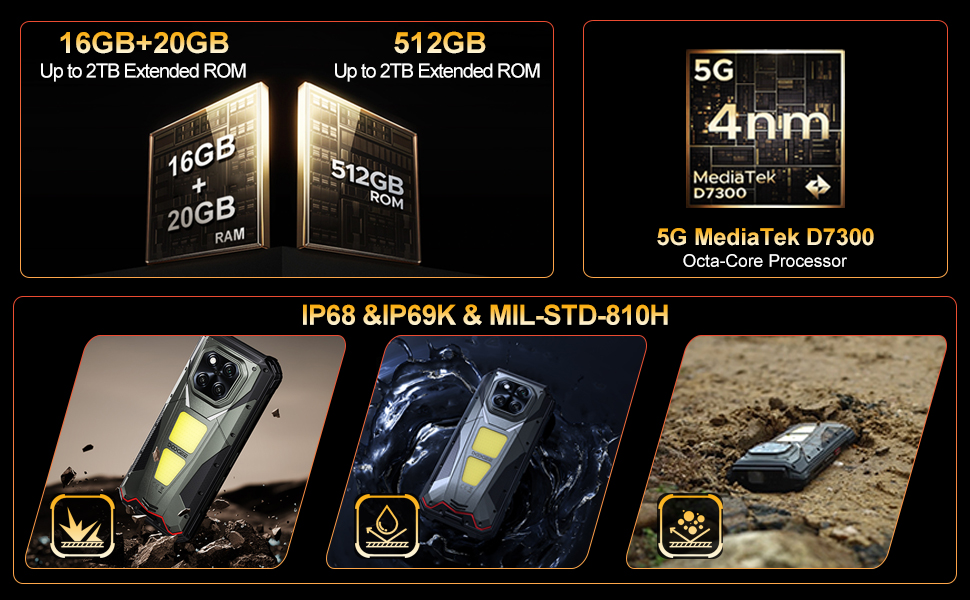
Image: The DOOGEE V Max Play running on Android 15 with Gemini AI integration.
| Caratteristica | Specificazione |
|---|---|
| Nome del modello | DOOGEE V Max Play |
| Sistema operativo | Androide 15 |
| Processore | MediaTek Dimensity 7300 5G (octa-core da 4 nm, 2.5 GHz) |
| Memoria RAM | 16GB Physical RAM + 20GB Virtual RAM (36GB Total) |
| Magazzinaggio | 512 GB di ROM (espandibile fino a 2 TB) |
| Display | 6.78-inch FHD+ (1080x2460) 120Hz Refresh Rate, 500 nits brightness |
| Proiettore | 100 Lumens, 854x480 Resolution, 60Hz Refresh Rate |
| Telecamera posteriore | 200MP AI Main (EIS), 20MP Night Vision, 8MP Ultra-Wide/Macro |
| Fotocamera frontale | 32MP |
| Batteria | 20500mAh, 45W Fast Charging, 10W Reverse OTG |
| Durata | IP68/IP69K, MIL-STD-810H |
| Connettività | Dual 5G SIM, Bluetooth 5.2, Wi-Fi 6, NFC (Google Pay), GPS/Beidou/GLONASS/Galileo |
| Dimensioni | 7.07 x 3.25 x 0.75 pollici |
| Peso | 1.18 libbre (536 grammi) |
Garanzia e supporto
Your DOOGEE V Max Play 5G Rugged Smartphone comes with a 24-month warranty. For any hardware or software issues, please contact our technical support team. We are committed to resolving your concerns promptly.
Per ulteriore assistenza, visita il sito ufficiale DOOGEE websito o contattare il servizio clienti tramite la piattaforma di acquisto.


