1. Introduzione
Thank you for choosing the CAMECHO 5-inch Wireless CarPlay/Android Auto Motorcycle Navigator. This manual provides essential information for the safe and efficient operation of your device. Please read it thoroughly before use and retain it for future reference.

The CAMECHO 5-inch Motorcycle Navigator provides a clear display for navigation and entertainment, integrating seamlessly with your motorcycle's handlebars.
2. Informazioni sulla sicurezza
- Dare sempre priorità alla sicurezza stradale. Non utilizzare il dispositivo in modo da distrarti dalla guida.
- Assicurarsi che il dispositivo sia montato saldamente e non ostruisca il view o il controllo della motocicletta.
- Evitare di esporre il dispositivo a temperature estreme o alla luce solare diretta per periodi prolungati quando non in uso.
- Non tentare di smontare o modificare il dispositivo. Per qualsiasi intervento di manutenzione, rivolgersi a personale qualificato.
3. Contenuto della confezione
Verificare che tutti gli articoli siano presenti nel pacco:
- 1 x CAMECHO 5-inch Motorcycle Navigator Unit
- 1 cavo di alimentazione da 3.4 m
- Waterproof Rings (for cable connections)
- Strip Rolling (cable ties)
- 1 x Manuale utente
- Direct Package (Mounting Hardware: universal and adjustable bracket components)

The package includes the 5-inch navigator unit, a 3.4m power cable, waterproof rings, cable ties, a user manual, and various mounting components for universal installation.
4. Impostazione
4.1 Montaggio del dispositivo
The navigator comes with a universal and adjustable mounting bracket designed for motorcycle handlebars. Follow these steps for installation:
- Allega il clamp base to your motorcycle's handlebar, ensuring a secure fit.
- Connect the adjustable arm to the clamp base.
- Attach the device cradle to the adjustable arm.
- Slide the navigator unit into the cradle until it clicks securely into place. Adjust the viewangolo di ingaggio secondo necessità.

This diagram shows the assembly process for the universal and adjustable mounting bracket, ensuring a secure fit on various motorcycle handlebars.
4.2 Collegamento di alimentazione
Connect the provided 3.4m power cable to your motorcycle's 12V power source. Ensure the connection is secure and protected from water using the waterproof rings.
4.3 Meccanismo di sgancio rapido
The navigator features a quick-release design for easy removal. To detach the device, press the release button on the mount and slide the unit upwards. This allows for convenient storage and helps deter theft when parked.

The quick-release design allows for easy attachment and detachment of the navigator from its mount, providing convenience and security when parking.
5. Istruzioni per l'uso
5.1 Accensione/Spegnimento
- Per accendere: Tenere premuto il pulsante di accensione finché lo schermo non si illumina.
- Per spegnere: Tenere premuto il pulsante di accensione finché non viene visualizzato il messaggio di spegnimento, quindi confermare.
5.2 Configurazione iniziale
Upon first use, the device may prompt you to select a language, set the date and time, and configure other basic settings. Follow the on-screen instructions.
5.3 Connessione wireless CarPlay e Android Auto
Per connettere il tuo smartphone in modalità wireless:
- Assicurati che Bluetooth e Wi-Fi siano abilitati sul tuo smartphone.
- On the navigator, select the CarPlay or Android Auto icon.
- Cercare the navigator's Bluetooth name on your smartphone and pair the devices.
- Confirm the pairing on both devices. CarPlay or Android Auto should now launch automatically.

This device supports wireless Apple CarPlay and Android Auto, allowing you to access navigation, music, and calls directly from your smartphone on the navigator's screen.
5.4 Bluetooth Connection for Audio
To connect your helmet's Bluetooth headset or external earphones:
- Ensure your helmet's Bluetooth headset is in pairing mode.
- On the navigator, navigate to the Bluetooth settings.
- Cercare and select your headset from the list of available devices.
- Confirm pairing. Audio from the navigator (navigation prompts, music, calls) will now be routed to your headset.
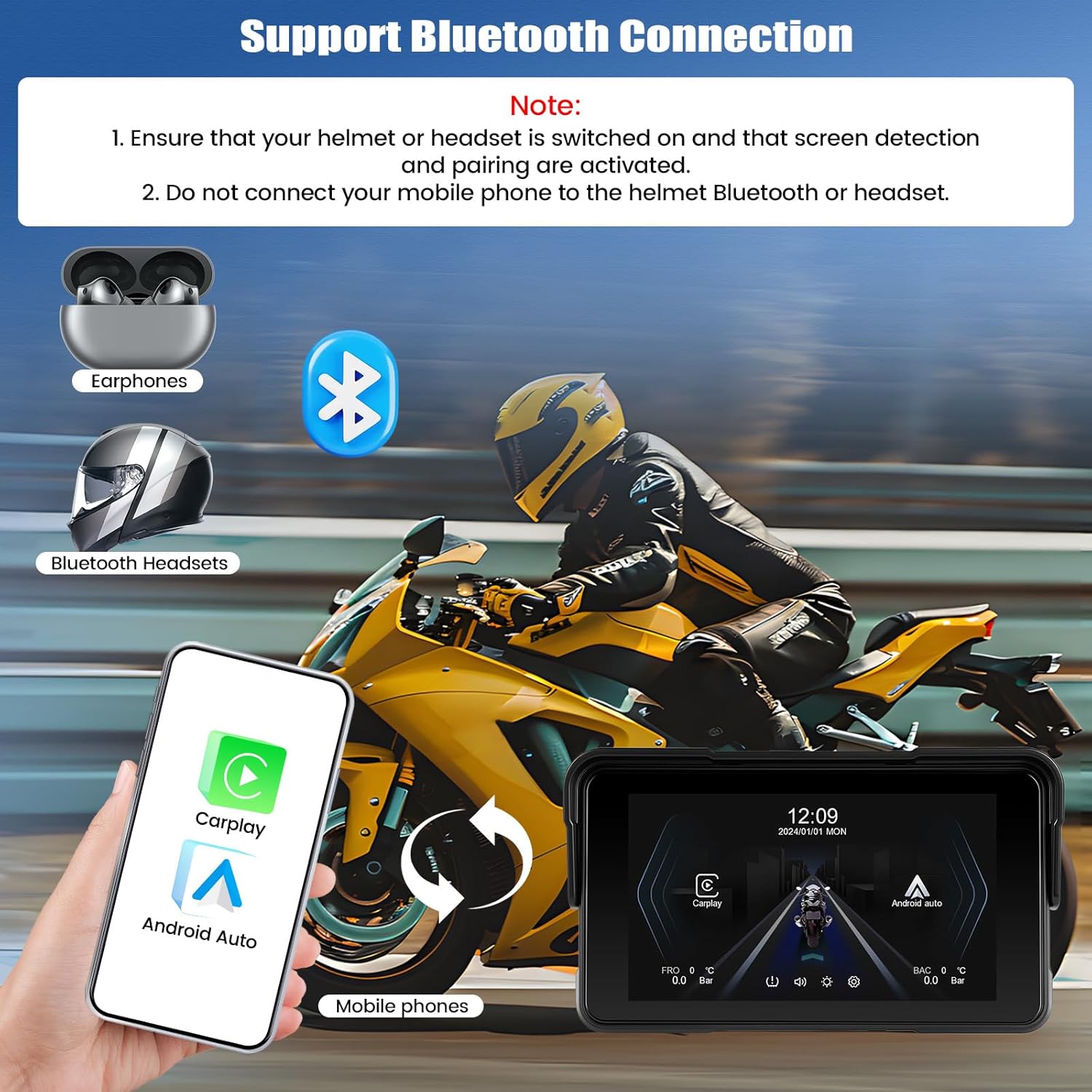
Connect your mobile phone to the navigator via Bluetooth to enable hands-free calls and music streaming. The navigator can then connect to your helmet's Bluetooth headset for audio output.
5.5 Regolazione della luminosità
You can manually adjust the screen brightness through the device settings to optimize visibility for day or night riding.

The screen brightness can be manually adjusted to ensure optimal visibility in various lighting conditions, from bright daylight to nighttime.
5.6 Monitoraggio della pressione dei pneumatici (opzionale)
The navigator supports tire pressure monitoring to enhance your safety. This feature requires the separate purchase and installation of a compatible sensor kit (ASIN: B0FNM7VGJS). Once installed, you can view real-time tire pressure and temperature on the device screen.

For enhanced safety, the device supports continuous tire pressure monitoring. This feature requires the separate purchase of a sensor kit (ASIN: B0FNM7VGJS).
5.7 Navigazione dell'interfaccia utente
The device features an intuitive touchscreen interface. Swipe left or right to navigate between screens, tap icons to open applications, and use the settings menu to customize your experience.

Various user interface screens demonstrating navigation, settings, and feature displays.
6. Manutenzione
6.1 Pulizia del dispositivo
Pulisci lo schermo e il corpo con un panno morbido eamp cloth. Avoid using abrasive cleaners or solvents that may damage the device's surface or waterproof seals.
6.2 Impermeabilità (IP68)
The device is rated IP68 for dust and water resistance. This means it is protected against dust ingress and can withstand immersion in water up to 1.5 meters for 30 minutes. Ensure all ports are securely closed to maintain waterproofing.

Designed for all weather conditions, the navigator features an IP68 waterproof rating, ensuring reliable performance even in rain or dusty environments.
6.3 Aggiornamenti software
Periodically check for software updates to ensure optimal performance and access to new features. Updates can typically be performed via a TF card. Refer to the device settings for update options.

Software updates can be performed using a TF card to ensure your device has the latest features and improvements.
7. Risoluzione Dei Problemi
| Problema | Possibile causa | Soluzione |
|---|---|---|
| Il dispositivo non si accende | No power, loose connection, discharged battery | Check power cable connection. Ensure motorcycle's ignition is on. |
| CarPlay/Android Auto non si connette | Bluetooth/Wi-Fi off, incorrect pairing, software glitch | Ensure phone's Bluetooth/Wi-Fi is on. Re-pair devices. Restart both phone and navigator. |
| Nessun audio dall'auricolare | Headset not paired, volume low, incorrect audio output selected | Check headset pairing. Increase volume on both devices. Verify audio output settings on navigator. |
| Lo schermo non risponde | Problema software temporaneo | Eseguire un soft reset tenendo premuto il pulsante di accensione finché il dispositivo non si riavvia. |
8. Specifiche
| Caratteristica | Dettaglio |
|---|---|
| Dimensioni dello schermo | 5 pollici |
| Grado di impermeabilità | Grado di protezione IP68 |
| Connettività | CarPlay wireless, Android Auto wireless, Bluetooth |
| Tipo di montaggio | Universal and Adjustable |
| Tipo di servizio del veicolo | Motociclo |
| Caratteristiche speciali | Bluetooth hands-free & music, Tire Pressure Detection (with optional accessory) |
| Nome del modello | NUOVO 2025 |
| Numero di modello del prodotto | 1 |
9. Garanzia e supporto
9.1 Informazioni sulla garanzia
This CAMECHO product is covered by a Garanzia di 2 anno dalla data di acquisto, a copertura dei difetti di fabbricazione. Si prega di conservare la prova d'acquisto per eventuali reclami in garanzia.
9.2 Assistenza clienti
Per assistenza tecnica, risoluzione dei problemi o richieste di garanzia, contattare l'assistenza clienti CAMECHO:
- E-mail: CAMECHOYI@123.com

Our customer support team is available to assist you with any questions or issues.