Introduzione
This manual provides detailed instructions for the proper use, setup, and maintenance of your ALLmeter Digital Dial Indicator with Magnetic Base. Designed for high-precision measurements, this tool is suitable for various applications in machine shops, automotive repair, and industrial settings. Please read this manual thoroughly before operating the device to ensure accurate results and safe handling.
Cosa c'è nella scatola
Dopo aver aperto la confezione, verificare che siano presenti tutti i seguenti componenti:
- Indicatore digitale del quadrante
- Magnetic Base with Flexible Arm
- Batteria da 1.5 V
- Scatola di stoccaggio portatile
- Manuale di istruzioni (questo documento)
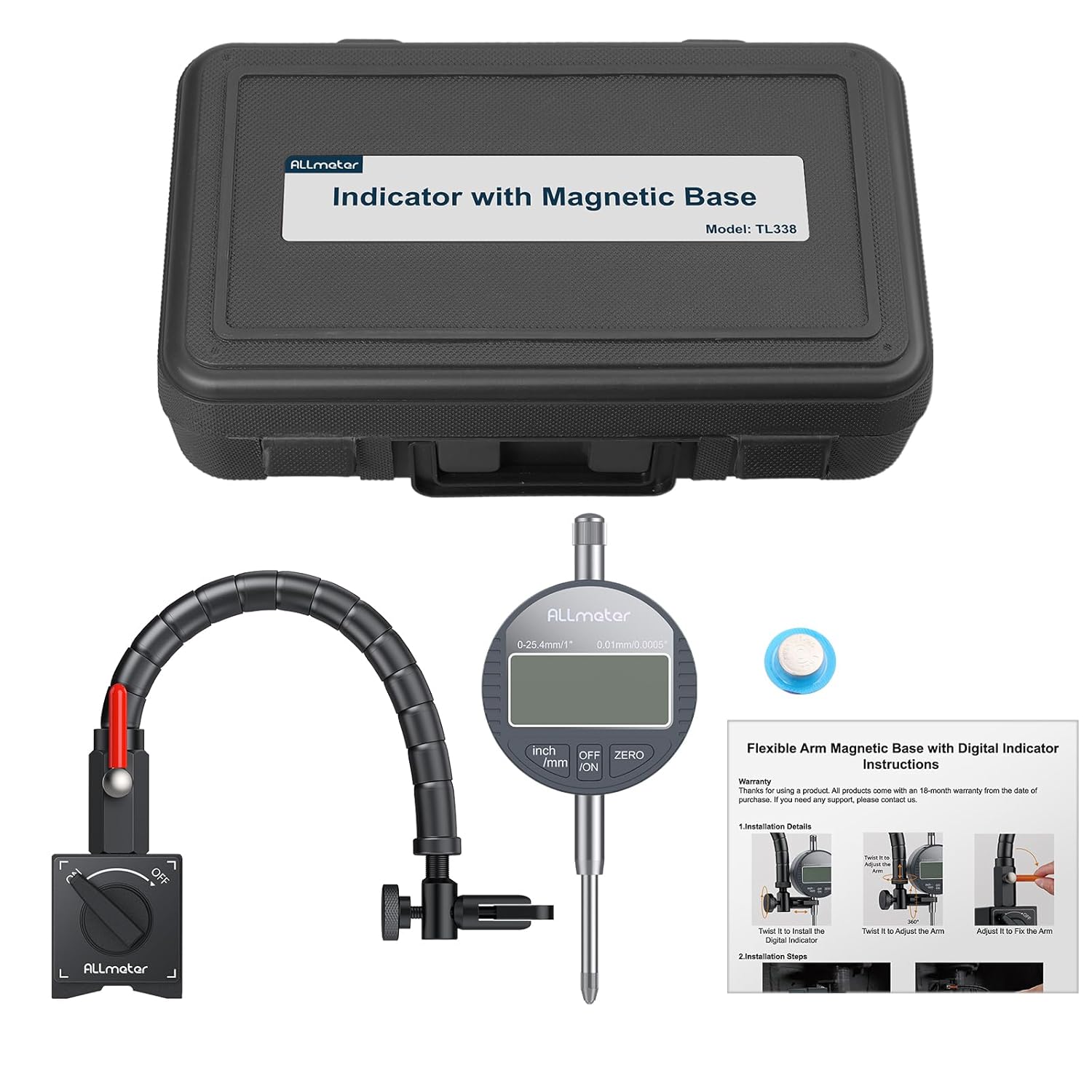
Image: All components included in the ALLmeter Digital Dial Indicator set, neatly arranged for inspection.
Caratteristiche del prodotto
- Alta precisione: Offers 0.01mm (0.0005") resolution and a 0-1 inch/25.4mm measuring range for accurate results.
- Posizionamento flessibile: Features a 360° adjustable magnetic base with 176lbs (80kg) tensile force for secure attachment and versatile positioning.
- Robust & Easy Use: Constructed with an aluminum alloy body, includes an auto-off function, and supports unit conversion between inches and millimeters.
- Compatibilità universale: Designed to fit all 4-14mm dial indicators, making it suitable for various machinery, including lathes, presses, and CNC machines.
- Kit completo: Comes with a battery, portable box, and this manual for immediate use.

Immagine: Oltreview of the ALLmeter Digital Dial Indicator and its key features.
Configurazione e installazione
Follow these steps to set up your digital dial indicator and magnetic base:
- Attach Flexible Arm to Magnetic Base: Securely screw the flexible arm into the magnetic base. Ensure it is tightened to prevent movement during use.
- Position Magnetic Base: Place the magnetic base on a clean, flat ferrous surface. Rotate the ON/OFF switch on the base to the "ON" position to activate the magnet and secure the base.
- Install Digital Dial Indicator: Insert the stem of the digital dial indicator into the clamp at the end of the flexible arm. Tighten the adjusting screw to firmly hold the indicator in place.
- Regola la posizione del braccio: Use the rotary lever on the flexible arm to adjust its angle and position. The 360° rotating twist allows for precise alignment of the indicator's probe with the measurement point.
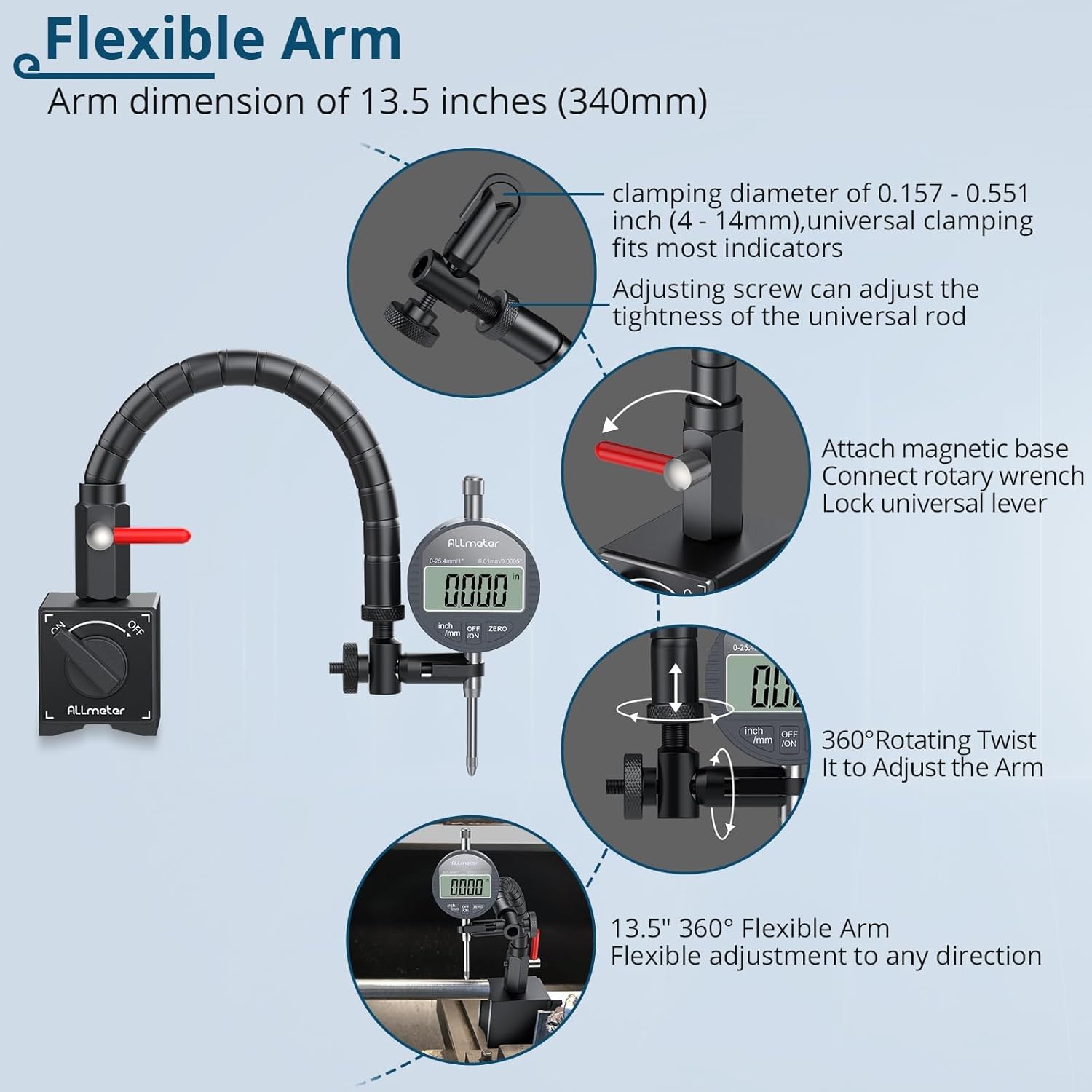
Image: Components of the flexible arm and magnetic base, illustrating adjustment points.

Image: Visual guide for the installation process, from securing the base to preparing for measurement.
Video: Demonstrates the assembly and initial setup of the ALLmeter Digital Dial Indicator with Magnetic Flex Arm.
Istruzioni per l'uso
Once the indicator is installed, follow these steps for accurate measurements:
- Accensione: Press the "ON/OFF" button to turn on the digital dial indicator.
- Seleziona unità: Press the "inch/mm" button to switch between imperial (inches) and metric (millimeters) units as needed.
- Impostazione zero: Position the probe against the reference surface or the starting point of your measurement. Press the "ZERO" button to set the current position as zero.
- Prendi la misura: Gently move the object or the indicator to measure the desired dimension. The digital display will show the displacement from the zero point.
- Spegni: Press the "ON/OFF" button again to turn off the indicator when not in use. The device also features an auto-off function to conserve battery.

Immagine: dettagliata view of the digital dial indicator's interface and controls.

Image: The dial indicator set measuring a brake rotor, illustrating a practical application.
Manutenzione
Proper maintenance ensures the longevity and accuracy of your ALLmeter Digital Dial Indicator:
- Pulizia: Wipe the indicator and magnetic base with a soft, dry cloth after each use. Avoid using solvents or abrasive cleaners.
- Magazzinaggio: Store the device in its portable storage box in a dry, dust-free environment when not in use.
- Sostituzione della batteria: If the display becomes dim or unresponsive, replace the 1.5V battery. Refer to the indicator's battery compartment for specific instructions.
- Evitare l'impatto: Protect the indicator from drops or impacts, as this can affect its precision.
- Cura della base magnetica: Keep the magnetic surfaces clean and free of debris to ensure maximum holding force.
Risoluzione dei problemi
If you encounter issues with your digital dial indicator, consider the following:
- Display non funzionante:
- Controllare che la batteria sia installata correttamente.
- Sostituire la batteria se è scarica o esaurita.
- Assicurarsi che il pulsante ON/OFF sia stato premuto.
- Letture imprecise:
- Ensure the magnetic base is securely attached to a stable, flat ferrous surface.
- Verify that the indicator is firmly clamped in the flexible arm and not loose.
- Clean the probe tip and the measurement surface to remove any debris.
- Perform a zero-setting calibration before taking measurements.
- Magnetic Base Not Holding:
- Ensure the ON/OFF switch on the magnetic base is in the "ON" position.
- Clean the magnetic surfaces and the mounting surface.
- The magnetic base requires a ferrous material surface at least 30mm thick for maximum pull force.
Specifiche
| Caratteristica | Specificazione |
|---|---|
| Campo di misura | 0-1 pollici / 0-25.4 mm |
| Risoluzione | 0.01 mm (0.0005 pollici) |
| Forza di trazione della base magnetica | 176 libbre (80 kg) |
| Lunghezza del braccio flessibile | 13.5 pollici (340 mm) |
| Compatibilità degli indicatori | 4-14 mm dial indicators |
| Fonte di alimentazione | Batteria da 1.5 V |
| Peso dell'articolo | 3.53 libbre |
| Dimensioni del pacco | 12.44 x 7.64 x 3.5 pollici |
| Numero di modello | ALL090FBA |

Immagine: Examples of the dial indicator set being used in different precision measurement scenarios.
Garanzia e supporto
ALLmeter products come with a 15-month warranty from the date of purchase. If you require any support, have questions, or need to claim warranty service, please contact ALLmeter customer service through the retailer where the product was purchased or visit the official ALLmeter websito per le informazioni di contatto.
ALLmeter is committed to providing precise, accurate, and stable measuring tools. We strive for unparalleled quality in each product to ensure customer satisfaction.

