1. Introduzione
The Gustard R30 is a fully-discrete R2R network streamer and Digital-to-Analog Converter (DAC) designed for high-fidelity audio reproduction. It features a true 1-bit DSD decoding capability, FPGA-based clock management, a self-developed network bridge, and a discrete Class-A analog output stage. This manual provides comprehensive instructions for setting up, operating, and maintaining your R30 unit to ensure optimal performance and longevity.

Figura 1.1: Fronte view of the Gustard R30 Network Streamer DAC. This image shows the sleek silver chassis with the display area and touch interface controls.
2. Caratteristiche principali
- Discrete R2R Ladder: Utilizes a discrete R2R module for direct digital signal conversion through a resistor ladder network, providing an organic sound.
- True 1-bit DSD Decoding: Native support for DSD1024, with a DIRECT DSD mode that bypasses PCM conversion for preserving micro-details and timing integrity.
- Smart Digital Filtering: Offers three filter modes (Linear Sharp, Minimum Slow, Super Slow) based on adaptive multi-order algorithms to reduce aliasing noise and enhance resolution.
- FPGA-Powered Control: A programmable FPGA manages clocking, PLL shaping, and signal routing for low jitter and stable synchronization.
- Precision OCXO Clocking: Features an SC-cut crystal OCXO clock for imperceptible jitter and accepts an external 10MHz clock input.
- Self-Developed Network Bridge: CelWare-based system optimized for audio playback, supporting Roon Bridge, AirPlay, HQPlayer NAA, UPnP/DLNA, Spotify Connect, MConnect, BubbleUPnP, and QQMusic.
- Class-A Analog Stage: Discrete Class-A low-pass filter stage for precise control of frequency response, harmonic character, and transient handling.
- Passive Relay Preamplificatore: R2R relay-based volume control, allowing direct connection to powered monitors or power amplifiers, with a pure bypass mode.
- XMOS USB with Isolation: XMOS XU216 interface supporting PCM768k and DSD512, with independent voltage regulation and isolated channels for minimal interference.

Figura 2.1: Oltreview of the Gustard R30's core features, including R2R architecture, 1-bit DSD support, digital filtering, FPGA, OCXO, network streaming, and analog output stage.

Figura 2.2: dettagliata view of the R30's all-new 27-Bit Architecture and True 1-Bit DSD Decoding capabilities, highlighting the internal components.

Figura 2.3: Esploso view illustrating the Digital Filter technology, OCXO Clock, GCLK-02 Clock Module, and FPGA Programmable Logic Chip within the R30.

Figure 2.4: Close-up of the R30's Analog LPF Circuit and the Passive Analog Preamplifier, detailing the discrete components.
3. Impostazione
3.1. Unboxing e contenuti
Carefully unpack your Gustard R30 unit from its packaging. Ensure all components are present and undamaged. The package should contain:
- 1 x GUSTARD R30 Unit
- Cavo di alimentazione (non elencato esplicitamente ma implicito)
- Remote Control (implied by "Controller Support")
- Manuale dell'utente (questo documento)
3.2. Connessioni
Before connecting any cables, ensure the R30 unit is powered off. Refer to the back panel diagram for connection points.
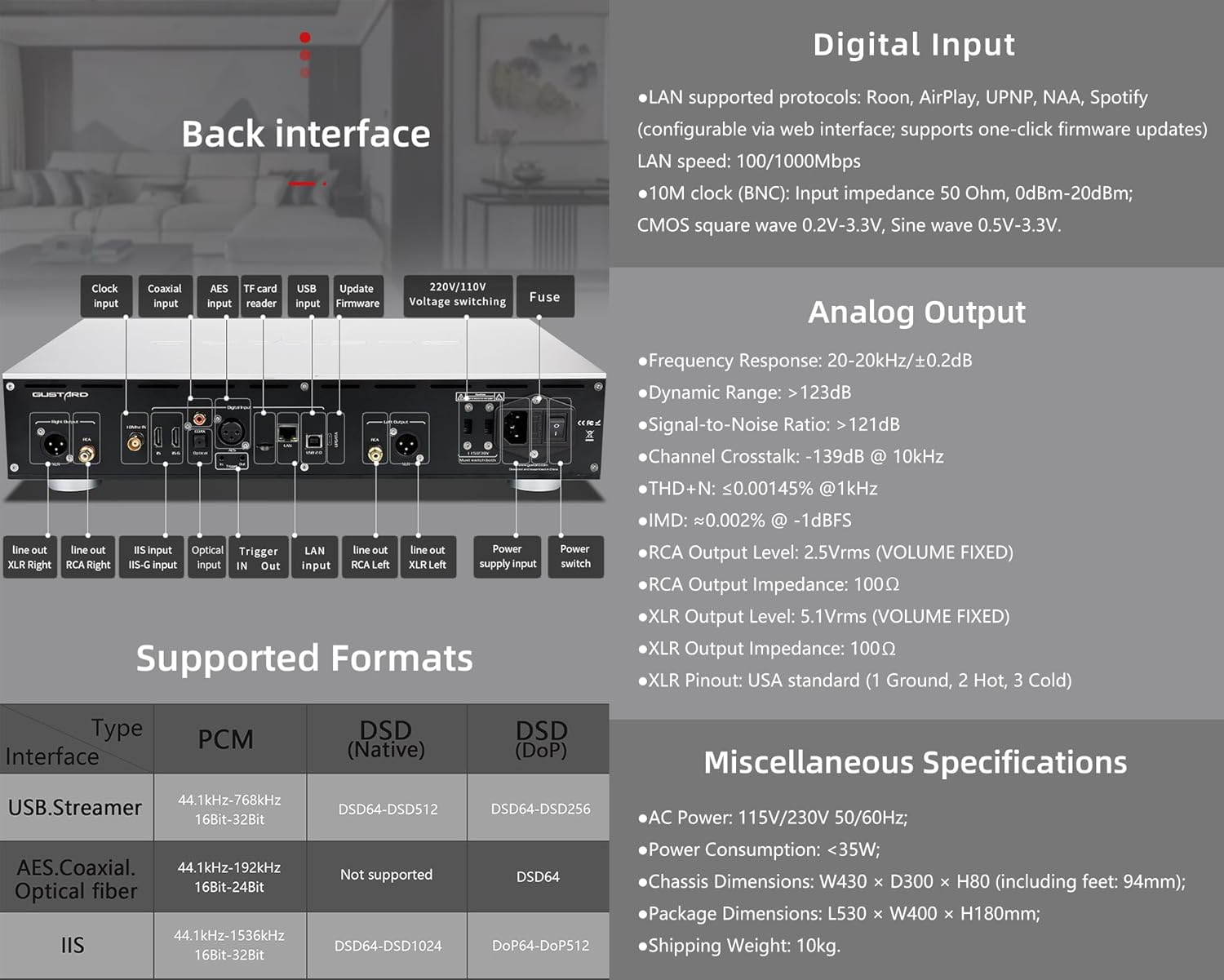
Figure 3.1: Rear panel of the Gustard R30, showing various input and output ports, along with digital input specifications.
- Uscita analogica:
- Connetti il tuo amplifier or powered speakers to the Uscita RCA (2.5Vrms) or Uscita XLR (5.1Vrms) ports. Ensure correct polarity for XLR (USA standard: 1 Ground, 2 Hot, 3 Cold).
- Input digitale:
- LAN: Connect an Ethernet cable to the LAN port for network streaming (Roon, AirPlay, UPnP, NAA, Spotify). Supports 100/1000Mbps.
- Orologio 10M (BNC): For external clock synchronization, connect a 10MHz clock source to the BNC input. Input impedance 50 Ohm, 0dBm-20dBm. Supports CMOS square wave (0.2V-3.3V) and Sine wave (0.5V-3.3V).
- USB: Connect your computer or digital audio source via the USB input (XMOS XU216 interface).
- IIS: The R30 features two IIS inputs. Refer to Section 4.4 for IIS Pinout Configuration. Note: IIS is not standard HDMI. Do not connect to a regular HDMI port.
- Other digital inputs include AES, Coassiale, E Fibra ottica.
- Energia: Connect the supplied power cable to the AC power input (115V/230V 50/60Hz). Ensure the voltagL'interruttore (se presente) è impostato correttamente per la tua regione.
3.3. Accensione
After all connections are secure, press the power switch on the rear panel or the standby switch on the front panel to turn on the R30. The display will illuminate, indicating the unit is operational.
4. Istruzioni per l'uso
4.1. Controlli del pannello frontale

Figure 4.1: Front panel layout of the Gustard R30, showing the display area, touch interface, and controller receiver. Also illustrates the CelWare-based network bridge system.
The R30 features a fluid touch control interface on its front panel:
- Area di visualizzazione: Mostra l'input corrente, sample rate, volume level, and other status information.
- Interfaccia touch: Provides intuitive control for navigating menus, changing inputs, and adjusting settings.
- Controller Receiver: For use with the included remote control.
- Interruttore di standby: Alterna la modalità attiva e quella standby dell'unità.
4.2. Network Streaming
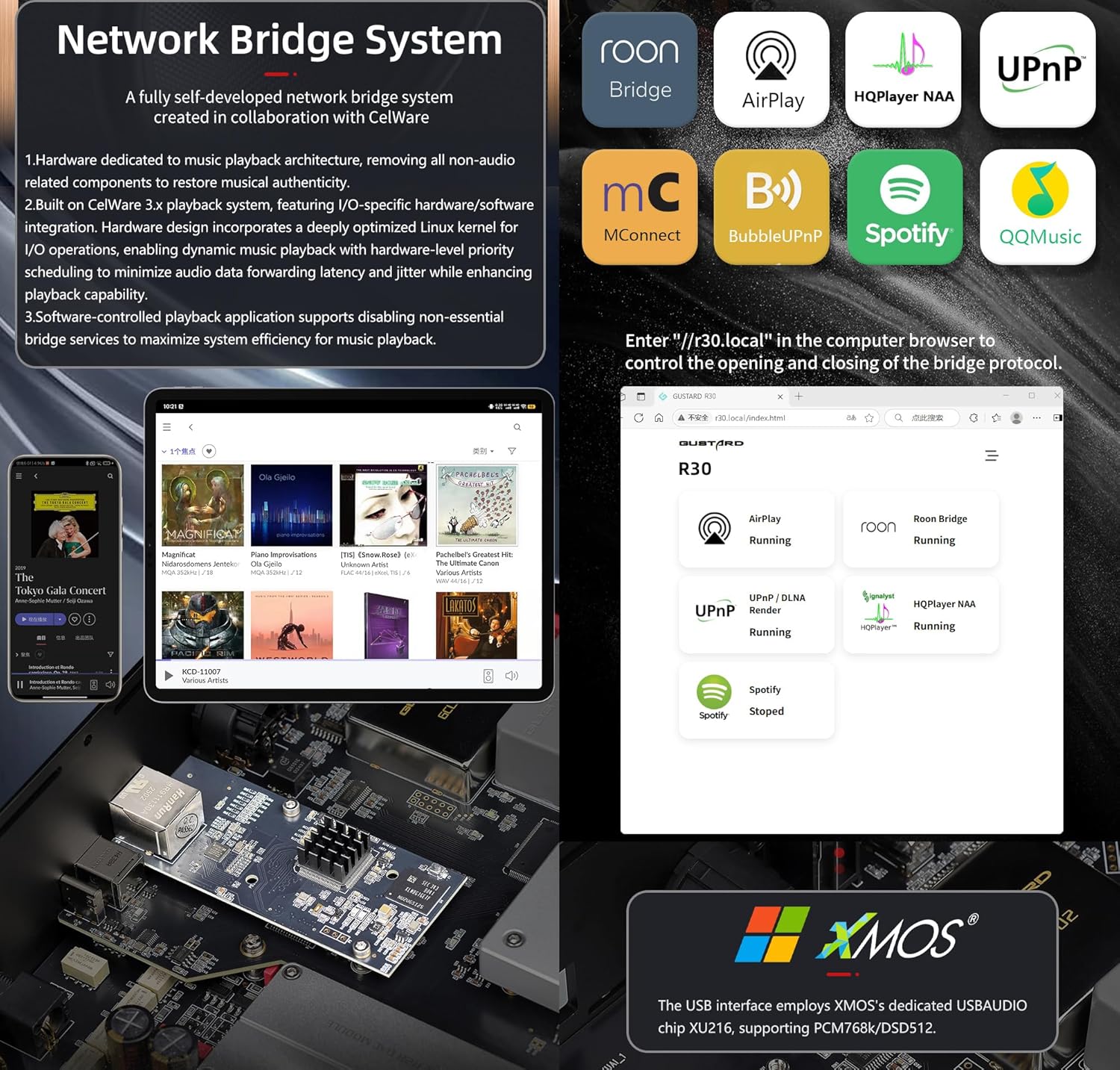
Figure 4.2: Diagram illustrating the R30's self-developed network bridge system and its supported protocols, alongside details of the XMOS USB interface.
The R30's self-developed CelWare-based network bridge system supports various streaming protocols:
- Roon Bridge
- Giocare ad aria
- HQPlayer NAA
- UPnP / DLNA
- Connetti Spotify
- MConnect
- BubbleUPnP
- Musica QQ
To configure network settings and update firmware, access the web interface by entering "http://r30.local" in your computer's browser.
4.3. Digital Filter Modes
The R30 offers three digital filter modes to tailor the sound to your preference:
- Linear Sharp: Provides a sharp roll-off with pre-ringing.
- Minimum Slow: Offers a slower roll-off with minimal pre-ringing.
- Super Slow: A very gentle roll-off, often preferred for a more natural sound.
These modes can be selected via the front panel controls or remote control.
4.4. Volume Control and Preamp Funzionalità
The R30 features a passive analog preamplifier with R2R relay-based volume control, offering a range of 0dB to -65dB. This allows you to connect the R30 directly to powered monitors or a power amplifier and control the volume remotely. You can also switch to a pure bypass mode if you prefer to use an external preamppiù vivace.
4.5. IIS Pinout Configuration
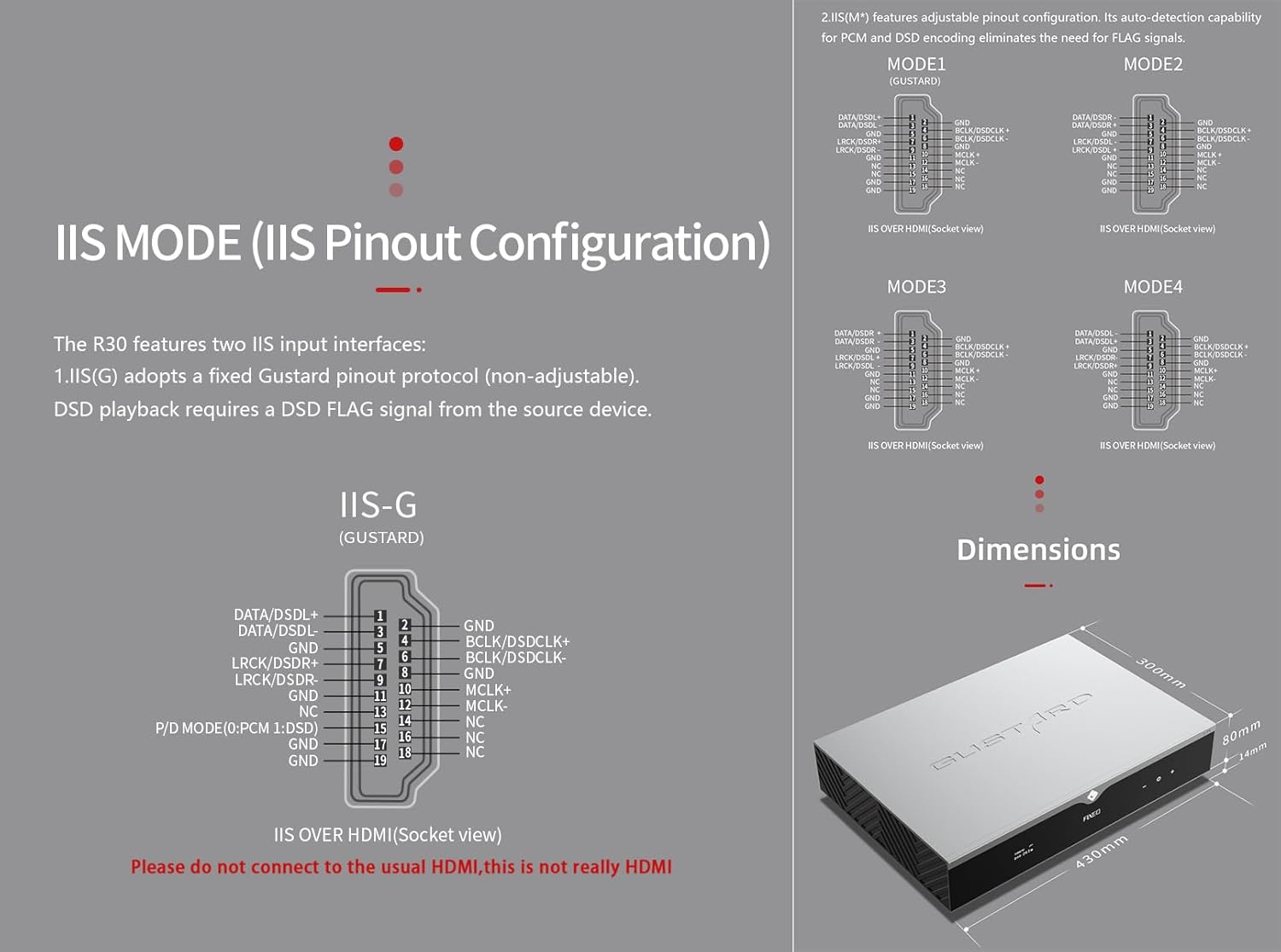
Figure 4.3: Detailed diagrams of the R30's IIS pinout configurations (IIS-G and IIS(M*)) and the overall dimensions of the unit.
The R30 includes two IIS input interfaces:
- IIS(G): Adopts a fixed Gustard pinout protocol (non-adjustable). DSD playback requires a DSD FLAG signal from the source device.
- IIS(M*): Features adjustable pinout configuration. Its auto-detection capability for PCM and DSD encoding eliminates the need for FLAG signals.
Refer to Figure 4.3 for detailed pinout diagrams (MODE1, MODE2, MODE3, MODE4 for IIS(M*) and IIS-G). Importante: These IIS inputs are not standard HDMI. Do not connect them to regular HDMI ports on other devices.
5. Manutenzione
- Pulizia: Utilizzare un panno morbido e asciutto per pulire l'esterno dell'unità. Evitare detergenti abrasivi o solventi.
- Ventilazione: Assicurare un'adeguata ventilazione attorno all'unità per evitare il surriscaldamento. Non ostruire le fessure di ventilazione.
- Magazzinaggio: Se si conserva l'unità per un periodo prolungato, scollegarla dall'alimentazione e conservarla in un luogo fresco e asciutto.
6. Risoluzione Dei Problemi
This section addresses common issues you might encounter with your Gustard R30.
6.1. Nessun potere
- Check if the power cable is securely connected to both the R30 and the power outlet.
- Verificare che la presa di corrente funzioni.
- Ensure the power switch on the rear panel is in the 'On' position.
- Check the fuse on the rear panel (refer to Figure 3.1). If blown, replace it with a fuse of the same rating.
6.2. Nessuna uscita audio
- Confirm that the correct input source is selected on the R30.
- Check all audio cable connections between the R30 and your amplificatore/altoparlanti.
- Ensure the volume level on the R30 is not set to minimum or muted.
- Verifica che il tuo amplifier/speakers are powered on and functioning correctly.
6.3. Problemi di connettività di rete
- Ensure the Ethernet cable is properly connected to the LAN port.
- Controlla le impostazioni del router e della rete.
- Access the R30's web interface (http://r30.local) to check network status and configuration.
- Restart your router, the R30, and the streaming device.
7. Specifiche
| Categoria | Specificazione |
|---|---|
| Digital Input (LAN) | Supported protocols: Roon, AirPlay, UPNP, NAA, Spotify (configurable via web interface; supports one-click firmware updates) LAN speed: 100/1000Mbps |
| Digital Input (10M Clock BNC) | Input impedance 50 Ohm, 0dBm-20dBm; CMOS square wave 0.2V-3.3V, Sine wave 0.5V-3.3V. |
| Digital Input (USB) | XMOS XU216 interface, supports PCM768k and DSD512. |
| Digital Input (IIS) | DSD1024, PCM 1536kHz (only IIS) |
| Analog Output - Frequency Response | 20-20kHz/±0.2dB |
| Analog Output - Dynamic Range | >123 dB |
| Analog Output - Signal-to-Noise Ratio | >121 dB |
| Analog Output - Channel Crosstalk | -139 dB a 10 kHz |
| Analog Output - THD+N | ≤0.00145% @1kHz |
| Analog Output - IMD | ≈0.002% @-1dBFS |
| Analog Output - RCA Level | 2.5Vrms (VOLUME FISSO) |
| Analog Output - RCA Impedance | 100Ω |
| Analog Output - XLR Level | 5.1Vrms (VOLUME FISSO) |
| Analog Output - XLR Impedance | 100Ω |
| Analog Output - XLR Pinout | USA standard (1 Ground, 2 Hot, 3 Cold) |
| Alimentazione CA | 115V/230V 50/60Hz |
| Consumo energetico | <35Settembre |
| Chassis Dimensions (W×D×H) | 430 × 300 × 80 mm (including feet: 94mm) |
| Dimensioni della confezione (L×W×H) | Dimensioni: 530 × 400 × 180 mm |
| Peso di spedizione | 10 kg (22 libbre) |
| Colore | Argento |
| Numero modello articolo | GUSTARD R30 |
Figure 7.1: Dimensional drawing of the Gustard R30 unit.
8. Garanzia e supporto
For warranty information and technical support, please refer to the warranty card included with your product or visit the official KGUSS websito. Conservare la ricevuta d'acquisto come prova d'acquisto per eventuali reclami in garanzia.
For further assistance, you may also contact the seller, HIFI College, through the Amazon platform.


