1. Prodotto finitoview
The Thunelec U9 Wireless Earbuds are designed to provide a superior audio experience with advanced features such as Active Noise Cancellation (ANC), Environmental Noise Cancellation (ENC), Bluetooth 5.4 connectivity, and a multifunctional touch screen charging case. These earbuds are built for comfort, durability, and high-fidelity sound.

Image 1.1: Thunelec U9 Wireless Earbuds and Multifunctional Touch Charging Case.
Contenuto della confezione:
- U9 wireless earbuds (L&R) x 2
- Multifunctional touch charging case x 1
- Cavo di ricarica x 1
- Manuale utente x 1
- Ear tips (S/L/M) x 3 pairs
2. Configurazione e utilizzo iniziale
2.1 Ricarica degli auricolari e della custodia
Before first use, fully charge the earbuds and the charging case. Connect the provided charging cable to the charging case and a USB power source. The touch screen on the case will display the battery levels for both earbuds and the case in real-time.
- Tempo di ricarica: Circa 1.5 ore per una carica completa della custodia.
- Tempo di riproduzione: 6-8 hours on a single earbud charge, extended to 48 hours with the charging case.

Image 2.1: Illustration of charging times and battery life for the U9 earbuds and case.
2.2 Associazione con un dispositivo
The Thunelec U9 earbuds feature one-step auto-pairing for convenience.
- Aprire la custodia di ricarica. Gli auricolari entreranno automaticamente in modalità di associazione.
- Sul tuo dispositivo (smartphone, tablet, laptop), attiva il Bluetooth.
- Cercare available Bluetooth devices and select "U9" from the list.
- Once connected, the earbuds will indicate successful pairing, and the device will show "U9 Connected."

Image 2.2: Visual guide for the one-step auto-pairing process with a mobile device.
2.3 Selezione degli auricolari
For optimal sound quality and comfort, choose the ear tips that best fit your ears. The package includes three sizes (S, M, L).
- Experiment with different sizes to find a secure and comfortable fit that creates a good seal in your ear canal.
- A proper seal enhances bass response and noise cancellation performance.

Image 2.3: Illustration of ergonomic design and included ear tip sizes for a comfortable and secure fit.
3. Istruzioni per l'uso
3.1 Controlli Smart Touch
Gli auricolari sono dotati di comandi touch intuitivi per varie funzioni:
- Rispondi/Termina chiamata: Un solo tocco su uno degli auricolari.
- Riproduci/Pausa musica: Un solo tocco su uno degli auricolari.
- Prossima canzone: Tocca due volte l'auricolare destro.
- Canzone precedente: Tocca due volte l'auricolare sinistro.
- Attiva l'assistente vocale (Siri): Tocca tre volte uno degli auricolari.
- ANC Mode Switching: Long press on either earbud (cycles through ANC, Transparency, Normal modes).
3.2 Custodia multifunzionale con touch screen
The charging case features a full-color touch display that provides additional controls and information:
- Controllo della riproduzione musicale: Riproduci, metti in pausa e salta i brani direttamente dallo schermo.
- ANC/Transparency Mode Activation: Switch between noise cancellation, transparency, and normal modes.
- Regolazione del volume: Controlla il volume audio.
- Controllo della telecamera: Utilizza la custodia come otturatore remoto per la fotocamera del tuo telefono.
- Cambio lingua: Select from seven supported languages.
- Cambio di sfondo: Personalizza lo sfondo dello schermo.
- Regolazione della luminosità dello schermo: Modify display brightness.
- Ricerca cuffie: Locate misplaced earbuds (see Troubleshooting section).
- Timer: Set a timer directly from the case.

Immagine 3.1: Passoview of the LED full-color touch screen functions on the charging case.
3.3 Modalità di cancellazione del rumore e trasparenza
The U9 earbuds feature advanced audio modes:
- ANC (cancellazione attiva del rumore): Reduces external noise by up to 45dB, ideal for noisy environments like public transport.
- ENC (cancellazione del rumore ambientale): Ensures clear call quality by filtering out background noise during conversations.
- Modalità trasparenza: Allows you to hear your surroundings clearly while listening to audio, enhancing safety during activities like cycling or driving.

Image 3.2: Visual representation of Normal, Noise Cancellation, and Transparent modes.
3.4 Sound Quality and EQ Modes
The earbuds are equipped with 14.2mm bio-carbon fiber dynamic coils for powerful bass and clear mid-high frequencies. Five adjustable equalizer (EQ) modes are available:
- Standard
- Classico
- Jazz
- Roccia
- Pop
Switch between these modes via the touch screen on the charging case to optimize your listening experience for different music genres.
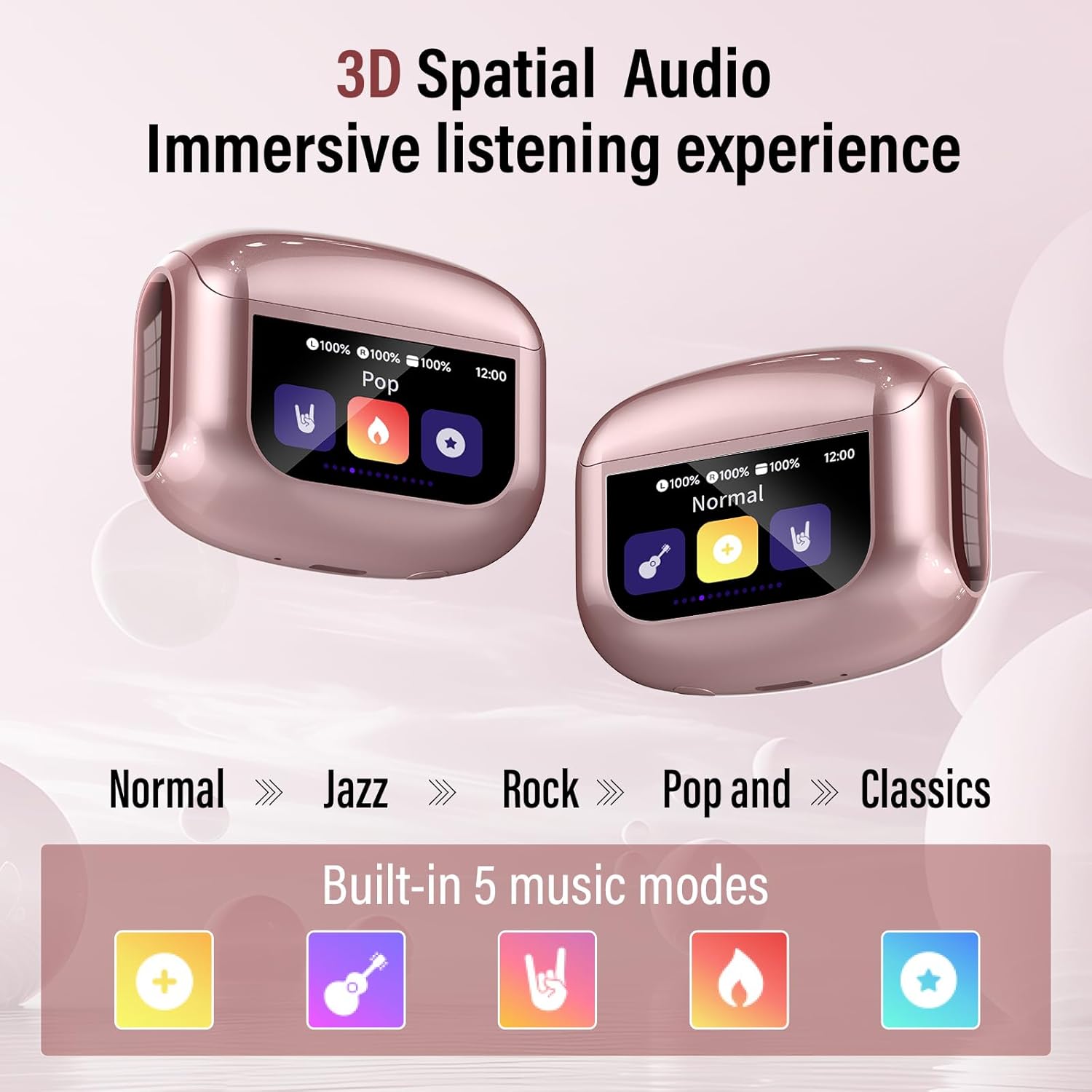
Image 3.3: Display of the five available music equalization modes.
4. Manutenzione
4.1 Pulizia
Una pulizia regolare aiuta a mantenere prestazioni e igiene ottimali:
- Pulisci delicatamente gli auricolari e la custodia di ricarica con un panno morbido, asciutto e privo di lanugine.
- Rimuovere i gommini auricolari e pulirli con acqua e sapone neutro, quindi asciugarli accuratamente prima di riapplicarli.
- Use a cotton swab or a small, soft brush to carefully clean the speaker mesh and charging contacts.
- Evitare l'uso di materiali abrasivi, solventi o prodotti chimici aggressivi.
4.2 Resistenza all'acqua (IPX7)
The Thunelec U9 earbuds feature an IPX7 waterproof rating, meaning they are protected against immersion in water up to 1 meter for 30 minutes. This makes them suitable for workouts and use in light rain.
- Non immergere intenzionalmente gli auricolari per periodi prolungati o a profondità superiori a quelle specificate.
- La custodia di ricarica non è impermeabile. Mantenerla asciutta.
- Ensure earbuds are completely dry before placing them back into the charging case to prevent damage to charging contacts.
5. Risoluzione Dei Problemi
5.1 Gli auricolari non si accoppiano o non si connettono
- Assicurarsi che entrambi gli auricolari siano carichi e rimossi dalla custodia di ricarica.
- Disattiva e riattiva il Bluetooth del tuo dispositivo.
- Forget "U9" from your device's Bluetooth list and attempt to re-pair.
- If issues persist, try resetting the earbuds (refer to the full user manual for specific reset instructions if available).
5.2 Nessun suono o scarsa qualità del suono
- Check the volume level on both your device and the earbuds/charging case.
- Assicurati che gli auricolari siano posizionati correttamente nelle orecchie e che aderiscano bene.
- Clean the speaker mesh to remove any debris that might be obstructing sound.
- Avvicinati al dispositivo connesso per evitare interferenze.
5.3 Earbud-Finding Function
If you misplace an earbud, use the "Find My Earphone" function on the charging case's touch screen. This will cause the selected earbud to emit a beeping sound to help you locate it.

Image 5.1: Illustration of the earbud-finding function on the charging case screen.
6. Specifiche
| Caratteristica | Descrizione |
|---|---|
| Nome del modello | U9 |
| Marca | Thunelec |
| Tecnologia di connettività | Wireless (Bluetooth) |
| Versione Bluetooth | 5.4 |
| Posizionamento dell'orecchio | Nell'orecchio |
| Fattore di forma | Nell'orecchio |
| Metodo di controllo | Tocco |
| Caratteristiche speciali | ANC & ENC Noise Canceling, Transparency Mode, Multifunctional Touch Screen, Call Control, Photo Control, Headphone Search Function, 5 EQ Modes |
| Livello di resistenza all'acqua | IPX7 impermeabile |
| Durata della batteria (auricolari) | 6-8 ore (carica singola) |
| Tempo di riproduzione totale (con custodia) | Fino a 48 ore |
| Tempo di ricarica (custodia) | Circa 1.5 ore |
| Peso dell'articolo | 3.52 once |
| Dispositivi compatibili | Smartphones, tablets, laptops, and other Bluetooth-enabled devices (iOS & Android) |
7. Garanzia e supporto
7.1 Garanzia limitata
Thunelec products are covered by a limited warranty against manufacturing defects from the date of purchase. Please retain your proof of purchase for warranty claims. The warranty does not cover damage caused by misuse, accidents, unauthorized modifications, or normal wear and tear.
7.2 Assistenza clienti
For technical assistance, warranty inquiries, or any questions regarding your Thunelec U9 Wireless Earbuds, please contact Thunelec customer support through the official channels. You can find more information and contact details by visiting the Thunelec Store on Amazon.