1. Prodotto finitoview
The ANYFAR RM-BZ2684F Decoder Adapter is designed to integrate advanced connectivity features such as Wireless CarPlay, Wireless Android Auto, Mirror Link, and USB media playback into compatible Mercedes-Benz vehicles. This adapter allows users to retain the original car's control system while enhancing the infotainment experience.
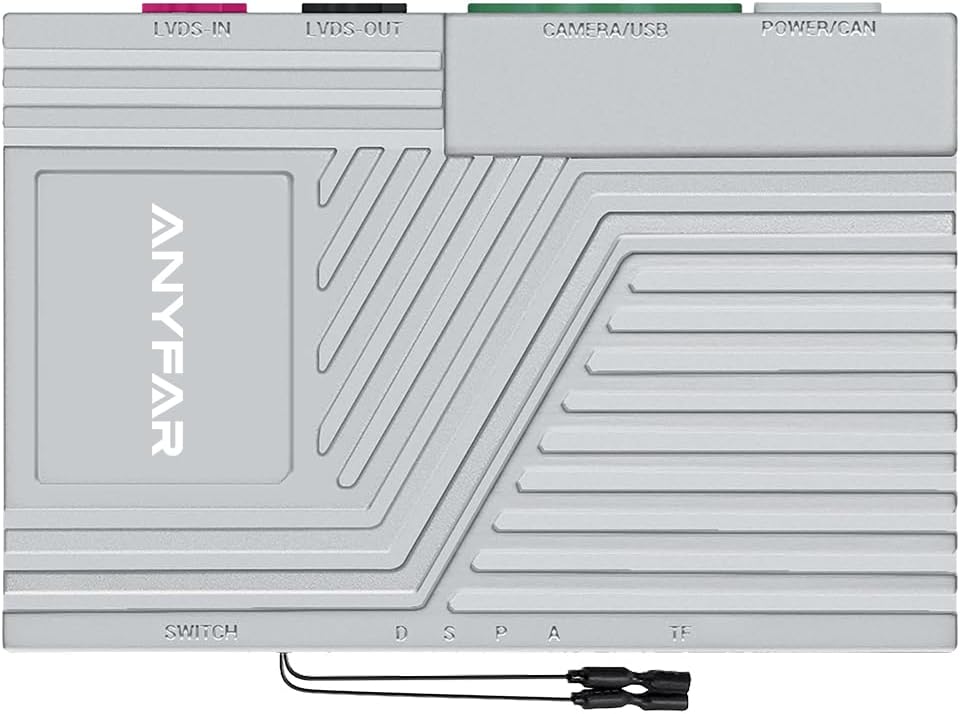
Figura 1: Superiore view of the ANYFAR RM-BZ2684F Decoder Adapter, showing connection ports for LVDS IN, LVDS OUT, CAMERA/USB, and POWER/CAN.
2. Informazioni sulla compatibilità
This decoder adapter is specifically designed for Mercedes-Benz vehicles equipped with the NTG 4.5/4.7 system, manufactured between 2010 e 2014. It is crucial to verify your vehicle's NTG system type and manufacturing year before installation.
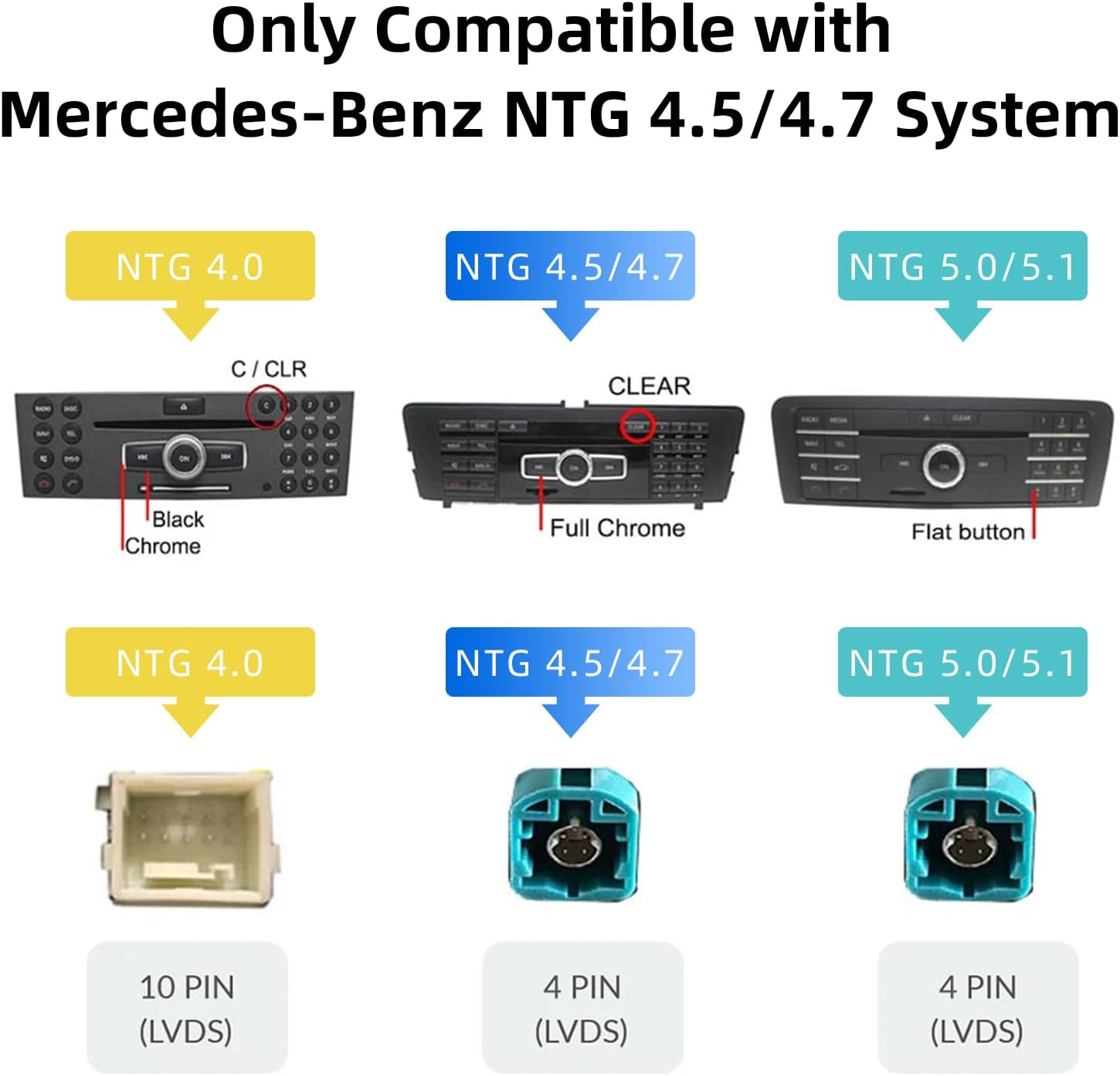
Figura 2: Visual guide for identifying Mercedes-Benz NTG 4.5/4.7 systems based on control panel appearance and LVDS connector type (4 PIN).
2.1 Modelli di veicoli compatibili
The following Mercedes-Benz models with NTG 4.5/4.7 systems are compatible:

Figura 3: Table detailing compatible Mercedes-Benz models, manufacturing years, and screen sizes for NTG 4.5/4.7 systems.
- A Class W176 (2013-2015)
- B Class W242/W246 (2012-2015)
- Classe C W204 (2011-2014)
- CLA Class C117/W117 (2013-2015)
- CLS Class W218 (2012-2015)
- E Class sedan W212 (2012-2015)
- E Class coupe C207 A207 (2012-2015)
- G Class W463 (2012-2015)
- GLA Class X156 (2013-2015)
- GLK Class (2013-2015)
- ML/GL (2012-2015)
- SLK R172 (2011-2015)
3. Contenuto della confezione
Prima di iniziare l'installazione, assicurarsi che tutti i componenti siano presenti nella confezione:
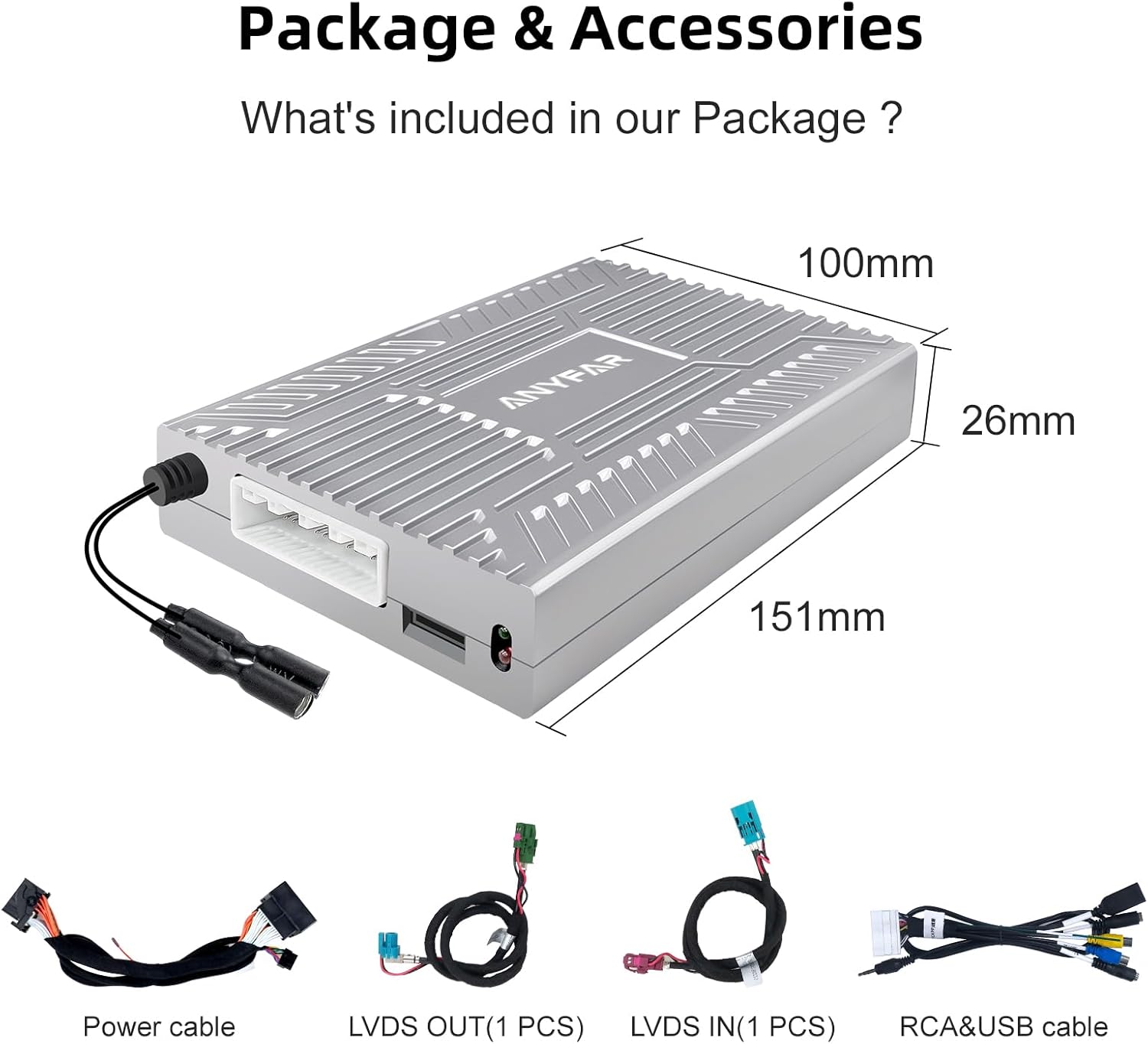
Figura 4: Illustration of the decoder module and included cables: Power cable, LVDS OUT (1 PCS), LVDS IN (1 PCS), and RCA & USB cable.
- ANYFAR RM-BZ2684F Decoder Adapter Module (Dimensions: 151mm x 100mm x 26mm)
- Cavo di alimentazione
- LVDS OUT Cable (1 PC)
- LVDS IN Cable (1 PC)
- Cavo RCA e USB
4. Configurazione e installazione
Installation of the ANYFAR RM-BZ2684F Decoder Adapter requires technical expertise and familiarity with automotive electrical systems. Professional installation is recommended. This section provides a general overview; refer to a qualified technician for detailed vehicle-specific instructions.
4.1 Lista di controllo pre-installazione
- Verify vehicle compatibility (NTG 4.5/4.7 system, 2010-2014 model year).
- Assicurarsi che tutto il contenuto della confezione sia presente.
- Scollegare la batteria del veicolo prima di iniziare qualsiasi lavoro elettrico.
- Gather necessary tools (e.g., trim removal tools, screwdrivers, wiring harness tools).
4.2 Fasi generali di installazione (consultare un professionista)
- Carefully remove the vehicle's head unit or display panel to access the rear connections.
- Locate the original LVDS cable connected to the display. Disconnect it.
- Connect the provided LVDS IN cable from the decoder adapter to the original LVDS port on the head unit.
- Connect the provided LVDS OUT cable from the decoder adapter to the vehicle's display.
- Connect the power/CAN cable from the decoder adapter to the vehicle's power harness, ensuring correct pin assignments.
- If installing a backup or front camera, connect it to the CAMERA/USB port on the decoder adapter using the RCA cable.
- Route the USB extension cable to an accessible location within the vehicle for USB drive playback or phone charging.
- Secure the decoder adapter module in a safe, dry location away from heat and moisture.
- Reconnect the vehicle's battery and test the system before reassembling the dashboard.
5. Istruzioni per l'uso
The ANYFAR Decoder Adapter seamlessly integrates with your vehicle's existing controls, providing an enhanced user experience.
5.1 Passaggio da un sistema all'altro
To switch between the original OEM car system and the CarPlay/Android Auto system, long-press the designated button on your car's knob or central control panel. Refer to your vehicle's specific controls for the exact button.

Figura 5: Diagram illustrating the process of switching between the OEM car system and the CarPlay/Android Auto system by long-pressing a button on the car knob.
5.2 CarPlay wireless e Android Auto
Once the adapter is installed, you can connect your smartphone wirelessly to access CarPlay or Android Auto functionalities. This includes navigation, music, calls, messaging, and voice assistant features.

Figura 6: Display showing the CarPlay interface on the vehicle's screen, highlighting features like Bluetooth, CarPlay, Android Auto, Voice Control, and Live Map.
5.3 Mirror Link & USB Drive Playback
The adapter supports Mirror Link (AirPlay for iOS) to display your phone's screen on the car's display. This allows for viewing content from apps like YouTube or Netflix. Additionally, the USB port enables playback of videos or music from a USB drive and can be used for phone charging.
5.4 Conservazione dei comandi originali dell'auto
The decoder kit ensures that all original car controls, including the touchscreen (if applicable), voice control, physical buttons, and knobs, remain fully functional for both the OEM system and the integrated CarPlay/Android Auto interface.

Figura 7: Images demonstrating the continued functionality of steering wheel buttons (e.g., volume, voice awakening) and the central control panel knob for system interaction.
5.5 Controllo vocale intelligente
Utilize your smartphone's voice assistant (Siri for CarPlay, Google Assistant for Android Auto) for hands-free operation. This allows for safer driving by controlling navigation, music, and calls using voice commands.

Figura 8: Screenshots showing Siri and Google Assistant interfaces on the car screen, responding to voice commands like "Hey Siri" or "Hey Google" for tasks such as playing music or making calls.
5.6 Backup Camera Input Support
The decoder adapter supports connecting an aftermarket backup camera or front camera. When the vehicle is shifted into reverse, the camera feed will automatically display on the car screen, aiding in parking and maneuvering.

Figura 9: Image depicting a rear-view camera display on the car's screen, showing parking guidelines and the view dietro il veicolo.
5.7 In-Car Hi-Fi Audio
The adapter utilizes digital transmission to maintain the original sound quality of your car's audio system, providing uninterrupted, high-quality music playback without signal interference or audio delay.
6. Manutenzione
The ANYFAR RM-BZ2684F Decoder Adapter is designed for maintenance-free operation. No user-serviceable parts are inside. To ensure longevity, keep the module free from moisture and extreme temperatures. Avoid attempting to open or repair the device, as this will void the warranty.
7. Risoluzione Dei Problemi
If you encounter issues with your ANYFAR Decoder Adapter, please refer to the following common troubleshooting steps:
- Nessuna alimentazione/Il sistema non si accende:
- Controllare tutti i collegamenti elettrici per accertarsi che siano saldamente fissati.
- Verificare che la batteria del veicolo sia correttamente collegata e carica.
- Confirm that the vehicle's ignition is on.
- Nessuna visualizzazione/schermo nero:
- Ensure the LVDS IN and LVDS OUT cables are correctly connected between the head unit, decoder, and display.
- Confirm the system is switched to the CarPlay/Android Auto interface (refer to Section 5.1).
- CarPlay/Android Auto wireless non si connette:
- Assicurati che il Bluetooth e il Wi-Fi del tuo telefono siano abilitati.
- Elimina il dispositivo dalle impostazioni Bluetooth del telefono e riprova ad associarlo.
- Riavvia il telefono e il sistema di infotainment del veicolo.
- Problemi audio (nessun suono/suono distorto):
- Check the vehicle's audio input settings to ensure the correct auxiliary input is selected.
- Verify all audio connections are secure.
- Adjust volume levels on both the phone and the car's system.
- La telecamera di backup non viene visualizzata:
- Ensure the camera is properly connected to the CAMERA/USB port on the decoder.
- Verificare che la telecamera sia alimentata.
- Check the vehicle's gear selection (must be in reverse).
Se questi passaggi non risolvono il problema, contattare l'assistenza clienti per ulteriore assistenza.
8. Specifiche
| Caratteristica | Dettaglio |
|---|---|
| Numero di modello | Modello RM-BZ2684F |
| Marca | OVUNQUE |
| Veicoli compatibili | Mercedes-Benz NTG 4.5/4.7 Systems (2010-2014) |
| Tecnologia di connettività | USB, Wireless (Bluetooth, Wi-Fi for CarPlay/Android Auto) |
| Tipo di controllore | Hand Control (integrates with original car controls) |
| Caratteristica speciale | Hands-Free Calling, Wireless CarPlay, Wireless Android Auto, Mirror Link, USB Playback, Backup Camera Support |
| Dispositivi compatibili | Smartphone |
| Tipo di connettore | Micro USB (for USB port), LVDS, Power/CAN |
| Modalità di uscita audio | Stereo |
| Dimensioni del pacco | 9.69 x 6.65 x 3.82 pollici |
| Peso dell'articolo | 2.02 libbre |
| Produttore | Huizhou Rhythm Technology Co, Ltd |
9. Garanzia e supporto
For warranty information and customer support, please refer to the documentation included with your purchase or visit the official ANYFAR website. If you require technical assistance or have questions regarding installation or operation, please contact ANYFAR customer service directly.


