1. Introduzione
The ANYFAR Decoder RM-LH2522F is an advanced interface designed to integrate modern smartphone functionalities like Wireless CarPlay and Android Auto into compatible Land Rover and Jaguar vehicles. This device enhances your in-car experience by providing navigation, music, communication, and other applications directly on your vehicle's existing 10.25-inch Harman headunit screen, while retaining all original car controls.
1.1. Avviso di compatibilità
This decoder is specifically compatible with 2016–2019 Land Rover and Jaguar vehicles equipped with a Harman head unit e un Schermo da 10.25 polliciI modelli compatibili includono:
- Land Rover: Evoque (2016–2019), Discovery 5 (2016–2019)
- Giaguaro: XE (2016–2019), XF (2016–2019), XJL (2016–2019), F-Type (2016–2019)
Please verify your vehicle's head unit and screen size before installation. Refer to the compatibility image below for visual guidance on screen display styles.
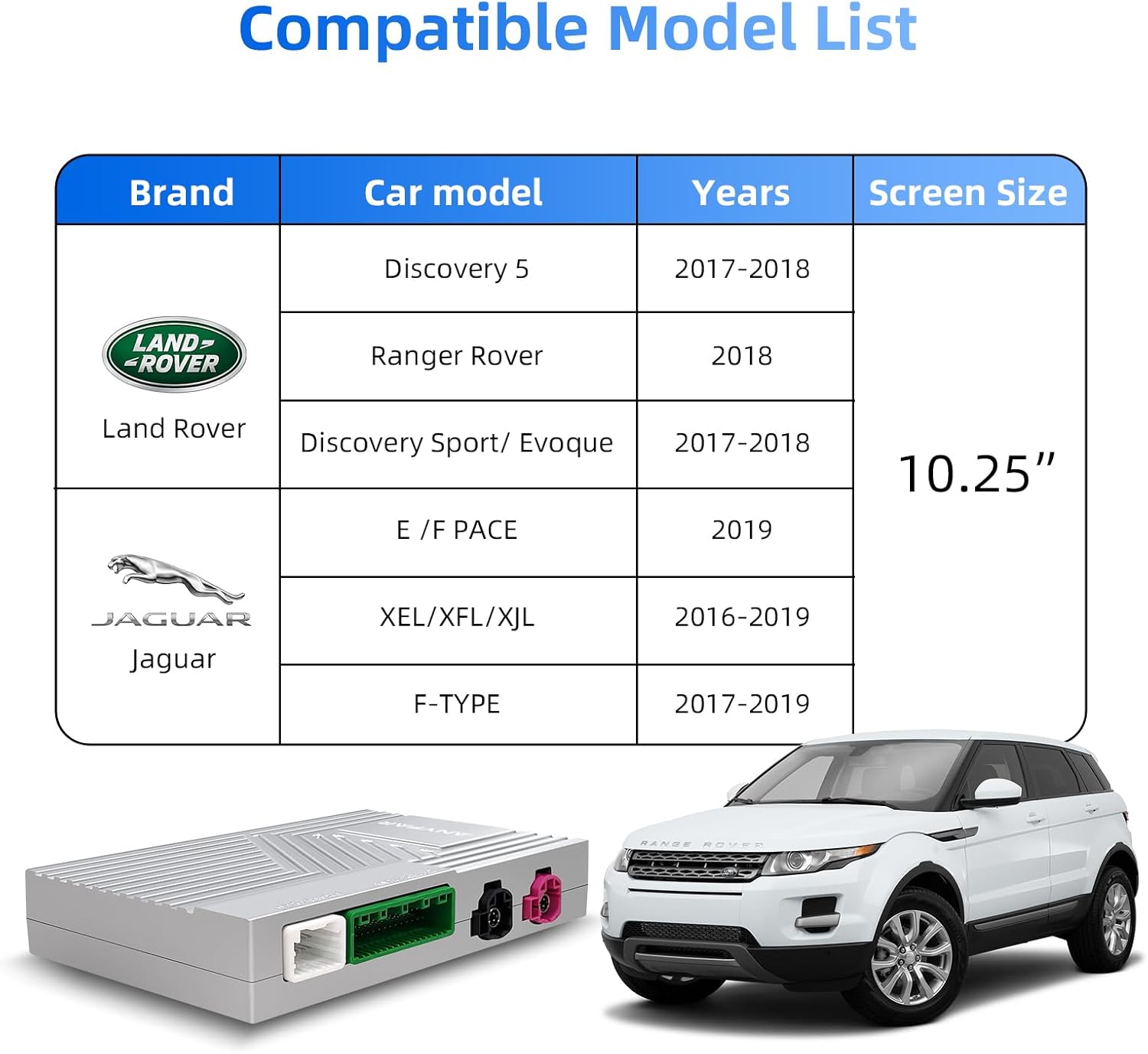
Immagine 1.1: Visual guide for checking vehicle compatibility based on screen time display style. Ensure your screen matches the 10.25-inch Harman style shown as compatible.
2. Contenuto della confezione
Before proceeding with installation, please ensure all components listed below are present in your package:
- ANYFAR Decoder Unit (RM-LH2522F)
- Cavo di alimentazione
- Cavo adattatore A
- Cavo adattatore B
- Cavo adattatore C
- Cavo LVDS OUT
- Cavo LVDS IN
- Cavo RCA e USB

Immagine 2.1: Sopraview of the ANYFAR Decoder unit with its dimensions (139mm x 92mm x 20mm) and the various cables included in the package.
3. Configurazione e installazione
Installation of the ANYFAR Decoder involves connecting it to your vehicle's existing head unit. Due to the complexity of vehicle electronics, professional installation is recommended to ensure proper functionality and avoid damage to your vehicle's system.
3.1. General Installation Steps (Consult a professional for detailed guidance)
- Preparazione: Prima di iniziare qualsiasi lavoro elettrico, assicurarsi che l'accensione del veicolo sia spenta e che la batteria sia scollegata.
- Unità principale di accesso: Carefully remove the necessary trim panels to access the rear of your vehicle's Harman head unit.
- Connetti Decoder: Connect the provided power cable, adapter cables (A, B, C), LVDS IN, LVDS OUT, and RCA/USB cables to the corresponding ports on the ANYFAR Decoder unit and your vehicle's head unit wiring harness. Ensure all connections are secure.
- Secure Decoder: Mount the decoder unit in a safe, dry location within the dashboard, ensuring it does not interfere with any moving parts or vehicle components.
- Ricollegare la batteria: Una volta verificati tutti i collegamenti, ricollegare la batteria del veicolo.
- Funzionalità di prova: Turn on the vehicle and test all functions of the decoder, including CarPlay, Android Auto, Mirror Link, and original car controls.

Immagine 3.1: The ANYFAR Decoder unit, showing its various connection ports for integration into the vehicle's infotainment system.
4. Istruzioni per l'uso
The ANYFAR Decoder provides a range of features to enhance your driving experience. Below are instructions for using its primary functions.
4.1. Switching Between OEM and Decoder System
To switch between your vehicle's original OEM system and the ANYFAR Decoder's interface (CarPlay/Android Auto), long-press the power button or a designated button on your car's knob. The system will seamlessly transition between the two interfaces.

Immagine 4.1: Illustration of switching between the vehicle's OEM system and the CarPlay/Android Auto interface by long-pressing the car knob button.
4.2. CarPlay wireless e Android Auto
The decoder supports wireless CarPlay and wireless Android Auto. Once connected, your phone's interface will appear on the car's 10.25-inch screen, allowing access to navigation, music, calls, messaging, and voice assistants without needing a physical cable connection.
- Connessione: Segui le istruzioni sullo schermo per associare il tuo smartphone tramite Bluetooth e Wi-Fi per CarPlay o Android Auto wireless.
- Funzionalità: Navigate using maps, stream music, make and receive calls, send messages, and use voice commands directly from your car's display.

Immagine 4.2: Un'auto view of the 10.25-inch screen displaying the Apple CarPlay interface, demonstrating integrated smartphone features.
4.3. Mirror Link & USB Drive Playback
The Mirror Link (AirPlay/AutoLink) feature allows you to mirror your smartphone's display onto the car screen. This enables viewing of content from apps like YouTube, Netflix, or Disney+.
- Collegamento specchio: Connect your phone via Wi-Fi or USB to mirror its screen.
- Riproduzione USB: Use the integrated USB port to play videos or music directly from a USB drive. The USB port can also be used for charging your phone.

Immagine 4.3: An illustration of the Mirror Link feature, where a smartphone's display is mirrored onto the car's screen.
4.4. Controllo vocale intelligente
Utilize voice commands for hands-free operation, enhancing driving safety. The system supports voice assistants like Siri and Google Assistant.
- Attivazione: Activate your voice assistant through the car's controls or by saying the wake-up phrase (e.g., "Hey Siri" or "Hey Google").
- Comandi: Immetti comandi per la navigazione, la riproduzione di musica, le chiamate, l'invio di messaggi e altro ancora.

Immagine 4.4: Examples of intelligent voice control functionality, showing interaction with Siri and Google Assistant for hands-free operation.
4.5. Conservazione dei comandi originali dell'auto
The ANYFAR Decoder is designed to work seamlessly with your vehicle's existing control systems. You will retain full access to:
- Schermo tattile: Continue to use the 10.25-inch touchscreen for input.
- Controllo vocale: Original voice control functions remain accessible.
- Physical Buttons & Knobs: All physical buttons and rotary knobs on your dashboard and steering wheel will function as before.
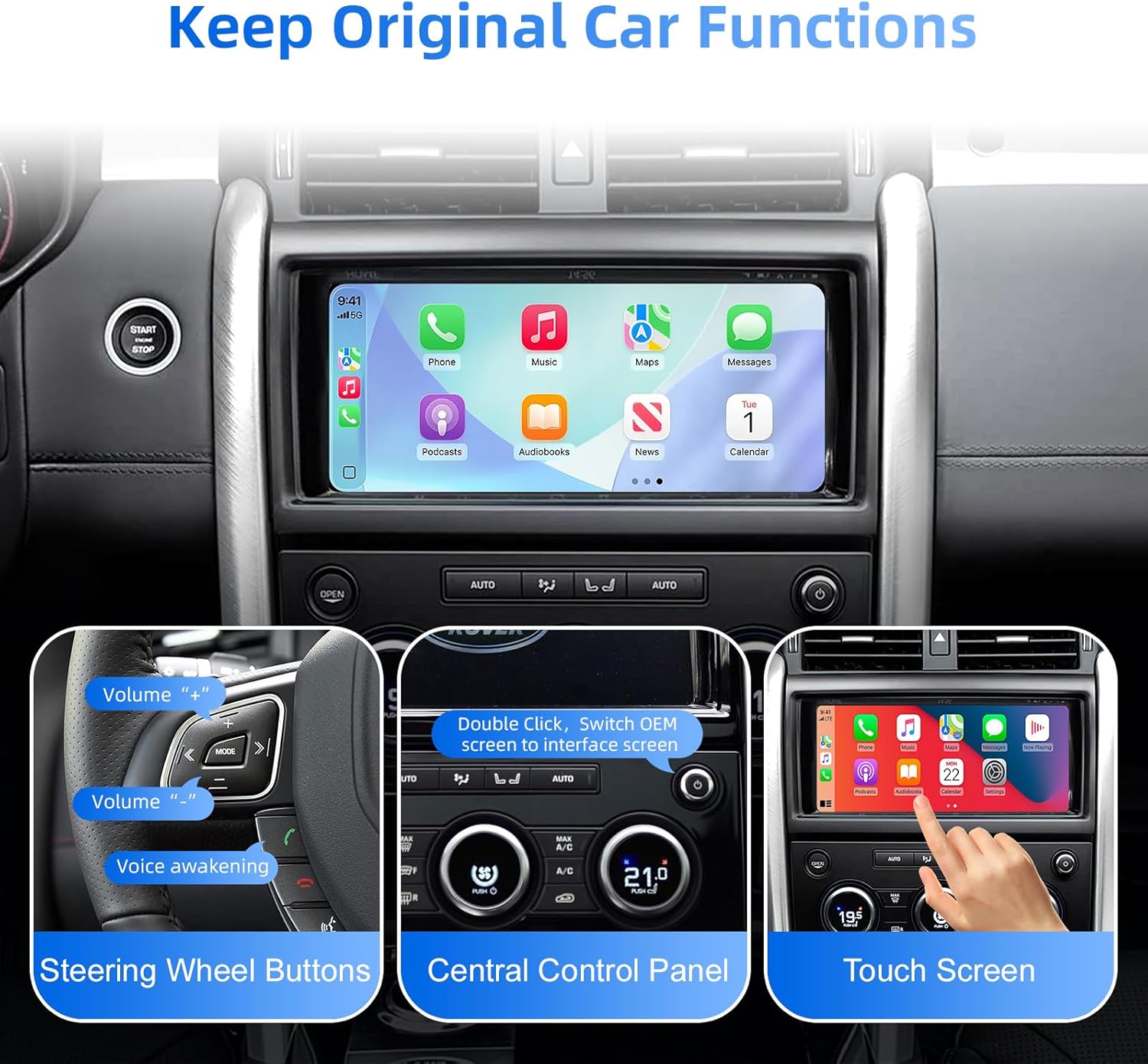
Immagine 4.5: This image demonstrates that the decoder allows full retention of the vehicle's original controls, including steering wheel buttons, the central control panel, and touchscreen input.
4.6. Backup Camera Input Support
The decoder supports connecting an aftermarket backup camera or front camera. The camera feed will automatically display on the car screen when you shift into reverse, providing enhanced safety and convenience.
- Connessione: Connect your backup camera to the decoder via the designated wire input.
- Visualizzazione automatica: La macchina fotografica view will automatically activate when the vehicle is put into reverse gear.
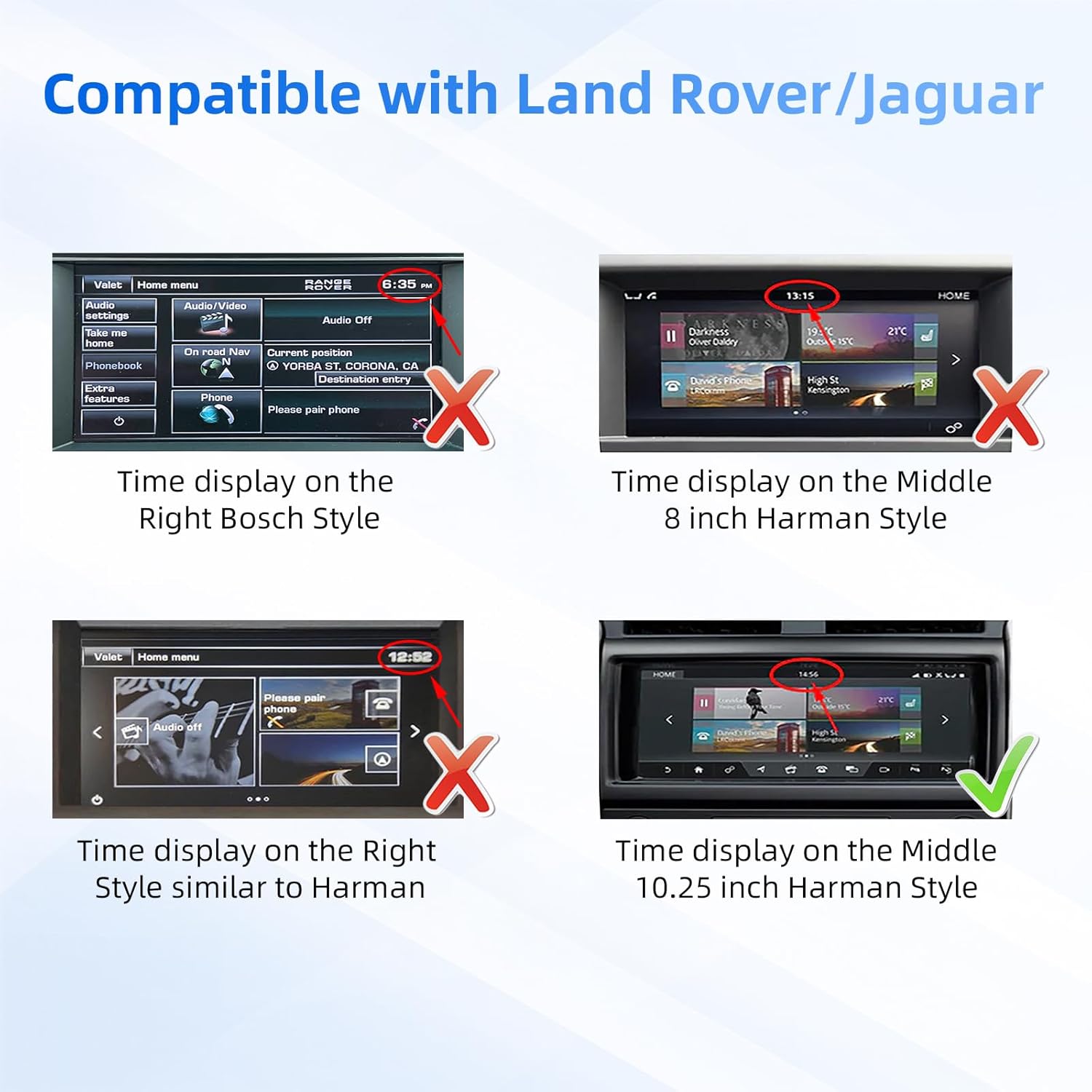
Immagine 4.6: The vehicle's screen showing the view from a connected backup camera, complete with dynamic parking guidelines.
4.7. In-Car Hi-Fi Audio
Experience high-fidelity audio quality through the ANYFAR Decoder. Its digital transmission technology ensures uninterrupted, high-quality music playback without signal interference or audio delay, preserving the original sound quality of your car's audio system.
5. Manutenzione
To ensure the longevity and optimal performance of your ANYFAR Decoder, follow these general maintenance guidelines:
- Mantenere pulito: Regularly clean the decoder unit and surrounding areas with a soft, dry cloth. Avoid using harsh chemicals or abrasive materials.
- Evitare l'umidità: Protect the unit from water, excessive humidity, and other liquids.
- Controllo della temperatura: Do not expose the unit to extreme temperatures, either hot or cold, as this can affect its electronic components.
- Connessioni sicure: Periodically check that all cables and connections are secure and free from damage.
6. Risoluzione Dei Problemi
If you encounter issues with your ANYFAR Decoder, consider the following basic troubleshooting steps:
- Nessuna alimentazione/Nessun display: Ensure all power cables are securely connected. Check the vehicle's fuse box for any blown fuses related to the infotainment system.
- Nessuna connessione CarPlay/Android Auto: Verify your phone's Bluetooth and Wi-Fi are enabled. Ensure the phone is properly paired with the decoder. Try restarting both your phone and the vehicle's infotainment system.
- Problemi audio: Check audio settings on both your phone and the car's head unit. Ensure the correct audio input source is selected on the car's system.
- Funzionalità intermittente: Ensure all cables are firmly seated. Loose connections can cause intermittent issues.
- Original Controls Not Working: If original car controls are not responding, verify the decoder's connections to the head unit. A system reset (disconnecting and reconnecting the car battery) may resolve temporary software glitches.
If problems persist after attempting these steps, please contact ANYFAR customer support for further assistance.
7. Specifiche
| Caratteristica | Specificazione |
|---|---|
| Numero di modello | RM-LH2522F |
| Marca | OVUNQUE |
| Veicoli compatibili | 2016–2019 Land Rover & Jaguar (with Harman headunit, 10.25" screen) |
| Tecnologia di connettività | USB, Wireless (Bluetooth, Wi-Fi for CarPlay/Android Auto) |
| Tipo di controllore | Hand Control (retains original car controls) |
| Caratteristica speciale | Hands-Free Calling, Wireless CarPlay, Wireless Android Auto, Mirror Link, USB Playback, Backup Camera Support |
| Dispositivi compatibili | Smartphone |
| Tipo di connettore | Micro USB (for data/charging) |
| Modalità di uscita audio | Stereo |
| Dimensioni del pacco | 10.63 x 6.69 x 4.33 pollici |
| Peso dell'articolo | 1.76 libbre |
| Produttore | Huizhou Rhythm Technology Co, Ltd |
8. Garanzia e supporto
Warranty information for the ANYFAR Decoder RM-LH2522F is typically provided with your purchase documentation. Please refer to the warranty card or contact your retailer for specific details regarding coverage and duration.
For technical support, troubleshooting assistance beyond this manual, or inquiries about replacement parts, please visit the official ANYFAR websul sito o contattare il servizio clienti. Le informazioni di contatto sono solitamente reperibili sulla confezione del prodotto o sulla pagina del negozio online del marchio.


