Introduzione
The XIAOMI Smart Camera C302 is an indoor security camera designed to provide comprehensive home monitoring. It features 2K UHD resolution, full-color night vision, and advanced AI detection capabilities for humans, pets, and baby cries. The camera offers 360° panoramic viewing, Wi-Fi 6 connectivity, and two-way audio communication. Enhanced privacy is ensured through a physical lens shield and a financial-grade security chip. This manual provides instructions for setting up, operating, maintaining, and troubleshooting your camera.
Cosa c'è nella scatola
Verifica che tutti i componenti siano presenti nel tuo pacchetto:
- Fotocamera intelligente XIAOMI C302
- Manuale di istruzioni
- Adattatore di alimentazione
Prodotto finitoview
Familiarizzare con i componenti della fotocamera.
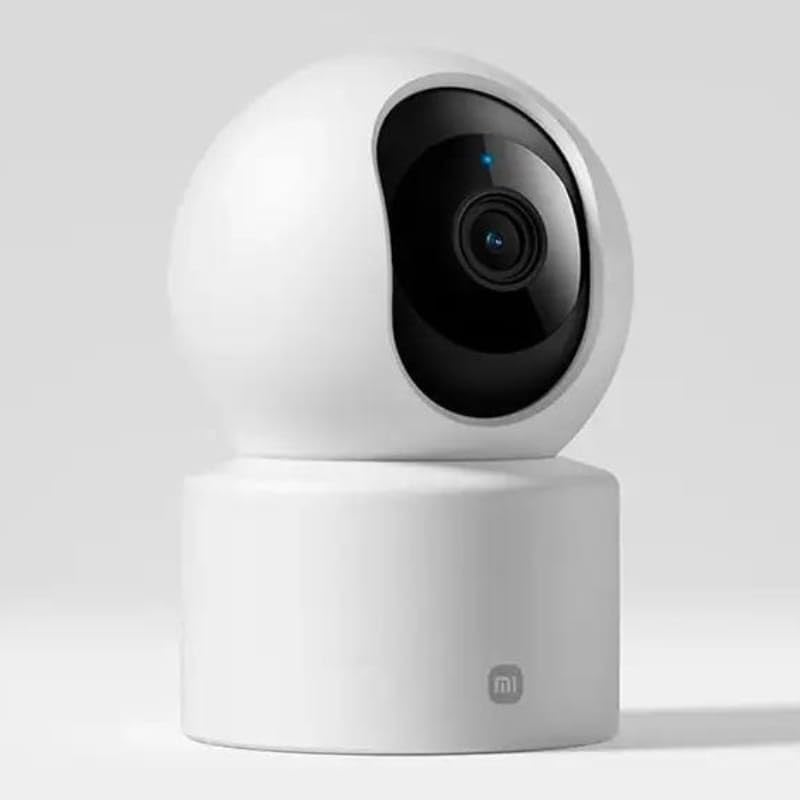
Figura 1: Fronte view della fotocamera, evidenziando l'obiettivo.
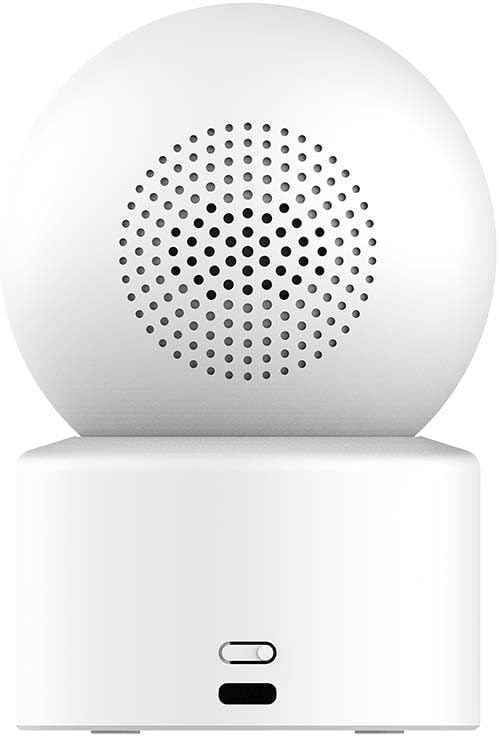
Figura 2: Indietro view of the camera, showing the speaker and power input.

Figure 3: The camera's physical lens shield mechanism.
Impostare
- Accensione: Connect the provided power adapter to the camera's power port and plug it into an electrical outlet. The camera will power on and initiate its startup sequence.
- Scarica l'app Xiaomi Home: Download and install the "Xiaomi Home" app on your smartphone from your device's app store.
- Aggiungi dispositivo: Open the Xiaomi Home app, log in or create an account, and follow the in-app instructions to add the XIAOMI Smart Camera C302. This typically involves scanning a QR code on the camera or selecting it from a list of nearby devices.
- Connessione Wi-Fi: Connect the camera to your home Wi-Fi network (2.4GHz or 5GHz, Wi-Fi 6 compatible) through the app. Ensure your Wi-Fi signal is strong in the camera's intended location.
- Installazione della scheda MicroSD (facoltativa): For local storage, insert a compatible MicroSD card (8GB to 256GB, not included) into the designated slot on the camera. Format the card via the Xiaomi Home app if prompted.
- Posizionamento: Place the camera on a flat surface such as a tabletop. Ensure it has a clear view dell'area che desideri monitorare.
Istruzioni per l'uso
Using the Xiaomi Home App
The Xiaomi Home app is the primary interface for controlling and managing your camera.
- Vivere View: Accedi al feed video in tempo reale dalla tua telecamera.
- Controllo Pan-Tilt: Use the app to remotely rotate the camera 360° horizontally and 107° vertically to adjust the viewangolo di ing.
- Audio bidirezionale: Utilizza il microfono e l'altoparlante integrati per la comunicazione bidirezionale.
- Registrazione e riproduzione: View registrato footage stored on the MicroSD card or cloud service (subscription may be required).
- Scudo per la privacy: Activate the physical lens shield through the app to retract the lens into the camera body, blocking the view per la privacy.
Funzionalità di rilevamento intelligente
The camera utilizes local AI for various detection functions:
- Human Detection & Tracking: Receive alerts when a human is detected and the camera can track their movement.
- Rilevamento animali domestici: Get notifications for pet activity (cats/dogs).
- Baby Cry Detection: Alerts are sent when a baby's cry is detected.
- Virtual Fence & Custom Zones: Define specific areas for monitoring and receive alerts when activity occurs within these zones.
- Rilevamento di suoni anomali: The camera can detect unusual sounds like glass breaking.
Visione notturna
La telecamera offre due modalità di visione notturna:
- Visione notturna a colori: In low-light conditions, the high-sensitivity sensor enables extended full-color imaging.
- Visione notturna in bianco e nero: In complete darkness, six non-glow infrared illuminators provide clear black and white footage.
Integrazione del controllo vocale
The camera is compatible with Amazon Alexa and Google Assistant. Link your Xiaomi Home account to these services to control the camera using voice commands, such as viewing vivo footage on compatible smart displays.
Manutenzione
- Pulizia: Utilizzare un panno morbido e asciutto per pulire l'obiettivo e il corpo della fotocamera. Evitare l'uso di detergenti liquidi o materiali abrasivi.
- Aggiornamenti del firmware: Regularly check for and install firmware updates through the Xiaomi Home app to ensure optimal performance and security.
- Gestione della scheda MicroSD: Periodicamente riview and manage recordings on your MicroSD card. Format the card through the app if performance degrades or storage is full.
Risoluzione dei problemi
- La fotocamera non si connette al Wi-Fi:
- Ensure the camera is within range of your Wi-Fi router. Verify your Wi-Fi password is correct. Try restarting both the camera and your router. Ensure your Wi-Fi network is 2.4GHz or 5GHz and compatible with Wi-Fi 6 standards.
- Scarsa qualità dell'immagine:
- Check the camera lens for dirt or smudges and clean it gently. Ensure adequate lighting in the monitored area. Verify your internet connection speed is sufficient for streaming 2K video.
- No detection alerts:
- Confirm that detection settings (human, pet, baby cry, virtual fence) are enabled in the Xiaomi Home app. Adjust sensitivity settings if necessary. Ensure the camera's view non è ostruito.
- L'audio bidirezionale non funziona:
- Check microphone and speaker permissions for the Xiaomi Home app on your smartphone. Ensure the camera's volume is not muted in the app.
- La fotocamera non risponde:
- Unplug the power adapter, wait 10 seconds, and plug it back in to restart the camera. If the issue persists, a factory reset may be required (refer to the Xiaomi Home app for instructions).
Specifiche
| Nome del modello | Telecamera intelligente Xiaomi C302 |
| Numero di modello | MBC28 |
| Uso interno/esterno | Al chiuso |
| Risoluzione di acquisizione video | 2K (risoluzione effettiva delle immagini fisse 3MP) |
| Protocollo di connettività | Wi-Fi (Wi-Fi 6 compatible) |
| Fonte di alimentazione | Elettrico con cavo (5 V, 5 W) |
| Tipo di montaggio | Supporto da tavolo |
| Gamma di panoramica/inclinazione | 360° Orizzontale, 107° Verticale |
| Visione notturna | Full-Color (low light), Black & White (IR) |
| Opzioni di archiviazione | MicroSD Card (8-256GB, not included), Cloud Service |
| Compatibilità con la casa intelligente | Amazon Alexa, Assistente Google |
| Dimensioni (L x P x A) | 3.07 x 2.99 x 4.53 pollici |
| Peso dell'articolo | 0.34 chilogrammi (12 once) |
Informazioni sulla garanzia
Warranty terms and conditions for the XIAOMI Smart Camera C302 are typically provided with your purchase documentation or can be found on the official XIAOMI websito. Conservare la prova d'acquisto per eventuali reclami in garanzia.
Supporto
For further assistance, please refer to the help section within the Xiaomi Home app or visit the official XIAOMI support website. You may also find frequently asked questions and additional resources there.


