1. Introduzione
This manual provides detailed instructions for the installation, operation, and maintenance of your Inefala Android 15 Car Radio. This multimedia system is designed to enhance your driving experience with advanced features such as wireless CarPlay, Android Auto, GPS navigation, Bluetooth connectivity, and a 7-inch touchscreen display. Please read this manual thoroughly before installation and use to ensure proper functionality and safety.
2. Contenuto della confezione
Verifica che tutti gli articoli elencati di seguito siano inclusi nel tuo pacchetto:
- 1 x lettore multimediale per auto
- 1 x cavo di alimentazione
- 1 cavo di ingresso/uscita RCA
- 2 x Cavi USB
- 1 x CAN Bus Cable + RCA Cable
- 1 antenna GPS
- 1 modulo 4G
- 1 x cavo di ingresso per telecamera posteriore
- 1 x Manuale utente
- 1 microfono da 3.5 mm
- 1 x adattatore per antenna
- 1 x telecamera per la retromarcia

3. Compatibilità
This Inefala Android 15 Car Radio is specifically designed for the following vehicle models:
- Toyota Corolla E120 (2000-2006)
- Toyota Corolla E130 (2004-2007)
- BYD F3 (2006-2013)
- Toyota Corolla Altis E120 (2000-2006)
Prima dell'acquistoasing and installation, please carefully verify your vehicle's model, year, and the shape of your center console to ensure compatibility. If you are unsure, contact customer support with your vehicle details for assistance.


4. Configurazione e installazione
4.1 Installazione generale
Installation of the car radio requires basic automotive electrical knowledge. If you are not confident in performing the installation yourself, it is highly recommended to seek professional assistance to avoid damage to the unit or your vehicle.
- Scollegare la batteria: Prima di iniziare, scollegare il terminale negativo della batteria del veicolo per evitare cortocircuiti.
- Rimuovere la vecchia unità: Rimuovere con cautela l'autoradio e la modanatura del cruscotto.
- Collegare il cablaggio: Connect the provided power cable and other necessary wiring harnesses to the car radio and your vehicle's wiring. Ensure all connections are secure.
- Installa l'antenna GPS: Montare l'antenna GPS in una posizione con una vista libera view del cielo, in genere sul cruscotto o sotto il parabrezza.
- Funzionalità di prova: Before fully reassembling the dashboard, reconnect the battery and test the basic functions of the car radio (power, sound, radio, touchscreen).
- Unità sicura: Once tested, secure the car radio into the dashboard and reassemble all trim pieces.
4.2 Cablaggio della telecamera di retromarcia
The included reversing camera provides enhanced safety during parking maneuvers. Follow these steps for proper wiring:
- Connect the camera's video output cable (yellow RCA) to the "CAM IN" input on the car radio.
- Connect the camera's power cable (red wire) to the vehicle's reverse light power supply. This ensures the camera activates when reverse gear is engaged.
- Connect the camera's ground wire (black wire) to a suitable ground point on the vehicle chassis.
- Ensure the white plug from the camera input cable is connected to the car radio for proper Bluetooth and WiFi signal reception.

5. Istruzioni per l'uso
5.1 Sistema Android 15
The car radio operates on Android 15, providing a familiar and intuitive user interface. With 4GB RAM and 64GB storage, it ensures smooth performance for applications and media. The 7-inch InCell touchscreen offers responsive control and vibrant visuals.
5.2 CarPlay wireless e Android Auto
Connect your smartphone wirelessly to access CarPlay (for iOS devices) or Android Auto (for Android devices). This allows seamless integration of navigation, music, calls, and messaging apps directly on the car radio display, enhancing convenience and safety.

5.3 Navigazione GPS
The built-in GPS module provides accurate navigation. You can use both online and offline maps for reliable guidance, even in areas without network coverage. The system supports real-time traffic updates when connected to the internet.
5.4 Connettività WiFi
Connect the car radio to the internet via a WiFi hotspot from your smartphone or a dedicated car WiFi device. This enables online streaming, web browsing, and easy download of additional applications from the app store.

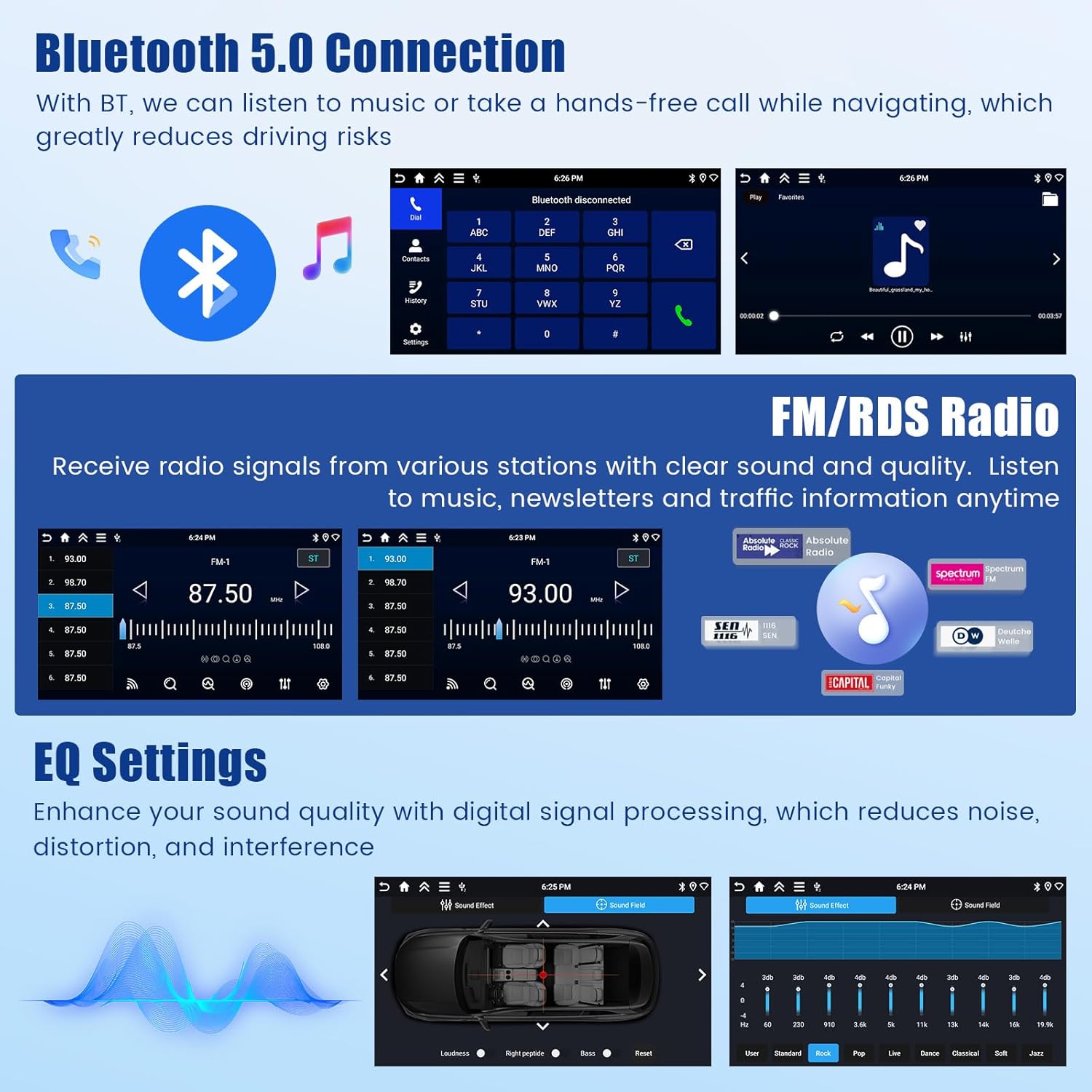
5.5Bluetooth 5.0
The integrated Bluetooth 5.0 module allows for hands-free calling and wireless music streaming from your paired smartphone. This feature significantly reduces driving distractions.
Radio FM/RDS 5.6
Enjoy your favorite FM radio stations with clear reception. The RDS (Radio Data System) function displays station information, song titles, and traffic announcements where available.
5.7 Impostazioni EQ
Customize your audio experience with the built-in Equalizer (EQ) settings. Adjust various frequency bands to optimize sound quality, reduce distortion, and match your personal preferences.

5.8 Controllo del volante (SWC)
The car radio supports your vehicle's existing steering wheel controls. This allows you to manage volume, change tracks, answer calls, and access other functions without taking your hands off the wheel, providing a safer and more convenient driving experience. Ensure proper wiring and configuration during installation.

5.9 Visualizzazione della telecamera di retromarcia
When the vehicle is shifted into reverse gear, the car radio automatically displays the feed from the connected reversing camera. This provides a clear view of the area behind your vehicle, making reversing maneuvers easier and safer.
5.10 Visualizzazione a schermo diviso
La funzione schermo diviso consente di eseguire due applicazioni contemporaneamente sul display. Ad esempioample, puoi avere la navigazione aperta da un lato e la riproduzione musicale dall'altro, migliorando le capacità multitasking.

6. Manutenzione
To ensure the longevity and optimal performance of your Inefala Car Radio, follow these maintenance guidelines:
- Pulizia dello schermo: Utilizzare un panno morbido e privo di lanugine leggermente dampPulire con acqua o con un detergente per schermi specificamente progettato per display elettronici. Evitare materiali abrasivi o sostanze chimiche aggressive.
- Aggiornamenti software: Controlla periodicamente la disponibilità di aggiornamenti software tramite le impostazioni di sistema. Gli aggiornamenti possono migliorare le prestazioni, aggiungere nuove funzionalità e correggere bug.
- Evitare temperature estreme: Non esporre l'unità a temperature estreme per periodi prolungati, poiché ciò potrebbe danneggiarne i componenti elettronici.
- Proteggere dall'umidità: Keep the unit dry and away from liquids. In case of accidental spills, immediately power off the unit and allow it to dry completely before use.
- Connessioni via cavo: Controllare periodicamente tutti i collegamenti dei cavi per assicurarsi che siano saldi e privi di corrosione.
7. Risoluzione Dei Problemi
Se riscontri problemi con l'autoradio, fai riferimento ai seguenti suggerimenti per la risoluzione dei problemi:
| Problema | Possibile causa | Soluzione |
|---|---|---|
| Nessun potere | Collegamento elettrico allentato, fusibile bruciato, problema alla batteria del veicolo. | Controllare i collegamenti dei cavi di alimentazione. Ispezionare i fusibili del veicolo. Assicurarsi che la batteria del veicolo sia carica. |
| Nessun suono | Volume troppo basso, modalità muto attivata, problema di cablaggio degli altoparlanti, sorgente audio errata. | Increase volume. Check if mute is active. Verify speaker wiring. Select correct audio source. |
| GPS non funzionante | Poor GPS signal, outdated maps, GPS antenna not connected. | Assicurarsi che l'antenna GPS abbia un cielo limpido view. Update maps. Check GPS antenna connection. |
| Problemi di connessione Bluetooth | Dispositivo non rilevabile, associazione errata, interferenza. | Ensure Bluetooth is enabled on both devices. Re-pair devices. Move away from other wireless devices. |
| Touchscreen non responsivo | System freeze, dirty screen, software issue. | Restart the unit. Clean the screen. If issue persists, perform a factory reset (refer to advanced settings). |
| Reversing Camera Not Displaying | Camera wiring issue, reverse gear not detected, camera malfunction. | Check camera power and video connections. Ensure reverse gear signal is correctly wired. |
If these solutions do not resolve the issue, please contact Inefala customer support for further assistance.
8. Specifiche
Key technical specifications for the Inefala Android 15 Car Radio:
- Marca: Inefala
- Modello: Inefala-A4399H6-EU60
- Sistema operativo: Androide 15
- Memoria RAM: 4 GB
- Magazzinaggio: 64 GB
- Dimensioni dello schermo: 7 pollici
- Risoluzione dello schermo: 1280*720P (In-cell Touch Screen)
- Connettività: Bluetooth 5.0, WiFi, 4G Module
- Caratteristiche speciali: Wireless Apple CarPlay, Android Auto, GPS Navigation, RDS, FM Radio, Steering Wheel Control (SWC), Backup Camera Input, Split Screen Display, EQ Settings
- Modalità di uscita audio: Stereo
- Configurazione del canale audio surround degli altoparlanti: 4
- Dimensioni del prodotto: 6.2 x 21.5 x 11.2 cm (2.44 x 8.46 x 4.41 pollici)
- Peso del prodotto: 1.07 kg (2.36 libbre)
- Dispositivi compatibili: Smartphone

9. Garanzia e supporto
Inefala provides comprehensive customer support for its products. If you have any questions, require technical assistance, or need to address any quality issues, please follow these steps:
- Contatta il venditore: Navigate to the product page on Amazon.es. Click on the seller name, typically "Inefala EU".
- Send a Message: On the seller's page, look for an option to contact the seller or send a message. Provide details of your issue and your order number for prompt assistance.
Inefala is committed to providing 24/7 technical assistance and guarantees to resolve any quality problems within 24 months from the date of purchase.


