Prodotto finitoview
The Moondrop LAN II POP earphones are designed for high-fidelity audio reproduction, emphasizing atmospheric performance, well-suited for vocals and pop music. They feature advanced acoustic technology and durable construction for an exceptional listening experience.
Caratteristiche principali:
- Fine-tuned Acoustics: Specifically tuned for mid-bass frequency and vocals, enhancing atmospheric performance for pop music.
- Advanced Diaphragm: Utilizes a large glass dome composite diaphragm (0.05 mm thick) for ultra-high Young's modulus and exceptional internal resistance, providing superior high-frequency extension and resolution.
- High-Efficiency Magnetic Driver: Features a double magnetic driver structure with two concentric N52 magnets, optimized for uniform magnetic flux density exceeding 1T, ensuring efficient and smooth diaphragm drive for outstanding dynamic acoustic performance.
- Costruzione durevole: Metal stainless steel housing crafted using a Metal Injection Molding (MIM) process for robust build quality.
- Interchangeable Cable Design: Universal 0.78mm 2-pin connector allows for easy cable replacement. Includes a 4.4mm balanced cable and a 3.5mm single-ended adapter.
- Cavo ad alta purezza: Oxygen-free copper cable ensures lossless signal transmission for high-quality audio.

Cosa c'è nella scatola
Your Moondrop LAN II POP package includes the following items:
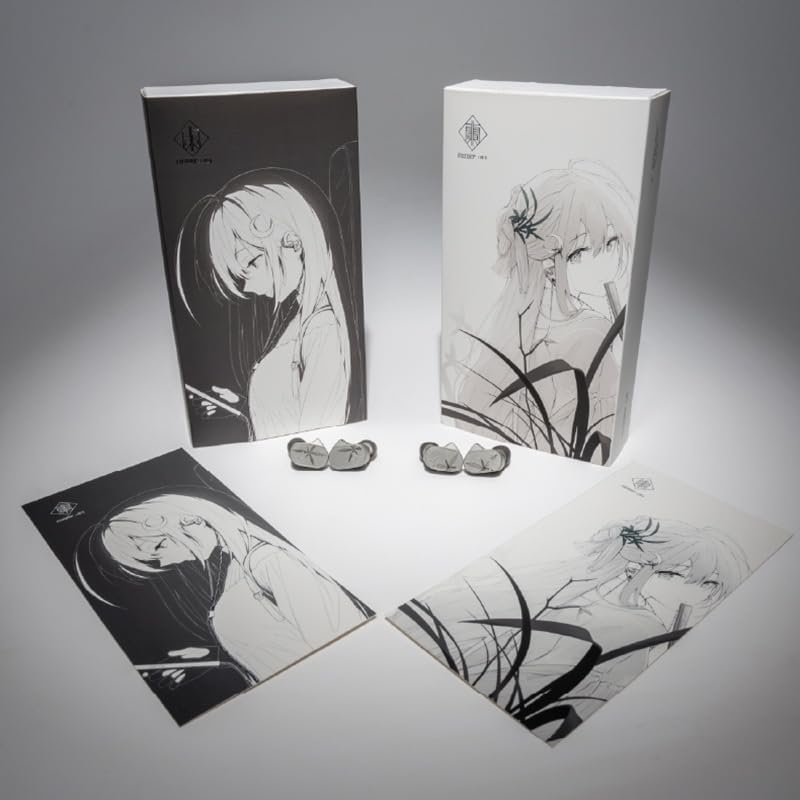
- One (1) pair of Moondrop LAN II earphones
- One (1) Stock Cable (4.4mm Balanced Cable / 3.5mm Single-ended Adapter)
- Una (1) custodia
- One (1) Anime-girl Card
- One (1) set of Eartips (S, M, L sizes)
- Un (1) manuale utente
- One (1) Certificate
- One (1) Service Card

Impostare
1. Collegamento del cavo
- Identify the left (L) and right (R) earphone units. The units are typically marked.
- Locate the 0.78mm 2-pin connectors on the cable and the corresponding sockets on the earphone units. Ensure correct orientation (the pins should align with the holes).
- Gently push the cable connectors into the earphone sockets until they are firmly seated. Do not force them.

2. Selezione degli auricolari
Choose the eartip size (S, M, L) that provides the best seal and comfort for your ears. A proper seal is crucial for optimal sound quality and bass response.
- Experiment with different sizes to find the most comfortable and secure fit.
- To change eartips, gently pull off the current eartip and push on the desired size until it is securely attached to the nozzle.
3. Collegamento a una sorgente audio
The included cable features a 4.4mm balanced plug and a 3.5mm single-ended adapter. Select the appropriate connection for your audio device.
- For devices with a 4.4mm balanced output, connect the cable directly.
- For devices with a standard 3.5mm headphone jack, attach the 3.5mm single-ended adapter to the 4.4mm plug on the cable, then connect to your device.
Operativo
Indossare gli auricolari
- Insert the earphone units into your ears, ensuring a snug and comfortable fit. The cable is designed to loop over your ears for secure placement.
- Adjust the cable behind your ears to minimize microphonics (cable noise) and ensure stability.
Riproduzione audio
- Once connected to your audio source, begin playback.
- Adjust the volume on your audio device to a comfortable listening level. Avoid excessively high volumes to prevent hearing damage.
Manutenzione
Pulizia
- Pulire regolarmente gli auricolari con un panno morbido e asciutto per rimuovere cerume e detriti.
- If necessary, eartips can be gently washed with mild soap and water, then thoroughly dried before reattaching.
- Wipe the earphone units and cable with a soft, dry cloth to keep them clean. Avoid using harsh chemicals or abrasive materials.
Magazzinaggio
- When not in use, store the earphones in the provided storage case to protect them from dust, moisture, and physical damage.
- Evitare temperature estreme e luce solare diretta.
Cura dei cavi
- Handle the cable gently to prevent kinks or damage.
- When detaching the cable, pull from the connector housing, not the cable itself.
Risoluzione dei problemi
| Problema | Possibile causa | Soluzione |
|---|---|---|
| Nessun suono o suono intermittente | Loose cable connection, incorrect audio source selection, damaged cable/earphone. | Ensure cable is securely connected to both earphones and audio source. Check audio source settings. Test with another cable or device if possible. |
| Scarsa qualità del suono (ad esempio, mancanza di bassi) | Improper eartip seal, earwax buildup, low-quality audio source. | Try different eartip sizes to achieve a better seal. Clean eartips and earphone nozzles. Use a high-quality audio source. |
| Gli auricolari cadono facilmente | Incorrect eartip size, improper wearing technique. | Experiment with different eartip sizes. Ensure the cable is looped over your ears for a more secure fit. |
Specifiche
- Nome modello: LAN II POP
- Marca: Moondrop
- Tecnologia di connettività: Cablato
- Jack per cuffie: 4.4mm, 3.5mm (with adapter)
- Tipo di driver audio: Driver dinamico
- Impedenza: 30 Ohm
- Materiale: Acciaio inossidabile
- Colore: Argento
- Peso dell'articolo: 7.7 once
- Metodo di controllo: Tocco (Note: For wired earphones, controls are typically inline on the cable if present, or via the source device.)
- Caratteristica speciale: Leggero
Garanzia e supporto
Moondrop products are designed for quality and reliability. For warranty information, product support, or service inquiries, please refer to the official Moondrop website or contact your retailer. Keep your purchase receipt and the included service card for warranty claims.
Video correlati
Video: Un prodotto finitoview of the Moondrop LAN II earphones, highlighting key features and design.
Video: Un oltreview of the Moondrop LAN HiFi Wired Earbuds, showcasinil loro design e la loro funzionalità.
Video: A demonstration of the Moondrop Premium Audio Cable, highlighting its quality and interchangeable design.


