Introduzione
Thank you for choosing the FreedConn R3Pro Motorcycle Intercom with 2K Camera. This device is designed to enhance your riding experience by providing seamless communication, high-definition video recording, and entertainment features. This manual provides detailed instructions on how to set up, operate, and maintain your R3Pro unit. Please read it carefully before use to ensure optimal performance and safety.
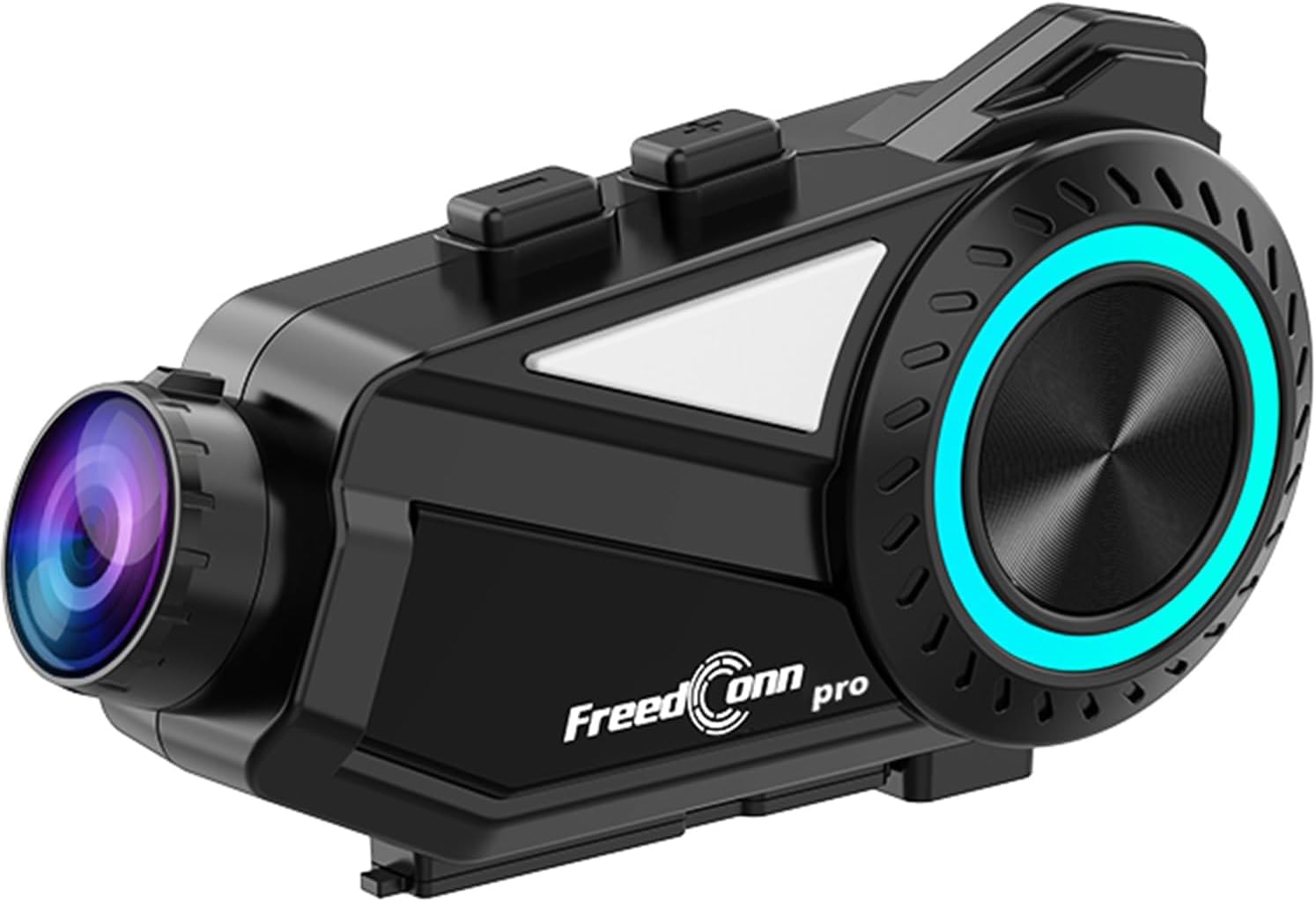
A sleek, black FreedConn R3Pro motorcycle intercom unit, featuring a camera lens on one end and a control dial with blue LED illumination on the side. It is designed to attach to a motorcycle helmet.
Prodotto finitoview
Caratteristiche principali
- Connettività Bluetooth 5.1: High-speed chip for stable connections, supporting HFP/HSP/A2DP protocols.
- Interfono di gruppo: Supports up to 6 riders simultaneously with a communication range of 1.2km.
- 2K Camera & Loop Recording: Captures clear 1440p video, with adjustable lens and 360-degree unit rotation. Supports up to 512GB memory cards.
- Cancellazione avanzata del rumore: CVC and DSP/C technologies reduce wind and engine noise for clear audio up to 120km/h.
- Batteria a lunga durata: 2000mAh battery provides up to 45 hours of talk time and 7 hours of continuous recording.
- App mobile dedicata: "RoadCam" app for real-time video viewing and downloading via Wi-Fi.
- FM Radio: Built-in FM radio function for entertainment and information.
- Supporto dell'assistente vocale: One-touch activation for hands-free control.
- IP65 impermeabile e antipolvere: Progettato per resistere a varie condizioni atmosferiche.
- Abbinamento universale: Compatible with other intercom brands (FODSPORTS, SENA) and various Bluetooth devices.
Contenuto della confezione

This image displays the contents of the FreedConn R3Pro package, including the Bluetooth kit, 2-in-1 soft & hard microphones, hook clip, velcro clip, headphone velcro, USB cable, and manual. Below, a seven-step visual guide illustrates how to install the intercom unit onto a motorcycle helmet.
The FreedConn R3Pro package typically includes:
- FreedConn R3Pro Intercom Unit
- 2-in-1 Soft & Hard Microphones
- Helmet Mounting Kit (Hook Clip, Velcro Clip)
- Cuscinetti in velcro per cuffie
- Cavo di ricarica USB
- Manuale d'uso
Schema dei componenti

A detailed diagram of the FreedConn R3Pro unit, highlighting its various buttons and ports. Labels indicate the camera, WiFi button, recorder power ON/OFF, record/pause button, multi-function button, Bluetooth ON/OFF/intercom button, LED indicator, volume/next track, volume/previous track, microphone, earphone jack, reset button, TF card slot, and charging/USB port.
Familiarize yourself with the buttons and ports on your R3Pro unit:
- Telecamera: Integrated 2K camera lens.
- Pulsante Wi-Fi: Activates Wi-Fi for app connection.
- Recorder Power ON/OFF / Record/Pause Button: Controls camera recording.
- Pulsante multifunzione: Used for various controls including pairing and voice assistant.
- Bluetooth ON/OFF / Intercom Button: Manages Bluetooth and intercom functions.
- Indicatore LED: Visualizza lo stato del dispositivo.
- Volume / Next Track: Adjusts volume and skips tracks.
- Volume / Previous Track: Adjusts volume and goes to previous tracks.
- Porta microfono: Connects the external microphone.
- Spinotto degli auricolari: Connects the helmet speakers.
- Pulsante di reset: Per il ripristino del dispositivo.
- Slot per schede TF: For inserting a microSD card for recording.
- Charging / USB Port: Per la ricarica e il trasferimento dei dati.
Impostare
1. Installazione del casco
Follow these steps to securely install the R3Pro unit on your motorcycle helmet:
- Attach the hook clip or velcro clip to the side of your helmet.
- Mount the R3Pro unit onto the attached clip.
- Insert the microphone into the helmet's interior, positioning it near your mouth.
- Attach the speakers inside the helmet using the provided velcro pads, ensuring they are aligned with your ears.
- Connect the microphone and speaker cables to the corresponding ports on the R3Pro unit.
2. Accoppiamento iniziale (Bluetooth)

An illustration showing the internal Bluetooth 5.1 chip of the FreedConn R3Pro, emphasizing high-speed communication, energy saving, low latency, and ultra-stability. An inset image demonstrates the multi-function button used for automatic pairing after the initial setup.
The R3Pro features automatic pairing after the first successful connection:
- Ensure your R3Pro unit is charged.
- Turn on the R3Pro unit.
- Attiva il Bluetooth sul tuo smartphone o altro dispositivo.
- Cercare "FreedConn R3Pro" in your device's Bluetooth settings and select it to pair.
- Once paired, the unit will automatically connect to your device when powered on.
3. App Connection (RoadCam)

This image illustrates the loop recording capability of the R3Pro and its integration with the "RoadCam" smartphone application. A motorcycle rider is shown, with the app interface on a phone displaying real-time video footage, indicating that recorded videos can be viewed and downloaded via Wi-Fi.
To connect to the dedicated "RoadCam" app:
- Download the "RoadCam" app from your smartphone's app store.
- Turn on the R3Pro unit and activate its Wi-Fi function (refer to the component diagram for the Wi-Fi button).
- Connect your smartphone to the R3Pro's Wi-Fi network (SSID and password usually found in the manual or on the device).
- Apri l'app "RoadCam" per view real-time video, manage recordings, and download files.
Istruzioni per l'uso
Accensione/spegnimento
- Accensione: Press and hold the Power button (refer to component diagram) until the LED indicator lights up.
- Spegni: Tenere premuto il pulsante di accensione finché l'indicatore LED non si spegne.
Comunicazione interfonica

An image depicting multiple motorcycle riders on a road, connected wirelessly by the FreedConn R3Pro intercoms. It highlights the automatic communication reconnection feature, allowing riders to rejoin the conversation seamlessly even if they temporarily separate up to 1.2km.
- Avvia Intercom: Press the Intercom button to start a conversation with paired units.
- Interfono di gruppo: The R3Pro supports up to 6 riders for simultaneous communication. Follow the specific pairing instructions in the full manual for multi-unit connections.
- Riconnessione automatica: If riders separate and exceed the 1.2km range, the units will automatically reconnect once they are back within range.
Funzionamento della fotocamera

This image demonstrates the adjustable camera features of the FreedConn R3Pro. It shows the camera lens can be adjusted by 30 degrees and the main unit can rotate 360 degrees, allowing riders to capture various angles.
- Avvia/Interrompi registrazione: Press the Record/Pause button (refer to component diagram) to start or stop video recording.
- Registrazione in loop: La telecamera supporta la registrazione in loop, sovrascrivendo automaticamente la registrazione più vecchia files quando la scheda di memoria è piena.
- Regolazione della fotocamera: The camera lens can be adjusted by 30 degrees, and the entire unit can rotate 360 degrees for optimal viewangoli di inclinazione.
- Scheda di memoria: Insert a microSD card (up to 512GB) into the TF card slot before recording.
Riproduzione e condivisione di musica

This image illustrates the R3Pro's universal pairing with various Bluetooth devices like smartphones, action cameras, and other Bluetooth earphones. It also shows two riders sharing music, emphasizing the ability to enjoy favorite tunes with a partner.
- Riproduci/Pausa: Use the multi-function button for music control.
- Traccia successiva / precedente: Use the Volume/Next Track and Volume/Previous Track buttons.
- Condivisione di musica: Share audio with a paired intercom unit up to 50 meters away.
Radio FM

A motorcycle rider is shown with the R3Pro, indicating the built-in FM radio feature. The image displays a frequency range from 76-108MHz, suggesting support for Japanese frequencies, and mentions support for sports broadcasts and news.
- Attiva la radio FM: Press the designated FM radio button (refer to the full manual for specific button assignment).
- Scansione canali: The unit will automatically scan and save available FM stations.
- Cambia canali: Use the Volume/Next Track and Volume/Previous Track buttons to switch between stations.
Telefonate

An image showing a motorcycle rider receiving a call, with a graphic indicating automatic answering after 15 seconds of no operation. It also states that hands-free calls are possible while riding, and music playback resumes after the call ends.
- Rispondi alla chiamata: The R3Pro supports automatic answering after 15 seconds of no operation. You can also tap the multi-function button to answer.
- Termina chiamata: Tap the multi-function button to end a call.
- Rifiuta chiamata: Tenere premuto il pulsante multifunzione per rifiutare una chiamata in arrivo.
- Connessione doppia del telefono: The unit can connect to two smartphones simultaneously, allowing real-time switching between call, music, and navigation functions.
Assistente vocale

An illustration showing how to activate the voice assistant by long-pressing the multi-function button for 2 seconds. Examples of voice commands are displayed, such as "Cercare gas station," "Call Mr. Matsumoto," "What day is today?", and "How's the weather tomorrow?".
To activate your smartphone's voice assistant (e.g., Siri, Google Assistant):
- Attivare: Tieni premuto il pulsante multifunzione per 2 secondi.
- Once activated, you can issue commands for navigation, calls, weather checks, and more.
Cancellazione del rumore

A diagram illustrating the effect of noise cancellation, showing sound waves before and after processing, with a significant reduction in noise. It also displays the internal components of the speaker, highlighting Hi-Res audio quality and an omnidirectional microphone for clear conversations up to 120km/h.
The R3Pro features advanced CVC and DSP/C noise cancellation technology, which automatically reduces ambient noise such as wind and engine sounds. This ensures clear voice communication and high-quality music playback even at speeds up to 120km/h.
Manutenzione
Carica della batteria

Un'immagine mostrataasing the 2000mAh battery of the R3Pro, indicating approximately 2.5 hours for a full charge. It highlights extended usage times: 42 hours for music, 33 hours for talk, and 7-8 hours for recording, with support for up to 512GB memory cards for loop recording.
- Connect the R3Pro to a power source using the provided USB charging cable via the Charging/USB Port.
- Una carica completa richiede in genere circa 2.5 ore.
- L'indicatore LED mostrerà lo stato di carica (ad esempio, rosso per la carica, blu per la carica completa).
Pulizia e cura

An image showing the FreedConn R3Pro unit being splashed with water, illustrating its IP65 waterproof and dustproof rating. This indicates stable communication and recording are possible even in sudden rain or bad weather conditions.
- Pulire l'unità con un panno morbido, damp stoffa. Non utilizzare prodotti chimici aggressivi o detergenti abrasivi.
- Assicurarsi che tutte le porte siano asciutte prima di caricare o collegare gli accessori.
- The IP65 rating protects against water jets and dust, but avoid submerging the unit in water.
Risoluzione dei problemi
Problemi comuni e soluzioni
| Problema | Possibile causa | Soluzione |
|---|---|---|
| L'unità non si accende | Batteria scarica; pulsante di accensione difettoso | Charge the unit fully; Contact support if issue persists. |
| Impossibile associare allo smartphone | Bluetooth not enabled; Unit not in pairing mode; Interference | Ensure Bluetooth is on; Put R3Pro in pairing mode; Move away from other devices; Reset unit. |
| Citofono non connesso | Units out of range; Incorrect pairing sequence; Low battery | Ensure units are within 1.2km; Re-pair units; Charge batteries. |
| Scarsa qualità audio/rumore | Microphone/speaker placement; High wind noise; Interference | Adjust microphone/speaker; Ensure CVC/DSP is active; Check for obstructions. |
| La fotocamera non registra | No microSD card; Full microSD card; Card error | Insert/replace microSD card; Format card; Check card compatibility. |
| Problemi di connessione dell'app | Wi-Fi not enabled on R3Pro; Incorrect Wi-Fi password; App not updated | Enable R3Pro Wi-Fi; Re-enter password; Update RoadCam app. |
If you encounter issues not listed here or if the suggested solutions do not resolve the problem, please refer to the comprehensive troubleshooting section in the full user manual or contact customer support.
Specifiche
| Caratteristica | Dettaglio |
|---|---|
| Marca | FreedConn |
| Nome del modello | R3 PRO |
| Tecnologia di connettività | Bluetooth 5.1, Wi-Fi |
| Interfono | Up to 1.2 km (multi-person) |
| Intercom di gruppo | Up to 6 riders simultaneously |
| Risoluzione di acquisizione video | Risoluzione 1440p (2K) |
| Caratteristiche della fotocamera | 30-degree lens adjustment, 360-degree unit rotation, Loop Recording |
| Supporto per schede di memoria | MicroSD fino a 512 GB |
| Cancellazione del rumore | CVC, DSP/C |
| Capacità della batteria | 2000mAh agli ioni di litio |
| Tempo di conversazione continua | Fino a 45 ore |
| Tempo di registrazione continuo | Circa 7 ore |
| Tempo di ricarica | Circa 2.5 ore |
| Grado di impermeabilità | Grado di protezione IP65 |
| Dimensioni | Dimensioni: 14.8 x 11.5 x 6.4 cm |
| Peso | 450 grammi |
Garanzia e supporto
The FreedConn R3Pro comes with a Garanzia di 1 anno dalla data di acquisto, a copertura dei difetti di fabbricazione. Si prega di conservare la prova d'acquisto per eventuali reclami in garanzia.
For technical support, troubleshooting assistance, or warranty inquiries, please contact FreedConn customer service through the retailer where you purchased the product or visit the official FreedConn websito per le informazioni di contatto.


