Introduzione
This manual provides detailed instructions for the Fire-Boltt Shott Smartwatch, Model 222BSWAAY#6. It covers setup, operation, maintenance, and troubleshooting to ensure optimal use of your device. The Fire-Boltt Shott features an elegant 1.5-inch round HD display, a built-in front camera, and a Nano SIM slot for standalone functionality.
Prodotto finitoview
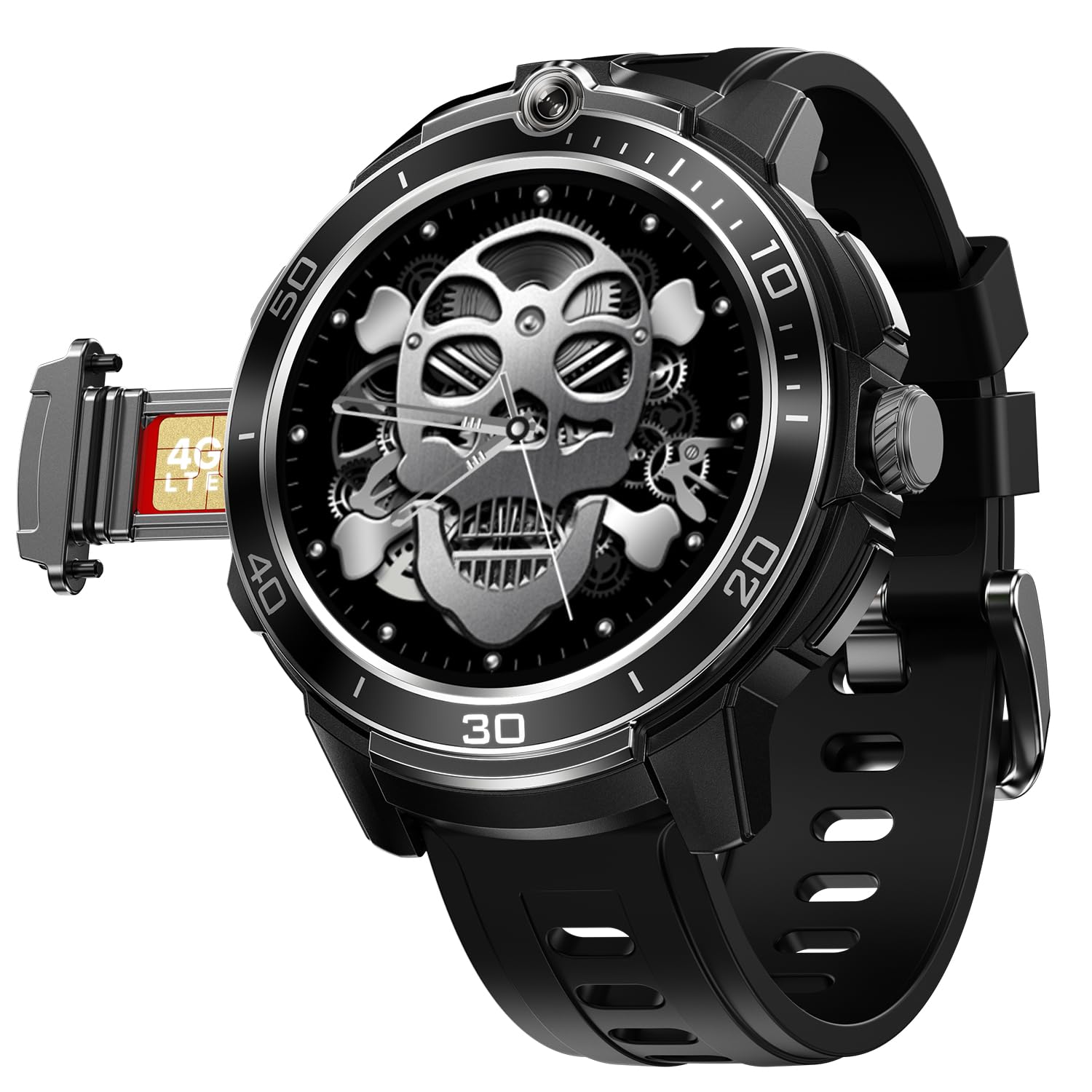
Image: Fire-Boltt Shott Smartwatch in Jet Eclipse color, showcasinil suo display rotondo e il design elegante.
The Fire-Boltt Shott Smartwatch is designed to offer advanced connectivity and health tracking features. Key functionalities include:
- Elegant Round 1.5" HD Display: Experience premium clarity and style with a circular HD screen that offers rich color depth, smooth touch response, and an always-on display mode for quick time checks.
- Built-in Front Camera + Nano-SIM Support: Capture selfies and make video calls directly from your wrist with the integrated 2 MP camera. Insert a nano-SIM to use it as a standalone watch phone.
- Seamless Bluetooth Calling: Stay connected without touching your phone. Make and receive calls directly from your wrist with an in-built mic and speaker for clear, stable sound quality.
- Multiple Sports & Activity Modes: From running and cycling to yoga and strength training, track your daily workouts with precision and view your progress in the companion app.
- Smart Notifications & Controls: Get alerts for calls, SMS, WhatsApp, and social apps. Control music, camera, and more right from your wrist for effortless multitasking.
Guida all'installazione
1. Ricarica dello smartwatch
Before first use, fully charge your Fire-Boltt Shott Smartwatch. Use the provided charging cable. Connect the magnetic end of the cable to the charging pins on the back of the watch and the USB end to a power adapter (not included) or a computer's USB port.
- Una carica completa richiede in genere circa 2 ore.
- The watch includes a Lithium Ion battery.
2. Nano SIM Card Installation
The Fire-Boltt Shott supports a Nano SIM card for standalone cellular connectivity (4G/LTE). This allows you to make and receive calls directly from the watch without a paired smartphone.
- Individuare lo slot per la scheda SIM sul lato dello smartwatch.
- Carefully open the SIM tray using the provided SIM ejector tool (if applicable) or a small pin.
- Insert the Nano SIM card into the tray with the gold contacts facing down, ensuring it is correctly oriented.
- Spingere delicatamente il vassoio della SIM nello slot finché non scatta in posizione.
Note: Ensure the watch is powered off before inserting or removing the SIM card. Some users have reported network issues with specific carriers (e.g., BSNL 4G).
3. Installazione e associazione dell'app
Per sfruttare appieno il potenziale del tuo smartwatch, scarica l'applicazione complementare sul tuo smartphone.
- Cercare "FireBoltt Fit" or "FireBoltt Fit Pro" in your smartphone's app store (Google Play Store for Android, Apple App Store for iOS). Based on user feedback, "FireBoltt Fit" may offer better connectivity.
- Installa l'applicazione.
- Enable Bluetooth on your smartphone and ensure the smartwatch is powered on.
- Open the FireBoltt app, create an account or log in, and follow the on-screen instructions to pair your smartwatch. This usually involves scanning a QR code displayed on the watch or selecting the watch from a list of nearby devices.
Ensure the app is updated to the latest version for optimal performance and connectivity.
Istruzioni per l'uso
Visualizzazione e navigazione
- The smartwatch features a 1.5-inch AMOLED touchscreen display.
- Scorri verso sinistra/destra, su/giù per navigare tra i menu e le funzioni.
- Tap to select items.
- Use the physical crown/button for power on/off, screen wake, and returning to the home screen.
Chiamata Bluetooth
Once paired with your smartphone via Bluetooth, you can make and receive calls directly from your wrist.
- To make a call: Access the dialer or contacts list on your watch.
- To receive a call: An incoming call notification will appear on the watch. Tap to answer or decline.
Ensure your watch is within Bluetooth range of your phone for this feature to work, or has an active SIM card for standalone calls.
Utilizzo della fotocamera frontale
The integrated 2 MP front camera allows for quick photos and video calls.
- Access the camera application from the watch menu.
- Tocca lo schermo per scattare una foto.
- For video calls, use compatible applications installed on the watch (e.g., WhatsApp, if supported).
Notifiche intelligenti
Receive notifications for calls, SMS, and various social media applications directly on your smartwatch.
- Ensure notification permissions are granted to the FireBoltt app on your smartphone.
- Customize which app notifications appear on your watch through the companion app settings.
Monitoraggio di sport e attività
The smartwatch supports multiple sports and activity modes to track your fitness data.
- Select your desired activity from the sports modes menu.
- The watch will record data such as steps, distance, calories burned, and heart rate.
- Sync the watch with the FireBoltt app to view detailed statistics and progress.
Manutenzione
Pulizia dello smartwatch
- Pulisci lo schermo e il corpo dell'orologio con un panno morbido e privo di lanugine.
- Per sporco ostinato, leggermente dampLavare il panno con acqua. Evitare l'uso di prodotti chimici aggressivi o materiali abrasivi.
- Regularly clean the charging pins and sensors on the back of the watch to ensure proper contact and accurate readings.
Cura della batteria
- Avoid exposing the watch to extreme temperatures, which can degrade battery life.
- Caricare regolarmente l'orologio, ma evitare di lasciarlo completamente scarico per periodi prolungati.
- Battery life can vary significantly based on usage, especially with 4G mode and frequent app use.
Risoluzione dei problemi
| Problema | Possibile causa/soluzione |
|---|---|
| Watch not connecting to phone app |
|
| Poor battery life / Fast discharge |
|
| Watch heating up during use |
|
| Crown/button not responding |
|
| SIM card network issues |
|
Specifiche
| Caratteristica | Dettaglio |
|---|---|
| Marca | Fire-Boltt |
| Numero di modello | 222BSWAAY#6 |
| Dimensioni dello schermo | 1.5 pollici |
| Tipo di visualizzazione | AMOLED |
| Forma | Girare |
| Telecamera | Front Camera (2 MP, based on features) |
| Supporto SIM | Slot per Nano SIM |
| Tecnologia cellulare | 4G/LTE |
| Connettività | Bluetooth |
| Dispositivi compatibili | Smartphone |
| Composizione delle celle della batteria | Ioni di litio |
| Hardware di montaggio | Cavo di ricarica |
| Peso dell'articolo | 46 grammi |
| Paese di origine | Cina |
Garanzia e supporto
For warranty information and technical support, please refer to the official Fire-Boltt webo contattare direttamente il servizio clienti. Conservare la ricevuta d'acquisto come prova d'acquisto per eventuali reclami in garanzia.
If you encounter issues not covered in this manual, or if troubleshooting steps do not resolve your problem, please reach out to Fire-Boltt customer support for further assistance.


