1. Introduzione
Welcome to the user manual for your new Fire-Boltt Clickk Smartwatch. This device is designed to enhance your daily life with its advanced features, including a vibrant AMOLED display, integrated front camera, Nano SIM support for standalone communication, and comprehensive health and fitness tracking capabilities. This manual provides essential information for setting up, operating, and maintaining your smartwatch.
2. Contenuto della confezione
Si prega di verificare che tutti gli articoli siano presenti nel pacco:
- Fire-Boltt Clickk Smartwatch
- Cavo di ricarica
- Manuale dell'utente (questo documento)
3. Guida all'installazione
3.1. Ricarica dello smartwatch
Before initial use, fully charge your Fire-Boltt Clickk Smartwatch.
- Collegare il cavo di ricarica in dotazione alla porta di ricarica sul retro dello smartwatch.
- Collegare l'altra estremità del cavo di ricarica a a Adattatore di alimentazione USB 5V 1A (not included). Using adapters with higher voltage o amperage may damage the device.
- Il display dello smartwatch indicherà lo stato di carica. Una ricarica completa richiede in genere circa 2.5 ore.
Note: The smartwatch has a 1000 mAh battery. Ensure proper charging practices to maintain battery health.
3.2. Nano SIM Card Installation
The Fire-Boltt Clickk Smartwatch supports a Nano SIM card for standalone calling and network connectivity.
- Locate the SIM card tray on the side of the smartwatch.
- Carefully insert the Nano SIM card into the tray, ensuring the correct orientation as indicated on the tray.
- Spingere delicatamente il vassoio nello smartwatch finché non scatta in posizione.
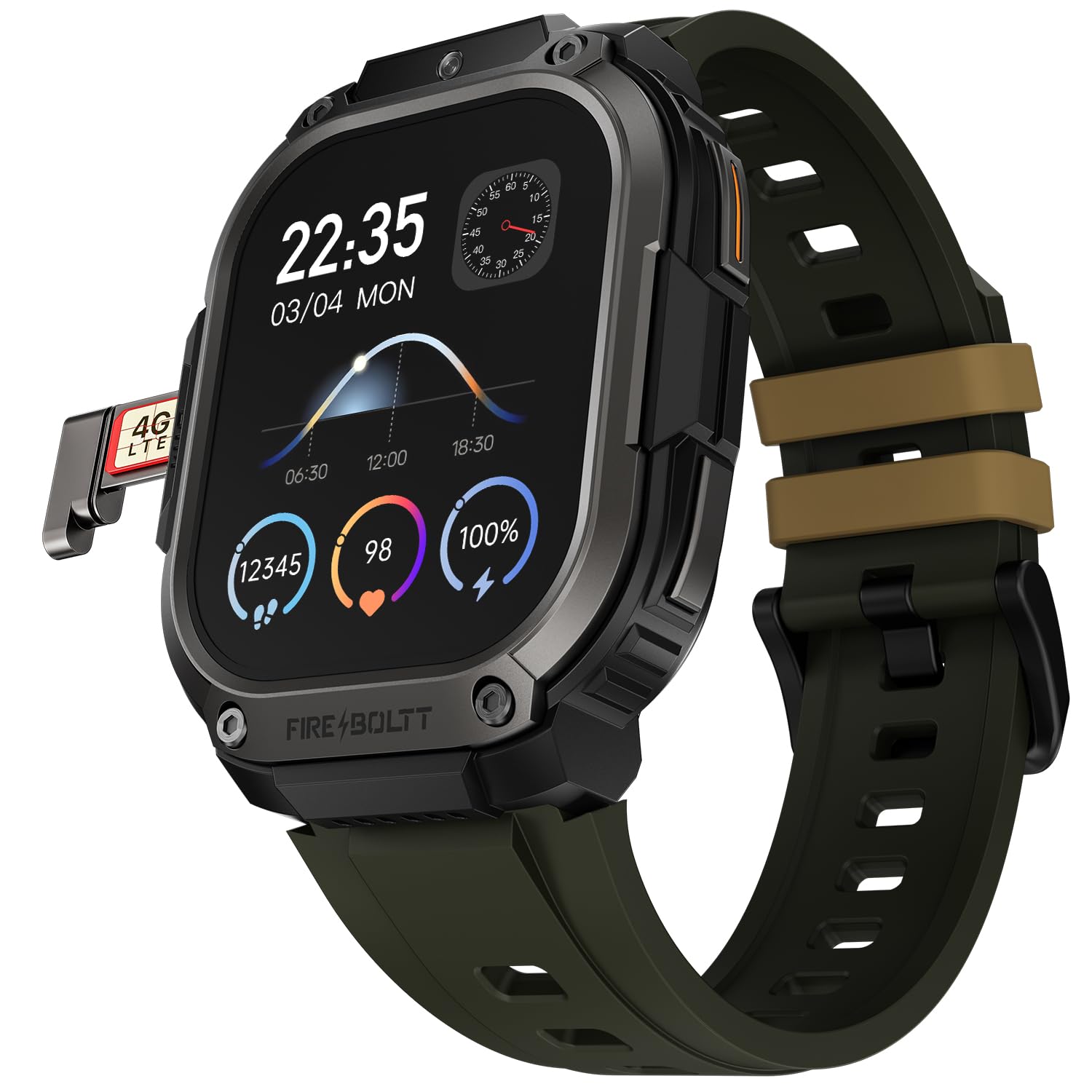
Immagine 1: The Fire-Boltt Clickk Smartwatch displaying its 54.1mm AMOLED screen and the Nano SIM card tray partially ejected on the left side, showing a "4G LTE" SIM card. The watch face shows time (22:35), date (03/04 MON), and various health metrics like steps, heart rate, and battery percentage.
3.3. Accensione/Spegnimento
- Per accendere: Press and hold the power button (usually on the side) until the Fire-Boltt logo appears.
- Per spegnere: Press and hold the power button, then select "Power Off" on the screen, or navigate to the settings menu and choose "Power Off".
3.4. App Pairing (Bluetooth Connection)
To unlock the full potential of your smartwatch, pair it with the official Fire-Boltt application on your smartphone.
- Download the official Fire-Boltt app from your smartphone's app store (Google Play Store for Android, Apple App Store for iOS).
- Assicurati che il Bluetooth sia abilitato sullo smartphone e sullo smartwatch.
- Open the Fire-Boltt app, create an account or log in, and follow the on-screen instructions to add your device.
- Select "Fire-Boltt Clickk" from the list of available devices in the app and confirm the pairing request on both your phone and smartwatch.
4. Utilizzo dello smartwatch
4.1. Navigazione di base
- Schermo tattile: Swipe left, right, up, or down to navigate through menus and widgets on the 2.12-inch AMOLED display. Tap to select items.
- Pulsanti laterali: Use the physical buttons on the side for quick access to functions like power on/off, back, or app shortcuts.
4.2. Effettuare e ricevere chiamate
- Chiamate Bluetooth: When paired with your smartphone, you can make and receive calls directly from your smartwatch using Bluetooth.
- Standalone Calling: With a Nano SIM card installed, the smartwatch can function as a standalone phone, allowing you to make and receive calls independently.
4.3. Utilizzo della fotocamera anteriore
The Fire-Boltt Clickk features a built-in 2 MP front camera.
- Accedi all'applicazione della fotocamera dal menu principale.
- Use the camera for taking selfies or participating in video calls directly from your wrist.
4.4. Monitoraggio della salute e del fitness
Your smartwatch is equipped with advanced sensors for comprehensive health monitoring.
- Monitoraggio della frequenza cardiaca: Monitora costantemente la tua frequenza cardiaca durante il giorno.
- SpO₂ Tracking: Monitora i livelli di ossigeno nel sangue.
- HRV: Heart Rate Variability tracking.
- Monitoraggio delle attività: Utilizes a 3-axis acceleration sensor to track steps, distance, and calories burned.
- Modalità Sportive: Select from multiple sports modes to accurately track various physical activities.
Tutti i dati sanitari possono essere viewed on the smartwatch and synchronized with the Fire-Boltt app for detailed analysis.
4.5. Notifiche e funzioni intelligenti
- Receive real-time notifications for calls, SMS, emails, and social media apps like WhatsApp directly on your wrist.
- The smartwatch supports Wi-Fi (802.11n) and built-in GPS for enhanced connectivity and location tracking.
5. Manutenzione
5.1. Pulizia dello smartwatch
Per mantenere il tuo smartwatch in condizioni ottimali:
- Pulire lo schermo e il corpo con un panno morbido e privo di lanugine.
- Evitare l'uso di prodotti chimici aggressivi o materiali abrasivi.
- Prima di procedere alla ricarica, assicurarsi che i contatti di ricarica siano puliti e asciutti.
5.2. Resistenza all'acqua
Information regarding specific water resistance ratings (e.g., IP67, 5ATM) is not provided. To prevent damage, avoid submerging the smartwatch in water or exposing it to high-pressure water jets.
6. Risoluzione Dei Problemi
6.1. Problemi comuni e soluzioni
- Lo smartwatch non si accende: Ensure the device is fully charged using a 5V 1A adapter.
- La batteria si scarica rapidamente:
- Ridurre la luminosità dello schermo.
- Limita l'utilizzo delle app in background.
- Disable unnecessary features like Wi-Fi or GPS when not in use.
- Ensure you are using the correct 5V 1A charger.
- Impossibile associare lo smartphone:
- Assicurati che il Bluetooth sia abilitato su entrambi i dispositivi.
- Riavviare sia lo smartwatch che lo smartphone.
- Make sure the Fire-Boltt app is updated to the latest version.
- Scarsa qualità della chiamata: Ensure good network signal if using a SIM card. If using Bluetooth calling, ensure your phone has good signal and is within range.
Per ulteriore assistenza, consultare la sezione supporto o contattare il servizio clienti.
7. Specifiche
| Caratteristica | Dettaglio |
|---|---|
| Marca | Fire-Boltt |
| Numero di modello | 221BSWAAY#3 |
| Dimensioni dello schermo | 54.1 mm (2.12 pollici) |
| Tipo di visualizzazione | AMOLED |
| Risoluzione | 410x502 pixel |
| Fotocamera frontale | 2 MP |
| Supporto SIM | Nano SIM |
| Capacità della batteria | 1000 mAh (ioni di litio) |
| Connettività | Bluetooth, Wi-Fi (802.11n), GPS (Built-in) |
| Monitoraggio della salute | Heart Rate, SpO₂, HRV, 3-axis acceleration sensor |
| Dispositivi compatibili | Smartphone |
| Peso dell'articolo | 46 grammi |
| Hardware di montaggio | Cavo di ricarica |
8. Garanzia e supporto
Your Fire-Boltt Clickk Smartwatch comes with a Garanzia del produttore di 1 anno dalla data di acquisto. La presente garanzia copre i difetti di fabbricazione. Si prega di conservare la prova d'acquisto per eventuali reclami in garanzia.
For technical support, warranty claims, or further inquiries, please visit the official Fire-Boltt websito o contattare il servizio clienti. Puoi trovare maggiori informazioni sul Fire-Boltt Store on Amazon.


