1. Introduzione
This manual provides essential information for the safe and efficient operation of your Thomson 43FT2S15 FHD LED Smart TV. Please read this manual thoroughly before using the television and retain it for future reference.
2. Informazioni sulla sicurezza
Quando si utilizza questo prodotto, seguire sempre le precauzioni di sicurezza di base per ridurre il rischio di incendi, scosse elettriche e lesioni.
- Non esporre il televisore alla pioggia o all'umidità.
- Non ostruire le aperture di ventilazione.
- Assicurare una corretta messa a terra del cavo di alimentazione.
- Non posizionare il televisore su un carrello, un supporto, un treppiede, una staffa o un tavolo instabili.
- Scollegare il televisore durante i temporali o quando non viene utilizzato per lunghi periodi.
- Affidare tutti gli interventi di assistenza a personale qualificato.
3. Contenuto della confezione
Verifica che tutti gli articoli elencati di seguito siano inclusi nel tuo pacchetto:
- Thomson 43FT2S15 FHD LED Smart TV
- Adattatore di alimentazione
- Telecomando
- Manuale dell'utente (questo documento)
- Scheda di garanzia

Immagine: Frontale view of the Thomson 43FT2S15 Smart TV.
4. Impostazione
4.1 Installazione fisica
The Thomson 43FT2S15 TV is designed for table mounting. Ensure the TV is placed on a stable, flat surface.

Image: Diagram showing the dimensions of the Thomson 43FT2S15 Smart TV. The screen size is 109 cm (43 inches) diagonally, with a width of 95 cm and height of 60 cm (including stand). The depth is 6 cm.
Dimensioni (L x A x P): 95 cm x 60 cm x 6 cm (without stand, depth is 6 cm). The screen diagonal is 109 cm (43 inches).
4.2 Collegamento dei dispositivi
Connect your external devices to the appropriate ports on the TV. Refer to the diagram below for port locations.
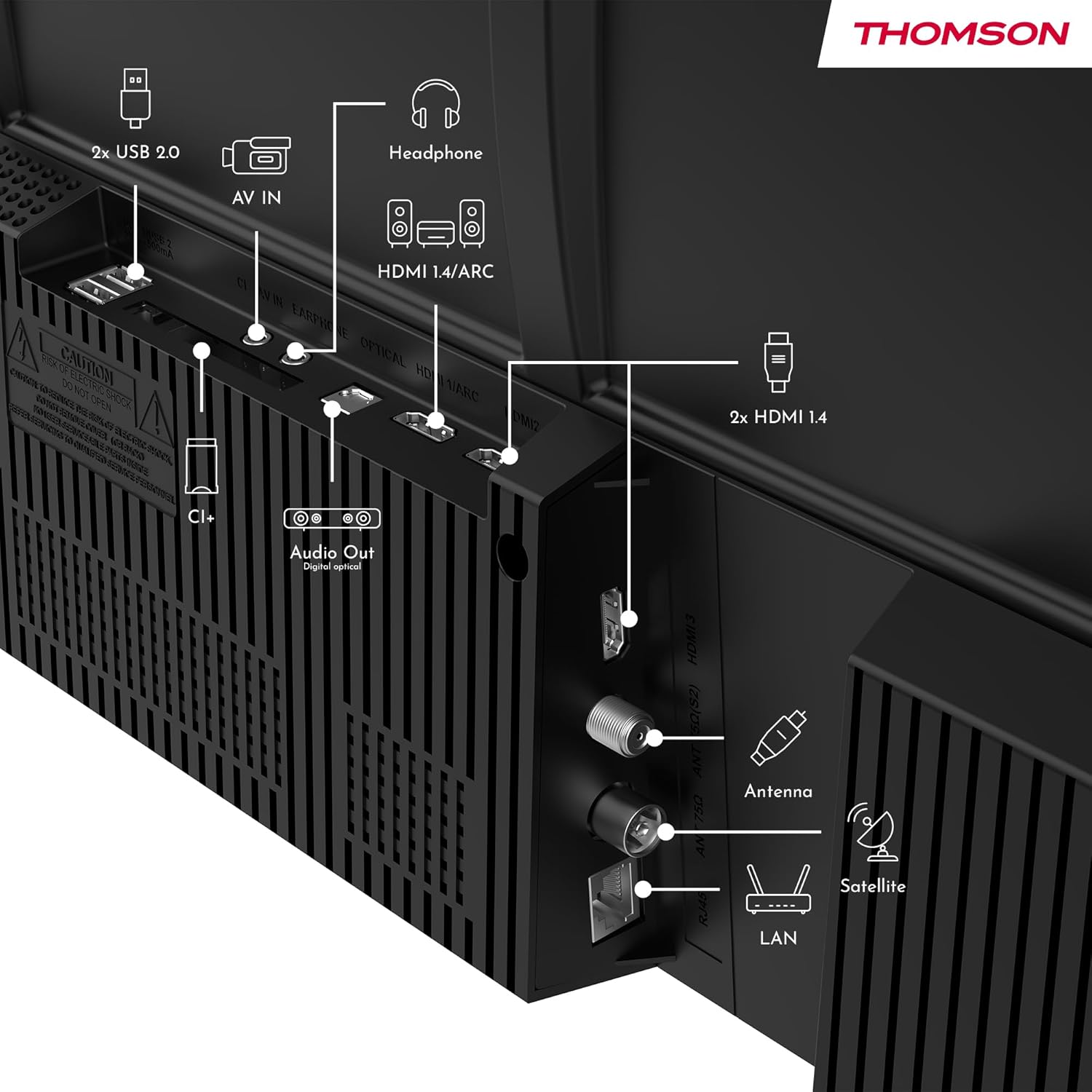
Immagine: Posteriore view of the Thomson 43FT2S15 Smart TV showing various connection ports. These include 2x USB 2.0, AV IN, Headphone out, HDMI 1.4/ARC, Optical Audio Out, CI+, Antenna (DVB-T2/C), Satellite (DVB-S2), and LAN (Ethernet).
- HDMI: Connect external devices like Blu-ray players, game consoles, or set-top boxes. The TV has 2 HDMI 1.4 ports, one with ARC support.
- USB: For connecting USB storage devices. The TV has 2 USB 2.0 ports.
- Antenna/Satellite: Connect your terrestrial or satellite antenna for live TV.
- LAN (Ethernet): Per una connessione Internet cablata.
- Wifi: Per la connessione internet wireless.
- Bluetooth: Per collegare accessori wireless compatibili.
- Uscita audio (ottica): Per il collegamento a un sistema audio esterno.
- Cuffia: Per collegare le cuffie.
- Slot CI+: For inserting a Conditional Access Module (CAM) for encrypted channels.
5. Istruzioni per l'uso
5.1 Accensione/spegnimento
Connect the power adapter to the TV and a power outlet. Press the power button on the remote control to turn the TV on or off.
5.2 TiVo OS e funzioni intelligenti
Your Thomson Smart TV is powered by TiVo OS, which integrates live TV, streaming applications, and on-demand services into a single, intuitive interface. Personalized recommendations help you discover new content.

Image: The Thomson Smart TV displaying the TiVo OS interface with various streaming apps like Netflix, Canal+, Prime Video, YouTube, and Disney+.
5.3 Controllo vocale
Use the TiVo Voice Control feature to navigate channels, open applications, or search for content across different platforms using voice commands. The remote control includes a microphone for this function.

Image: The Thomson Smart TV remote control highlighting the voice control microphone, backlit buttons, and direct access buttons for streaming services.
5.4 Wireless Display
Mirror content from your smartphone, tablet, or laptop to the TV screen using the Wireless Display function. This allows for easy sharing of videos, photos, and applications.
5.5 Miglioramenti audio e video
- Audio Dolby: Experience enhanced sound quality with Dolby Audio, providing clear dialogue and immersive, multi-dimensional effects.

Image: A Thomson Smart TV displaying content with visual representations of sound waves, indicating the Dolby Audio feature.
- Tipo di HDR: Enjoy sharper contrast and lifelike colors with HDR10 technology, revealing details in both bright highlights and deep shadows.

Image: A split-screen comparison showing the difference between SDR (Standard Dynamic Range) and HDR10 (High Dynamic Range) image quality on a Thomson Smart TV, demonstrating improved contrast and color.
5.6 telecomando
The ergonomic remote control features backlit buttons for easy navigation in low light conditions. It also includes direct access buttons for popular streaming services such as Netflix, YouTube, Prime Video, Disney+, and Canal+.
6. Manutenzione
Per garantire la longevità e le prestazioni ottimali del tuo televisore, segui queste linee guida per la manutenzione:
- Pulizia dello schermo: Pulisci delicatamente lo schermo con un panno morbido e privo di lanugine. Per le macchie ostinate, utilizza un detergente per schermi specifico per TV, applicato sul panno, non direttamente sullo schermo.
- Pulizia dell'armadio: Per pulire il mobile TV, utilizzare un panno morbido e asciutto. Non utilizzare detergenti abrasivi o solventi.
- Ventilazione: Assicurarsi che le aperture di ventilazione sul retro del televisore non siano ostruite per evitare il surriscaldamento.
- Cavo di alimentazione: Controllare regolarmente il cavo di alimentazione per verificare la presenza di eventuali danni. In caso di danni, contattare personale di assistenza qualificato per la sostituzione.
7. Risoluzione Dei Problemi
Se riscontri problemi con la tua TV, fai riferimento ai seguenti passaggi comuni per la risoluzione dei problemi:
- Nessun potere:
- Controllare che il cavo di alimentazione sia collegato saldamente al televisore e alla presa di corrente.
- Assicurarsi che la presa di corrente funzioni collegandovi un altro dispositivo.
- Prova a premere il pulsante di accensione sul televisore stesso, non solo sul telecomando.
- Nessuna immagine/suono:
- Verificare che sia selezionata la sorgente di ingresso corretta (ad esempio, HDMI 1, Antenna).
- Controllare tutti i collegamenti dei cavi tra la TV e i dispositivi esterni.
- Adjust the volume and ensure the TV is not muted.
- Il telecomando non funziona:
- Sostituire le batterie del telecomando.
- Assicurarsi che non vi siano ostacoli tra il telecomando e il sensore IR del televisore.
- Smart TV Features Not Working (Wi-Fi/Apps):
- Check your internet connection. Restart your router if necessary.
- Go to the TV's network settings to ensure it's connected to Wi-Fi or Ethernet.
- Prova a riavviare la TV.
For more complex issues, please contact customer support or refer to the manufacturer's websito.
8. Specifiche
Key technical specifications for the Thomson 43FT2S15 FHD LED Smart TV:
| Caratteristica | Specificazione |
|---|---|
| Marca | Tommaso |
| Modello | 43FT2S15 |
| Dimensioni dello schermo | 43 pollici (109 cm) |
| Tecnologia di visualizzazione | GUIDATO |
| Risoluzione | Risoluzione 1920 x 1080 (Full HD) |
| Frequenza di aggiornamento | Frequenza 60 Hz |
| Proporzioni | 16:9 |
| Sistema operativo | TiVo OS |
| Tecnologia audio | Dolby Audio (Dolby Atmos encoding) |
| Supporto HDR | L'HDR10 |
| Connettività | Wi-Fi, Ethernet, Bluetooth, 2x HDMI 1.4 (1x ARC), 2x USB 2.0, Optical Audio Out, AV In, Headphone, CI+ |
| Sintonizzatori | DVB-T2/C/S2 (Triple Tuner) |
| Servizi Internet supportati | Netflix, YouTube, Prime Video, Disney+, Canal+, Browser |
| Dimensioni (prodotto) | Dimensioni: 6 x 95 x 60 cm; 6.5 kg |
| Classe di efficienza energetica | E |

Image: Energy efficiency label for the Thomson 43FT2S15 Smart TV, showing an energy class of E and energy consumption of 42 kWh/1000h (SDR) and 46 kWh/1000h (HDR).
Per informazioni dettagliate sul prodotto, fare riferimento al database EPREL: https://eprel.ec.europa.eu/qr/1969521
9. Garanzia e supporto
Your Thomson 43FT2S15 TV comes with a warranty. Please refer to the included Warranty Card for specific terms and conditions.
Per supporto tecnico o richieste di assistenza, contattare il produttore:
- Produttore: Flussoview Società a responsabilità limitata
- Websito: www.streamview.com
- E-mail: contatto@streamview.com
- Telefono: +4318900066
Please have your model number (43FT2S15) and purchase information ready when contacting support.


