1. Introduzione
This user manual provides comprehensive instructions for the Brondi MAXY Flipper Dual SIM mobile phone. Please read this manual carefully before using your device to ensure proper operation and to maximize its features. Keep this manual for future reference.
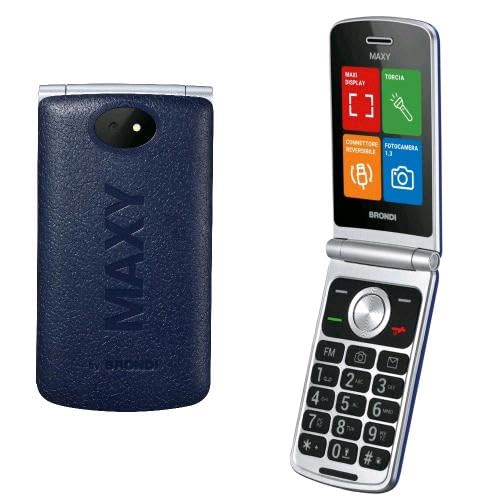
Image 1.1: Brondi MAXY Flipper Dual SIM Phone. This image shows the front view of the Brondi MAXY Flipper phone, highlighting its compact design and physical keypad.
2. Contenuto della confezione
Assicurarsi che tutti gli articoli siano presenti nel pacco:
- Brondi MAXY Flipper Mobile Phone
- Caricabatterie di tipo C
- Batteria
- Manuale d'uso
3. Impostazione
3.1. Installazione della batteria
- Rimuovere la cover posteriore del telefono sollevandola delicatamente dalla tacca.
- Allineare i contatti della batteria con i terminali all'interno del telefono.
- Premere la batteria verso il basso finché non è saldamente in posizione.
- Riposizionare il coperchio posteriore, assicurandosi che scatti in posizione.
3.2. Inserimento delle schede SIM
The Brondi MAXY Flipper supports Dual SIM functionality.
- Dopo aver rimosso la batteria, individuare gli slot della scheda SIM.
- Insert your SIM cards into the designated slots, ensuring the gold contacts face downwards and the cut corner aligns correctly.
- Reinstallare la batteria e il coperchio posteriore.
3.3. Carica della batteria
- Connect the Type-C charger to the charging port at the bottom of the phone.
- Collegare il caricabatterie a una presa di corrente.
- The charging indicator will appear on the screen. Allow the phone to charge fully before first use.
4. Istruzioni per l'uso
4.1. Accensione/spegnimento
- Per accendere: tenere premuto il tasto Accensione/Fine chiamata pulsante finché lo schermo non si illumina.
- Per spegnere: tenere premuto il tasto Accensione/Fine chiamata pulsante, quindi selezionare "Spegni" dalle opzioni.
4.2. Effettuare chiamate
- Inserire il numero di telefono utilizzando la tastiera.
- Premere il tasto Chiamata pulsante (solitamente verde) per avviare la chiamata.
- Per terminare una chiamata, premere il Termina chiamata button (usually red).
4.3. Rispondere alle chiamate
Quando squilla una chiamata in arrivo, premere il tasto Chiamata button to answer. To reject a call, press the Termina chiamata pulsante.
4.4. Selezione rapida
The phone supports direct memories for speed dial from 2 to 9.
- Vai a Menu > Contacts > Speed Dial.
- Seleziona un numero (2-9) e assegna un contatto dalla tua rubrica.
- To use, press and hold the assigned number key on the keypad.
4.5. Messaggistica
To send and receive SMS messages:
- Vai a Menu > Messaggi > Scrivi messaggio.
- Inserisci il tuo messaggio utilizzando la tastiera.
- Inserisci il numero del destinatario o selezionalo dai contatti.
- Selezionare "Invia".
4.6. Macchina fotografica
The phone features a 1.3 MP camera with flash.
- To access the camera, go to Menu > Fotocamera.
- Use the navigation keys to adjust settings.
- Premere il tasto Centro/OK pulsante per scattare una foto.
4.7. Bluetooth
To connect to other Bluetooth devices:
- Vai a Menu > Impostazioni > Connettività > Bluetooth.
- Attiva il Bluetooth On.
- Seleziona "Cercare devices" to find available devices.
- Select the desired device and pair using the provided passkey if required.
5. Manutenzione
5.1. Pulizia del dispositivo
Utilizzare un panno morbido e asciutto per pulire lo schermo e il corpo del telefono. Evitare l'uso di detergenti liquidi o materiali abrasivi.
5.2. Cura della batteria
- Non esporre la batteria a temperature estreme.
- Use only the original Brondi charger.
- Se il telefono non verrà utilizzato per un periodo prolungato, caricare la batteria fino a circa il 50% e conservarla in un luogo fresco e asciutto.
5.3. Aggiornamenti software
Check for available software updates periodically through the phone's settings menu to ensure optimal performance and security. (Note: Software updates are not guaranteed for this model.)
6. Risoluzione Dei Problemi
| Problema | Possibile causa | Soluzione |
|---|---|---|
| Il telefono non si accende | Batteria scarica; batteria non installata correttamente | Caricare la batteria; Reinstallare la batteria correttamente |
| Non è possibile effettuare o ricevere chiamate | Nessuna scheda SIM; Scheda SIM non inserita correttamente; Nessun segnale di rete | Insert SIM card; Reinsert SIM card; Move to an area with better signal |
| Scarsa qualità delle chiamate | Segnale di rete debole; Ostruzioni | Move to an open area; Avoid using in enclosed spaces |
| La batteria si scarica rapidamente | Many applications running; High screen brightness; Old battery | Close unused applications; Reduce screen brightness; Consider replacing battery |
| Il Bluetooth non si connette | Bluetooth off; Device out of range; Pairing issue | Ensure Bluetooth is on; Move devices closer; Re-pair the devices |
7. Specifiche
| Caratteristica | Dettaglio |
|---|---|
| Marca | Brondi |
| Nome del modello | Pinna |
| Peso dell'articolo | 200 grammi |
| Batteria | 1 Non-standard battery (included) |
| Capacità di memoria | 1 GB |
| Installed Flash Memory Size | 8 GB |
| Capacità di archiviazione digitale | 8 GB |
| Sistema operativo | Proprietario |
| Caratteristiche aggiuntive | Dual SIM, Backlit Keys, Speakerphone, Vibration |
| Componenti inclusi | Flipper Mobile Phone, Type-C Charger, Battery, User Manual |
| Numero di articoli | 1 |
| Display | LCD |
| Risoluzione del sensore ottico | 1.3 MP |
| Batterie incluse? | SÌ |
| Potenza nominale della batteria | 800 milioneampore (mAh) |
| Tecnologia cellulare | 2G |
| Tipo di connettore | Bluetooth |
| Input dell'interfaccia umana | Tastiera alfanumerica |
| Fattore di forma | cursore |
| Fornitore di servizi wireless | Tutti i vettori |
| Tecnologia di rete wireless | GSM |
| Number of SIM Card Slots | Doppia SIM |
8. Garanzia e supporto
For warranty information and customer support, please refer to the documentation included in your product package or visit the official Brondi websito. Conservare la prova d'acquisto per eventuali reclami in garanzia.
Nota: The product was available on Amazon.it starting October 13, 2025. Software updates are not guaranteed for this model.


