1. Introduzione
The Phomemo M832D is a portable thermal inkless printer designed for convenient printing on the go. This manual provides essential information to help you set up, operate, and maintain your printer effectively. It supports various paper sizes, including US Letter and A4, and offers multiple connectivity options.
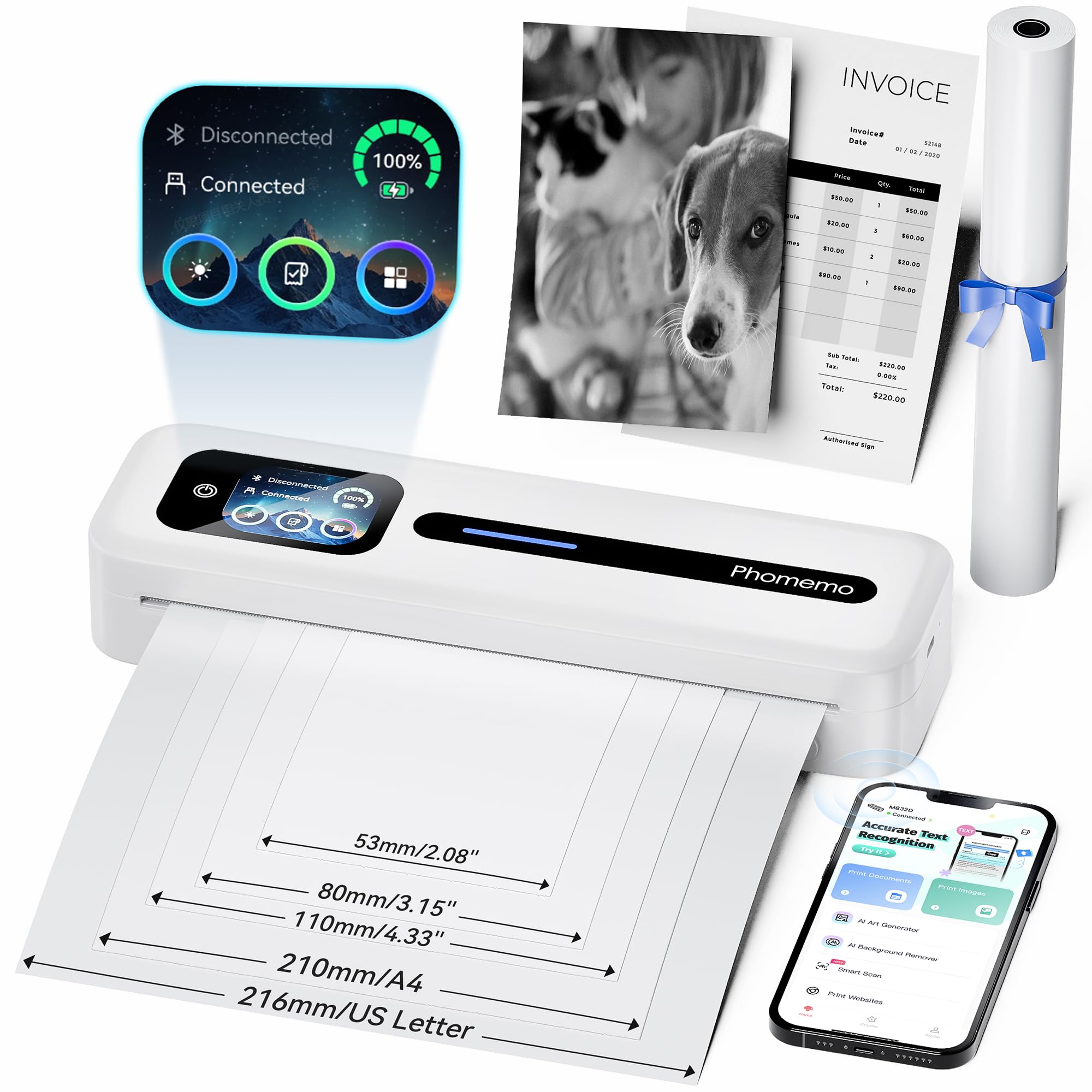
Figure 1: Phomemo M832D Portable Thermal Printer.

Figure 2: The M832D printer highlighting its compact size and light weight of 1.5 lbs.
2. Cosa c'è nella scatola
Si prega di controllare il contenuto della confezione per assicurarsi che siano presenti tutti gli articoli:
- 1x Phomemo M832D Portable Printer
- 1x US Letter Size Thermal Roll Paper (pre-installed inside the printer)
- 1x USB-C Charging Cable & USB-Type C Adapter
- 1x Manuale utente

Figure 3: All components included in the Phomemo M832D package.
3. Guida all'installazione
3.1 Carica iniziale
Before first use, fully charge the printer using the provided USB-C cable and adapter. The touchscreen display will indicate the battery status.
3.2 Caricamento della carta
The M832D printer supports various thermal paper types and sizes. Follow these steps to load paper:
- Aprire il coperchio del vano carta.
- Insert the thermal paper roll or stack, ensuring the printable side faces the print head.
- Close the paper compartment cover securely. The printer will automatically detect and align the paper.

Figure 4: Illustration of loading thermal paper and the various supported paper sizes.
3.3 Installazione dell'app (per dispositivi mobili)
To print from your smartphone or tablet, download the official Phomemo Smart APP:
- Scan the QR code provided in the quick start guide or search for "Phomemo" in your device's app store.
- Install the Phomemo Smart APP.

Figura 5: Oltreview of the Phomemo Smart APP interface for printing documents and images.
3.4 Connettività
3.4.1 Connessione Bluetooth (iOS/Android)
- Assicurati che la stampante sia accesa.
- Sul tuo dispositivo mobile, attiva il Bluetooth.
- Open the Phomemo Smart APP.
- Within the app, search for and select the M832D printer to connect. The printer's touchscreen will show a connected status.

Figure 6: Steps for connecting the M832D printer wirelessly via Bluetooth to a phone or tablet. For app download, scan the QR code: Phomemo App.
3.4.2 USB-C Connection (PC/Laptop)
- Scarica il driver più recente dal sito ufficiale Phomemo website (refer to the user manual for the specific URL).
- Connect the M832D printer to your computer using the provided USB-C cable.
- Install the driver and follow the on-screen instructions to complete the setup.

Figure 7: Instructions for connecting the M832D printer to a computer via USB-C cable.
4. Istruzioni per l'uso
4.1 Touchscreen Display Functions
The M832D features an intuitive touchscreen display for easy control and monitoring:
- Visualizzazione della potenza: Mostra il livello attuale della batteria.
- Stato della connessione: Indica se la stampante è connessa tramite Bluetooth o USB.
- Guida per l'utente: Access on-screen help and tutorials.
- Stato della carta: Identifies paper placement and type.
- Impostazioni: Adjust screen brightness, auto-shutdown time, perform calibration, print self-test page, and restore factory settings.

Figure 8: The smart display showing power, connection status, and access to the user guide.

Figure 9: The 2.01-inch LCD display showing various menu options for printer settings and help.

Figura 10: Oltreview of the multifunctional settings available on the M832D printer, including screen brightness, calibration, and factory reset.
4.2 Stampa dei documenti
Once connected, you can print documents, photos, and web pages directly from the Phomemo Smart APP or your computer's print dialogue. Select the M832D as your printer and adjust print settings as needed.
4.3 Supported Media Types and Sizes
The M832D printer is compatible with various thermal paper types and sizes:
- Dimensioni: 8.5" x 11" (US Letter), A4, 2.08" (53mm), 3.15" (80mm), and 4.33" (110mm).
- Tipi: Thermal roll paper, folded thermal paper, and single-sheet thermal paper.

Figure 11: The M832D printer supports multiple paper sizes and types, including US Letter, A4, and various smaller formats.
5. Manutenzione
5.1 Pulizia della testina di stampa
Per garantire una qualità di stampa ottimale, pulire regolarmente la testina di stampa. Utilizzare un panno morbido e privo di lanugine leggermenteampcon alcol isopropilico. Pulire delicatamente la superficie della testina di stampa. Assicurarsi che la stampante sia spenta e raffreddata prima di pulirla.
5.2 Cura della batteria
Per prolungare la durata della batteria:
- Evitare di scaricare completamente la batteria frequentemente.
- Quando non si utilizza la stampante per lunghi periodi, conservarla in un luogo fresco e asciutto.
- Se la stampante non viene utilizzata per un lungo periodo, caricarla periodicamente per evitare che si scarichi completamente.
6. Risoluzione Dei Problemi
If you encounter issues with your Phomemo M832D printer, refer to the common problems and solutions below:
- Stampe vuote: Check if the thermal paper is loaded correctly with the printable side facing the print head. Ensure the paper is thermal paper.
- Paper Not Detected: Open and close the paper compartment to re-seat the paper. Perform a calibration via the touchscreen settings.
- Problemi di connessione: For Bluetooth, ensure Bluetooth is enabled on your device and the printer, and try reconnecting through the app. For USB, verify the cable connection and driver installation.
- Scarsa qualità di stampa: Clean the print head. Ensure the battery is sufficiently charged. Use high-quality thermal paper.

Figure 12: The printer's Help Center provides guidance on common issues like paper loading and blank prints.
7. Specifiche
| Caratteristica | Dettaglio |
|---|---|
| Serie di modelli | M832D |
| Tecnologia di stampa | Termico |
| Uscita della stampante | Monocromo |
| Risoluzione massima di stampa in bianco e nero | 300 DPI |
| Velocità di stampa massima in bianco e nero | 15 ppm |
| Dimensione massima del supporto | 8.5 x 11 pollici |
| Formati dei supporti supportati | 8.5 x 11 (US Letter), A4, 2.08", 3.15", 4.33" |
| Stampa Media | Carta termica |
| Tecnologia di connettività | Bluetooth, USB (Type C) |
| Dispositivi compatibili | Computer portatili, PC, smartphone, tablet |
| Metodo di controllo | App, Touchscreen |
| Batteria | Polimeri di litio da 2600 mAh (inclusi) |
| Capacità massima del foglio di input | 150 fogli |
| Dimensioni del prodotto | 12.17"P x 2.5"L x 1.87"A |
| Peso dell'articolo | 1.52 libbre |
8. Garanzia e supporto
For warranty information and technical support, please refer to the warranty card included in your package or visit the official Phomemo website. You can also contact Phomemo customer service directly for assistance with product issues or inquiries.


