1. Introduzione
This manual provides detailed instructions for the installation, operation, and maintenance of your AINAVI 11.5-inch Car Radio Stereo. This advanced system is designed to upgrade your vehicle's infotainment experience with Android 13.0, wireless CarPlay, Android Auto, GPS navigation, and various multimedia features. Please read this manual thoroughly before installation and use to ensure proper functionality and safety.
2. Prodotto finitoview
The AINAVI 11.5-inch Car Radio Stereo is a high-performance multimedia system compatible with specific Jeep Wrangler JK, Dodge Grand Caravan, and Dodge Ram models. It features an 11.5-inch QLED touchscreen with 1280x800 resolution, running on Android 13.0 with 4GB RAM and 64GB ROM for smooth operation. Key features include:
- Touchscreen QLED da 11.5 pollici: G+G full lamination technology with 178° full-viewangolo di ing.
- Sistema operativo Android 13.0: Latest operating system for enhanced performance.
- CarPlay e Android Auto wireless/cablati: Integrazione perfetta con gli smartphone.
- Navigazione GPS: Supporta mappe online e offline.
- Wi-Fi 5G e Bluetooth 5.4: Fast internet connectivity and stable device pairing.
- Radio AM/FM/RDS: Access to various radio stations.
- Controllo del volante: Mantiene i comandi originali del veicolo.

Image: The 11.5-inch HD IPS Touch Screen, showcasing its vibrant display and full lamination technology for clarity and responsiveness.
3. Contenuto della confezione
Verifica che tutti gli articoli elencati di seguito siano inclusi nel pacco. Se alcuni articoli risultano mancanti o danneggiati, contatta l'assistenza clienti.
- 11.5-inch Car Head Unit for Jeep Wrangler JK
- Telaio in plastica
- AHD 1080P posteriore View Camera + Extension Power Cable
- Microfono
- Antenna GPS
- Cavo USB a 4 pin
- Cavo USB a 6 pin
- Manuale dell'utente (questo documento)
- Cavo di alimentazione
- Power Harness with CAN BUS (for some models)
- Strumento di rimozione della cornice blu
- RCA
- Cavo di controllo della retromarcia
Note: The specific cables included may vary slightly depending on the vehicle model.
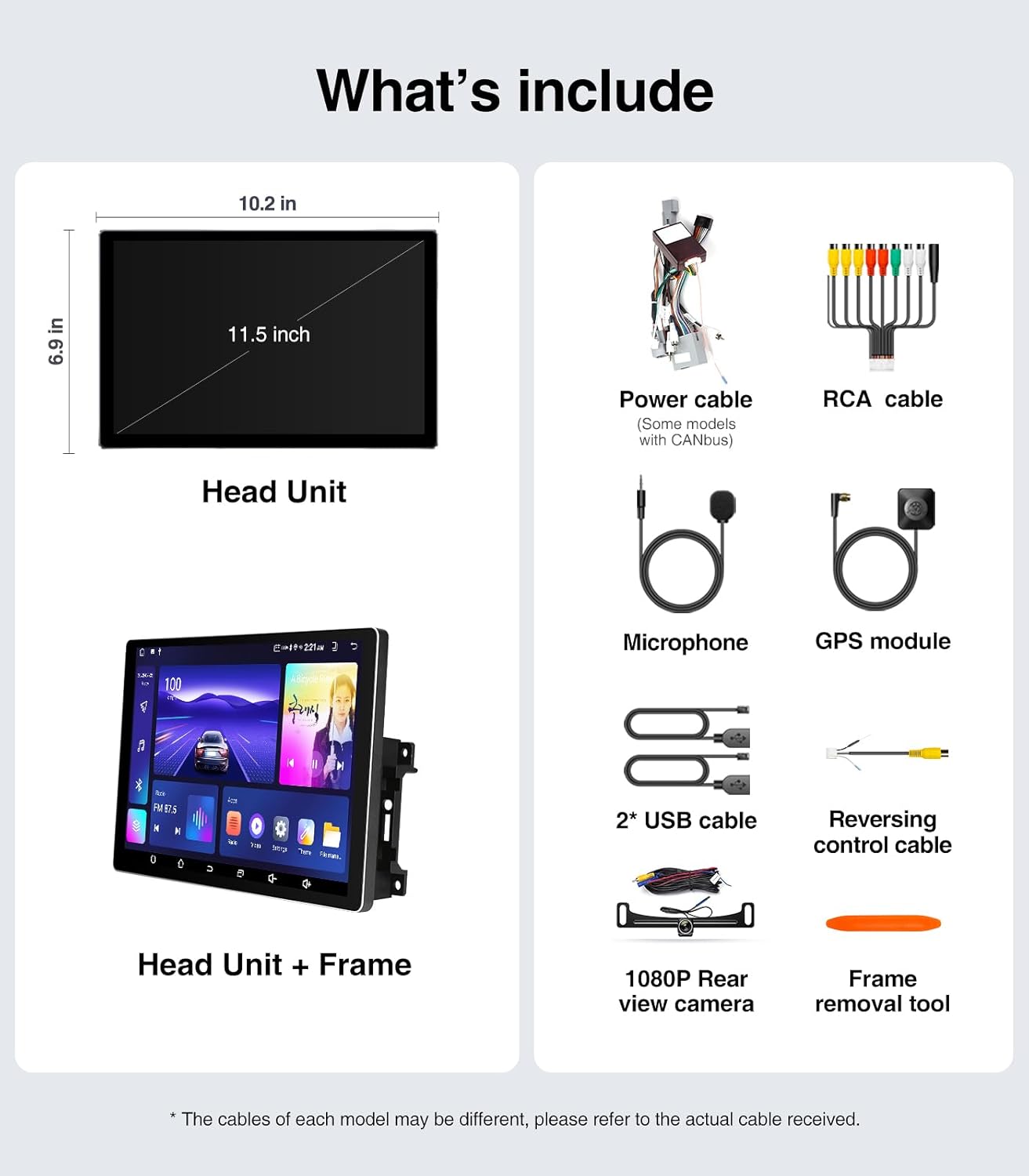
Image: A visual representation of all components included in the package, such as the head unit, frame, various cables, camera, microphone, and tools.
4. Guida all'installazione (configurazione)
The AINAVI Car Radio Stereo is designed for a plug-and-play installation for compatible vehicles. However, professional installation is recommended if you are unfamiliar with car audio system wiring.
4.1 Controllo pre-installazione
- Ensure your vehicle is compatible with the head unit (Jeep Wrangler JK 2007-2018, Dodge Grand Caravan 2011-2020, Dodge Ram 2009-2012, etc.).
- Gather all necessary tools, including the provided frame removal tool.
- Disconnect the vehicle's battery before starting the installation to prevent electrical shorts.
4.2 Passaggi di installazione
- Carefully remove the original car radio and dashboard trim using the frame removal tool. Refer to your vehicle's service manual for specific trim removal instructions.
- Connect the provided power harness and CAN BUS (if applicable) to the vehicle's wiring. Ensure all connections are secure.
- Collegare l'antenna GPS, i cavi USB, il microfono e la parte posteriore view camera cables to the corresponding ports on the new head unit.
- Mount the new 11.5-inch head unit into the dashboard opening. Ensure it fits securely within the plastic frame.
- Ricollegare la batteria del veicolo.
- Turn on the vehicle's ignition and test the head unit's basic functions (power, audio, touch screen).
- Reinstallare i pannelli di rivestimento del cruscotto.

Image: A comparison showing the vehicle's dashboard before and after the installation of the AINAVI 11.5-inch car radio stereo, highlighting the significant visual upgrade.

Image: Illustrates the plug-and-play nature of the installation, showing a user connecting wiring harnesses, along with icons indicating support for Steering Wheel Control and AMP.
5. Istruzioni per l'uso
5.1 Funzionamento di base
- Accensione/spegnimento: The unit powers on with the vehicle's ignition. Press and hold the power button (if available) for manual power control.
- Schermo tattile: Navigate the Android interface by tapping, swiping, and pinching gestures.
- Controllo del volume: Adjust volume using the on-screen controls or your vehicle's steering wheel buttons.
5.2 CarPlay wireless/cablato e Android Auto
Connect your iPhone or Android smartphone for seamless integration of navigation, communication, and entertainment apps.
- Assicurati che il Bluetooth sia abilitato sullo smartphone e sull'unità principale.
- Sull'unità principale, aprire l'applicazione CarPlay o Android Auto.
- Per la connessione wireless, associa il telefono tramite Bluetooth. Per la connessione cablata, collega il telefono tramite un cavo USB alla porta USB designata.
- Seguire le istruzioni visualizzate sullo schermo per completare la connessione.
Once connected, you can use voice commands (e.g., "Hey Siri" or "Hey Google") for hands-free operation.

Image: A visual of the head unit displaying the Wireless CarPlay and Android Auto interface, with a smartphone icon indicating connectivity and various app logos.
5.3 Navigazione GPS
L'unità supporta la navigazione sia online che offline.
- Mappe online: Connect the head unit to a WiFi hotspot (e.g., from your phone) to access real-time traffic information and updated maps.
- Mappe offline: Download maps for your region to the unit's internal storage. This allows navigation without an internet connection.
- Use the pre-installed navigation app or download your preferred app from the Google Play Store.
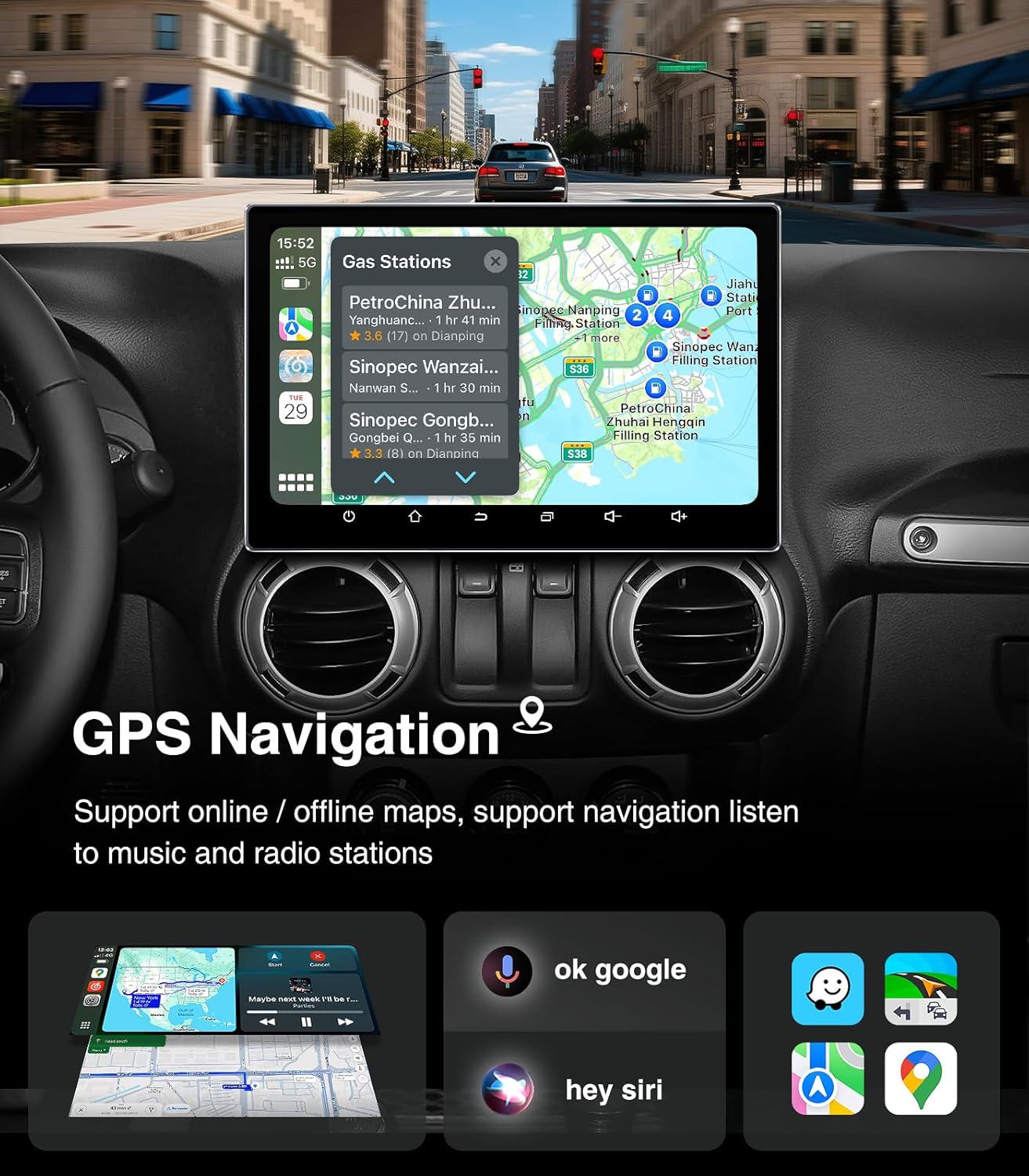
Image: The head unit displaying a GPS navigation map with points of interest and traffic information, alongside icons for voice commands like "ok google" and "hey siri".
Radio AM/FM/RDS 5.4
Access your favorite radio stations with the built-in tuner.
- Open the "Radio" application on the head unit.
- Cerca le stazioni disponibili o sintonizzati manualmente su una frequenza specifica.
- Salva le tue stazioni preferite come preimpostate per accedervi rapidamente.
- The RDS (Radio Data System) feature displays station information where available.

Image: The head unit displaying the AM/FM/RDS radio interface, showing frequency tuning and preset options, with a scenic road background.
5.5 5G WiFi Hotspot & Bluetooth Connection
Enhance your connectivity with fast WiFi and stable Bluetooth.
- Wifi: Connect to a mobile hotspot or home WiFi network to browse the internet, download apps, and stream content. Supports dual-band 2.4GHz & 5GHz.
- Bluetooth 5.4: Pair your smartphone for hands-free calls, Bluetooth music streaming, and phonebook synchronization.

Image: The head unit displaying a phone dialer interface, indicating Bluetooth connectivity with a smartphone, and icons for various supported apps like Google Play, Chrome, YouTube, Instagram, and Netflix.
6. Manutenzione
Per garantire la longevità e le prestazioni ottimali della tua autoradio stereo AINAVI, segui queste linee guida per la manutenzione:
- Pulizia dello schermo: Utilizzare un panno morbido e privo di lanugine per pulire delicatamente il touchscreen. Per le macchie ostinate, strofinare leggermenteampPulisci il panno con acqua o un detergente per schermi. Evita prodotti chimici aggressivi o materiali abrasivi.
- Aggiornamenti software: Periodically check for system updates through the unit's settings menu. Keeping the software updated ensures optimal performance, security, and access to new features.
- Controllo della temperatura: Avoid exposing the unit to extreme temperatures for extended periods. While designed for automotive environments, prolonged exposure to direct sunlight or freezing conditions can affect performance.
- Connessioni via cavo: Assicurarsi che tutti i cavi siano saldamente collegati. Collegamenti allentati possono causare problemi intermittenti.
7. Risoluzione Dei Problemi
Se riscontri problemi con l'autoradio, fai riferimento ai seguenti problemi comuni e alle relative soluzioni:
| Problema | Possibile causa | Soluzione |
|---|---|---|
| L'unità non si accende | Collegamento elettrico allentato, fusibile bruciato, problema alla batteria del veicolo. | Controllare i cavi di alimentazione e il fusibile. Assicurarsi che la batteria del veicolo sia carica. |
| Nessun suono | Volume troppo basso, modalità muto attivata, problema di cablaggio degli altoparlanti, sorgente audio errata. | Aumentare il volume, controllare lo stato di disattivazione dell'audio, verificare i collegamenti degli altoparlanti, selezionare la sorgente audio corretta. |
| Il touchscreen non risponde | Problema software, problema di calibrazione dello schermo. | Riavviare l'unità. Se il problema persiste, eseguire un ripristino delle impostazioni di fabbrica (i dati andranno persi). |
| CarPlay/Android Auto non si connette | Bluetooth/USB issue, phone settings, app not updated. | Ensure Bluetooth is on and paired. Try a different USB cable. Update phone OS and apps. |
| Segnale GPS perso o impreciso | Ostruzione dell'antenna GPS, scarsa ricezione satellitare. | Assicurarsi che l'antenna GPS abbia una visuale libera view del cielo. Controllare il collegamento dell'antenna. |
If these solutions do not resolve the issue, please contact AINAVI customer support.
8. Specifiche
| Caratteristica | Dettaglio |
|---|---|
| Marca | AINAVI |
| Sistema operativo | Androide 13.0 |
| Capacità di archiviazione della memoria | 64 GB (ROM) |
| Memoria RAM | 4 GB |
| Dimensioni dello schermo | 11.5 pollici |
| Tipo di visualizzazione | QLED, laminazione completa G+G |
| Risoluzione | 1280x800 |
| Tecnologia di connettività | Bluetooth 5.4, USB, Wi-Fi (2.4Ghz & 5Ghz), Wireless CarPlay, Wired Android Auto |
| Caratteristiche speciali | AM/FM/RDS radio, 5G WiFi, CarPlay+Android Auto+Mirror Link+AirPlay, Split Screen Function, Touch Screen |
| Dispositivi compatibili | Smartphone, iPhone |
| Tipo di montaggio | Supporto per cruscotto |
| Modalità di uscita audio | Stereo |
| Tipo di servizio del veicolo | Auto |
9. Garanzia e supporto
AINAVI provides technical support for this product. If you have any questions regarding installation, operation, or troubleshooting that are not covered in this manual, please do not hesitate to contact us via Amazon email. We are committed to providing prompt assistance.
Please retain your proof of purchase for warranty claims. Specific warranty terms and conditions may apply and are available upon request or through the product's purchase platform.


