1. Introduzione
This manual provides detailed instructions for the VENTION 15-in-1 USB-C Docking Station. It covers product features, setup procedures, operational guidelines, and troubleshooting tips to ensure optimal performance and user experience. Please read this manual thoroughly before using the device.
2. Prodotto finitoview
The VENTION 15-in-1 USB-C Docking Station is designed to expand the connectivity of your laptop, transforming a single USB-C port into multiple ports for various peripherals, external displays, and network connections. It features a robust aluminum alloy shell for optimal heat dissipation and a 360° rotatable, detachable base for flexible placement.
2.1. Disposizione delle porte
The docking station offers a comprehensive array of ports to meet diverse connectivity needs:
- 2 x 4K@60Hz HDMI Ports
- 1 x 4K@60Hz DisplayPort (DP)
- 1 x 10Gbps USB-C Port (Data)
- 2 x 10Gbps USB-A Ports (USB 3.2 Gen 2)
- 1 x USB 3.0 Port (5Gbps)
- 2 x USB 2.0 Ports (480Mbps)
- 1 x 100W Power Delivery (PD) Port (Input)
- 1 x PC Host Port (USB-C connection to laptop)
- 1 x 3.5mm Audio Port (Microphone/Audio Jack)
- 1 x lettore di schede SD
- 1 x lettore di schede TF
- 1 x RJ45 Gigabit Ethernet Port

2.2. Caratteristiche del design
- Dissipazione ottimale del calore: Constructed with an aluminum alloy shell to efficiently dissipate heat, ensuring stable performance during extended use.
- Cuscinetti antiscivolo: Equipped with anti-slip pads for stability on various surfaces.
- Detachable and Rotatable U-shaped Stand: The docking station features a versatile stand that allows for 360° rotation for optimal viewing angles and can be detached for minimalist use or portability.

3. Guida all'installazione
Follow these steps to set up your VENTION 15-in-1 USB-C Docking Station:
- Verifica la compatibilità del laptop: Ensure your laptop's USB-C port supports DisplayPort Alternate Mode (Alt Mode) for video output and Power Delivery for charging. Laptops with Thunderbolt 3/4 ports are also compatible.
- Collegamento all'alimentazione (facoltativo ma consigliato): For optimal performance and laptop charging, connect a 100W Power Delivery (PD) charger (not included) to the PD input port on the docking station.
- Connetti al laptop: Use the included USB-C 4.0 cable to connect the docking station's "PC HOST" port to your laptop's USB-C or Thunderbolt port.
- Collegare schermi esterni: Connect your monitors to the HDMI and/or DisplayPort (DP) outputs on the docking station using appropriate cables (not included). Refer to Section 4.1 for display configuration details.
- Connetti le periferiche: Plug in your USB devices (keyboard, mouse, external drives), Ethernet cable, audio devices, and SD/TF cards as needed.


4. Istruzioni per l'uso
4.1. Display Configuration (Dual/Triple Monitors)
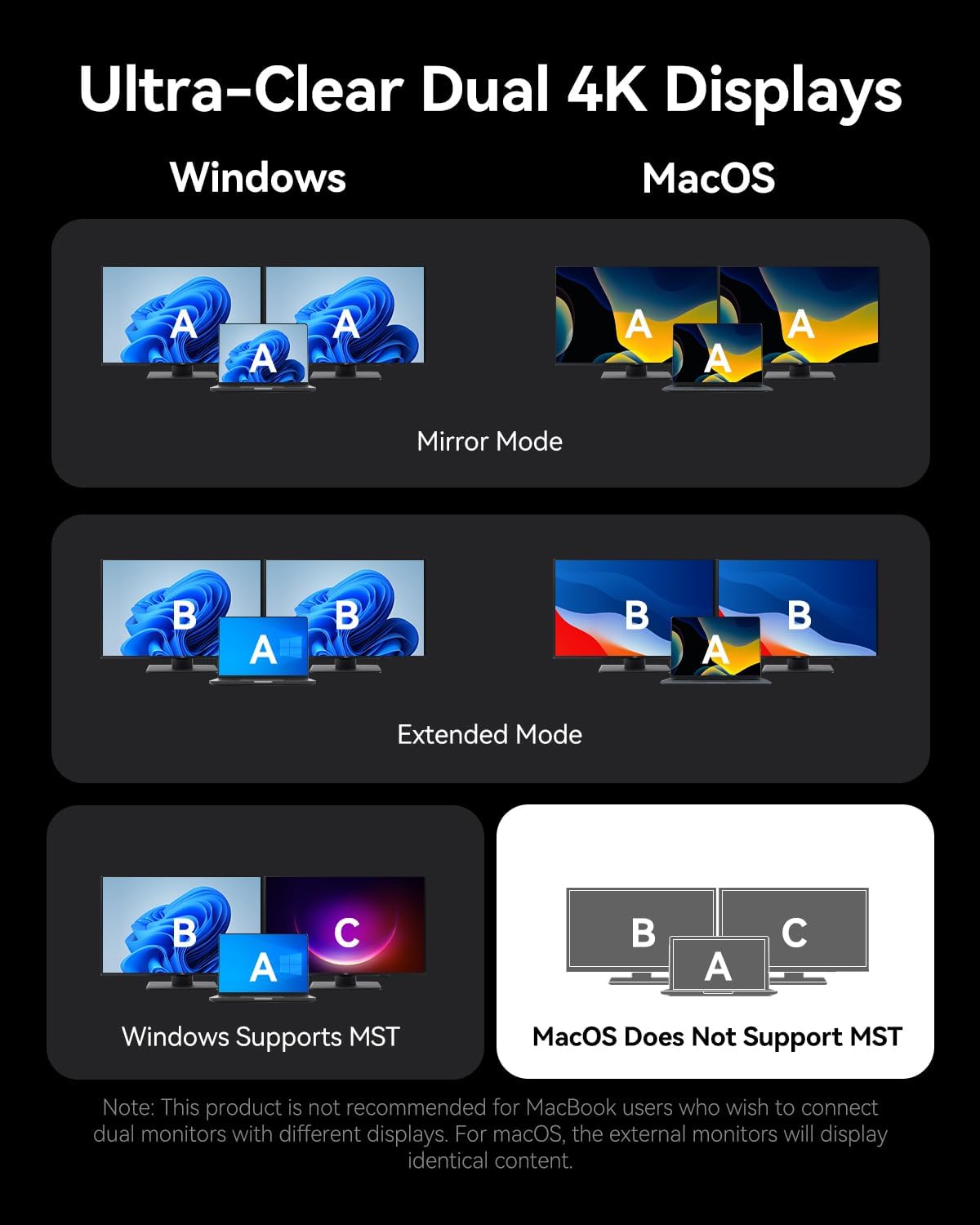
The docking station supports connecting up to three external monitors via its two HDMI ports and one DisplayPort. The display behavior varies depending on your operating system:
Per i sistemi Windows:
- Doppio monitor: Supporta fino a 4K a 30 Hz.
- Monitor tripli: Supports up to 1080P@60Hz.
- Windows systems support Multi-Stream Transport (MST) mode, allowing for extended displays where each monitor shows different content (A-B-C or A-B-B).
Per i sistemi macOS:
- Single, Dual, or Triple Monitors: Supports up to 4K@60Hz for each display.
- macOS systems only support Single-Stream Transport (SST) mode. This means all external monitors will mirror the content of your laptop's display (A-A-A) or mirror each other while extending from the laptop (A-B-B). Extended displays with different content on each external monitor are not supported.
Note: For screen mirroring or extending, please use your own HDMI/DP cables. The included USB-C cable is for charging and data transfer, not video output.

4.2. Trasferimento dei dati
La docking station offre funzionalità di trasferimento dati ad alta velocità:
- USB 3.2 Gen 2 Ports (USB-A & USB-C): Offers speeds up to 10Gbps for rapid file transfers with compatible devices.
- Porta USB 3.0: Provides speeds up to 5Gbps.
- Porte USB: 2.0 Suitable for connecting peripherals like keyboards and mice with speeds up to 480Mbps.
- Slot per schede SD/TF: Supports simultaneous reading and writing of SD and TF cards, ideal for photographers and content creators.

4.3. Ricarica Power Delivery (PD)
The dedicated 100W PD input port allows you to charge your laptop while using the docking station. Connect a compatible 100W USB-C power adapter to this port. The docking station will pass through up to 85W to your laptop, reserving power for its own operation.
4.4. GigabitEthernet
Connect an Ethernet cable to the RJ45 port for a stable and high-speed wired network connection, supporting speeds of 10Mbps, 100Mbps, and 1000Mbps (1 Gigabit).
4.5. Connettività audio
The 3.5mm audio port supports both microphone input and audio output, allowing you to connect headphones, speakers, or a headset for communication and multimedia.
5. Compatibilità
The VENTION 15-in-1 USB-C Docking Station is compatible with a wide range of devices that feature a full-featured USB-C port or Thunderbolt 3/4 port. This includes, but is not limited to:
- MacBook Pro (2016-2021)
- MacBook Air (2018-2021)
- MacBook (2015-2021)
- Dell XPS 13/15
- Computer portatili HP
- Computer portatili Lenovo
- Surface Book 2 / Surface Go
- iPad Pro / iPad Air (with USB-C)
- Other laptops with full-featured USB-C or Thunderbolt 3/4 ports.
Important: Ensure your laptop's USB-C port supports DisplayPort Alternate Mode for video output and Power Delivery for charging functionality.

6. Risoluzione Dei Problemi
Se riscontri problemi con la docking station, fai riferimento alle seguenti soluzioni comuni:
- Nessuna uscita di visualizzazione:
- Assicurati che la porta USB-C del tuo laptop supporti la modalità alternativa DisplayPort.
- Check all video cables (HDMI/DP) are securely connected and functional.
- Verificare che la sorgente di input del monitor sia selezionata correttamente.
- Prova a collegare un monitor alla volta per isolare il problema.
- Riavvia il tuo laptop e ricollega la docking station.
- Il portatile non si carica:
- Ensure a compatible 100W PD power adapter is connected to the docking station's PD input port.
- Verifica che la porta USB-C del tuo laptop supporti Power Delivery.
- Check the USB-C cable connecting the docking station to your laptop is securely plugged in.
- Dispositivi USB non riconosciuti:
- Assicurati che la docking station sia collegata correttamente al tuo laptop.
- Prova a collegare il dispositivo USB a una porta diversa della docking station.
- Collega il dispositivo USB direttamente al tuo laptop per verificare che funzioni.
- Problemi di connessione Ethernet:
- Controllare la connessione del cavo Ethernet sia alla docking station che al router/modem.
- Verifica le impostazioni di rete sul tuo laptop.
- Se possibile, testare il cavo Ethernet con un altro dispositivo.
If problems persist, please contact VENTION customer support for further assistance.
7. Specifiche
| Caratteristica | Specificazione |
|---|---|
| Modello | B0FX459ZTN |
| Porti | 2x HDMI (4K@60Hz), 1x DP (4K@60Hz), 1x USB-C (10Gbps), 2x USB-A (10Gbps), 1x USB 3.0 (5Gbps), 2x USB 2.0 (480Mbps), 1x PD (100W), 1x PC Host, 1x 3.5mm Audio, 1x SD, 1x TF, 1x RJ45 Gigabit Ethernet |
| Erogazione di potenza | 100W Input, up to 85W Output to Laptop |
| Velocità di trasferimento dati | USB 3.2 Gen 2: 10Gbps, USB 3.0: 5Gbps, USB 2.0: 480Mbps |
| Velocità Ethernet | 10/100/1000Mbps |
| Materiale | Lega di alluminio |
| Dimensioni | 7.91 x 6.81 x 2.44 pollici |
| Peso | 1.78 libbre |
| Colore | Nero |
8. Manutenzione
To ensure the longevity and optimal performance of your VENTION 15-in-1 USB-C Docking Station, follow these maintenance guidelines:
- Pulizia: Use a soft, dry, lint-free cloth to clean the exterior of the docking station. Avoid using liquid cleaners, aerosols, or solvents.
- Magazzinaggio: Conservare la docking station in un luogo fresco e asciutto, lontano dalla luce solare diretta e da temperature estreme.
- Gestione: Evitare di far cadere o sottoporre il dispositivo a forti urti. Non tentare di smontare la docking station, poiché ciò invaliderebbe la garanzia.
- Gestione dei cavi: Organize cables to prevent tangling and strain on the ports.
9. Garanzia e supporto
The VENTION 15-in-1 USB-C Docking Station comes with a Garanzia di 12 mesi dalla data di acquisto. La presente garanzia copre difetti di fabbricazione e malfunzionamenti in condizioni di normale utilizzo.
Il pacchetto include:
- 1 x USB-C Docking Station (15-in-1)
- 1 x 360-Degree Rotatable Base
- 1 cavo USB-C 4.0
- 1 x Manuale utente

For any questions, technical support, or warranty claims, please contact VENTION customer service. Refer to the contact information provided on the product packaging or the official VENTION websito.
10. Video ufficiale del prodotto
Watch the official product video for a visual guide on the VENTION 15-in-1 USB-C Docking Station's features and usage:


