1. Introduzione
This user manual provides detailed instructions for the ANCEL BM300 Pro Battery Monitor and the ANCEL DS500BT Bidirectional OBD2 Scanner. Please read this manual thoroughly before using the devices to ensure proper operation and to maximize their functionality. Keep this manual for future reference.
2. ANCEL BM300 Pro Battery Monitor
2.1. Finitaview e Caratteristiche principali
The ANCEL BM300 Pro is an advanced battery monitor designed for 6V, 12V, and 24V battery systems. It offers enhanced features over its predecessor, including upgraded Bluetooth 5.3 connectivity, IP67 waterproofing, and extended data storage. This device allows for comprehensive monitoring of battery health and performance.
- Ampia compatibilità: Supports 6V, 12V, and 24V battery systems, including lead-acid and lithium batteries.
- Bluetooth avanzato: Features Bluetooth 5.3 for stable and efficient wireless communication.
- Archiviazione dati estesa: Stores up to 72 days of battery data, allowing for historical analysis.
- Impermeabilità IP67: Provides robust protection against dust and water ingress.
- Monitoraggio multi-batteria: In grado di monitorare fino a 4 batterie contemporaneamente.
- Monitoraggio sanitario completo: Tracce vol.tage, cranking system, charging system, and driving records.
- Basso consumo energetico: Operates with a minimal power draw of approximately 1mA.
2.2. Configurazione e installazione
The BM300 Pro is designed for permanent installation on your vehicle's battery, providing continuous monitoring without repeated setup.
- Scarica l'App: Scansiona il codice QR fornito nella confezione del prodotto o visita http://link.quicklynks.com/bm300.html to download the ANCEL BM300 Pro application from the App Store or Google Play.
- Collegamento alla batteria: Securely attach the BM300 Pro device to your vehicle's battery terminals. Ensure a firm connection for accurate readings.
- Connessione tramite Bluetooth: Open the ANCEL BM300 Pro app on your smartphone. The app will automatically search for and connect to the BM300 Pro device via Bluetooth 5.3.

Figure 2.2.1: BM300 Pro Easy Installation and Bluetooth Connection
2.3. Operation: Battery Monitoring
Once connected, the app provides real-time data and various tests to assess your battery's condition.
- Voltage Prova: Visualizza il volume corrente della batteriatage and State of Charge (SoC).
- Prova di carica: Evaluates the vehicle's charging system, showing charging voltage increspatura.
- Prova di avviamento: Measures the battery's ability to start the engine, indicating cranking voltage e tempo.
- Dati storici: Access stored data for up to 72 days to track battery performance over time.

Figure 2.3.1: Multi-functional Battery Monitoring Interface

Figure 2.3.2: BM300 Pro Accurate Voltage Letture
2.4. BM300 Pro Specifications
| Caratteristica | BM300pro |
|---|---|
| Volume di provatage | 6V, 12V, 24V |
| Tipi di batteria supportati | Lead-acid batteries & Lithium batteries |
| Data Storage Days | 72 giorni |
| Gestione dei dispositivi | Fino a 4 batterie |
| Grado di impermeabilità | Grado di protezione IP67 |
| EXCEL Data Export | SÌ |
| Vehicle Search Record | SÌ |

Figure 2.4.1: BM300 Pro Upgraded Features Comparison
3. ANCEL DS500BT Bidirectional OBD2 Scanner
3.1. Finitaview e Caratteristiche principali
The ANCEL DS500BT is a professional bidirectional OBD2 scanner designed for comprehensive vehicle diagnostics and maintenance. It offers a wide range of functions, including advanced reset services and full-system scanning, enabling users to identify and resolve complex vehicle issues.
- Controllo bidirezionale: Send commands to the ECU to perform active tests and verify repairs.
- 28+ funzioni di ripristino: Supports a wide array of professional maintenance resets, including EPB, SAS, and Transmission Adaptations.
- Diagnostica completa del sistema: Scans all available vehicle modules (PCM, transmission, ABS, SRS, etc.) for a complete health report.
- Flusso di dati in tempo reale: Displays real-time sensor data for in-depth analysis.
- Libreria DTC: Built-in database for quick lookup of diagnostic trouble codes.
- FCA AutoAuth & CAN-FD Protocol: Included for compatibility with modern vehicle systems.
3.2. Operation: Diagnostic Functions
The DS500BT provides powerful diagnostic capabilities to help you understand and manage your vehicle's health.
3.2.1. Active Tests (Bidirectional Control)
Perform specific component tests by sending commands to the vehicle's ECU. This allows for verification of component functionality without manual intervention.
- Controllo della luce
- Wiper adjustment
- Window open/close
- Posterioreview controllo dello specchio
- Test dell'iniettore di carburante
- Starting fuel pump activation

Figure 3.2.1: DS500BT Active Test Capabilities
3.2.2. Professional Maintenance Resets
The DS500BT offers over 28 reset functions to clear warning lights and restore vehicle performance after repairs.
- Common Service Resets: Oil Reset, BMS Reset, TPMS Reset, D-P-F Reset.
- System & Safety Resets: SAS Reset, Airbag Reset, ABS Bleeding, EGR Reset.
- Advanced & Custom Resets: Injector Coding, Gear Reset, Stop/Start Reset, Brake Reset.
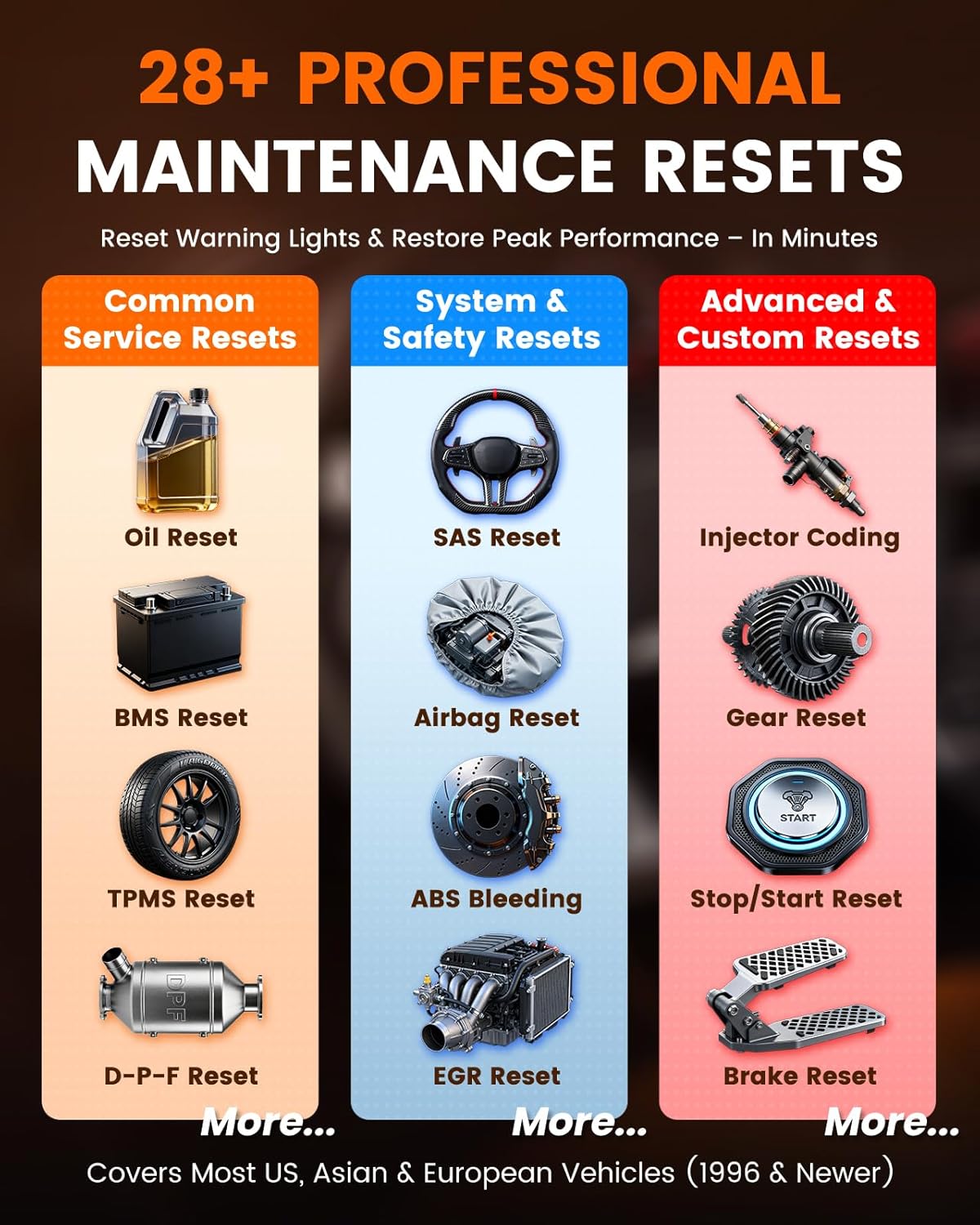
Figure 3.2.2: DS500BT Professional Maintenance Resets
3.2.3. Scansione completa del sistema
Perform a comprehensive scan of all electronic control units (ECUs) in the vehicle to identify diagnostic trouble codes (DTCs) and view dati in tempo reale.
- Leggi i codici: Retrieve current, pending, and permanent DTCs.
- Codici chiari: Erase DTCs and turn off warning lights after repairs.
- Dati in tempo reale: Monitor real-time parameters from various sensors and modules (e.g., engine RPM, coolant temperature, oxygen sensor readings).
- Prova EVAP: Conduct the Evaporative Emission System Leak Test.
- Cornice di congelamento: View un'istantanea delle condizioni operative del veicolo al momento dell'impostazione del codice di errore.
- Informazioni sul veicolo: Recupera il numero di identificazione del veicolo (VIN), l'ID di calibrazione e i numeri di verifica della calibrazione (CVN).

Figure 3.2.3: DS500BT Full System Scan Capabilities
3.3. DS500BT Specifications
| Caratteristica | DS500BT |
|---|---|
| Aggiornamenti gratuiti a vita | SÌ |
| Reset Service Functions | 28+ |
| Test attivo | SÌ |
| Autoautenticazione FCA | Incluso |
| CAN-FD Protocol | Incluso |
| Tempo di standby | > 8 giorni |
| Metodo di connessione | 10M BT5.0 |

Figure 3.3.1: DS500BT Feature Advantage at a Glance
4. Risoluzione Dei Problemi
If you encounter issues with your ANCEL BM300 Pro or DS500BT, please refer to the following general troubleshooting steps:
- Problemi di connessione: Ensure Bluetooth is enabled on your smartphone and the device is within range. For BM300 Pro, verify secure connection to battery terminals. For DS500BT, ensure the OBD2 connector is firmly seated.
- L'app non risponde: Close and restart the application. If the issue persists, try reinstalling the app.
- Inaccurate Readings (BM300 Pro): Check battery terminal connections for corrosion or looseness. Ensure the battery is fully charged before performing tests for baseline accuracy.
- Scanner Not Communicating (DS500BT): Verify the vehicle's ignition is on. Check the vehicle's OBD2 port for power. Try connecting to a different vehicle if possible to rule out a vehicle-specific issue.
- Aggiornamenti software: Ensure both devices' firmware and the associated apps are updated to the latest versions.
For more specific troubleshooting or persistent issues, please contact ANCEL customer support.
5. Manutenzione
Una corretta manutenzione garantisce la longevità e le prestazioni ottimali dei dispositivi ANCEL.
- Pulizia: Use a soft, dry cloth to clean the exterior of the devices. Avoid using abrasive cleaners or solvents.
- Magazzinaggio: Quando non vengono utilizzati, conservare i dispositivi in un luogo fresco e asciutto, lontano dalla luce solare diretta e da temperature estreme.
- Cura del cavo: Inspect cables and connectors regularly for any signs of damage. Avoid bending or crimping cables excessively.
- Aggiornamenti software: Regularly check for and install software and firmware updates to ensure compatibility and access to new features.
6. Garanzia e supporto
Per informazioni sulla garanzia del prodotto, sul supporto tecnico o sull'assistenza, fare riferimento al sito ufficiale ANCEL website or contact their customer service department directly. Details are typically provided with your purchase documentation or on the manufacturer's websito.


