1. Introduzione
The CallToU Wi-Fi Wireless Caregiver Pager System is designed to provide reliable emergency alerts for seniors, patients, and individuals with disabilities. This system includes a plug-in receiver and wireless call buttons, enabling instant notifications to caregivers via a mobile application. The receiver connects to your home Wi-Fi network, ensuring global access to alerts without monthly fees for app notifications.
2. Contenuto della confezione
- 1 x Wi-Fi Wireless Receiver
- 1 x Wireless Call Button (Wrist or Pendant style, depending on package)
- 1 x Manuale utente
3. Guida all'installazione
- Accendere il ricevitore: Plug the Wi-Fi Wireless Receiver into a standard electrical outlet. Ensure it is within range of your 2.4G Wi-Fi router. The receiver will power on automatically.
- Scarica l'app mobile: Cercare the "Tuya Smart" or "Smart Life" app in your smartphone's app store (iOS or Android) and install it.
- Registrati/Accedi: Apri l'app e crea un nuovo account o accedi se ne hai già uno.
- Aggiungi dispositivo: In the app, tap the "+" icon to add a new device. Select "Sensor" > "Alarm (Wi-Fi)" or follow the on-screen instructions to add a smart device. Follow the app's prompts to connect the receiver to your 2.4G Wi-Fi network. Nota: The system only supports 2.4G Wi-Fi, not 5G.
- Pair Call Button: Once the receiver is connected to Wi-Fi, follow the app's instructions to pair the wireless call button(s) with the receiver. Typically, this involves putting the receiver into pairing mode and then pressing the call button.
- Prova il sistema: Press the call button to ensure the receiver sounds an alarm and you receive a notification on your mobile app.
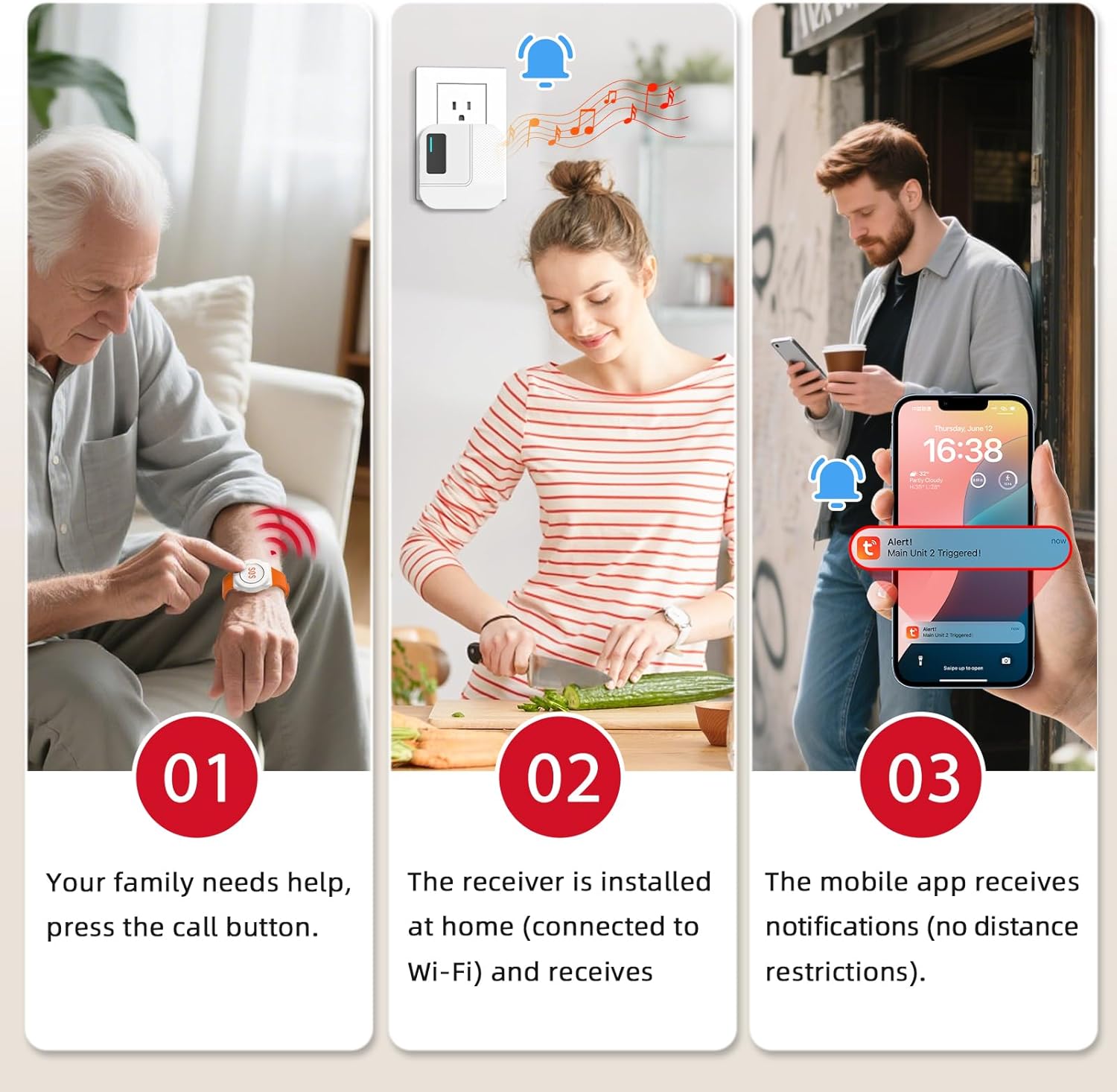
Image: Step-by-step illustration of the system's operation, from pressing the call button to receiving a mobile app notification.
4. Istruzioni per l'uso
4.1. Triggering an Alert
To send an alert, simply press the call button. The receiver will emit a loud alarm with flashing lights, and an instant notification will be sent to your connected mobile app.
4.2. Mobile App Notifications
The mobile app provides real-time alerts when the call button is pressed. These app notifications are free of charge. Ensure your smartphone has an active internet connection to receive alerts.

Image: Illustration of the system's global monitoring capability via the mobile app, showing notifications received regardless of location.
4.3. Sharing Notifications with Family
The Tuya app allows you to share the notification function with multiple family members or caregivers. This ensures that when the call button is pressed, all designated individuals receive the alert message simultaneously. Refer to the app's settings for the sharing function.
4.4. Customizing Ringtones and Button Names
The receiver offers 20 distinct ringtones and 5 adjustable volume levels. Through the mobile app, you can customize the ringtone for each paired call button and assign unique names to them. This feature helps identify the location or individual requesting assistance.

Image: App interface demonstrating how to rename call buttons and select different ringtones for various locations.
5. Subscription Services
While mobile app notifications are free, the system offers optional subscription plans for SMS and phone call notifications. These services provide additional alert methods for enhanced reliability.
| Caratteristica | Notifica APP | Notifiche SMS | Notifiche telefoniche |
|---|---|---|---|
| Free/Subscription | Gratuito | Sottoscrizione | Sottoscrizione |
| Receiver ringtone notif | ✓ | ✓ | ✓ |
| Tuya APP notificatif | ✓ | ✓ | ✓ |
| sms | ✕ | ✓ | Based on subscription plan |
| Telefono | ✕ | Based on subscription plan | ✓ |
| Subscription fees | — | $3.99/30 SMS notif, $9.9/200 SMS notif, $39.9/1 year | $3.99/20 Calls notif, $9.99/100 Calls notif, $19.99/100 Calls notif |
Image: Table detailing the features and costs of free app notifications versus optional SMS and phone call subscription services.
6. Features and Placement
- Gamma estesa: The system operates using 433MHz technology, providing a working range of up to 328 feet (100 meters) in open areas, capable of penetrating walls and doors.
- Design impermeabile: The call buttons feature an IP55 or IP66 waterproof rating, making them suitable for use in bathrooms or other areas where splashes may occur.
- Posizionamento flessibile: Call buttons can be fixed on a wall, worn around the neck with a lanyard, or worn on the wrist like a watch.
- Promemoria batteria scarica: The system includes a low battery reminder feature for the call buttons, ensuring timely battery replacement.

Image: Diagram illustrating the 328ft/100m working range of the system within a typical home environment.

Image: Demonstrates the IP55 waterproof rating and various wearing/mounting options for the call button.

Image: Highlights features of the wrist-worn call button, including comfort, waterproof rating, and low battery alerts.
7. Manutenzione
7.1. Sostituzione della batteria
When the low battery reminder is activated for a call button, replace its battery promptly to ensure continuous operation. Refer to the call button's specific design for battery access and type (e.g., CR2032 coin cell).
7.2. Pulizia
Wipe the receiver and call buttons with a soft, dry cloth. Do not use abrasive cleaners or immerse the receiver in water. For call buttons, ensure the waterproof seal is intact after cleaning or battery replacement.
8. Risoluzione Dei Problemi
- Nessuna notifica dell'app:
- Ensure the receiver is powered on and connected to your 2.4G Wi-Fi network.
- Verifica che il tuo smartphone abbia una connessione Internet attiva.
- Check app notification settings on your phone and within the Tuya app.
- Confirm the call button is properly paired with the receiver.
- Il ricevitore non è allarmante:
- Controllare che il ricevitore sia collegato e acceso.
- Ensure the call button's battery is not depleted.
- Verify the call button is within the operating range of the receiver.
- Re-pair the call button with the receiver if necessary.
- Problemi di connessione Wi-Fi:
- Confirm your Wi-Fi network is 2.4G. The system does not support 5G Wi-Fi.
- Ensure the receiver is close enough to your Wi-Fi router.
- Riavvia il router Wi-Fi e il ricevitore.
- Attempt to re-add the receiver to the app.
9. Specifiche
- Modello: TY01WH-US
- Tecnologia wireless: 433 MHz
- Campo di funzionamento: Fino a 328 piedi/100 m (area aperta)
- Compatibilità Wi-Fi: 2.4G Wi-Fi only (IEEE 802.11b/g/n)
- Potenza del ricevitore: Spina CA
- Call Button Power: Battery (type may vary by button style, typically CR2032)
- Waterproof Rating (Call Button): IP55 / IP66 (depending on button type)
- Il testo: 20 opzioni
- Livelli del volume: 5 livelli regolabili
10. Garanzia e supporto
CallToU provides a lifetime warranty for this caregiver pager system. For any questions, technical assistance, or warranty claims regarding your CallToU caregiver pager, please contact us directly via Amazon's messaging system. Our support team is available to assist you.


