Introduzione
This manual provides detailed instructions for the installation, operation, and maintenance of your WALI Laptop Pole Mount (Model 011ARMLPN). Please read these instructions carefully before use to ensure proper setup and safe operation. This mount is designed to enhance comfort and optimize workspace by elevating your laptop or monitor.
Contenuto della confezione
Verificare che tutti i componenti siano presenti prima di iniziare l'installazione:
- Laptop Pole Mount x 1
- Mounting Holes Plate x 1
- Manuale utente x 1
- Necessary hardware (screws, Allen keys)
Caratteristiche del prodotto
- Compatibilità universale: Fits pole diameters from 1.1" to 2.36" and supports 10"–15.6" laptops (max load 15.4 lbs). Also supports VESA 75x75 or 100x100 mm monitors up to 17.6 lbs.
- Flessibilità di movimento completo: Offers 10.1" arm extension, +45°/-45° tilt, and +/-90° swivel for optimal viewangoli di inclinazione.
- Comfort ergonomico: Elevates your device to eye level to reduce neck, shoulder, and eye strain.
- Design salvaspazio: Frees up desktop space by suspending your laptop or monitor.
- Secure & Stable Hold: Equipped with adjustable heavy-duty clamps for a firm, wobble-free setup.
- Vented Laptop Tray: Features air circulation holes to help dissipate heat from your laptop.
- Gestione dei cavi: Integrated clips help organize and conceal cables for a tidy workspace.

Image: Close-up of the vented laptop tray, highlighting adjustable clips and slip-resistant pads for secure laptop placement and heat dissipation.
Istruzioni di installazione
Follow these steps to assemble and install your WALI Laptop Pole Mount:
Sopraview dei passaggi di installazione

Image: A visual guide to the 3-step installation process: 1. Attach the arm onto the pole. 2. Assemble the VESA plate and the laptop tray. 3. Attach the VESA plate to the arm.
Step 1: Attach the Arm onto the Pole
Secure the mounting arm to your existing pole. Ensure the clamps are tightened firmly to prevent movement. The mount is compatible with pole diameters between 1.1" and 2.36".
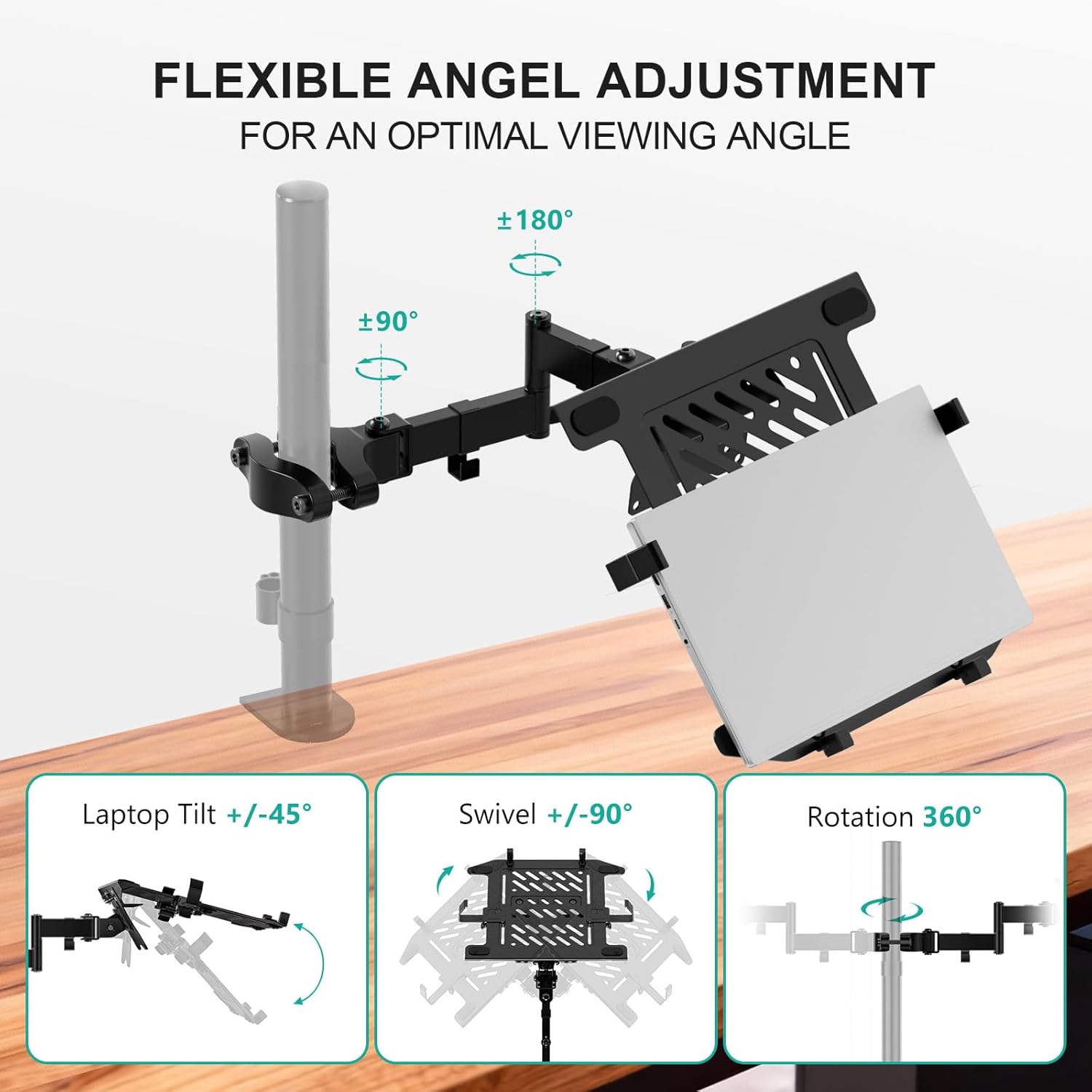
Immagine: dettagliata view of the adjustable clamp, showing M8x55 and M8x70 screws for securing the mount to poles of varying diameters (1.1" to 2.4").
Step 2: Assemble the VESA Plate and Laptop Tray
If using the laptop tray, attach it to the VESA plate using the provided screws. Ensure the tray is securely fastened.
Step 3: Attach the VESA Plate to the Arm
Connect the assembled VESA plate (with or without the laptop tray) to the end of the mounting arm. Secure it with the appropriate hardware. For monitor installation, attach the monitor directly to the VESA plate.
Istruzioni per l'uso
The WALI Laptop Pole Mount offers extensive adjustability for optimal viewing and ergonomic comfort:
- Inclinazione: Adjust the laptop tray or monitor +45° to -45° to reduce glare and find your preferred angle.
- Girevole: Rotate the arm +/-90° to share your screen or reposition your device.
- Rotazione: The entire setup can rotate 360° for landscape or portrait orientation.
- Regolazione dell'altezza: Allentare la clamp on the pole to slide the arm up or down to your desired height, then re-tighten securely.

Image: Illustration demonstrating the flexible angle adjustments: Laptop Tilt +/-45°, Swivel +/-90°, and Rotation 360°.
Manutenzione
To ensure the longevity and optimal performance of your WALI Laptop Pole Mount, follow these maintenance guidelines:
- Pulizia regolare: Pulisci il supporto con un panno morbido eamp stoffa. Evitare detergenti abrasivi che potrebbero danneggiare la finitura.
- Controllare la tenuta: Periodically inspect all screws and clamps to ensure they remain tight. Re-tighten if any looseness is detected to maintain stability.
- Lubrificazione: If any joints become stiff, a small amount of silicone-based lubricant can be applied to moving parts.
Risoluzione dei problemi
If you encounter any issues with your WALI Laptop Pole Mount, refer to the following common solutions:
- Mount is Wobbling:
- Garantire tutti clamps securing the arm to the pole are fully tightened.
- Verify that the VESA plate and laptop tray are securely attached to the arm.
- Check the stability of the pole itself.
- Difficulty Adjusting Position:
- Loosen the adjustment screws slightly before attempting to reposition, then re-tighten once the desired position is achieved.
- Apply a small amount of silicone lubricant to the joints if they are excessively stiff.
- Laptop Slipping from Tray:
- Ensure the adjustable clips on the sides of the tray are properly positioned and secured around your laptop.
- Verify that the slip-resistant pads on the tray are intact and providing adequate grip.
Specifiche
<| Caratteristica | Dettaglio |
|---|---|
| Numero di modello | 011ARMLPN |
| Marca | WALI |
| Laptop Size Compatibility | 10" - 15.6" |
| Laptop Weight Capacity | Fino a 15.4 libbre |
| Compatibilità delle dimensioni del monitor | 17" - 32" |
| Capacità di peso del monitor | Fino a 17.6 libbre |
| Compatibilità VESA | 75x75mm, 100x100mm |
| Pole Diameter Compatibility | 1.1" - 2.36" |
| Estensione del braccio | 10.1" |
| Gamma di inclinazione | +45° / -45° |
| Gamma girevole | +/-90° |
| Rotazione | 360° |
| Colore | Nero |
| Peso dell'articolo | 5.96 libbre |

Image: Diagram illustrating the product dimensions, including pole diameter (1.10"-2.36"), arm extension (4.96" + 3.3" + 3.3"), and laptop tray dimensions (11" x 11.75" with adjustable width 9.5"-16.5").
Garanzia e supporto
WALI products are designed for durability and performance. For any questions, technical assistance, or warranty information, please refer to the contact details provided in your product packaging or visit the official WALI websito. I piani di protezione sono disponibili per l'acquisto separatamente.
For customer support, you may also refer to the information provided by the retailer.