1. Introduzione
The Emerson SmartVoice 4-in-1 Wall Plug (Model ES522) provides convenient, offline voice control for your devices without the need for Wi-Fi, apps, or complex setup. This smart outlet features two AC outlets and two USB-A ports, offering versatile power management for your home or office. Enjoy enhanced privacy and accessibility with local voice command processing.

Image: The Emerson SmartVoice Wall Plug in use, demonstrating its convenience for controlling devices like lamps with simple voice commands. It highlights the 'Hey Emerson, Lights on' command.
2. Informazioni sulla sicurezza
- Solo per uso interno: This device is designed for indoor use in dry locations. Do not expose to water or moisture.
- Valutazione elettrica: Non superare la potenza elettrica nominale di 15 Amps, 125 Volts AC, 1875 Watts. Overloading may cause damage or fire.
- Messa a terra: Assicurarsi che la presa a muro sia correttamente messa a terra.
- Bambini: Tenere fuori dalla portata dei bambini.
- Ventilazione: Do not cover the device or block ventilation openings.
- Smontaggio: Non tentare di smontare o modificare il dispositivo. Per qualsiasi intervento di manutenzione, rivolgersi a personale qualificato.
- ETL elencato: Questo prodotto è certificato ETL, il che ne garantisce la conformità agli standard di sicurezza riconosciuti.
3. Contenuto della confezione
Verifica che il pacco contenga i seguenti articoli:
- Emerson SmartVoice 4-in-1 Wall Plug (Model ES522)
- Manuale dell'utente (questo documento)
- Guida Rapida

Image: The retail packaging for the Emerson SmartVoice Wall Plug, displaying the product and highlighting features like '30+ Voice Commands' and 'No App, No Wi-Fi, No Hub'.
4. Prodotto finitoview
The Emerson SmartVoice Wall Plug is designed for ease of use and functionality. Familiarize yourself with its components:
- Regular Outlet: An always-on AC outlet for devices requiring continuous power.
- SmartVoice Outlet: An AC outlet controlled by voice commands.
- Porte USB-A (x2): For charging USB-compatible devices. These ports are always on.
- Spia luminosa: Fornisce un feedback visivo sullo stato del dispositivo.
- Power/Program Button: Used for manual control and programming wake words.
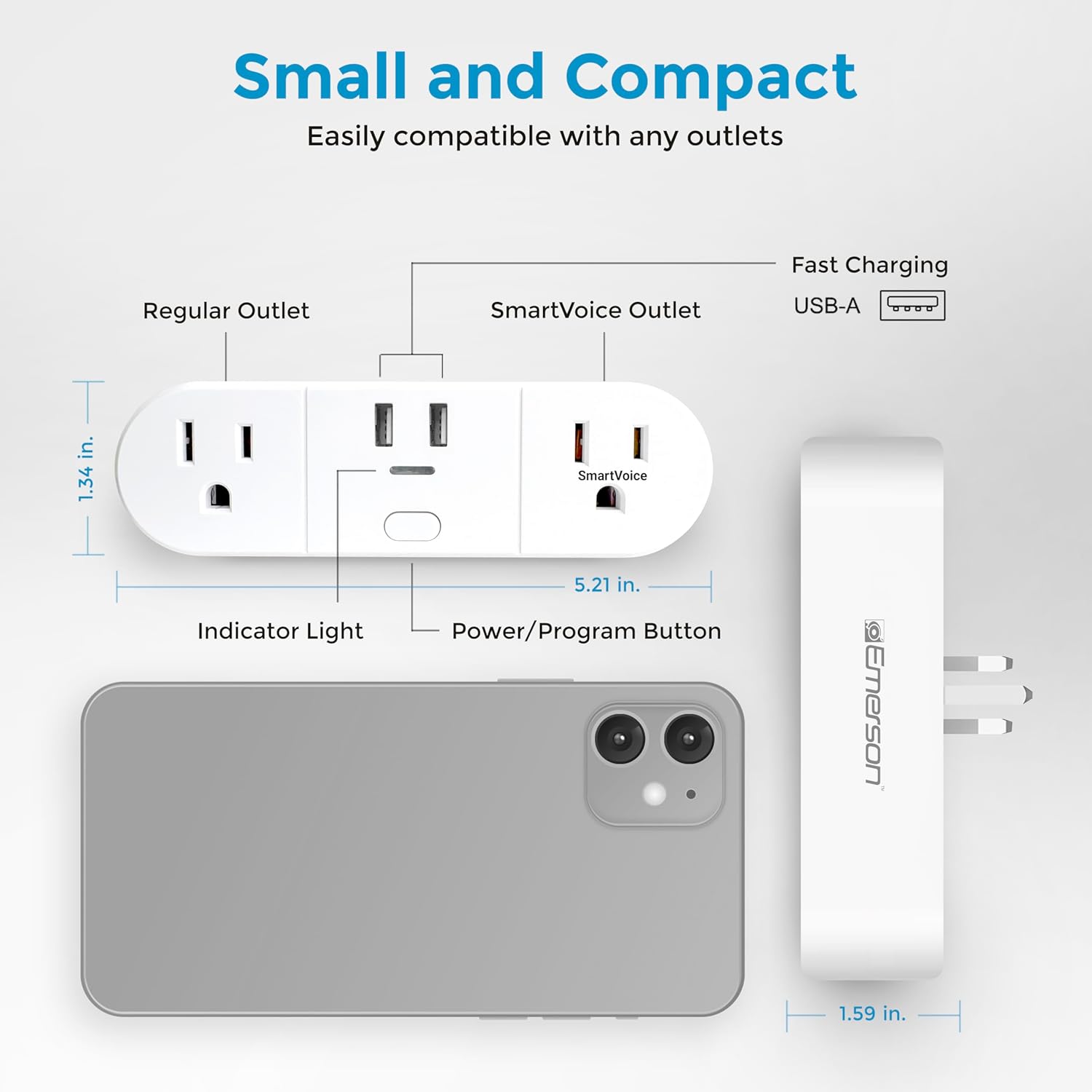
Image: A detailed diagram of the Emerson SmartVoice Wall Plug, highlighting its compact size and labeling each component for easy identification, including the regular outlet, SmartVoice outlet, USB-A ports, indicator light, and power/program button.
5. Impostazione
The Emerson SmartVoice Wall Plug requires no Wi-Fi, app, or complex setup. It works instantly out of the box.
- Collegare: Insert the SmartVoice Wall Plug into a standard 3-prong wall outlet.
- Connetti dispositivi:
- Plug devices you want to control via voice into the SmartVoice Outlet.
- Plug devices requiring continuous power into the Regular Outlet.
- Collegare i dispositivi USB al Porte USB-A per la ricarica.
- Inizia a usare: The device is now ready for voice commands.

Image: The Emerson SmartVoice Wall Plug plugged into a wall, illustrating its use with a floor lamp and a tower fan, showing how it integrates into a living space to control appliances.
6. Istruzioni per l'uso
The SmartVoice Wall Plug responds to over 30 offline voice commands. Ensure you are within a reasonable range for the microphone to pick up your voice clearly.
6.1 Comandi vocali di base
To activate the device, start with the default wake word "Hey Emerson," followed by a command. The SmartVoice Outlet will respond.
- Per attivare: "Hey Emerson, Turn On" or "Hey Emerson, Lights On" or "Hey Emerson, Power On"
- Per spegnere: "Hey Emerson, Turn Off" or "Hey Emerson, Lights Off" or "Hey Emerson, Power Off"

Image: A visual guide to common voice commands for the Emerson SmartVoice Wall Plug, including commands for turning devices on/off and setting timers.
6.2 Sleep & Wake Timers
You can set timers using voice commands for the SmartVoice Outlet.
- Imposta timer di spegnimento: "Hey Emerson, Sleep in [X] hours/minutes" (e.g., "Hey Emerson, Sleep in one hour")
- Set Wake Timer: "Hey Emerson, Wake in [X] hours/minutes" (e.g., "Hey Emerson, Wake in 6 hours")
- Annulla timer: "Hey Emerson, Cancel Timer"
6.3 Customizing Wake Words (Group Control)
The SmartVoice Wall Plug supports up to five different custom wake words, allowing you to control multiple plugs individually or as a group in the same room.
- Entra in modalità di programmazione: Press and hold the Power/Program Button for 5 seconds until the indicator light flashes.
- Speak New Wake Word: Say your desired custom wake word (e.g., "Hey Lamp," "Hey Fan," "Hey Plug 1").
- Confermare: The indicator light will stop flashing and confirm the new wake word.
- Use Custom Wake Word: Now, use your custom wake word followed by a command (e.g., "Hey Lamp, Turn On").
To reset a custom wake word to the default "Hey Emerson," repeat the programming steps and say "Hey Emerson" as the new wake word.
7. Manutenzione
To ensure optimal performance and longevity of your Emerson SmartVoice Wall Plug:
- Pulizia: Disconnect the plug from the wall outlet before cleaning. Wipe with a dry, soft cloth. Do not use liquid cleaners or aerosols.
- Magazzinaggio: Quando non in uso, conservare in un luogo fresco e asciutto, lontano dalla luce solare diretta e da temperature estreme.
- Ispezione: Periodically inspect the plug and connected cords for any signs of damage. Discontinue use if damage is observed.
8. Risoluzione Dei Problemi
If you encounter issues with your SmartVoice Wall Plug, refer to the following common solutions:
| Problema | Possibile causa | Soluzione |
|---|---|---|
| Device does not respond to voice commands. | Microphone not picking up voice; incorrect wake word or command; device not powered. | Speak clearly and closer to the device. Ensure you are using the correct wake word and command. Check if the plug is securely inserted into the wall outlet. |
| SmartVoice Outlet does not turn on/off. | Device connected to the Regular Outlet; power outage; apparecchio difettoso. | Ensure the appliance is plugged into the SmartVoice Outlet. Check your home's circuit breaker. Test the appliance in a different outlet. |
| La funzione timer non funziona. | Incorrect timer command; timer already active. | Ensure the timer command is spoken correctly (e.g., "Sleep in 1 hour"). Try saying "Cancel Timer" before setting a new one. |
| La spia è spenta. | Nessuna corrente alla presa. | Check the wall outlet and your home's circuit breaker. |
9. Specifiche
- Modello: ES522
- Ingresso volumetage: 125 V CA
- Corrente massima: 15 Amps
- Potenza massima: 1875 Watt
- Uscita USB: 5V DC, 2.4A (shared)
- Punti vendita: 2 AC outlets (1 voice-controlled, 1 always-on), 2 USB-A ports (always-on)
- Dimensioni: 5.21"P x 1.34"L x 1.59"A
- Peso: 8.1 once
- Materiale: Plastica, gomma
- Certificazioni: ETL quotato
- Ambiente operativo: Solo per uso interno

Image: A visual summary of the Emerson SmartVoice Wall Plug's features and specifications, including its offline voice control, multiple wake word support, USB-A ports, dual outlets, 15A rating, and ETL certification.
10. Garanzia e supporto
For warranty information and customer support, please refer to the documentation included with your product or visit the official Emerson Smart websito.
Pagina ufficiale del prodotto: https://emersonsmart.com/products/emerson-smartvoice-wall-plug-es521
If you require further assistance, please contact Emerson customer service through their websito.