1. Introduzione
The Coleman Compact Panel Light is a versatile, multi-functional lighting solution designed for various outdoor and indoor applications. Its compact design and remote control capability offer convenience and adaptability. This manual provides essential information for the safe and effective use of your device.

Figure 1: Coleman Compact Panel Light in its closed, compact form.
2. Contenuto della confezione
Verifica che tutti gli articoli elencati di seguito siano inclusi nel tuo pacchetto:
- Coleman Compact Panel Light Unit
- Cavo di ricarica USB di tipo C.
- Controllo remoto senza fili
3. Configurazione e ricarica iniziale
3.1 Carica iniziale
Before first use, fully charge the Coleman Compact Panel Light. Use the provided USB Type-C cable to connect the light to a compatible USB power source (e.g., wall adapter, computer USB port, power bank).
- Locate the USB Type-C charging port on the light unit.
- Insert the USB Type-C cable into the light's port.
- Collegare l'altra estremità del cavo a una fonte di alimentazione USB.
- The charging indicator light will illuminate during charging and typically change color or turn off when fully charged. Refer to the indicator status for your specific model.
A full charge ensures optimal performance and battery life.

Figure 2: The Coleman Compact Panel Light connected via USB Type-C cable for charging.
4. Istruzioni per l'uso
4.1 Powering On/Off and Light Modes
The light can be operated using the integrated buttons on the unit or the wireless remote control.
- Pulsante di accensione: Press and hold the power button on the unit or the remote to turn the light ON or OFF.
- Regolazione della luminosità: Short press the '+' or '-' buttons on the unit or remote to cycle through different brightness levels.
- Modalità luce: The light may feature multiple modes (e.g., full panel illumination, spotlight, ambient). Press the mode button (often indicated by a light bulb icon) on the unit or remote to switch between available modes.
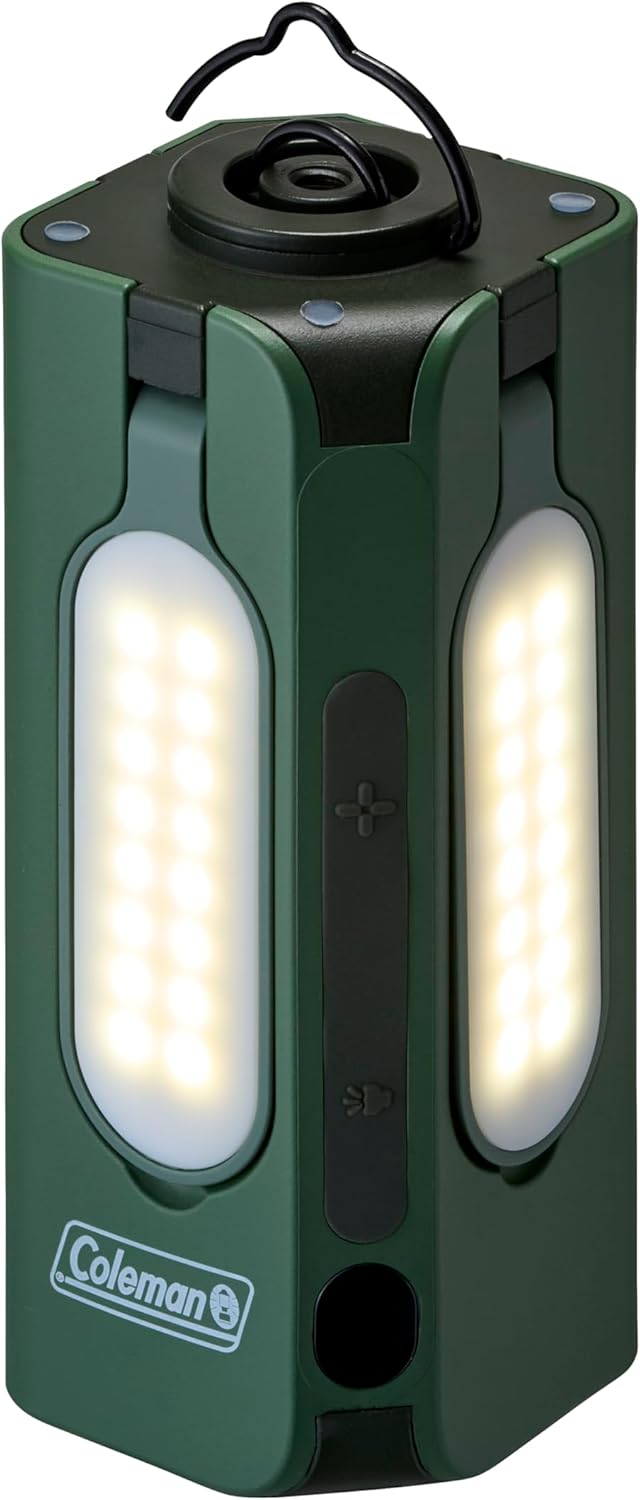
Figure 3: Closed panels with lights illuminated.

Figure 4: Focused spotlight function.
4.2 Deploying Light Panels
The Compact Panel Light features multiple adjustable panels for broader illumination.
- Gently pull each panel outwards from the main unit.
- Adjust the angle of each panel to direct light as needed.
- To retract, gently push each panel back into its original position until it clicks securely.

Figure 5: Panels extended for wide area lighting.

Figure 6: Illumination in a dark environment with panels extended.
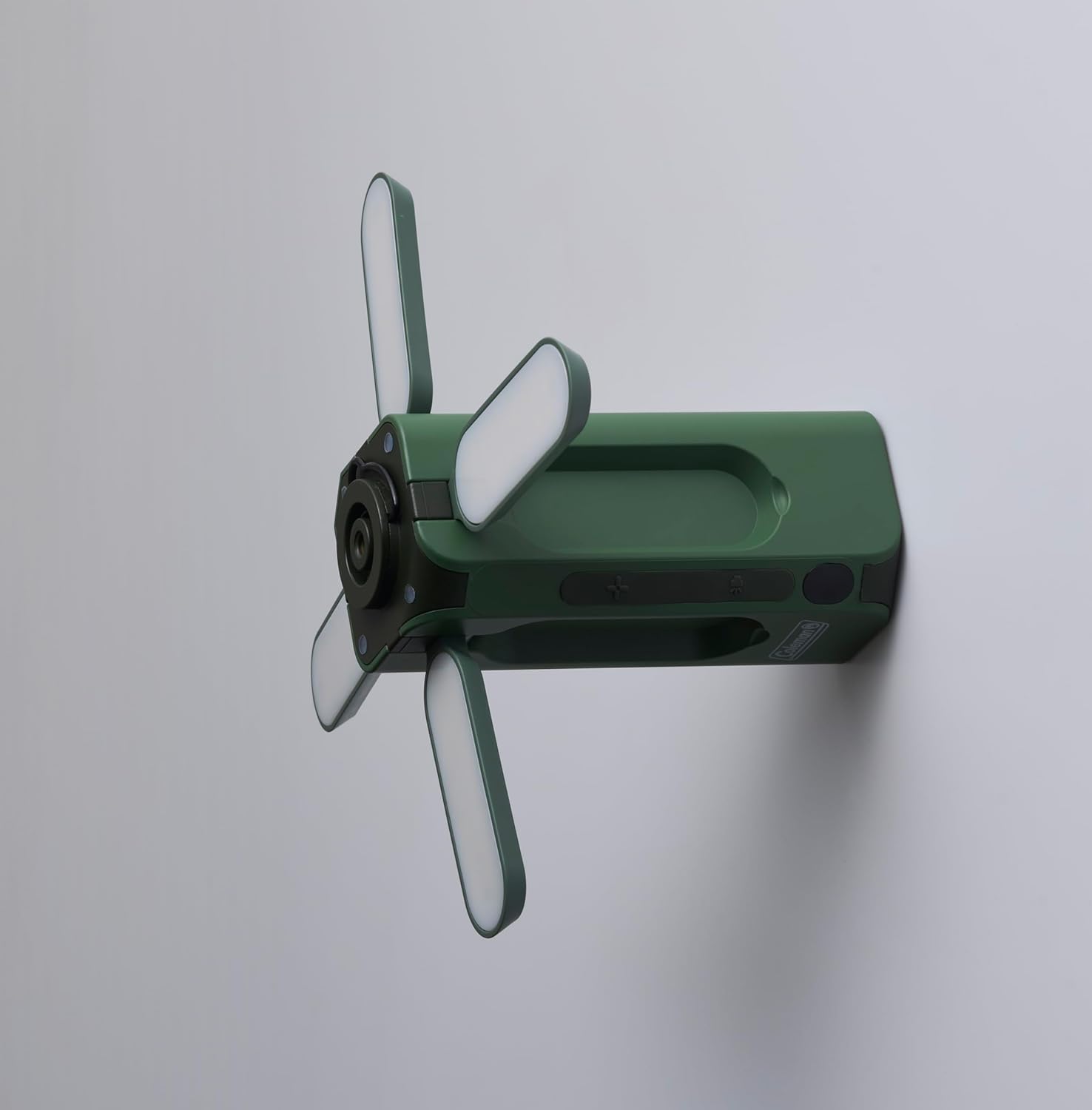
Figura 7: lato view with panels extended, illustrating mounting versatility.
5. Utilizzo del telecomando wireless
Il telecomando wireless incluso consente un comodo utilizzo a distanza.
- Pulsante di accensione: Premere per accendere o spegnere la luce.
- Pulsanti luminosità (+/-): Regola l'intensità della luce.
- Pulsante Modalità: Cycle through different lighting modes (if applicable).
Ensure the remote control has working batteries (if applicable, check battery compartment for type) and is within operational range of the light unit.

Figure 8: Coleman Compact Panel Light with its wireless remote control.
6. Manutenzione
6.1 Pulizia
Per pulire la luce, pulirla con un panno morbido, damp cloth. Do not use abrasive cleaners or solvents, as these may damage the finish or electronic components. Ensure the charging port cover is securely closed before cleaning.
6.2 Conservazione
When storing the light for extended periods, ensure it is fully charged. Store in a cool, dry place away from direct sunlight and extreme temperatures. Recharge the unit every 3-6 months to maintain battery health.
7. Risoluzione Dei Problemi
- La luce non si accende:
- Assicurarsi che l'unità sia completamente carica.
- Verificare che il pulsante di accensione sia premuto correttamente.
- Telecomando non funzionante:
- Check if the remote's batteries need replacement (if applicable).
- Assicurarsi che non vi siano ostacoli tra il telecomando e l'unità luminosa.
- Confirm the remote is within operational range.
- La luce è fioca o tremolante:
- The battery level may be low; recharge the unit.
- Ensure the light panels are fully extended and clean.
8. Specifiche
| Modello | Compact Panel Light |
| Marca | Coleman |
| Dimensioni (chiuso) | 5P x 5L x 12.5A centimetri |
| Peso dell'articolo | 700 grammi |
| Colore | Verde |
| Fonte di alimentazione | Ricaricabile (USB Type-C) |
| Componenti inclusi | USB Type-C Cable, Wireless Remote Control |
| Assemblaggio richiesto | NO |
9. Informazioni sulla sicurezza
- Non esporre la lampada a temperature estreme, alla luce solare diretta per periodi prolungati o a fiamme libere.
- Evitare di immergere la luce nell'acqua.
- Do not attempt to disassemble or modify the light unit, as this may void the warranty and pose safety risks.
- Tenere fuori dalla portata dei bambini.
- Per la ricarica utilizzare solo il cavo USB Type-C in dotazione o un cavo USB Type-C certificato.
10. Garanzia e supporto
For warranty information or technical support, please refer to the documentation provided with your purchase or visit the official Coleman websito. Conservare la prova d'acquisto per eventuali reclami in garanzia.


