Introduzione
Thank you for choosing Monster Open Ear AC225 Headphones. These wireless earbuds are designed for comfort, high-quality audio, and clear communication, featuring an open-ear design for situational awareness. This manual provides essential information for setting up, operating, and maintaining your headphones.
Cosa c'è nella scatola
- Monster Open Ear AC225 Headphones (Left and Right Earbuds)
- Custodia di ricarica
- Manuale d'uso
Prodotto finitoview
The Monster Open Ear AC225 Headphones feature a unique clip-on design for comfort and stability, allowing you to stay aware of your surroundings while enjoying audio. The earbuds are lightweight, weighing only 5.1g each, and come with a compact charging case.
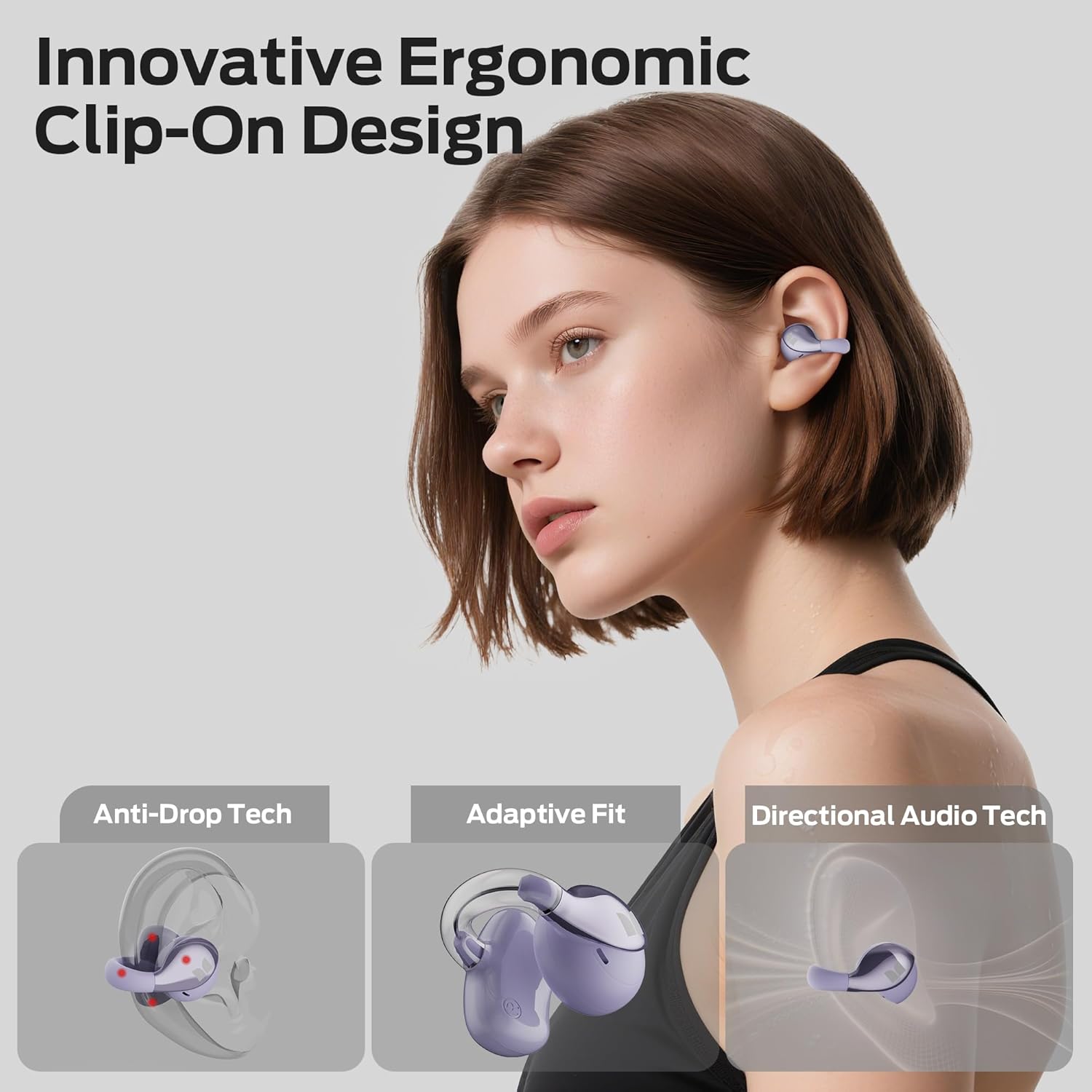
Image: Monster Open Ear AC225 Headphones inside their charging case.

Image: Diagram illustrating the innovative ergonomic clip-on design, anti-drop technology, adaptive fit, and directional audio technology of the earbuds.
Impostare
1. Carica delle cuffie
Before first use, fully charge the headphones and the charging case. Place the earbuds into the charging case. Connect the charging case to a power source using a compatible USB cable (not included). The indicator lights on the case will show the charging status.
A single charge provides approximately 8 hours of playtime. The charging case extends total playtime to up to 36 hours.

Image: Visual representation of the charging case and the 8 hours of single charge playtime, extending to 36 hours with the case.
2. Accoppiamento Bluetooth
- Assicurati che gli auricolari siano carichi.
- Open the charging case. The earbuds will automatically enter pairing mode, indicated by a flashing light (refer to product for specific light indicators).
- Sul tuo dispositivo (smartphone, tablet, laptop), attiva il Bluetooth.
- Cercare available Bluetooth devices and select "Monster AC225" (or similar name) from the list.
- Once connected, the earbuds will indicate successful pairing (e.g., a steady light or voice prompt).
The headphones utilize advanced Bluetooth 6.0 technology for a stable and low-latency connection.

Image: Internal diagram highlighting the Bluetooth 6.0 chip for stable and lag-free connection.
Istruzioni per l'uso
Controlli touch
The Monster Open Ear AC225 Headphones feature intuitive touch controls on each earbud for managing audio playback, calls, and voice assistants.

Image: Visual guide to touch controls, including gestures for answering/ending calls, rejecting calls, voice assistant, volume adjustment, play/pause, and track navigation.
- Riproduci/Pausa: Tocca due volte uno degli auricolari.
- Prossima canzone: Tocca tre volte l'auricolare destro.
- Canzone precedente: Tocca tre volte l'auricolare sinistro.
- Aumenta volume: Tocca una volta l'auricolare destro.
- Volume basso: Tocca una volta l'auricolare sinistro.
- Rispondi/Termina chiamata: Tocca due volte uno degli auricolari.
- Rifiuta chiamata: Tieni premuto uno degli auricolari per 2 secondi.
- Attiva l'assistente vocale: Tenere premuto uno dei due auricolari per 2 secondi (quando non si è impegnati in una chiamata).
Qualità audio e consapevolezza
The 13mm dynamic drivers with dual-composite diaphragms deliver deep bass and clear highs for an immersive listening experience. The open-ear design allows you to hear your surroundings, enhancing safety during outdoor activities.

Immagine: dettagliata view of the 13mm dynamic driver, illustrating its components for powerful bass and clear sound.

Image: A person wearing the open-ear headphones, highlighting the ability to hear ambient sounds for safety.
Clear Calls with ENC Mic
The built-in ENC (Environmental Noise Cancellation) microphone reduces background noise, ensuring crystal-clear calls even in noisy environments.

Image: Diagram showing how the ENC mic enhances voice clarity and reduces background noise during calls.
Manutenzione
- Pulizia: Utilizzare un panno morbido e asciutto per pulire gli auricolari e la custodia di ricarica. Non utilizzare detergenti abrasivi o solventi.
- Magazzinaggio: Quando non le usi, conserva le cuffie nella custodia di ricarica per proteggerle e mantenerle cariche.
- Resistenza all'acqua: The headphones are IPX6 waterproof, meaning they are resistant to sweat and splashes. Do not submerge them in water. Ensure they are dry before placing them back in the charging case.

Image: The earbuds shown with water droplets, indicating their IPX6 waterproof rating for protection against sweat and rain.
Risoluzione dei problemi
Nessun suono o connessione intermittente
- Assicurati che entrambi gli auricolari siano carichi.
- Verifica che il Bluetooth sia abilitato sul tuo dispositivo e che le cuffie siano associate.
- Avvicinati al dispositivo per evitare interferenze.
- Prova a disaccoppiare e riassociare le cuffie al tuo dispositivo.
Gli auricolari non si caricano
- Assicurarsi che il cavo di ricarica sia collegato saldamente sia alla custodia sia alla fonte di alimentazione.
- Controllare che i contatti di ricarica sugli auricolari e all'interno della custodia siano puliti e privi di detriti.
- Prova un cavo di ricarica o un adattatore di alimentazione diverso.
Problemi di qualità della chiamata
- Assicurarsi che il microfono non sia ostruito.
- Move to a quieter environment if background noise is excessive.
- Controlla le impostazioni del volume delle chiamate del tuo dispositivo.
Specifiche
| Marca | Mostro |
| Nome del modello | AC225 (E106) |
| Tecnologia di connettività | Wireless (Bluetooth) |
| Versione Bluetooth | 6.0 |
| Posizionamento dell'orecchio | Orecchio aperto |
| Fattore di forma | Orecchio aperto |
| Tipo di driver audio | Driver dinamico (13 mm) |
| Caratteristiche di controllo del rumore | Cancellazione del rumore ambientale (ENC) |
| Livello di resistenza all'acqua | IPX6 impermeabile |
| Metodo di controllo | Tocco |
| Tempo di riproduzione (carica singola) | Fino a 8 ore |
| Tempo di riproduzione totale (con custodia di ricarica) | Fino a 36 ore |
| Peso degli auricolari | 5.1 g (ciascuno) |
| Materiale | Plastica |
Garanzia e supporto
Monster products are designed and manufactured to the highest quality standards. For information regarding warranty coverage, technical support, or service inquiries, please refer to the warranty card included with your product or visit the official Monster websito.
Conservare la prova d'acquisto per eventuali richieste di garanzia.


