1. Introduzione
Thank you for choosing the GOBOULT Z40 V2.0 True Wireless Earbuds. These earbuds are designed to provide a high-quality audio experience with features such as extended playtime, clear call quality, and low-latency gaming. This manual provides instructions for setup, operation, maintenance, and troubleshooting to ensure optimal use of your device.

Image 1.1: GOBOULT Z40 V2.0 True Wireless Earbuds and Charging Case.
2. Prodotto finitoview
2.1 Componenti inclusi
Il pacchetto include i seguenti articoli:
- GOBOULT Z40 V2.0 Earbuds
- Custodia di ricarica
- Cavo di ricarica USB
- Punte auricolari (varie misure)
- Manuale d'uso
- Scheda di garanzia
2.2 Caratteristiche principali
- Fino a 70 ore di riproduzione totale
- Quad Mic Environmental Noise Cancellation (ENC) for clear calls
- 13mm Bass Drivers for enhanced audio
- 45ms Low Latency Gaming Mode
- Bluetooth v5.4 for stable connectivity
- Resistenza all'acqua IPX5
- Smart Touch Controls with Voice Assistant support
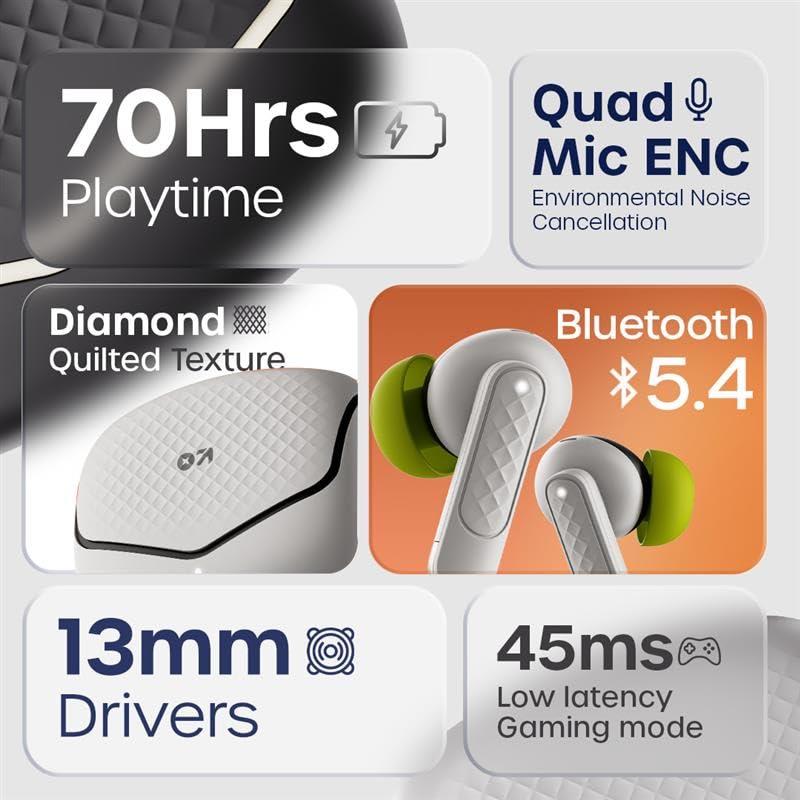
Immagine 2.1: Passoview of GOBOULT Z40 V2.0 key features.
3. Istruzioni per l'installazione
3.1 Ricarica degli auricolari e della custodia
Prima del primo utilizzo, caricare completamente gli auricolari e la custodia di ricarica.
- Riporre gli auricolari nella custodia di ricarica.
- Collegare il cavo di ricarica USB alla porta di ricarica sulla custodia e a una fonte di alimentazione.
- La spia luminosa sulla custodia indicherà lo stato di carica.
- A 10-minute charge provides approximately 120 minutes of playtime. The case offers up to 70 hours of total battery life for the earbuds.

Image 3.1: Charging and battery life details.
3.2 Associazione Bluetooth
The GOBOULT Z40 V2.0 earbuds utilize Bluetooth v5.4 for quick and reliable pairing.
- Open the charging case. The earbuds will automatically enter pairing mode (Blink&Pair™ Tech).
- Sul tuo dispositivo (smartphone, tablet, laptop), attiva il Bluetooth.
- Cercare available Bluetooth devices and select "GOBOULT Z40 V2.0" from the list.
- Una volta connessi, gli auricolari indicheranno l'avvenuta associazione.
- Una volta rimossi dalla custodia, gli auricolari si riconnetteranno automaticamente all'ultimo dispositivo associato.

Image 3.2: Bluetooth 5.4 and Blink&Pair™ technology.
4. Istruzioni per l'uso
4.1 Comandi touch
The earbuds feature intuitive touch controls for managing various functions:
- Riproduci/Pausa: Un solo tocco su uno degli auricolari.
- Traccia successiva: Tocca due volte l'auricolare destro.
- Traccia precedente: Tocca due volte l'auricolare sinistro.
- Rispondi/Termina chiamata: Un solo tocco su uno degli auricolari.
- Rifiuta chiamata: Tieni premuto uno degli auricolari per 2 secondi.
- Attiva l'assistente vocale: Tocca tre volte uno degli auricolari.
- Attiva/disattiva la modalità di gioco: Press and hold the right earbud for 2 seconds (specific gesture may vary, refer to quick start guide).

Image 4.1: Hands-free control and voice assistant activation.
4.2 Effettuare e ricevere chiamate
The Quad Mic ENC system ensures clear voice transmission during calls by reducing environmental noise.
- Ensure earbuds are connected to your device.
- Utilizza i comandi touch per rispondere, terminare o rifiutare le chiamate.

Image 4.2: Quad Mic ENC for clear calls.
4.3 Modalità di gioco
Activate Combat™ Gaming Mode for a low-latency audio experience, ideal for gaming and video playback.
- Refer to the touch control section for activating Gaming Mode (typically a press and hold gesture).
- This mode reduces audio latency to 45ms, providing synchronized sound with on-screen action.

Image 4.3: Low Latency Gaming Mode.
5. Manutenzione
5.1 Pulizia
Una pulizia regolare aiuta a mantenere le prestazioni e la longevità degli auricolari.
- Per pulire gli auricolari e la custodia di ricarica, utilizzare un panno morbido, asciutto e privo di lanugine.
- Rimuovere delicatamente eventuali residui di cerume o detriti dagli auricolari e dalla rete dell'altoparlante utilizzando uno spazzolino o un cotton fioc.
- Evitare l'uso di materiali abrasivi, alcol o detergenti chimici.
5.2 Resistenza all'acqua (IPX5)
The earbuds are rated IPX5 water-resistant, meaning they can withstand sweat and light splashes.
- Non immergere gli auricolari in acqua.
- Avoid exposing them to heavy rain or strong water jets.
- Per evitare danni, assicurarsi che gli auricolari siano asciutti prima di riporli nella custodia di ricarica.
Immagine 5.1: Resistenza all'acqua IPX5.
6. Risoluzione Dei Problemi
If you encounter any issues with your GOBOULT Z40 V2.0 earbuds, please refer to the following common solutions:
- Nessun suono: Ensure the earbuds are charged and properly paired with your device. Check the volume level on both the earbuds and your device.
- Problemi di accoppiamento: Assicurati che il Bluetooth sia attivato sul tuo dispositivo e che gli auricolari siano in modalità di associazione. Prova a disaccoppiare e riassociare gli auricolari.
- Connessione intermittente: Assicurati di trovarti entro un raggio di 10 metri dal segnale Bluetooth. Evita ostacoli tra gli auricolari e il dispositivo.
- Problemi di ricarica: Verificare che il cavo di ricarica sia collegato saldamente e che la fonte di alimentazione sia attiva. Pulire i contatti di ricarica sia sugli auricolari che sulla custodia.
- Microfono non funzionante: Ensure the earbuds are properly seated in your ears. Check if any debris is blocking the microphone ports.
If the problem persists, please contact GOBOULT customer support for further assistance.
7. Specifiche
Detailed technical specifications for the GOBOULT Z40 V2.0 True Wireless Earbuds:
| Caratteristica | Specificazione |
|---|---|
| Nome del modello | Z40 V2.0 (Airbass Earbuds) |
| Tecnologia di connettività | Wireless (Bluetooth) |
| Versione Bluetooth | 5.4 |
| Portata Bluetooth | 10 metri |
| Dimensioni del driver audio | 13 millimetri |
| Tipo di driver audio | Driver dinamico |
| Risposta in frequenza | Frequenza 20 Hz |
| Sensibilità | 115 dB |
| Durata della batteria (auricolari) | Fino a 70 ore (con custodia di ricarica) |
| Tempo di ricarica | 10 Minutes for 120 minutes playtime |
| Microfono | Quad Mic with ENC |
| Latenza audio | 45 millisecondi (modalità di gioco) |
| Resistenza all'acqua | Grado di protezione IPX5 |
| Tipo di controllore | Tocco |
| Interfaccia Hardware | USB tipo C |
| Posizionamento dell'orecchio | Nell'orecchio |
| Dimensioni del prodotto | Dimensioni: 5.8 x 4 x 4.9 cm |
| Peso dell'articolo | 600 g (peso totale della confezione) |

Image 7.1: 13mm Bass Drivers for enhanced audio.
8. Garanzia e supporto
8.1 Garanzia del produttore
The GOBOULT Z40 V2.0 True Wireless Earbuds come with a 1-year manufacturer’s warranty. This warranty covers manufacturing defects and ensures product quality and durability.
8.2 Assistenza clienti
For any product-related queries, technical assistance, or warranty claims, please contact GOBOULT customer support. Refer to the warranty card included in your package for contact details or visit the official GOBOULT websito.