Introduzione
This manual provides detailed instructions for the use and maintenance of your GOBOULT Raven True Wireless Stereo (TWS) Earbuds. Please read this manual thoroughly before using the product to ensure proper operation and to maximize your listening experience.

Immagine: Oltreview of GOBOULT Raven TWS Earbuds showcasing main features like 70 hours playtime, app support, dual device pairing, 10mm drivers, quad mic environmental noise cancellation, and available color options.
Cosa c'è nella scatola
Your GOBOULT Raven TWS Earbuds package includes the following items:
- GOBOULT Raven TWS Earbuds (Left and Right)
- Custodia di ricarica
- Cavo di ricarica USB
- Diverse misure di gommini auricolari
- Manuale dell'utente (questo documento)
- Scheda di garanzia
Prodotto finitoview
The GOBOULT Raven TWS Earbuds are designed for comfort and high-quality audio. Familiarize yourself with the components:
- Earbuds: Left (L) and Right (R) earbuds with touch control areas and microphones.
- Custodia di ricarica: Stores and charges the earbuds. Features a USB Type-C charging port.
- Indicatori LED: On both earbuds and the charging case, indicating battery status, charging, and pairing mode.
- Microfoni: Quad microphones for Environmental Noise Cancellation (ENC) during calls.

Immagine: dettagliata view of the GOBOULT Raven earbuds and their charging case, showcasing the satin metal finish and exquisite pearl body design.
Impostare
1. Ricarica iniziale
Prima del primo utilizzo, caricare completamente gli auricolari e la custodia di ricarica.
- Posiziona entrambi gli auricolari nella custodia di ricarica.
- Collegare il cavo di ricarica USB Type-C alla porta di ricarica sulla custodia e a una fonte di alimentazione.
- L'indicatore LED sulla custodia mostrerà lo stato di carica. Una volta completata la carica, l'indicatore cambierà colore o si spegnerà.
A 10-minute charge provides approximately 120 minutes of playtime.

Image: The GOBOULT Raven earbuds being charged in their case, highlighting the impressive 70-hour total battery life and the quick charge capability (10 mins charge for 120 mins playtime).
2. Associazione con un dispositivo
The earbuds use Bluetooth 5.4 for stable and quick connections.
- Open the charging case. The earbuds will automatically enter pairing mode (LED indicators will flash).
- Sul tuo dispositivo (smartphone, tablet, laptop), attiva il Bluetooth.
- Cercare "GOBOULT Raven" in the list of available Bluetooth devices and select it to connect.
- Una volta effettuata la connessione, gli indicatori LED sugli auricolari smetteranno di lampeggiare.
The earbuds feature Blink&Pair™ technology for instant pairing after the initial setup.

Image: The GOBOULT Raven earbuds and case, emphasizing the upgraded Bluetooth v5.4 for instant pairing and reliable connection, along with support for SBC and AAC audio codecs.
3. GOBOULT App Installation
For enhanced customization and control, download the GOBOULT App from your device's app store.
- Cercare "GOBOULT" in the App Store (iOS) or Google Play Store (Android).
- Install the app and follow the on-screen instructions to connect your Raven earbuds.
- The app allows you to customize sound profiles (EQ modes), control features, and manage touch controls.

Image: A smartphone screen displaying the GOBOULT Amp APP, illustrating features like equalizer customization, custom touch controls, gaming mode activation, and widget support for a personalized audio experience.
Istruzioni per l'uso
Controlli touch
The GOBOULT Raven earbuds feature intuitive touch controls on each earbud. The specific functions can often be customized via the GOBOULT App.
| Azione | Funzione |
|---|---|
| Tocco singolo (S/D) | Riproduci/Metti in pausa la musica, Rispondi/Termina chiamata |
| Doppio tocco (L) | Traccia precedente |
| Doppio tocco (R) | Traccia successiva |
| Triplo tocco (S/D) | Attiva l'Assistente Vocale |
| Pressione lunga (S/D) | Reject Call, Toggle Gaming Mode (customizable) |
Note: These are typical touch control functions. Refer to the GOBOULT App for exact and customizable controls.
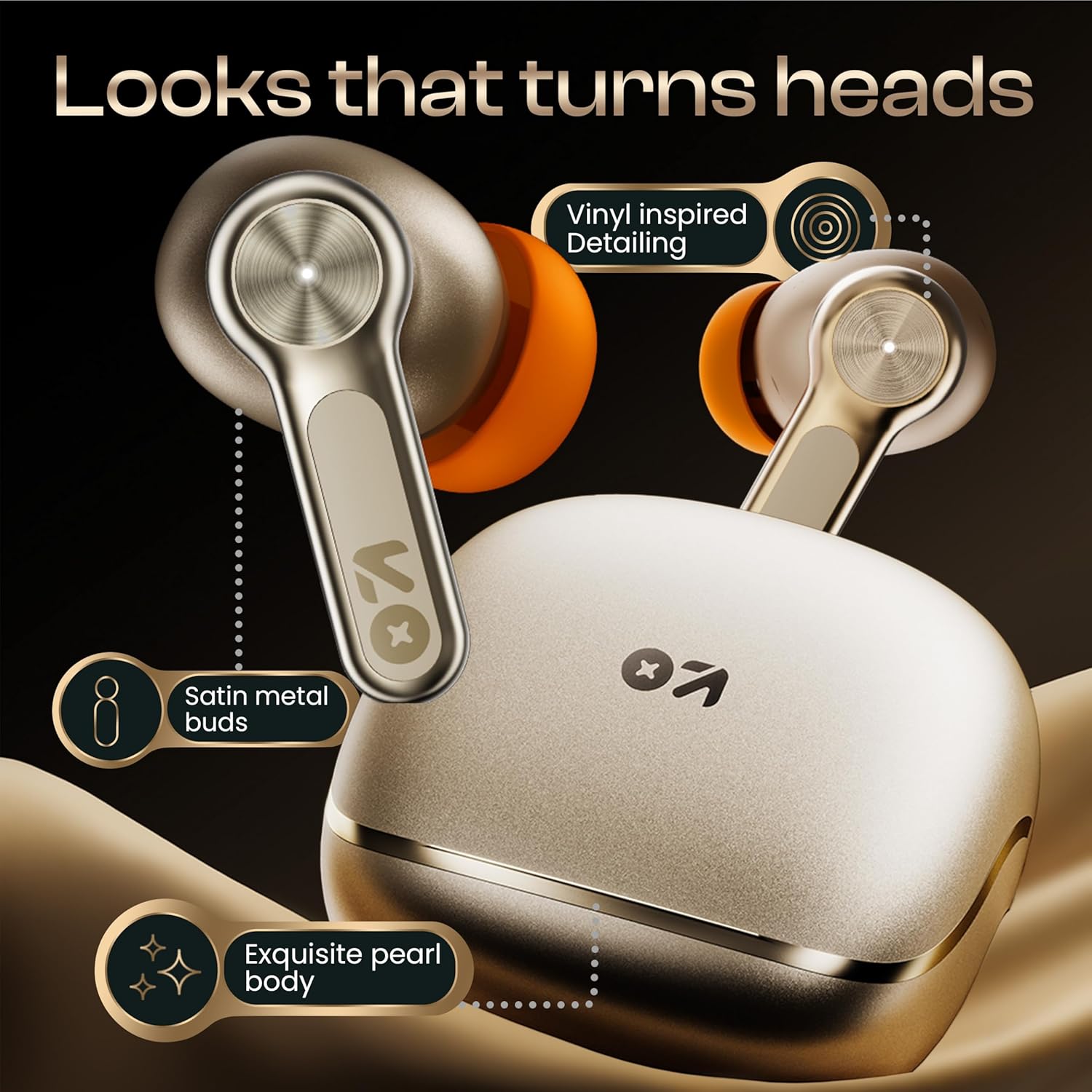
Immagine: Un dettaglio view of the GOBOULT Raven earbud's touch-sensitive surface, indicating areas for music playback control and call management.
Accoppiamento a due dispositivi
The earbuds can connect to two devices simultaneously, allowing seamless switching between them.
- Pair the earbuds with your first device (e.g., smartphone) as described in the "Pairing with a Device" section.
- Disconnect Bluetooth on the first device or put the earbuds back in the case and close it, then open it again to re-enter pairing mode.
- Associa gli auricolari al tuo secondo dispositivo (ad esempio, un laptop).
- Reconnect the earbuds to the first device via its Bluetooth settings. The earbuds should now be connected to both.
L'audio passerà automaticamente al dispositivo che riproduce contenuti o riceve una chiamata.

Image: The GOBOULT Raven earbuds and their case positioned between a smartphone and a laptop, demonstrating the dual device pairing feature for seamless switching between audio sources.
Modalità di gioco (latenza ultra bassa)
Activate Gaming Mode for a 50ms ultra-low latency experience, ideal for gaming and video playback.
- Gaming Mode can typically be activated via a specific touch control gesture (refer to your GOBOULT App settings or the table above).
- You can also enable/disable Gaming Mode through the GOBOULT App.

Image: The GOBOULT Raven earbuds and their charging case next to a gaming controller, emphasizing the Combat™ Gaming Mode with 50ms ultra-low latency for an optimized gaming experience.
Assistente vocale
Access your device's voice assistant (Google Assistant, Siri) directly from the earbuds.
- Perform the designated touch control gesture (e.g., triple tap) to activate the voice assistant.
- Pronuncia il comando dopo il prompt.

Image: A composite image illustrating the Smart AI Voice Assistance feature, showing integration with "Ok Google" and "Hey Siri", alongside the IPX5 water-resistant rating of the earbuds.
Manutenzione
Pulizia
- Pulisci regolarmente gli auricolari e la custodia di ricarica con un panno morbido, asciutto e privo di lanugine.
- Rimuovere i gommini auricolari e pulire eventuali residui di cerume o detriti dagli ugelli degli auricolari utilizzando uno spazzolino o un cotton fioc.
- Assicurarsi che i contatti di ricarica degli auricolari e della custodia siano puliti e asciutti.
Resistenza all'acqua (IPX5)
The GOBOULT Raven earbuds are IPX5 water-resistant, meaning they can withstand sweat and light rain. They are not designed for submersion in water.
- Do not expose the earbuds to running water or submerge them.
- Se si bagnano, asciugarli accuratamente prima di riporli nella custodia di ricarica.
Magazzinaggio
Conserva gli auricolari nella custodia di ricarica quando non vengono utilizzati per proteggerli e mantenerli carichi.
- Evitare di conservare in luoghi con temperature estreme o elevata umidità.
Risoluzione dei problemi
| Problema | Possibile soluzione |
|---|---|
| Gli auricolari non si accoppiano |
|
| Un solo auricolare funzionante |
|
| Scarsa qualità del suono |
|
| Problemi di ricarica |
|
Specifiche
| Caratteristica | Dettaglio |
|---|---|
| Nome del modello | Raven (Airbass Earbuds) |
| Connettività | Bluetooth v5.4 |
| wireless Range | Fino a 10 metri |
| Driver audio | Driver dinamici da 10 mm |
| Tempo di gioco | Fino a 70 ore (con custodia di ricarica) |
| Tempo di ricarica | Approx. 20 minutes (for quick charge) |
| Latenza audio | 50ms (Gaming Mode) / 45ms (as per spec) |
| Microfoni | Microfono quadruplo con cancellazione del rumore ambientale (ENC) |
| Resistenza all'acqua | Grado di protezione IPX5 |
| Metodo di controllo | Tocco, Voce |
| Caratteristiche speciali | Dual Device Pairing, GOBOULT App Support, Smart AI Voice Assistance |
| Risposta in frequenza | 20 Hz (lower bound) |
| Sensibilità | 115 dB |
| Interfaccia Hardware | USB tipo C |
| Dimensioni del prodotto | Dimensioni: 5 x 4.5 x 5.4 cm |
| Peso dell'articolo | 600 g (peso della confezione) |
Nota: le specifiche sono soggette a modifiche senza preavviso.
Garanzia e supporto
Informazioni sulla garanzia
Your GOBOULT Raven TWS Earbuds come with a Garanzia del produttore di 1 anno from the date of purchase. This warranty covers manufacturing defects and ensures trusted performance and premium build quality.
- Please retain your purchase receipt and the warranty card for warranty claims.
- La garanzia non copre i danni causati da uso improprio, incidenti, modifiche non autorizzate o normale usura.
Assistenza clienti
For any queries, technical assistance, or warranty claims, please contact GOBOULT customer support. Refer to the contact information provided on your warranty card or visit the official GOBOULT websito per i dettagli del supporto.
Produttore: GOBOULT, B-67 Wazirpur Industrial Area, New Delhi 110052, India


