1. Importanti istruzioni di sicurezza
Si prega di leggere attentamente tutte le istruzioni di sicurezza e di funzionamento prima di utilizzare questo televisore. Conservare queste istruzioni per riferimento futuro.
- Energia: Ensure the TV is connected to a power supply with the correct voltage. Unplug the TV during lightning storms or when unused for long periods.
- Ventilazione: Non ostruire le aperture di ventilazione. Mantenere uno spazio adeguato attorno al televisore per garantire un corretto flusso d'aria.
- Acqua e umidità: Non esporre il televisore a pioggia o umidità. Non posizionare oggetti contenenti liquidi, come vasi, sul televisore.
- Calore: Keep the TV away from heat sources like radiators, heat registers, stoves, or other heat-producing appliances.
- Pulizia: Scollegare il televisore prima di pulirlo. Utilizzare un panno morbido e asciutto. Non utilizzare detergenti liquidi o spray.
- Posizionamento: Place the TV on a stable, flat surface. Avoid placing it in direct sunlight or near strong magnetic fields.
- Manutenzione: Non tentare di riparare questo prodotto da soli. Affidare tutte le operazioni di manutenzione a personale di assistenza qualificato.
2. Contenuto della confezione
Verifica che tutti gli articoli elencati di seguito siano inclusi nella confezione. Se alcuni articoli risultano mancanti o danneggiati, contatta il rivenditore.
- Blaupunkt Smart TV 32" HD LED (Model 32HCT6000S)
- Telecomando
- Cavo di alimentazione
- Supporto (2 pezzi)
- Manuale dell'utente (questo documento)

3. Impostazione
3.1 Fissaggio del supporto
Per fissare il supporto al televisore, seguire questi passaggi:
- Posizionare con cautela il televisore a faccia in giù su una superficie morbida e pulita per evitare di danneggiare lo schermo.
- Align each stand foot with the corresponding screw holes on the bottom rear of the TV.
- Secure each stand foot using the provided screws. Ensure they are tightened firmly.
- Sollevare con cautela il televisore in posizione verticale su una superficie stabile.

3.2 Montaggio a parete (opzionale)
The Blaupunkt 32HCT6000S TV is compatible with VESA wall mounts. The VESA mounting pattern for this model is not explicitly stated in the provided data, but typically for a 32-inch TV, it would be 100x100mm or 200x200mm. Consult your wall mount's instructions and ensure it is suitable for the TV's weight (4 kg).
- Avvertimento: Wall mounting should be performed by qualified personnel using appropriate mounting hardware.
- Remove the stand feet before wall mounting.
- Assicurarsi che la parete possa sostenere il peso della TV e del supporto.
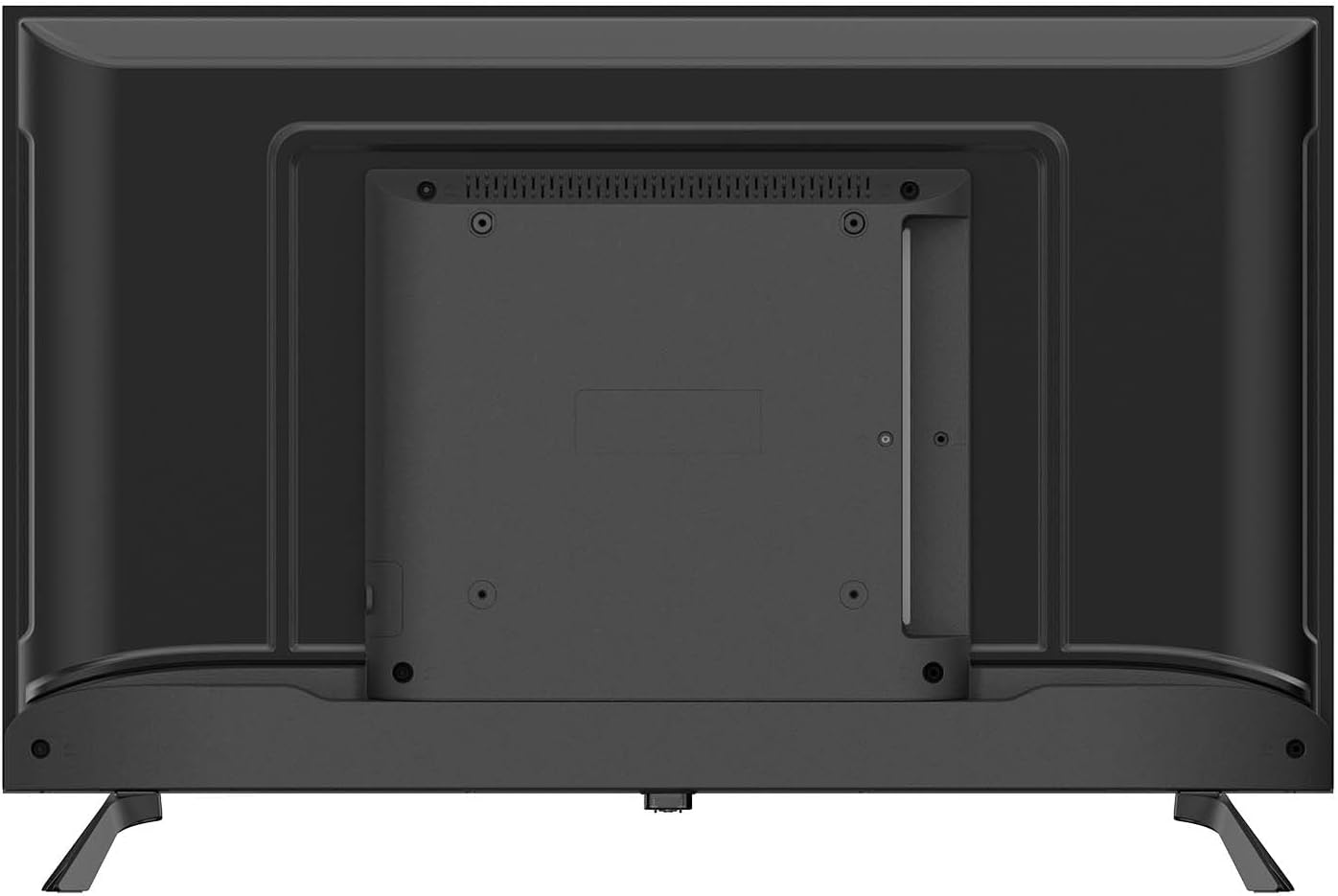
3.3 Collegamento delle periferiche
Collega i tuoi dispositivi esterni al televisore utilizzando le porte disponibili:
- HDMI (x2): Per collegare dispositivi ad alta definizione come lettori Blu-ray, console di gioco o decoder.
- USB 2.0 (x2): Per collegare dispositivi di archiviazione USB per riprodurre contenuti multimediali fileo per gli aggiornamenti software.
- RJ-45 (Ethernet) (x1): Per una connessione Internet cablata.
- CI+ (Common Interface Plus) (x1): For inserting a CAM (Conditional Access Module) and smart card to access encrypted digital TV services.
- AV In (x1): Per collegare dispositivi più vecchi utilizzando cavi video composito e audio stereo.
- Optical SPDIF Output (x1): For connecting to an external audio system or soundbar for digital audio output.
- Antenna Input (DVB-C/T/T2/S2): For connecting an aerial or satellite dish for digital television reception.

3.4 Collegamento di alimentazione
After connecting all desired peripherals, plug the power cable into the TV's power input, then plug the other end into a suitable wall outlet. The TV is designed for 240 Volt power supply.
4. Initial Setup and Operating
4.1 First Time Power On
Quando accendi il televisore per la prima volta, una procedura guidata ti guiderà attraverso la configurazione iniziale:
- Selezione della lingua: Scegli la lingua preferita per il menu TV.
- Connessione di rete: Connect to your home network via Wi-Fi (2.4G or 5G) or Ethernet. Follow the on-screen prompts to enter your Wi-Fi password if necessary.
- Scansione canali: The TV will automatically scan for available digital channels (DVB-C/T/T2/S2). This may take several minutes.
- Fuso orario e data: Imposta il fuso orario e la data corretti.
4.2 Funzionamento di base
- Accensione/spegnimento: Premere il pulsante di accensione sul telecomando o sul televisore stesso.
- Selezione canale: Use the 'CH+' / 'CH-' buttons to change channels or enter channel numbers directly.
- Controllo del volume: Use the 'VOL+' / 'VOL-' buttons to adjust the volume.
- Sorgente di input: Press the 'SOURCE' button on the remote to select between HDMI, AV, TV, or other connected inputs.
- Navigazione nel menu: Use the arrow keys and 'OK' button on the remote to navigate through the TV's menus and settings.
4.3 Smart TV Features (Tizen OS 8.0)
Your Blaupunkt Smart TV runs on Tizen OS 8.0, providing access to a variety of smart features:
- Applicazioni: Access pre-installed apps like Netflix and YouTube. You can download additional apps from the Tizen app store.
- Clonazione schermo: Share content from your compatible smartphone or tablet directly to the TV screen.
- Bluetooth 5.1: Connect Bluetooth-enabled devices such as headphones, soundbars, or game controllers wirelessly.
- Funzione AirPlay: AirPlay functionality will be available after November 2025, allowing seamless streaming from Apple devices.
- EPG (Guida elettronica ai programmi): View program schedules for digital channels.
- Blocco genitori: Impostare restrizioni sui canali o sui programmi in base alla classificazione per età.
- Sveglia: Configure the TV to automatically turn off after a set period.
4.4 telecomando
The included infrared remote control allows full control over your TV's functions. Ensure there are no obstructions between the remote and the TV's IR sensor. Insert two AAA batteries (not included) into the remote control, observing the correct polarity.
5. Manutenzione
5.1 Pulizia del televisore
- Schermo: Pulire delicatamente lo schermo con un panno morbido e privo di lanugine. Per macchie ostinate, strofinare leggermenteampInumidire il panno con acqua o con un detergente specifico per schermi (non spruzzare direttamente sullo schermo).
- Casing: Utilizzare un panno morbido e asciutto per pulire la TV casing. Evitare l'uso di detergenti abrasivi, cere o solventi.
- Prima di pulire il televisore, scollegarlo sempre dalla presa di corrente.
5.2 Conservazione
If you need to store the TV for an extended period:
- Unplug the TV and disconnect all cables.
- Remove the stand if possible and pack it separately.
- Store the TV in its original packaging in a dry, dust-free environment.
- Evitare temperature e umidità estreme.
6. Risoluzione Dei Problemi
Se riscontri problemi con il tuo televisore, fai riferimento ai seguenti problemi comuni e alle relative soluzioni:
| Problema | Possibile soluzione |
|---|---|
| Nessun potere | Controlla che il cavo di alimentazione sia collegato saldamente al televisore e alla presa a muro. Prova una presa diversa. |
| Nessuna immagine, ma l'audio è presente | Assicurarsi che sia selezionata la sorgente di ingresso corretta. Controllare i collegamenti dei cavi ai dispositivi esterni. |
| Nessun suono, ma l'immagine è presente | Check the volume level and mute status. Ensure external audio systems are correctly connected and powered on. |
| Il telecomando non funziona | Controllare e sostituire le batterie. Assicurarsi che non vi siano ostacoli tra il telecomando e il sensore IR del televisore. |
| Impossibile connettersi al Wi-Fi | Assicurati che il router Wi-Fi sia acceso e funzionante. Reinserisci la password Wi-Fi con attenzione. Prova a riavviare sia la TV che il router. |
| Qualità dell'immagine scadente | Check antenna/cable connections. Adjust picture settings (brightness, contrast, sharpness). |
Se il problema persiste dopo aver provato queste soluzioni, contattare l'assistenza clienti.
7. Specifiche
Detailed technical specifications for the Blaupunkt 32HCT6000S Smart TV:
| Caratteristica | Specificazione |
|---|---|
| Modello | 32HCT6000S |
| Dimensioni dello schermo | 32 pollici |
| Tecnologia di visualizzazione | LED HD |
| Risoluzione | 1366×768 pixel (720p) |
| Proporzioni | 16:9 |
| Frequenza di aggiornamento | Frequenza 60 Hz |
| Viewangolo di ing | 178° |
| Luminosità del pannello | 200–240 cd/m² |
| Sistema operativo | Sistema operativo Tizen 8.0 |
| Uscita audio | 2 x 6 W |
| Tecnologia audio | Dolby Digital Plus, NICAM/Stereo |
| Bluetooth | 5.1 (and compatible older versions) |
| Wifi | IEEE 802.11 ac/b/g/n, 2T2R, 2.4G + 5G |
| Porte HDMI | 2 |
| Porte USB 2.0 | 2 |
| Ethernet (RJ-45) | 1 |
| Slot CI+ | 1 |
| AV In | 1 |
| Uscita ottica SPDIF | SÌ |
| Sintonizzatore | DVB-C / T / T2 / S2 |
| Consumo energetico (in uso) | 26 L |
| Classe energetica | E |
| Potenza in stand-by | ≤ 0.5 W |
| Dimensions with Stand (W x D x H) | Dimensioni: 720 x 198 x 478 mm |
| Dimensioni senza supporto (L x P x A) | Dimensioni: 720 x 82 x 424 mm |
| Peso netto | 4.0 kg |
| Compatibilità di montaggio | VESA compatible (Mounting on table) |
8. Garanzia e supporto
Your Blaupunkt Smart TV is covered by a manufacturer's warranty. Please refer to the warranty card included in your package or visit the official Blaupunkt websito per termini e condizioni di garanzia dettagliati.
For technical support, troubleshooting assistance, or service inquiries, please contact Blaupunkt customer service. Contact information can typically be found on the manufacturer's websito o nella documentazione di garanzia.


