1. Introduzione
This manual provides essential information for setting up, operating, and maintaining your Prechen 15.6 Inch Portable Touchscreen Monitor. Featuring a 10-point multi-touch IPS FHD 1080P display with a 60Hz refresh rate, this monitor is designed for versatility and clear visuals. It includes built-in stereo speakers and supports various connectivity options, making it suitable for diverse environments and applications.
2. Cosa c'è nella scatola
Verifica che tutti i seguenti elementi siano inclusi nel tuo pacchetto:
- Prechen 15.6 Inch Portable Touchscreen Monitor
- Cavo da HDMI a HDMI
- Cavo da USB-A a USB-C
- Cavo da USB-C a USB-C
- Adattatore di alimentazione
- Protective Carry Sleeve
- Manuale utente e guida rapida

3. Prodotto finitoview
3.1 Porte e controlli
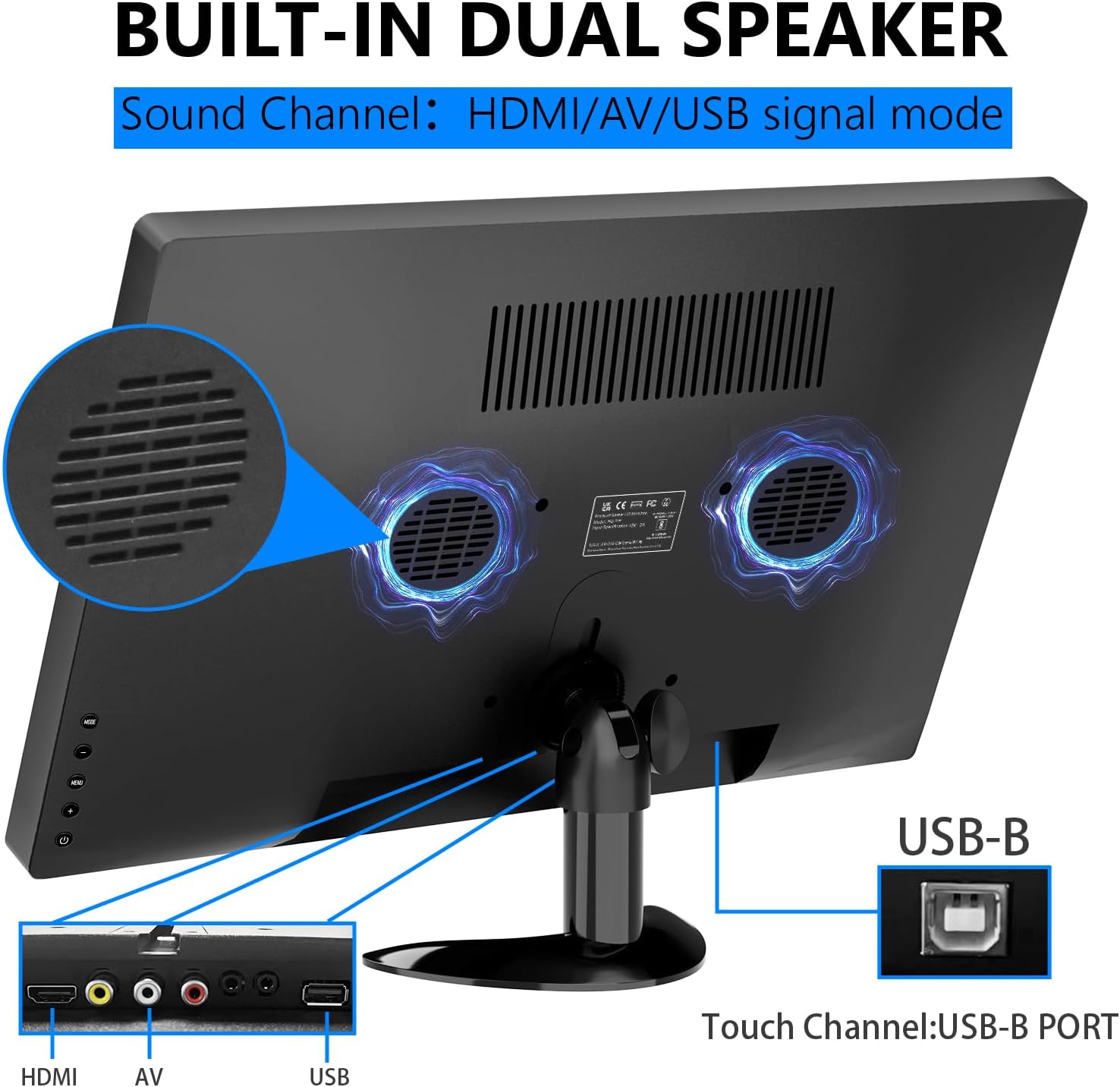
The monitor features various ports and control buttons for connectivity and settings adjustment:
- Ingresso alimentazione CC: Per alimentazione esterna.
- Ingresso VGA: For connecting to devices with VGA output.
- Ingresso HDMI: Per ingresso audio e video ad alta definizione.
- Ingresso AV: For analog video and audio input.
- Ingresso microfono: Per il collegamento del microfono.
- Spinotto degli auricolari: Per collegare cuffie o altoparlanti esterni.
- Porta USB: Per collegare dispositivi USB.
- Porta USB-B: Essential for enabling touch functionality when connected to a compatible device.
- Pulsanti di controllo: For navigating the On-Screen Display (OSD) menu, adjusting brightness, volume, and other settings.

3.2 Supporto regolabile
The monitor features an integrated adjustable stand that allows for up to 180° rotation, providing versatile viewangoli di inclinazione per vari usi.

4. Impostazione
4.1 Collegamento di alimentazione
Connect the power adapter to the DC power input on the monitor and plug it into a power outlet. Alternatively, if using a USB-C connection that supports power delivery, the monitor can draw power directly from the connected device.
4.2 Video and Touch Connection
The monitor supports multiple connection methods. For touch functionality, a USB-B connection is required in addition to the video input.
- Connessione HDMI: Connect one end of the HDMI cable to your device and the other end to the HDMI input on the monitor. For touch functionality, also connect the USB-B cable from your device to the USB-B port on the monitor.
- Connessione USB-C: If your device has a full-featured USB-C port (supporting video, audio, and power delivery), connect the USB-C to USB-C cable directly from your device to one of the USB-C ports on the monitor. This single cable can provide video, audio, power, and touch functionality.
- VGA/AV Connection: Connect the appropriate VGA or AV cable from your device to the monitor. For touch functionality, a separate USB-B connection from your device to the monitor is required.

4.3 Compatibility Notes for Touch Function
The touch function is compatible with Windows and Chromebook systems. However, it is incompatibile con i seguenti dispositivi:
- PS3/4/5
- Interruttore Nintendo
- Console Xbox
- Ponte di vapore
- Chiavetta Fire TV
- Cubo TV Fuoco
- Some Apple products

5. Funzionamento del monitor
5.1 Accensione/spegnimento
Press the power button located on the side of the monitor to turn it on or off. The power indicator light will illuminate when the monitor is active.
5.2 Menu di visualizzazione su schermo (OSD)
Use the control buttons to navigate the OSD menu. Here you can adjust various settings:
- Luminosità e contrasto: Adjust display luminosity and contrast levels.
- Volume: Control the output level of the built-in stereo speakers.
- Sorgente di input: Select between HDMI, USB-C, VGA, or AV inputs.
- Effetto colore: Choose from various color modes to optimize your viewesperienza di acquisizione.
- Lingua: Seleziona la lingua preferita per il menu OSD.
- Impostazioni di sistema: Access advanced display and power management options.
5.3 Gesti del touchscreen
The 10-point multi-touch display supports intuitive gestures for navigation and interaction:
- Rubinetto: Tocca una volta per selezionare gli elementi o attivare le funzioni.
- Doppio tocco: Double tap to open fileso applicazioni.
- Trascinare: Touch and drag to move items or scroll through content.
- Zoom avanti/indietro: Use a two-finger pinch gesture to zoom in or out.
- Ruotare: Use a two-finger twist gesture to rotate images or objects.
- Scorri: Swipe across the screen to navigate between pages or applications.

5.4 Altoparlanti integrati
The monitor is equipped with integrated dual stereo speakers, providing audio output without the need for external devices. Volume can be adjusted via the control buttons or the OSD menu.
6. Opzioni di montaggio
In addition to the adjustable stand, the monitor supports VESA 75x75mm wall mounting for fixed installations in offices, homes, or kiosks.

7. Specifiche
| Caratteristica | Dettaglio |
|---|---|
| Dimensioni del prodotto | 14.17 x 1.18 x 9.05 pollici |
| Peso dell'articolo | 4.2 libbre |
| Dimensioni dello schermo | 15.6 pollici |
| Risoluzione | 1920 x 1080 pixel (FHD 1080p) |
| Proporzioni | 16:9 |
| Luminosità dell'immagine | 300 Candela |
| Descrizione della superficie dello schermo | Lucido |
| Porte USB totali | 1 (USB-B for touch) |
| Produttore | Shenzhen Kenowa Electronics Co., LTD |
8. Risoluzione Dei Problemi
- Nessuna visualizzazione: Ensure the monitor is powered on and all video cables (HDMI, USB-C, VGA, AV) are securely connected to both the monitor and your source device. Try different cables or ports if available.
- Funzione touch non funzionante: Verify that the USB-B cable is correctly connected from your device to the monitor. Confirm your device's operating system (Windows/Chromebook) is compatible with the touch function. Note that gaming consoles and some Apple products do not support touch.
- Nessun suono: Check the monitor's volume settings via the OSD menu. Ensure your audio source is correctly selected and that any external headphones/speakers are properly connected to the earphone jack.
- Touch Screen Effect Displayed on Main Screen (Windows): If the touch effect is incorrectly displayed on your main laptop screen instead of the portable monitor, you may need to calibrate the touch screen. Access the 'Control Panel' -> 'Hardware and Sound' -> 'Tablet PC Settings'. In the 'Display Options', select 'InnoView' (or the corresponding name for your portable monitor) and then click 'Setup'. Follow the on-screen prompts to tap the portable monitor to identify it as the touchscreen.
9. Manutenzione
- Pulizia dello schermo: Utilizzare un panno morbido e privo di lanugine per pulire delicatamente lo schermo. Per macchie ostinate, leggermente dampen the cloth with water or a screen-cleaning solution. Avoid using harsh chemicals, abrasive cleaners, or alcohol-based solutions.
- Pulizia generale: Wipe the exterior of the monitor with a soft, dry cloth. Keep vents clear of dust and debris to ensure proper airflow.
- Magazzinaggio: When not in use or during travel, store the monitor in its protective carry sleeve to prevent scratches and damage.
10. Garanzia e supporto
For warranty information, technical support, or service inquiries, please refer to the documentation included in your product package or contact Prechen customer service directly. Keep your purchase receipt for warranty claims.