1. Introduzione
This manual provides essential information for the proper setup, operation, and maintenance of your BTECH BS-50 Bluetooth Wireless Speaker Microphone. Designed for seamless integration with BTECH PRO-series radios, this device offers wireless control, a clear color display, and robust weatherproofing for various environments.
Cosa c'è nella scatola
- BS-50 (tan) wireless speaker mic
- Clip da cintura
- Manuale d'uso
- Cavo di ricarica USB-C
2. Prodotto finitoview
The BTECH BS-50 is a versatile Bluetooth wireless speaker microphone designed to enhance your radio communication experience. It features a 1.44-inch color display and six front buttons for full control, allowing you to operate key functions remotely while your radio remains securely mounted or stowed.
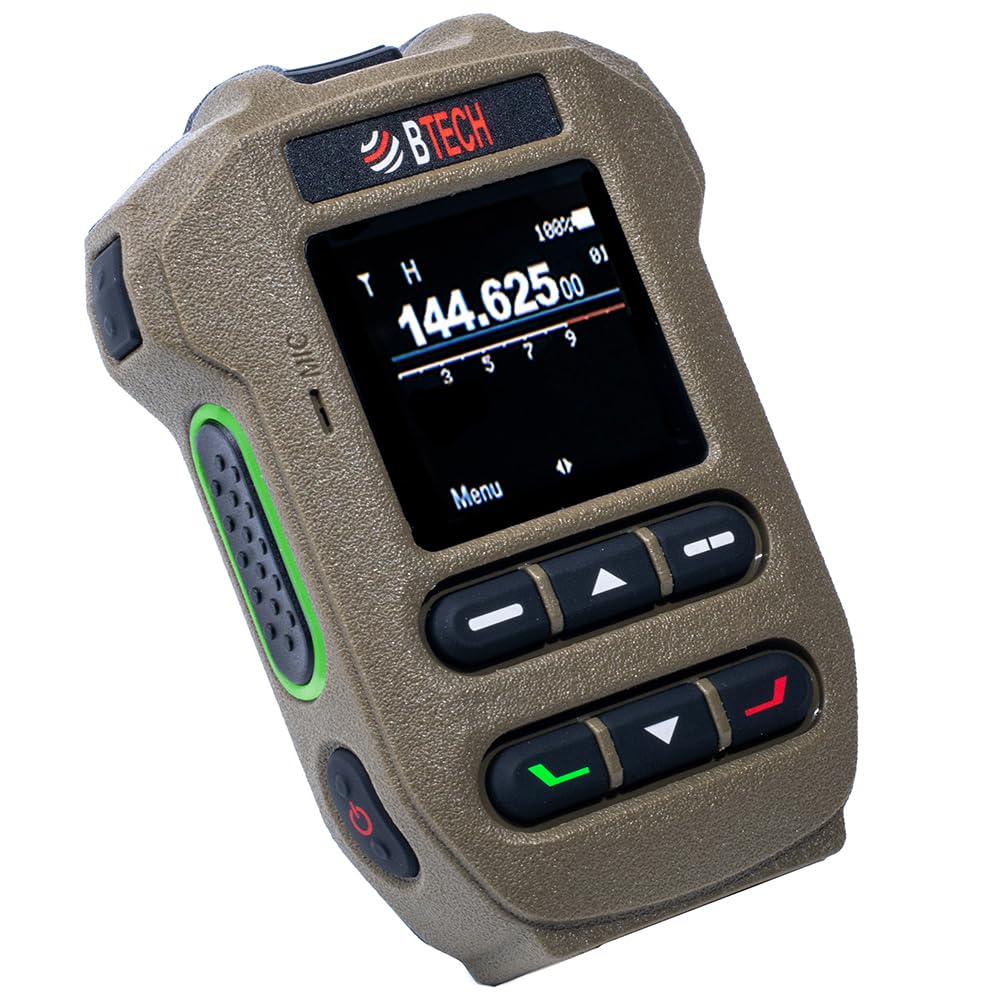
Figure 2.1: BTECH BS-50 Bluetooth Wireless Speaker Microphone in tan.
Caratteristiche principali
- Wireless Bluetooth Speaker Mic: Offers full remote control capabilities.
- 1.44” Color Display + 6 Front Buttons: Provides fast access and visible status for easy adjustments.
- Built-in GPS + Electronic Compass: Adds utility for tracking and navigation in the field.
- Resistenza alle intemperie IP54: Designed to withstand rain, splash, and dust for outdoor and job site use.
- Up to 10m Wireless Range: Effective Bluetooth distance in open conditions.
- 1200mAh Li-ion + USB-C Charging: Modern USB-C charging for a 3.7V battery.
- Programmable Keys + Multi-Color Status LEDs: Customize functions and monitor status at a glance.
- Compatibilità: Primarily designed for BTECH PRO-series radios (GMRS-PRO/GMRS-50PRO/UV-PRO/UV-50PRO) and also works with select VGC N-Series radios (full control) and Icom/Yaesu models (audio-only).
3. Impostazione
3.1 Charging the BS-50
The BS-50 is equipped with a 1200mAh Li-ion battery and supports USB-C charging. For optimal charging, use a 5V/1A rated adapter or a standard USB power source.

Figure 3.1: USB-C charging port on the BTECH BS-50.
3.2 Associazione Bluetooth
To pair your BS-50 with a compatible radio or device, ensure Bluetooth is enabled on both devices. The pairing process typically involves accessing the Bluetooth settings on your radio and initiating a search for nearby devices. Select 'BS-50' from the list to establish a connection.
Video 3.1: Instructional video demonstrating the pairing process for a Bluetooth PTT device with Zello. While this video features a PTT button, the general steps for enabling Bluetooth and pairing with a compatible application are similar for the BS-50 speaker microphone.
4. Istruzioni per l'uso
4.1 Display e controlli
The 1.44-inch color display provides clear information on channels, status, GPS data, and more. Use the six front buttons for navigation and control. Refer to your radio's manual for specific button assignments and functions when connected.

Figure 4.1: The BS-50's display and control buttons for remote operation.
4.2 GPS and Electronic Compass
The integrated GPS and electronic compass provide location and directional data, enhancing utility for outdoor activities and field work. Access these features through the device's menu.

Figure 4.2: BS-50 menu displaying GPS Status and Pairing options.
4.3 tasti programmabili
The BS-50 features programmable side keys and multi-color status LEDs. These can be configured to assign functions such as volume control, channel selection, mute, or scan, depending on the connected radio's capabilities.

Figure 4.3: Programmable side keys on the BS-50 for customized functions.
5. Manutenzione
5.1 Pulizia e cura
The BS-50 is IP54 weatherproof, meaning it is protected against dust and splashing water. To clean, wipe the device with a soft, damp cloth. Avoid using harsh chemicals or abrasive materials. Ensure the USB-C port cover is securely closed when not charging to maintain water resistance.

Figure 5.1: The BS-50 demonstrating its IP54 weatherproof capabilities.
5.2 Longevità della batteria
To maximize battery life, avoid fully discharging the device frequently. Store the device in a cool, dry place when not in use for extended periods.
6. Risoluzione Dei Problemi
6.1 Problemi comuni
- Il dispositivo non si accende: Ensure the battery is charged. Connect to a USB-C charger and check for charging indicators.
- Impossibile effettuare l'associazione tramite Bluetooth: Verify Bluetooth is enabled on both the BS-50 and the host radio. Ensure both devices are within the 10m wireless range. Restart both devices and attempt pairing again.
- No audio/microphone function: Check the connection to the host radio. For non-BTECH PRO-series radios, confirm compatibility for audio-only functions. Adjust volume settings on both the BS-50 and the radio.
- Portata wireless limitata: Obstacles such as walls, vehicles, or terrain can reduce the effective Bluetooth range. Try operating in open conditions.
7. Specifiche
| Caratteristica | Dettaglio |
|---|---|
| Peso dell'articolo | 1.5 once |
| Dimensioni del pacco | 6.46 x 4.84 x 2.17 pollici |
| ASIN | B0GFXCCQ3R |
| Numero modello articolo | BS-50-TAN-Wireless-Speaker-Mi |
| Batterie | È necessaria 1 batteria agli ioni di litio (inclusa) |
| Data prima disponibilità | 17 gennaio 2026 |
| Nome del colore | Abbronzatura |
| Dispositivi compatibili | GMRS-50PRO, GMRS-PRO, UV-50PRO, UV-PRO |
| Misurare | BS-50 |
| Schermo a colori | SÌ |
| Marca | B-TECHNOLOGIA |
| Livello di resistenza all'acqua | Resistente all'acqua (IP54) |
| Portata massima di conversazione | 10 Meter (Bluetooth) |
8. Garanzia e supporto
Your BTECH BS-50 Bluetooth Wireless Speaker Microphone comes with a standard manufacturer's warranty. Please refer to the included warranty card for specific terms and conditions. For additional support, software downloads, and video tutorials, visit the official BTECH websito:
- Download software: https://baofengtech.com/download
- Tutorial di YouTube: https://www.youtube.com/c/Baofengtechradio
For further assistance, contact BTECH customer support.