1. Introduzione
This manual provides essential information for setting up, operating, maintaining, and troubleshooting your Thunderobot Radiant 16S Gaming Laptop. Please read this guide thoroughly to ensure optimal performance and longevity of your device.
2. Impostazione
2.1 Disimballaggio e accensione iniziale
Carefully remove the laptop and all accessories from the packaging. Connect the power adapter to the laptop and a power outlet. Press the power button to start the laptop. Follow the on-screen instructions for initial Windows 11 Home setup.
2.2 Collegamento delle periferiche
Utilize the various ports available to connect your external devices such as a mouse, keyboard, external display, or headset.
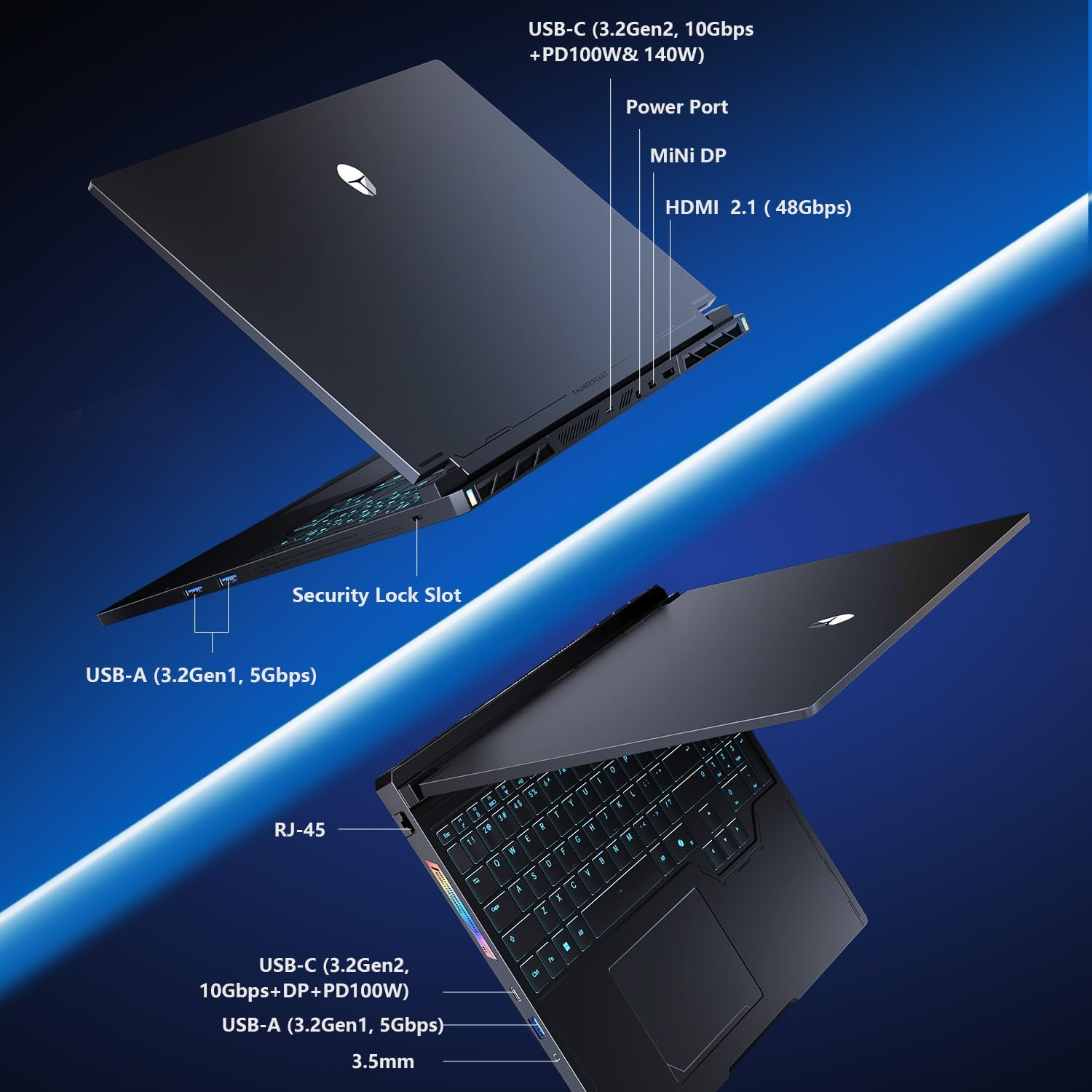
Figure 2.2: Connectivity options including USB-C, USB-A, HDMI, Mini DP, Ethernet, and audio jack.
3. Istruzioni per l'uso
3.1 Tastiera e touchpad
The laptop features an RGB backlit keyboard and a responsive glass-like touchpad. Customize keyboard backlighting through the system's control center software.
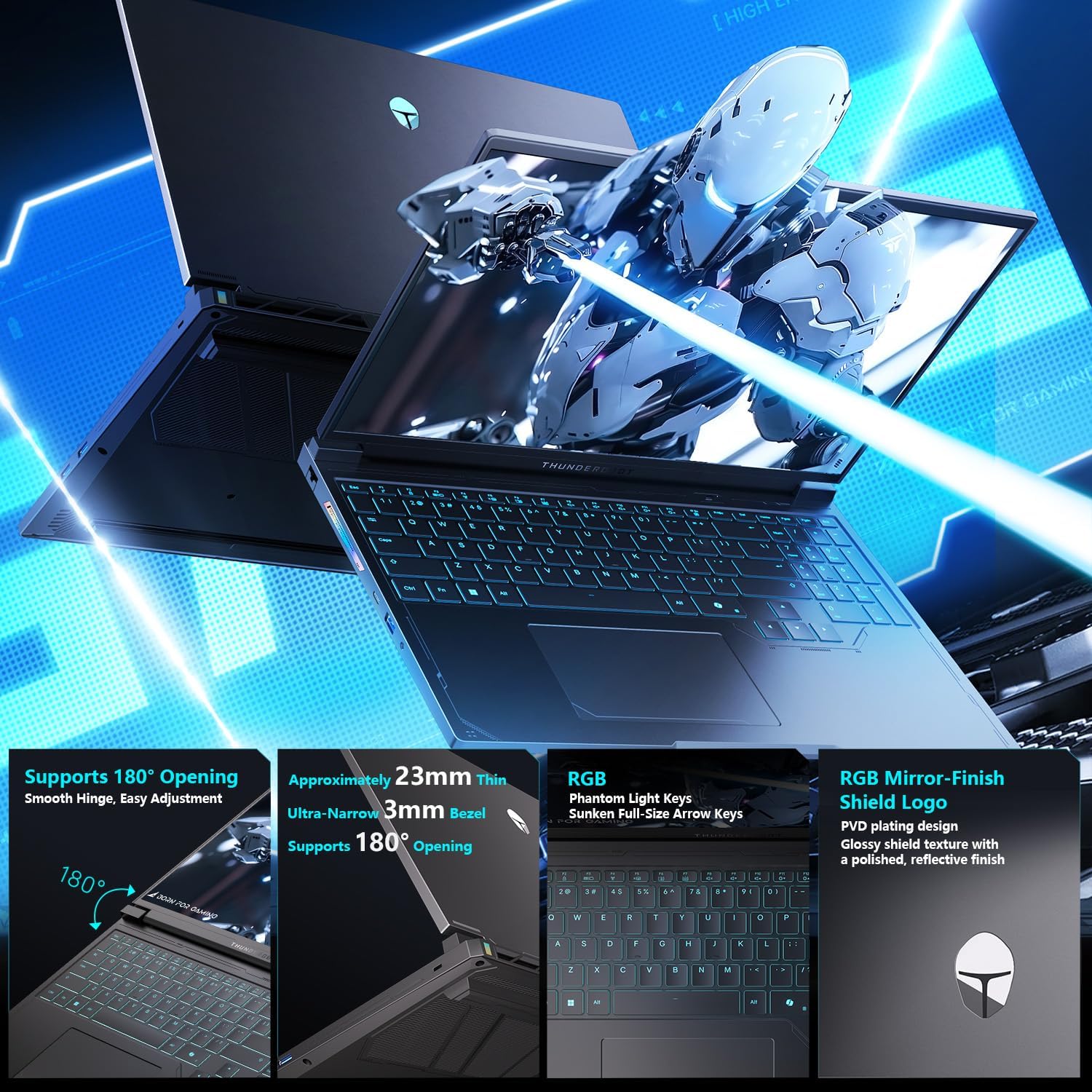
Figure 3.1: Keyboard layout with RGB backlighting and the integrated touchpad.
3.2 Control Center Modes
The integrated Control Center allows you to switch between different performance modes to optimize your laptop for various tasks. These modes include:
- Modalità ufficio: Optimized for power saving and quiet operation during productivity tasks.
- Modalità di gioco: Balances performance and cooling for a smooth gaming experience.
- Modalità Turbo: Unleashes maximum performance for demanding applications and intense gaming.
Ensure the device is connected to a power source to enable GPU direct-output mode and unlock the full refresh rate in the control center.

Figure 3.2: Control Center interface for managing performance modes.
4. Caratteristiche principali
- Fast DDR5 Memory & NVMe Storage: Equipped with 32GB DDR5 RAM and a 1TB PCIe M.2 SSD for rapid multitasking and quick load times.
- Advanced Compute & Graphics Engine: Features an AMD Ryzen 9 7945HX processor and NVIDIA GeForce RTX 5060 Laptop GPU for high computational throughput and smooth graphics.
- 300Hz QHD+ High-Fidelity Display: A 16-inch 2560x1600 (2.5K) display with a 300Hz refresh rate, full DCI-P3 color reproduction, pro calibration, and 500-nit brightness for sharp visuals and reduced eye fatigue.
- Enhanced WindBlade Cooling Architecture: Dual ultra-thin low-noise fans, four heat pipes, and an improved 3D airflow structure deliver up to 200W of cooling performance while maintaining low noise levels (43dB).
- All-Around Connectivity Options: Includes dual USB-C, triple USB-A 3.X, HDMI, Ethernet, and an audio jack for comprehensive peripheral support.
- Wi-Fi 6: Ensures stable and fast wireless internet connectivity.

Figura 4.1: Oltreview of the GPU and CPU capabilities.

Figure 4.2: Features of the Hummingbird Eye-Care Display.

Figure 4.3: Illustration of the advanced cooling system.
5. Specifiche
| Caratteristica | Dettaglio |
|---|---|
| Dimensioni dello schermo | 16 pollici |
| Risoluzione massima dello schermo | 2560x1600 Pixels (QHD+ 2.5K) |
| Processore | AMD Ryzen 9 7945HX (5.4 GHz) |
| Memoria RAM | 32 GB DDR5 (4800 MHz) |
| Disco rigido | 1 TB PCIe M.2 SSD |
| Coprocessore grafico | GPU per laptop NVIDIA GeForce RTX 5060 (8 GB GDDR6) |
| Sistema operativo | Windows 11 Casa |
| Tipo senza fili | 802.11ax (Wi-Fi 6) |
| Porti | Dual USB-C, Triple USB-A 3.X, HDMI 2.1, Ethernet, Audio Jack, Mini DP |
| Caratteristiche speciali | RGB Backlit Keyboard, Numeric Keypad, Hummingbird Eye-Care Panel |
| Peso dell'articolo | 12 libbre |
| Dimensioni del prodotto | 14.05 x 10.22 x 1.17 pollici |
6. Manutenzione
6.1 Pulizia
Regularly clean the screen with a soft, lint-free cloth and a screen-safe cleaning solution. Use compressed air to clear dust from the keyboard and cooling vents. Ensure the laptop is powered off before cleaning.
6.2 Cura del sistema di raffreddamento
The WindBlade Cooling Architecture is designed for efficient heat dissipation. To maintain optimal cooling performance, ensure that the air vents are not obstructed. Avoid placing the laptop on soft surfaces that can block airflow. Periodically check for dust buildup in the vents and clean as described above.
6.3 Longevità della batteria
To maximize battery life, avoid fully discharging the battery frequently. For prolonged storage, charge the battery to about 50-60% and store the laptop in a cool, dry place.
7. Risoluzione Dei Problemi
7.1 Problemi di alimentazione
- Il portatile non si accende: Assicurarsi che l'adattatore di alimentazione sia collegato saldamente sia al laptop che a una presa di corrente funzionante. Verificare che la presa di corrente funzioni correttamente.
- La batteria non si carica: Verificare che l'adattatore di alimentazione sia collegato correttamente. Provare una presa di corrente diversa.
7.2 Problemi di visualizzazione
- Nessuna visualizzazione: Connect an external monitor to check if the issue is with the laptop's internal display. Ensure the display cable is properly connected if using an external monitor.
- Schermo tremolante: Aggiorna i driver della scheda grafica. Regola le impostazioni della frequenza di aggiornamento dello schermo in Windows.
7.3 Problemi di prestazioni
- Prestazioni lente: Close unnecessary applications. Check for background processes consuming high CPU/RAM. Ensure the cooling system is clean and functioning. Switch to a higher performance mode in the Control Center.
- Surriscaldamento: Ensure vents are clear. Use the laptop on a hard, flat surface. Consider using a cooling pad.
8. Garanzia e supporto
Every Thunderobot laptop includes a Garanzia di 12 mesi, offering expert support and thorough diagnostics. We also provide a Garanzia di 90 giorni on all warranty replacement parts, ensuring hassle-free repairs. Your complete satisfaction is our commitment.
For technical assistance, please visit the official Thunderobot support website or contact our customer service team. Keep your purchase receipt and product serial number handy for faster service.


