
Introduzione
This instruction manual provides detailed guidance for the installation, setup, and operation of your Nivian Smart Home DIN Rail WiFi Switch with Consumption Meter. This device allows you to remotely control your electrical circuits, monitor energy consumption, and implement smart home automations, enhancing both convenience and safety in your home or business. Please read this manual thoroughly before installation and use to ensure proper functioning and to prevent any electrical hazards.
Prodotto finitoview
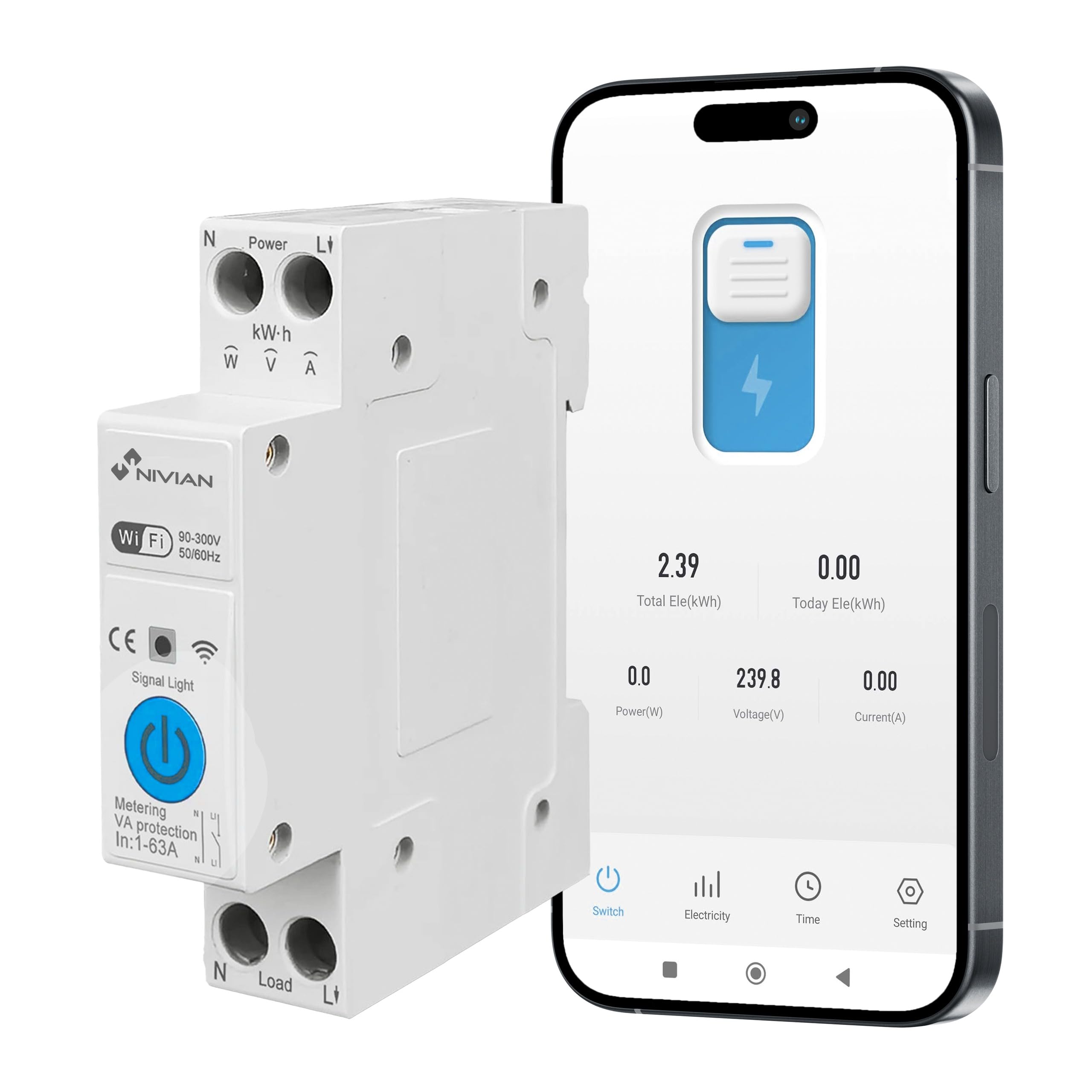
The Nivian Smart Home DIN Rail WiFi Switch is a versatile device designed for intelligent electrical management. It integrates a WiFi-enabled switch with an energy consumption meter, offering comprehensive control and monitoring capabilities.
Caratteristiche principali:
- Telecomando: Turn circuits on/off from anywhere via the mobile app.
- Monitoraggio energetico: Real-time and historical data on electricity consumption.
- Automazioni intelligenti: Program schedules, timers, and smart scenes.
- Controllo vocale: Compatibile con Alexa e Google Assistant.
- Protezione elettrica: Automatic protection against overload, overvoltage, sottovoltage, and current limits.
- Installazione su guida DIN: Designed for easy integration into electrical panels.
- Materiale ignifugo: V0 grade fire-retardant casing per una maggiore sicurezza.
Componenti inclusi:
- Nivian Consumption Control Device (NVS-ENERGYMETER65DIN-W)

Informazioni sulla sicurezza
AVVERTIMENTO: L'installazione elettrica deve essere eseguita solo da personale qualificato. Un'installazione non corretta può causare scosse elettriche, incendi o altri pericoli.
- Prima di installare o effettuare la manutenzione del dispositivo, scollegare sempre l'alimentazione dall'interruttore principale.
- Assicurarsi che tutti i collegamenti elettrici siano sicuri e conformi alle normative elettriche locali.
- Non superare la corrente massima nominale di 63 A.
- Tenere il dispositivo lontano dall'acqua e da ambienti ad alta umidità.
- Non tentare di smontare o modificare il dispositivo.
Installazione
The Nivian Smart Home DIN Rail WiFi Switch is designed for easy installation on a standard DIN rail within your electrical distribution board.
Fasi di installazione:
- Disconnessione dell'alimentazione: Before starting, ensure the main power supply to the electrical panel is completely disconnected.
- Montaggio: Clip the device onto a standard 35mm DIN rail in your electrical panel. Ensure it is securely fastened.
- Cablaggio:
- Connect the incoming Live (L1) and Neutral (N) wires to the "Power" terminals at the top of the device.
- Connect the outgoing Live (L1) and Neutral (N) wires to the "Load" terminals at the bottom of the device, leading to the circuit you wish to control.
- Ensure all connections are tight and correct to prevent loose contacts or short circuits.
- Ripristino dell'energia: Once wiring is complete and verified, restore power to the electrical panel. The device's signal light should illuminate.

Impostare
To utilize the smart features of your Nivian device, you need to connect it to the Nivian Smart Home app (or a compatible app like Tuya Smart or Smart Life).
App Pairing Steps:
- Scarica l'App: Download the "Nivian Smart Home" app from your smartphone's app store (available for iOS and Android). Alternatively, you can use the Tuya Smart or Smart Life app.
- Registrati/Accedi: Apri l'app e registrati per un nuovo account oppure accedi con uno esistente.
- Aggiungi dispositivo: Nell'app, tocca l'icona "+" per aggiungere un nuovo dispositivo.
- Accoppiamento Bluetooth: The device supports quick configuration via Bluetooth. Ensure Bluetooth is enabled on your smartphone. The app should automatically detect the device or guide you through a discovery process.
- Connessione wifi: Follow the in-app instructions to connect the device to your 2.4GHz WiFi network. Enter your WiFi password when prompted.
- Conferma: Once successfully paired, the device will appear in your app's device list. You can then rename it for easier identification.

Operativo
After successful setup, you can control and monitor your electrical circuits using the Nivian Smart Home app or voice commands.
Telecomando:
Open the Nivian Smart Home app, select your device, and use the on-screen toggle to switch the connected circuit on or off from anywhere with an internet connection.
Monitoraggio energetico:
The app provides real-time energy consumption data (kWh, Amps, Volts, Watts). You can view daily, monthly, and yearly statistics, helping you identify energy usage patterns and potential savings.

Automazioni intelligenti:
Create custom automation rules within the app:
- Orari: Set specific times for the circuit to turn on or off (e.g., lights on at sunset).
- Timer: Set countdown timers for temporary control.
- Scene intelligenti: Trigger actions based on conditions like location, weather, or other smart devices (e.g., turn off power when leaving home).
- Presence Simulation: Automate lights or devices to turn on/off randomly to simulate occupancy when you are away.

Controllo vocale:
Integrate your Nivian device with Amazon Alexa or Google Assistant for hands-free control.
- Collega account: In the Alexa or Google Home app, enable the "Nivian Smart Home" skill/service and link your Nivian account.
- Scopri i dispositivi: Chiedi ad Alexa o all'Assistente Google di scoprire nuovi dispositivi.
- Comandi vocali: Use commands like "Alexa, turn on [device name]" or "Hey Google, turn off [device name]".
Funzioni di protezione
The device includes intelligent electrical protections to safeguard your installation and connected equipment.
- Protezione da sovraccarico: Automatically cuts power if the current exceeds a set limit (up to 63A).
- Sovravoltage Protezione: Protects against damage from excessively high voltage.
- Sottovoltage Protezione: Prevents equipment damage from excessively low voltage.
- Protezione limite di corrente: Allows setting a maximum current threshold.
- Protezione dalle correnti di dispersione: Detects and protects against hazardous leakage currents.
You can configure custom limits and receive alerts via the app if any protection is triggered, enhancing safety and preventing damage.

Manutenzione
The Nivian Smart Home DIN Rail WiFi Switch requires minimal maintenance.
- Pulizia: Pulire periodicamente il dispositivo con un panno asciutto e morbido. Non utilizzare detergenti abrasivi o solventi.
- Verifica della connessione: Occasionally, verify that all electrical connections are secure, especially after initial installation or if the device has been moved.
- Aggiornamenti del firmware: Keep the Nivian Smart Home app updated to ensure you receive the latest firmware for your device, which may include performance improvements and new features.
Risoluzione dei problemi
If you encounter issues with your Nivian Smart Home DIN Rail WiFi Switch, refer to the following common problems and solutions:
| Problema | Possibile causa/soluzione |
|---|---|
| Device not connecting to WiFi / App |
|
| Device not responding to app commands |
|
| No energy consumption data |
|
| Cannot connect with Alexa/Google Assistant |
|
| Il dispositivo scatta frequentemente |
|
Specifiche
| Caratteristica | Dettaglio |
|---|---|
| Numero di modello | NVS-ENERGYMETER65DIN-W |
| Marca | NIVIANO |
| Dimensioni (L x P x A) | 8 x 3 x 2 cm (3.15 x 1.18 x 0.79 pollici) |
| Peso | 110 g (0.24 libbre) |
| Corrente massima nominale | 63A |
| Voltage Gamma | 90-300 V |
| Frequenza | Frequenza 50/60 Hz |
| Tipo di montaggio | Guida DIN |
| Connettività | WiFi (2.4GHz), Bluetooth for quick setup |
| Materiale | V0 Fire Retardant |
| Componenti inclusi | Nivian Consumption Control Device |
Garanzia e supporto
For detailed warranty information, technical support, and additional resources, please visit the official Nivian Home websito o sui loro canali social media.
- Ufficiale Websito: Casa Nivian
- Instagram: @nivianhome_es
- Italiano: Nivian Official Channel
These platforms offer tutorials, tips, and direct support to help you maximize your device's potential.