1. Introduzione
This manual provides comprehensive instructions for the setup, operation, and maintenance of your GOBOULT Mustang Racer Smart Watch. Please read this manual thoroughly before using the device to ensure proper functionality and to maximize your user experience. Keep this manual for future reference.
2. Cosa c'è nella scatola
Verificare che tutti gli articoli siano presenti nel pacco:
- GOBOULT Mustang Racer Smart Watch
- Cavo di ricarica
- Manuale dell'utente (questo documento)
- Scheda di garanzia
3. Prodotto finitoview
Familiarize yourself with the key components of your GOBOULT Mustang Racer Smart Watch.
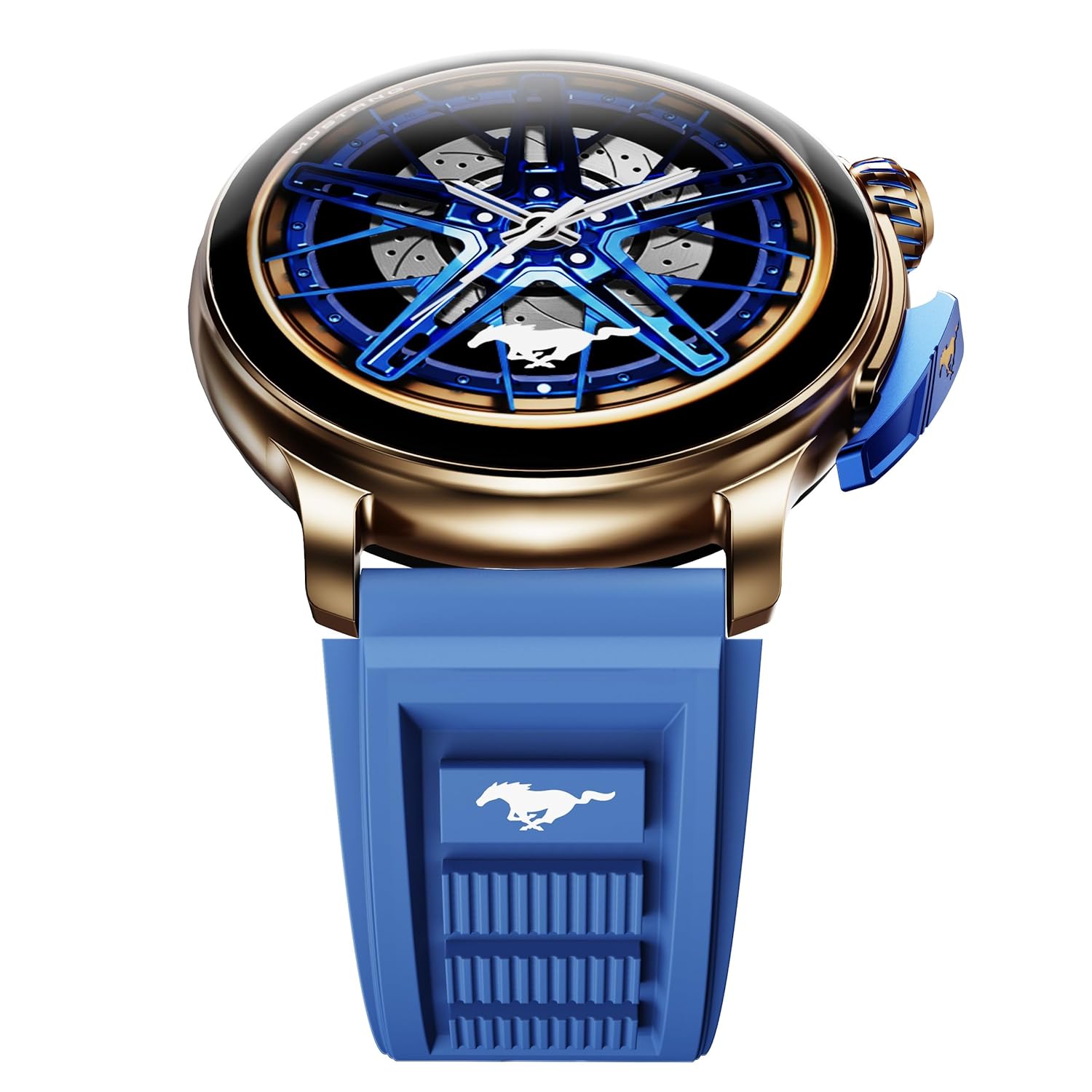
Image: The GOBOULT Mustang Racer Smart Watch, showcasing its 1.43-inch AMOLED display and overall design.
Display and Bezel
The watch features a 1.43-inch AMOLED display with 500 Nits brightness for clear visibility. The functional rotating bezel allows for intuitive navigation through menus and features.

Immagine: Un dettaglio view of the smartwatch's 1.43-inch AMOLED display and the rotating bezel, highlighting its design and brightness.
Pulsanti e corona
The watch includes a rotating tyre-tread crown for navigation and selection, along with a functional paddle shifter button for quick access to features.

Image: The smartwatch featuring its functional paddle shifter and rotating crown, designed for enhanced control.
4. Impostazione
4.1. Ricarica dello Smart Watch
Before initial use, fully charge your smartwatch. Connect the magnetic charging cable to the charging pins on the back of the watch and plug the USB end into a compatible power adapter (not included) or a computer's USB port. The watch will display a charging indicator. A full charge takes approximately 120 minutes.
4.2. Accensione/Spegnimento
- Accensione: Press and hold the main power button (crown) for a few seconds until the GOBOULT logo appears.
- Spegni: From the watch face, swipe down to access quick settings, or navigate to the settings menu. Select "Power Off" and confirm. Alternatively, press and hold the main power button until the power-off option appears.
4.3. Associazione con lo smartphone
To unlock all features, pair your GOBOULT Mustang Racer Smart Watch with the companion app on your smartphone via Bluetooth.
- Download the official GOBOULT app from your smartphone's app store (iOS App Store or Google Play Store).
- Assicurati che il Bluetooth sia abilitato sul tuo smartphone.
- Open the GOBOULT app and follow the on-screen instructions to create an account or log in.
- In the app, select "Add Device" or similar option.
- Select "GOBOULT Mustang Racer" from the list of available devices.
- Conferma la richiesta di associazione sia sullo smartphone che sullo smartwatch.
Una volta associato, l'orologio sincronizzerà i dati con il tuo telefono e potrai personalizzare le impostazioni tramite l'app.

Image: The smartwatch highlighting its Bluetooth V5.3 connectivity for quick syncing and IP67 water resistance.
5. Istruzioni per l'uso
5.1. Navigazione
- Scorri verso l'alto/il basso/sinistra/destra: Navigate through menus, notifications, and quick access panels.
- Rubinetto: Seleziona un elemento o conferma un'azione.
- Rotating Bezel/Crown: Rotate to scroll through lists or adjust settings. Press to select or return to the home screen.
- Paddle Shifter Button: Customizable shortcut for frequently used functions (e.g., sports modes).
5.2. Chiamate Bluetooth
With integrated speaker and microphone, you can make and receive calls directly from your wrist after pairing with your smartphone.
- Assicurati che l'orologio sia connesso al telefono tramite Bluetooth.
- To make a call: Access the dialer or contacts list on your watch.
- To receive a call: An incoming call notification will appear on your watch. Tap to answer or decline.
5.3. Quadranti dell'orologio
Customize your watch's appearance with over 150 watch faces, including exclusive Mustang designs. Long-press the watch face to change it, or use the companion app for more options.

Immagine: Lo smartwatch mostraasing multiple watch face options, including exclusive Mustang designs.
5.4. Modalità sportive
The watch supports over 120 sports modes to track your physical activities. Access sports modes from the main menu or via the paddle shifter shortcut (if configured).
- Select your desired sport.
- Start the activity. The watch will record metrics such as duration, calories burned, and heart rate.
- End the activity to save data. Review your performance in the app.

Image: The smartwatch displaying a sports tracking interface, indicating its capability to monitor various physical activities.
5.5. Monitoraggio della salute
The GOBOULT Mustang Racer Smart Watch provides comprehensive health tracking features:
- 24x7 Heart Rate Monitor: Tiene traccia costantemente della tua frequenza cardiaca.
- SpO2 Blood Oxygen Saturation Monitor: Misura i livelli di ossigeno nel sangue.
- Monitoraggio del sonno: Analyzes sleep patterns (deep sleep, light sleep, awake time).
- Monitoraggio dello stress: Fornisce informazioni sui tuoi livelli di stress.
- Pressione sanguigna: (Note: Smartwatch blood pressure measurements are for reference only and should not be used for medical diagnosis.)
Access these features from the watch's health menu or view report dettagliati nell'app complementare.

Immagine: Un interno view of the smartwatch highlighting its health tracking sensors, with text indicating features like heart rate, SpO2, sleep, and stress monitoring.
5.6. Assistente vocale AI
Activate the AI Voice Assistant on your watch to perform tasks, set reminders, or get information using voice commands. Ensure your watch is connected to your phone for this feature to function.
5.7. Notifiche intelligenti
Receive notifications for calls, messages, and app alerts directly on your watch. Manage notification settings through the GOBOULT app.
5.8. Always On Display
The Always On Display feature allows the time and essential information to remain visible on the screen without needing to raise your wrist or press a button. This feature can be enabled or disabled in the watch settings to manage battery consumption.

Image: The smartwatch displaying the time and a car image, illustrating the Always On Display functionality.
6. Caratteristiche e specifiche
Caratteristiche principali:
- 1.43" AMOLED Display with 500 Nits Brightness
- Bluetooth Calling (BT V5.3)
- Rotating Bezel for intuitive control
- 150+ Watch Faces, including exclusive Mustang designs
- AI Voice Assistant
- Health Monitoring: SpO2, Heart Rate, Sleep, Stress, Blood Pressure
- 120+ modalità sportive
- IP67 resistente all'acqua
- Up to 7-day battery runtime with fast charging
Specifiche tecniche:
| Marca | GOBOULT |
| Numero di modello | GOBOULT Mustang Racer |
| Dimensioni dello schermo | 1.43 pollici |
| Tipo senza fili | Versione Bluetooth 5.3 |
| Tempo di carica della batteria | 120 minuti |
| Contenuto energetico della batteria | 1.11 Watt ora |
| Resistenza all'acqua | Grado di protezione IP67 |
| Peso dell'articolo | 55 grammi |
| Paese di origine | Cina |
7. Manutenzione
7.1. Pulizia dello smartwatch
Una pulizia regolare aiuta a preservare l'aspetto e la funzionalità dell'orologio:
- Pulire lo schermo e il corpo con un panno morbido e privo di lanugine.
- Per macchie ostinate, leggermente dampLavare il panno con acqua. Evitare l'uso di prodotti chimici aggressivi o materiali abrasivi.
- Clean the charging contacts periodically with a dry cloth to ensure proper charging.
7.2. Resistenza all'acqua (IP67)
The GOBOULT Mustang Racer Smart Watch is IP67 water resistant, meaning it can withstand immersion in up to 1 meter of fresh water for up to 30 minutes. It is suitable for daily use and light splashes. However, it is not recommended for swimming, showering with hot water, or diving. Avoid exposure to saltwater or chemicals, as this may damage the device.
7.3. Cura della batteria
- Evitare di scaricare completamente la batteria frequentemente.
- Conservare l'orologio in un luogo fresco e asciutto quando non lo si utilizza per lunghi periodi.
- Utilizzare solo il cavo di ricarica fornito.
8. Risoluzione Dei Problemi
| Problema | Possibile soluzione |
|---|---|
| L'orologio non si accende. | Assicurati che l'orologio sia completamente carico. Collegalo al caricabatterie per almeno 30 minuti. |
| Impossibile effettuare l'associazione con lo smartphone. |
|
| Dati sanitari imprecisi. |
|
| Durata breve della batteria. |
|
9. Garanzia e supporto
Your GOBOULT Mustang Racer Smart Watch comes with a warranty as specified on the included Warranty Card. Please refer to the card for details regarding warranty period, coverage, and terms and conditions.
For technical support, product inquiries, or warranty claims, please contact GOBOULT customer service through the contact information provided on your Warranty Card or visit the official GOBOULT websito.
Componenti inclusi: Charging Cable, Mustang Racer Apex Blue Smart watch, User Manual, Warranty Card


