Introduzione
The Havit H2015PRO is a versatile gaming headset designed for multi-platform compatibility and immersive audio experiences. Featuring five distinct connection modes, this headset offers flexibility for various gaming setups and entertainment needs. It delivers high-fidelity sound with 360° spatial audio and low latency, ensuring a competitive edge in gaming. This manual provides essential information for setting up, operating, maintaining, and troubleshooting your Havit H2015PRO headset.
Prodotto finitoview
The Havit H2015PRO headset includes the following components:
- Havit H2015PRO Gaming Headset
- Microfono staccabile
- 2.4 GHz USB Wireless Dongle
- Cavo di ricarica USB-C
- Cavo audio da 3.5 mm
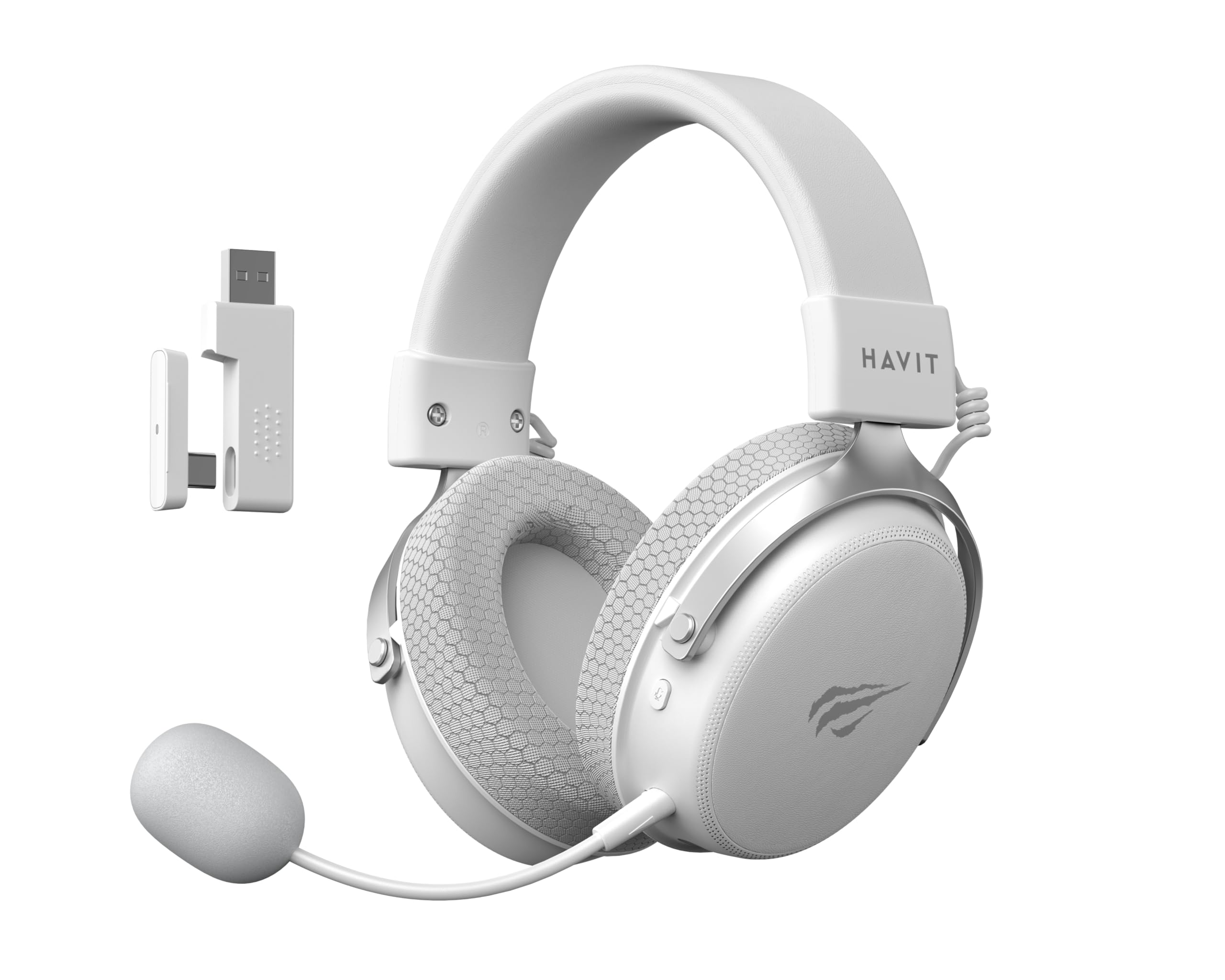
Image: The Havit H2015PRO headset in white, showcasing the main unit, detachable microphone, and the 2.4 GHz USB wireless dongle. This image provides a clear view dei componenti principali inclusi nel prodotto.
Impostare
The Havit H2015PRO offers five connectivity options to suit various devices and preferences.
1. 2.4 GHz Wireless Connection (USB Dongle)
- Insert the 2.4 GHz USB wireless dongle into an available USB port on your PC, PlayStation, or Nintendo Switch (in docked mode).
- Accendi le cuffie. Le cuffie dovrebbero connettersi automaticamente al dongle.
- Assicurati che l'auricolare sia selezionato come dispositivo di input e output audio nelle impostazioni di sistema.
2. Connessione Bluetooth
- Power on the headset and switch it to Bluetooth mode (refer to the headset controls for mode selection).
- On your device (smartphone, tablet, PC with Bluetooth), go to Bluetooth settings and enable Bluetooth.
- Select "Havit H2015PRO" from the list of available devices to pair.
3. Connessione cablata (cavo audio da 3.5 mm)
- Collegare un'estremità del cavo audio da 3.5 mm alla porta da 3.5 mm dell'auricolare.
- Connect the other end to the 3.5mm audio jack on your PC, console controller, or mobile device.
- This mode does not require the headset to be powered on.
4. Wired Connection (USB-C Cable)
- Connect the USB-C cable to the headset's USB-C port.
- Connect the other end to a compatible USB-C port on your PC or device.
- This connection can be used for both audio and charging.

Immagine: Un angolo view of the Havit H2015PRO headset, highlighting the earcups, headband, and visible controls on the side. This perspective helps in identifying connection ports and buttons.
Istruzioni per l'uso
Accensione/spegnimento
- Per accendere, tenere premuto il pulsante di accensione finché la spia non si accende.
- Per spegnere, tenere premuto il pulsante di accensione finché la spia non si spegne.
Controllo del volume
- Use the volume roller or buttons located on the earcup to adjust the audio level.
Utilizzo del microfono
- Collegare il microfono staccabile alla porta designata sull'auricolare.
- Adjust the microphone's flexible arm for optimal voice pickup.
- Use the microphone mute button (if available) on the headset to toggle mute on/off.
Ricarica dell'auricolare
- Connect the USB-C charging cable to the headset's USB-C port and the other end to a USB power source.
- La spia luminosa indicherà lo stato di carica (ad esempio, rossa per la carica, spenta o verde per la carica completa).
- Una carica completa richiede in genere circa 2-3 ore.
Manutenzione
Proper care ensures the longevity and performance of your Havit H2015PRO headset.
- Pulizia: Use a soft, dry cloth to wipe the headset. For earcups, a slightly damp È possibile utilizzare un panno imbevuto di sapone neutro, ma assicurarsi che non penetri umidità nelle griglie degli altoparlanti.
- Magazzinaggio: Conservare le cuffie in un luogo fresco e asciutto, lontano dalla luce solare diretta e da temperature estreme.
- Cura della batteria: Per preservare la durata della batteria, evitare di scaricare completamente le cuffie frequentemente. Caricarle regolarmente, anche se non vengono utilizzate per periodi prolungati.
- Evitare i liquidi: Do not expose the headset to water or other liquids, as it is not water-resistant.
Risoluzione dei problemi
If you encounter issues with your Havit H2015PRO headset, refer to the following common solutions:
| Problema | Soluzione |
|---|---|
| Nessun suono dalle cuffie |
|
| Il microfono non funziona |
|
| L'auricolare non si connette in modalità wireless |
|
| Problemi di ricarica |
|
Specifiche
Detailed technical specifications for the Havit H2015PRO headset:
- Nome modello: HAVIT H2015PRO
- Tecnologia di connettività: Hybrid (2.4 GHz Wireless, Bluetooth, 3.5mm Jack, USB-C)
- Dimensioni del driver: 53 millimetri
- Impedenza: 64 Ohm
- Risposta in frequenza: 20.2 Hz (Specific value provided, typical range is 20Hz-20kHz)
- Capacità della batteria: 1500 mAh
- Bassa latenza: 24 millisecondi
- Caratteristiche audio: 360° Spatial Audio, Virtual 7.1 Surround Sound
- Microfono: Rimovibile e regolabile
- Tipo di controllo: Integrated (Touch controls)
- Materiale: Plastica
- Peso del prodotto: 500 grammi
- Compatibilità: Desktops, PC, PlayStation, Xbox, Nintendo Switch, Mobile Devices
- Livello di resistenza all'acqua: Non resistente all'acqua

Immagine: Una vista frontale view of the Havit H2015PRO headset, clearly showing the earcups, headband, and the attached microphone. This view emphasizes the ergonomic design and microphone placement.
Garanzia e supporto
Informazioni sulla garanzia
The Havit H2015PRO headset comes with a Garanzia del produttore di 1 annoLa presente garanzia copre i difetti di materiali e fabbricazione in condizioni di normale utilizzo. Si prega di conservare la prova d'acquisto per eventuali reclami in garanzia.
Assistenza clienti
For technical assistance, warranty claims, or further inquiries, please contact Havit customer support through their official website or the retailer where the product was purchased. Provide your product model number (H2015PRO) and proof of purchase when seeking support.